sparkfun/Arduino_Boards là dự án mã nguồn mở trên GitHub, viết chủ yếu bằng C, với 281 sao. Board definitions for SparkFun-manufactured AVR, ARM, and ESP-based Arduino boards.
Tóm tắt dựng từ metadata GitHub của chính dự án — chưa có bài review TopGit. Trang sẽ tự động cập nhật khi bài review đầy đủ được xuất bản.
VÌ SAO CHƯA CÓ REVIEW
TopGit viết bài đầy đủ cho repo có nhiều sao nhất và được yêu cầu nhiều nhất. Trang này là snapshot trong thời gian chờ — xem README gốc ở tab READ ME.
This repository contains support for the following SparkFun Arduino-compatible development boards.
IMPORTANT NOTE: These board files have been updated for compatibility with Arduino version 1.8 and higher. Some boards (e.g. SAMD) may not compile correctly with earlier versions of Arduino. If you need compatibility with earlier versions of Arduino, you can choose previous releases of these boards from the Boards Manager.
Apollo3 Boards
Artemis Module
Redboard Artemis
Redboard Artemis ATP
Redboard Artemis Nano
Edge
AVR Boards
RedBoard
MaKey MaKey
Pro Micro 3.3V
Pro Micro 5V
Fio v3
Qduino Mini
Digital Sandbox
Mega Pro 3.3V
Mega Pro 5V
RedBot
Serial 7-Segment Display
ATmega128RFA1 Development Board
LilyPad USB Plus
SAMD (ARM Cortex-M0+) Boards
SparkFun SAMD21 Dev Breakout
SparkFun SAMD21 Mini Breakout
SparkFun 9DoF Razor IMU M0 (SAMD21)
SparkFun LilyMini ProtoSnap (SAMD11)
SparkFun LilyMini (SAMD11)
SparkFun SAMD21 Pro RF LoRa 915MHz
SparkFun Qwiic Micro
ESP8266 Boards
These boards are supported by Espressif. :+1:
ESP8266 Thing
ESP8266 Thing Dev
ESP8266 WiFi Shield
SparkFun Blynk
ESP32 Boards
These boards are supported by Espressif. :+1:
SparkFun Thing Plus - ESP32 WROOM
SparkFun ESP32 Thing
SparkFun LoRa Gateway - 1-Channel (ESP32)
SparkFun MicroMod ESP32 Processor
nRF52 Boards
SparkFun Thing Plus NINA-B306
Installation Instructions
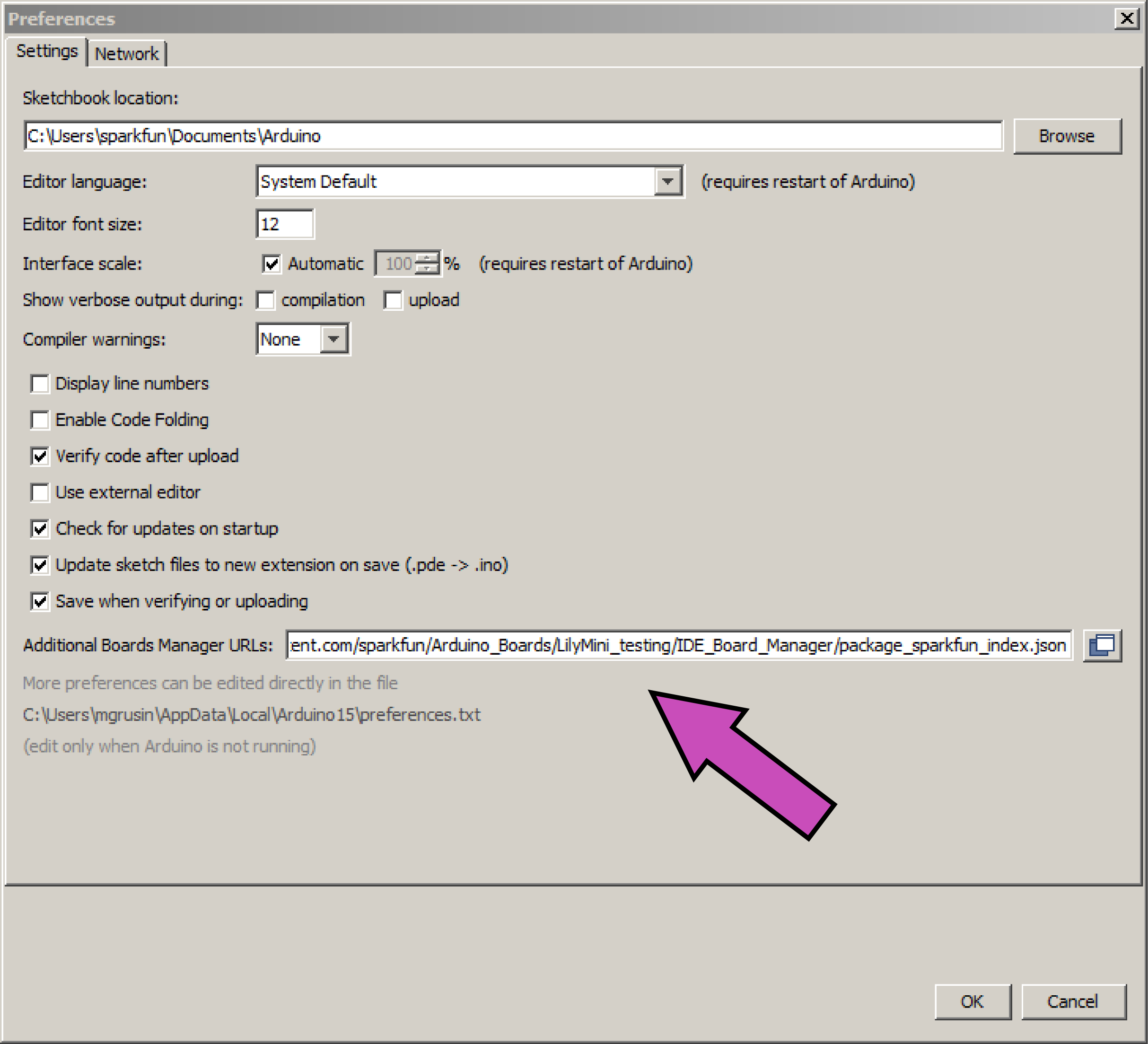
To add board support for our products, start Arduino and open the Preferences window (File > Preferences). Now copy and paste the following URL into the 'Additional Boards Manager URLs' input field:
If there is already an URL from another manufacturer in that field, click the button at the right end of the field. This will open an editing window allowing you to paste the above URL onto a new line.
Apollo3 and AVR Installation Instructions
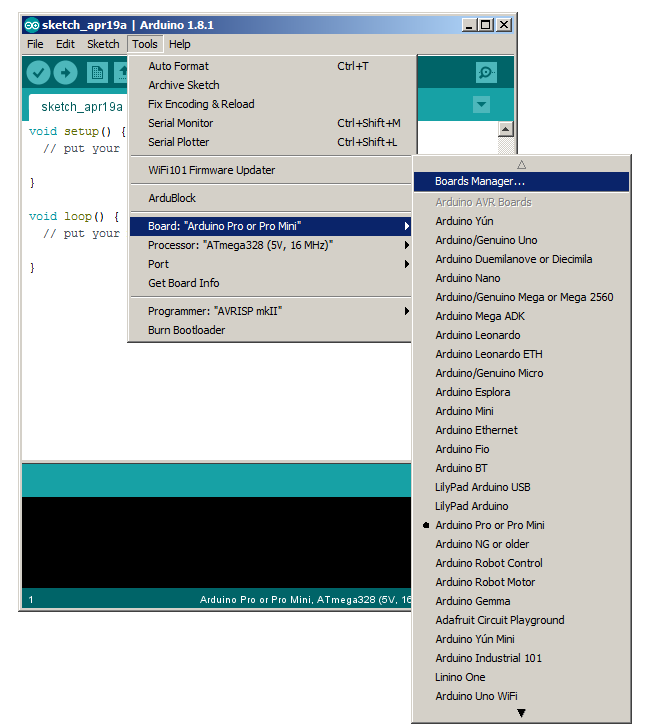
Open the Boards Manager window by selecting Tools > Board, scroll to the top of the board list, and select Boards Manager.
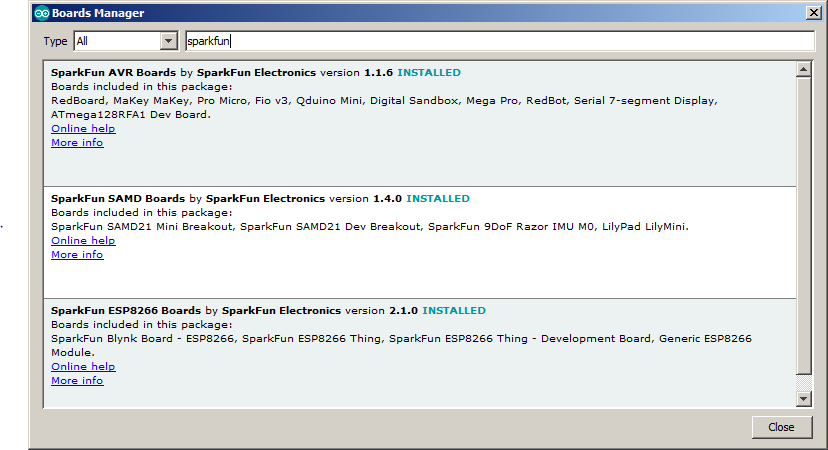
If you type "sparkfun" (without quotes) into the "filter your search" field, you will see options to install SparkFun's Apollo3 and AVR board files. Click in the desired box, and click the "Install" button that appears. Once installed, the boards will appear at the bottom of the board list.
SAMD Installation Instructions
When installing SAMD boards, you will need to first install Arduino SAMD support, then SparkFun's SAMD boards.
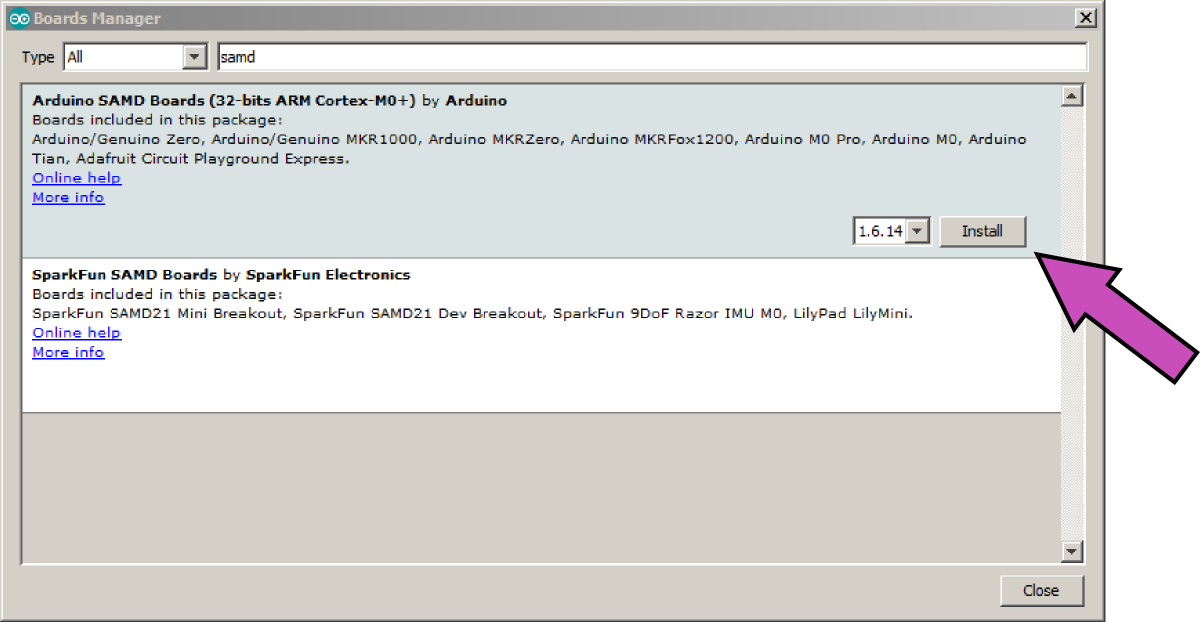
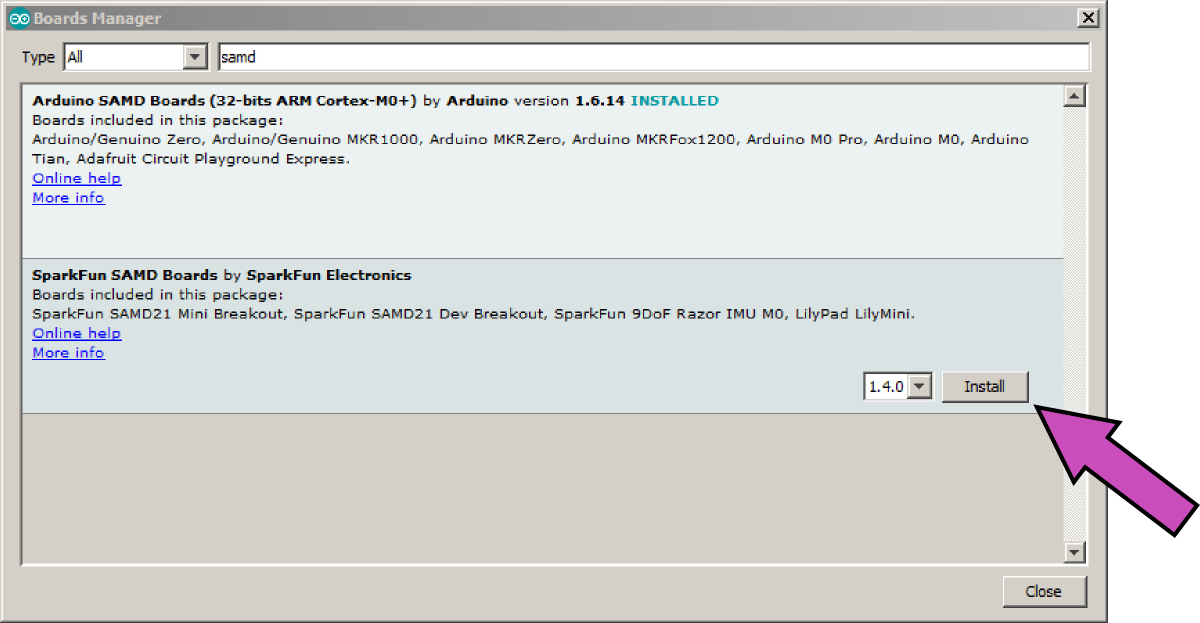
Open the Boards Manager window by selecting Tools > Board, scroll to the top of the board list, and select Boards Manager. Now type "samd" (without quotes) into the "filter your search" field at the top of the window. Two entries should show up, one for Arduino SAMD boards, and one for SparkFun SAMD boards. We'll install both of these, starting with Arduino SAMD boards.
Click anywhere in the "Arduino SAMD Boards" box, and click "Install". This is a large installation and will take a while.
Now click anywhere in the "SparkFun SAMD Boards" box, and click "Install". This is a small installation and will happen much faster.
You're now ready to use SparkFun SAMD boards. They will appear at the bottom of the board list.
ESP Boards?
All support for our ESP based boards are supported within their respective Espressif's Repository.
For our ESP8266 based boards: Blynk, ESP8266 Thing, or ESP8266 Thing Dev, you can install the board files by following the instructions here.
For our ESP32 based boards Boards: SparkFun Thing Plus - ESP32 WROOM, SparkFun ESP32 Thing, SparkFun LoRa Gateway - 1-Channel (ESP32 you can install the board files by following the instructions here.
Notes
Some boards such as the Arduino Pro and Pro Mini come in more than one flavor. For these you must select the correct processor in the 'Tools' menu.
Information on compiling and programming the bootloaders can be found in the bootloaders directory.
Trang TopGit này là một snapshot — tab "Readme" hiển thị nguyên văn README của repo (đã bỏ link, giữ ảnh). Repo GitHub ở github.com/sparkfun/Arduino_Boards là nguồn chính thức.
sparkfun/Arduino_Boards có những chủ đề gì?
GitHub topics của sparkfun/Arduino_Boards: "arduino-boards", "arduino-ide", "arm", "avr", "boards-manager", "bootloader", "sparkfun-boards". TopGit xếp repo vào nhóm mã nguồn mở.
sparkfun/Arduino_Boards có phải mã nguồn mở không?
TopGit chưa ghi nhận license cho sparkfun/Arduino_Boards. Phần lớn repo public trên GitHub là mã nguồn mở, nhưng điều khoản khác nhau từng repo — mở file LICENSE để xác nhận.
sparkfun/Arduino_Boards có website riêng không?
TopGit chưa ghi nhận URL trang chủ cho sparkfun/Arduino_Boards. Phần README ở tab phía trên thường có link demo, hoặc xem mô tả GitHub của repo.
sparkfun/Arduino_Boards còn đang phát triển không?
Commit gần nhất trên sparkfun/Arduino_Boards là 1.5 năm trước (theo timestamp GitHub). Repo có 121 fork — một chỉ báo về mức độ quan tâm của cộng đồng.
Đọc đầy đủ README ở tab phía trên.
Muốn nghe thêm một ý kiến về Arduino_Boards?
Hỏi một AI đọc được trang này — một cú bấm là có ngay nhận định về Arduino_Boards.
 /Arduino_Boards