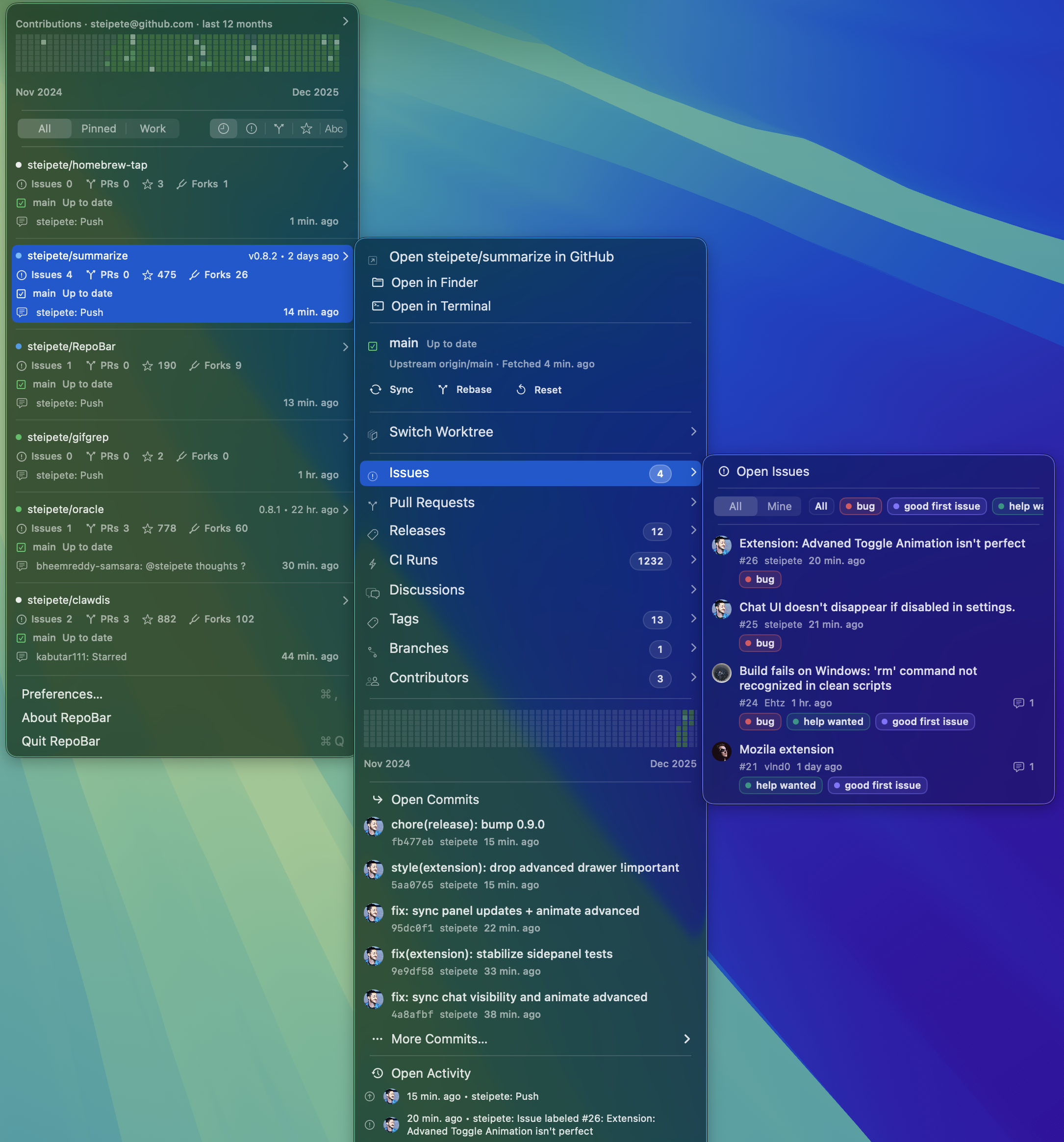
TopGit theo dõi steipete/RepoBar trên GitHub trong nhóm Developer Tools, đã đạt 2.2k sao. Show status of GitHub Repos right in your menu bar and terminal: CI, Issues, Pull Requests, Latest Release.
Tóm tắt dựng từ metadata GitHub của chính dự án — chưa có bài review TopGit. Trang sẽ tự động cập nhật khi bài review đầy đủ được xuất bản.
VÌ SAO CHƯA CÓ REVIEW
TopGit viết bài đầy đủ cho repo có nhiều sao nhất và được yêu cầu nhiều nhất. Trang này là snapshot trong thời gian chờ — xem README gốc ở tab READ ME.
RepoBar is a native macOS menu bar app for maintainers who track many GitHub repositories. It keeps issue and pull request counts, CI, releases, activity, rate limits, and local checkout state in one menu.
Install
Install the Homebrew cask:
brew install --cask repobar
RepoBar requires macOS 15 or newer. A signed app archive is also available from the latest GitHub release.
Quick start
Open RepoBar from Applications. Its traffic-light icon appears in the menu bar.
Select Sign in to GitHub and complete the browser login.
Open Preferences → Repositories to choose visible, pinned, and hidden repositories.
Select a repository in the menu to inspect its issues, pull requests, releases, CI runs, branches, tags, commits, and activity.
That is the complete setup for GitHub.com. Local checkout status and archive-backed offline data are optional.
Repository dashboard
The main menu shows issue and pull request pressure, stars, forks, recent activity, CI state, releases, and contribution heatmaps. Filters narrow the list to pinned repositories, local checkouts, or repositories with active work.
Choose Light, Dark, or System Default under Preferences → General → Display → Appearance. RepoBar applies the choice to its menus and windows; System Default follows macOS. The CLI also accepts repobar settings set color-scheme light|dark|system, which takes effect on the next app launch.
Choose Repository heatmap → Submenu in Preferences → General → Display to show activity inside each repository menu. Changing Heatmap color takes effect the next time you open that submenu.
Each repository opens a submenu with recent GitHub activity and, when a local checkout is configured, its branch, upstream, dirty files, ahead/behind state, and worktrees. RepoBar can open the checkout in Finder or a terminal and can fast-forward clean repositories without discarding local changes.
Preferences → Repositories searches the repositories available to the active account. Search covers names, descriptions, languages, and topics; visibility rules remain visible when an account temporarily loses access, which makes permission problems easier to diagnose.
Authentication and private repositories
RepoBar supports GitHub.com and GitHub Enterprise. GitHub.com login uses a GitHub App user token, so access is limited by both the signed-in user and the repositories where the RepoBar GitHub App is installed.
Install the GitHub App on an organization to expose its private repositories. A Personal Access Token with repository and organization read access is available for SAML SSO or repositories outside that installation boundary. GitHub Enterprise uses its configured HTTPS host and OAuth settings.
Release builds store credentials in the macOS Keychain. Debug builds use file-backed storage to avoid Keychain prompts; auth storage documents the exact behavior.
Local projects
Choose a projects folder in Preferences → Advanced → Local Projects to match GitHub repositories with local checkouts. RepoBar reports branches, worktrees, dirty files, and upstream state; optional auto-sync runs only for clean, non-detached repositories that can fast-forward.
See Local Projects for scanning, matching, sandbox access, caching, and sync rules.
Caching and archives
RepoBar opens from its persistent SQLite cache first and refreshes GitHub data in the background. The GitHub API Status menu shows REST and GraphQL quotas, endpoint cooldowns, and the age of cached samples.
Git-backed GitHub archive snapshots can seed the cache when GitHub is rate-limited or unavailable. RepoBar owns the imported database and archive configuration; it does not modify the source archive. See the cache and archive design.
The optional clipboard reference monitor recognizes GitHub URLs, issue and pull request references, commit hashes, and workflow-run URLs. It checks the cache first and performs a live lookup only when needed.
Command-line interface
RepoBar bundles a repobar CLI for automation and diagnostics. Install it from Preferences → Advanced → CLI, then use --plain for terminal tables or --json for structured output:
The CLI reference covers authentication, repositories, local Git actions, caches, archives, settings, and output formats.
Documentation
Original product specification
CLI reference
Cache and archive design
Authentication storage
Local project sync
Release process
Development
Development requires macOS, Xcode 26 with Swift 6.2, Node.js 22.13 or newer, and pnpm 11. CI and release jobs use the Apple silicon xcode-27 runner with its default Xcode 27 toolchain; CI uses Node.js 26 and builds both macOS and iOS targets. Release verification smoke-tests both CLI architectures, using Rosetta for Intel. The supported application versions remain macOS 15 and iOS 26.
pnpm install
pnpm build
pnpm check
The repository guide describes the project layout, local app workflow, and focused test commands.
steipete/RepoBar thuộc nhóm Developer Tools trên TopGit, cùng 3 topic GitHub. Trang Trending và Topics liệt kê các repo cùng số sao và cùng ngôn ngữ để so sánh.
Đọc thêm về steipete/RepoBar ở đâu?
Trang TopGit này là một snapshot — tab "Readme" hiển thị nguyên văn README của repo (đã bỏ link, giữ ảnh). Repo GitHub ở github.com/steipete/RepoBar là nguồn chính thức.
steipete/RepoBar có bao nhiêu sao?
steipete/RepoBar có 2.2k sao GitHub — tải lại trang để xem số mới nhất, hoặc xem trực tiếp github.com/steipete/RepoBar. TopGit phản chiếu số sao của GitHub nhưng không cam kết đến từng phút.
steipete/RepoBar có phải mã nguồn mở không?
Có — steipete/RepoBar phát hành theo license MIT, nghĩa là mã nguồn mở để đọc, fork và (tùy license) tái sử dụng. Mã: github.com/steipete/RepoBar.
steipete/RepoBar còn đang phát triển không?
Commit gần nhất trên steipete/RepoBar là 14 ngày trước (theo timestamp GitHub). Repo có 138 fork — một chỉ báo về mức độ quan tâm của cộng đồng.
steipete/RepoBar dùng license gì?
steipete/RepoBar phát hành theo license MIT. Nên mở file LICENSE trên GitHub để xác nhận — license metadata đôi khi lệch với thực tế dự án.
steipete/RepoBar là gì?
steipete/RepoBar (steipete/RepoBar) là dự án Swift trên GitHub. Theo mô tả gốc: Show status of GitHub Repos right in your menu bar and terminal: CI, Issues, Pull Requests, Latest Release.
steipete/RepoBar viết bằng ngôn ngữ gì?
steipete/RepoBar chủ yếu viết bằng Swift. Trường "language" của GitHub dựa trên phần lớn byte ở nhánh mặc định.
Đọc đầy đủ README ở tab phía trên.
Vẫn đang phân vân về RepoBar?
Một cú bấm sẽ gửi câu hỏi kèm trang này cho AI — xem AI nói gì về RepoBar.

 /RepoBar