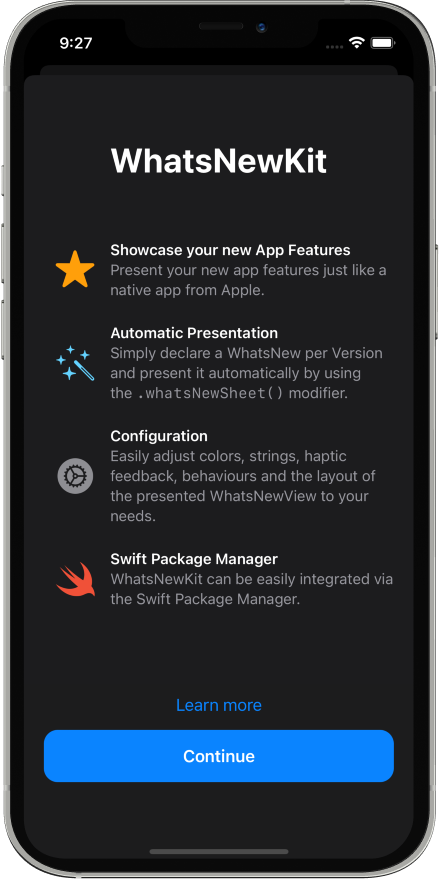
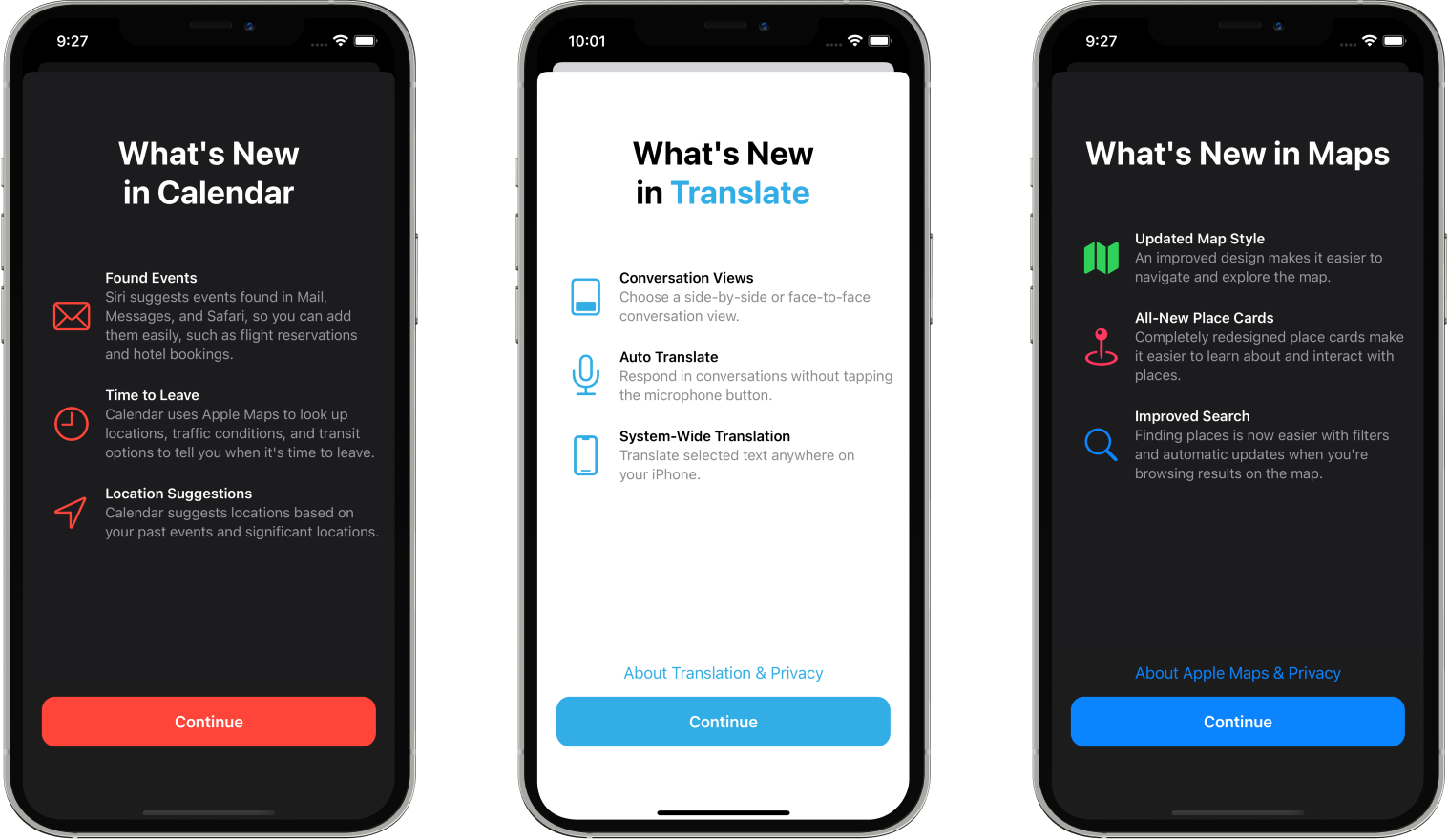
4.4k sao GitHub và vẫn tăng — SvenTiigi/WhatsNewKit là dự án Swift mà TopGit đang theo dõi trên nền tảng. Showcase your awesome new app features 📱
Tóm tắt dựng từ metadata GitHub của chính dự án — chưa có bài review TopGit. Trang sẽ tự động cập nhật khi bài review đầy đủ được xuất bản.
VÌ SAO CHƯA CÓ REVIEW
TopGit viết bài đầy đủ cho repo có nhiều sao nhất và được yêu cầu nhiều nhất. Trang này là snapshot trong thời gian chờ — xem README gốc ở tab READ ME.
Or navigate to your Xcode project then select Swift Packages, click the “+” icon and search for WhatsNewKit.
Example
Check out the example application to see WhatsNewKit in action. Simply open the Example/Example.xcodeproj and run the "Example" scheme.
Usage
Table of contents
Manual Presentation
Automatic Presentation
WhatsNewEnvironment
WhatsNewVersionStore
WhatsNew
Layout
WhatsNewViewController
Manual Presentation
If you wish to manually present a WhatsNewView you can make use of the sheet(whatsNew:) modifier.
struct ContentView: View {

    @State
    var whatsNew: WhatsNew? = WhatsNew(
        title: "WhatsNewKit",
        features: [
            .init(
                image: .init(
                    systemName: "star.fill",
                    foregroundColor: .orange
                ),
                title: "Showcase your new App Features",
                subtitle: "Present your new app features..."
            ),
            // ...
        ]
    )

    var body: some View {
        NavigationView {
            // ...
        }
        .sheet(
            whatsNew: self.$whatsNew
        )
    }

}
Automatic Presentation
The automatic presentation mode allows you to simply declare your new features via the SwiftUI Environment and WhatsNewKit will take care to present the corresponding WhatsNewView.
First add a .whatsNewSheet() modifier to the view where the WhatsNewView should be presented on.
struct ContentView: View {

    var body: some View {
        NavigationView {
            // ...
        }
        // Automatically present a WhatsNewView, if needed.
        // The WhatsNew that should be presented to the user
        // is automatically retrieved from the `WhatsNewEnvironment`
        .whatsNewSheet()
    }

}
The .whatsNewSheet() modifier is making use of the WhatsNewEnvironment to retrieve an optional WhatsNew object that should be presented to the user for the current version. Therefore you can easily configure the WhatsNewEnvironment via the environment modifier.
extension App: SwiftUI.App {

    var body: some Scene {
        WindowGroup {
            ContentView()
                .environment(
                    \.whatsNew,
                    WhatsNewEnvironment(
                        // Specify in which way the presented WhatsNew Versions are stored.
                        // In default the `UserDefaultsWhatsNewVersionStore` is used.
                        versionStore: UserDefaultsWhatsNewVersionStore(),
                        // Pass a `WhatsNewCollectionProvider` or an array of WhatsNew instances
                        whatsNewCollection: self
                    )
                )
        }
    }

}

// MARK: - App+WhatsNewCollectionProvider

extension App: WhatsNewCollectionProvider {

    /// Declare your WhatsNew instances per version
    var whatsNewCollection: WhatsNewCollection {
        WhatsNew(
            version: "1.0.0",
            // ...
        )
        WhatsNew(
            version: "1.1.0",
            // ...
        )
        WhatsNew(
            version: "1.2.0",
            // ...
        )
    }

}
WhatsNewEnvironment
The WhatsNewEnvironment will take care to determine the matching WhatsNew object that should be presented to the user for the current version.
As seen in the previous example you can initialize a WhatsNewEnvironment by specifying the WhatsNewVersionStore and providing a WhatsNewCollection.
// Initialize WhatsNewEnvironment by passing an array of WhatsNew Instances.
// UserDefaultsWhatsNewVersionStore is used as default WhatsNewVersionStore
let whatsNewEnvironment = WhatsNewEnvironment(
    whatsNewCollection: [
        WhatsNew(
            version: "1.0.0",
            // ...
        )
    ]
)

// Initialize WhatsNewEnvironment with NSUbiquitousKeyValueWhatsNewVersionStore
// which stores the presented versions in iCloud.
// WhatsNewCollection is provided by a `WhatsNewBuilder` closure
let whatsNewEnvironment = WhatsNewEnvironment(
    versionStore: NSUbiquitousKeyValueWhatsNewVersionStore(),
    whatsNewCollection: {
        WhatsNew(
            version: "1.0.0",
            // ...
        )
    }
)
Additionally, the WhatsNewEnvironment includes a fallback for patch versions. For example when a user installs version 1.0.1 and you only have declared a WhatsNew for version 1.0.0 the environment will automatically fallback to version 1.0.0 and present the WhatsNewView to the user if needed.
If you wish to further customize the behaviour of the WhatsNewEnvironment you can easily subclass it and override the whatsNew() function.
class MyCustomWhatsNewEnvironment: WhatsNewEnvironment {

    /// Retrieve a WhatsNew that should be presented to the user, if available.
    override func whatsNew() -> WhatsNew? {
        // The current version
        let currentVersion = self.currentVersion
        // Your declared WhatsNew objects
        let whatsNewCollection = self.whatsNewCollection
        // The WhatsNewVersionStore used to determine the already presented versions
        let versionStore = self.whatsNewVersionStore
        // TODO: Determine WhatsNew that should be presented to the user...
    }

}
WhatsNewVersionStore
A WhatsNewVersionStore is a protocol type which is responsible for saving and retrieving versions that have been presented to the user.
let whatsNewVersionStore: WhatsNewVersionStore

// Save presented versions
whatsNewVersionStore.save(presentedVersion: "1.0.0")

// Retrieve presented versions
let presentedVersions = whatsNewVersionStore.presentedVersions

// Retrieve bool value if a given version has already been presented
let hasPresented = whatsNewVersionStore.hasPresented("1.0.0")
WhatsNewKit comes along with three predefined implementations:
// Persists presented versions in the UserDefaults
let userDefaultsWhatsNewVersionStore = UserDefaultsWhatsNewVersionStore()

// Persists presented versions in iCloud using the NSUbiquitousKeyValueStore
let ubiquitousKeyValueWhatsNewVersionStore = NSUbiquitousKeyValueWhatsNewVersionStore()

// Stores presented versions in memory. Perfect for testing purposes
let inMemoryWhatsNewVersionStore = InMemoryWhatsNewVersionStore()
If you already have a specific implementation to store user related settings like Realm or Core Data you can easily adopt your existing implementation to the WhatsNewVersionStore protocol.
NSUbiquitousKeyValueWhatsNewVersionStore
If you are making use of the NSUbiquitousKeyValueWhatsNewVersionStore please ensure to enable the iCloud Key-value storage capability in the "Signing & Capabilities" section of your Xcode project.
WhatsNew
The following sections explains how a WhatsNew struct can be initialized in order to describe the new features for a given version of your app.
let whatsnew = WhatsNew(
    // The Version that relates to the features you want to showcase
    version: "1.0.0",
    // The title that is shown at the top
    title: "What's New",
    // The features you want to showcase
    features: [
        WhatsNew.Feature(
            image: .init(systemName: "star.fill"),
            title: "Title",
            subtitle: "Subtitle"
        )
    ],
    // The primary action that is used to dismiss the WhatsNewView
    primaryAction: WhatsNew.PrimaryAction(
        title: "Continue",
        backgroundColor: .accentColor,
        foregroundColor: .white,
        hapticFeedback: .notification(.success),
        onDismiss: {
            print("WhatsNewView has been dismissed")
        }
    ),
    // The optional secondary action that is displayed above the primary action
    secondaryAction: WhatsNew.SecondaryAction(
        title: "Learn more",
        foregroundColor: .accentColor,
        hapticFeedback: .selection,
        action: .openURL(
            .init(string: "https://github.com/SvenTiigi/WhatsNewKit")
        )
    )
)
WhatsNew.Version
The WhatsNew.Version specifies the version that has introduced certain features to your app.
// Initialize with major, minor, and patch
let version = WhatsNew.Version(
    major: 1,
    minor: 0,
    patch: 0
)

// Initialize by string literal
let version: WhatsNew.Version = "1.0.0"

// Initialize WhatsNew Version by using the current version of your bundle
let version: WhatsNew.Version = .current()
WhatsNew.Title
A WhatsNew.Title represents the title text that is rendered above the features.
// Initialize by string literal
let title: WhatsNew.Title = "Continue"

// Initialize with text and foreground color
let title = WhatsNew.Title(
    text: "Continue",
    foregroundColor: .primary
)

// On >= iOS 15 initialize with AttributedString using Markdown
let title = WhatsNew.Title(
    text: try AttributedString(
        markdown: "What's **New**"
    )
)
WhatsNew.Feature
A WhatsNew.Feature describe a specific feature of your app and generally consist of an image, title, and subtitle.
let feature = WhatsNew.Feature(
    image: .init(
        systemName: "wand.and.stars"
    ),
    title: "New Design",
    subtitle: .init(
        try AttributedString(
            markdown: "An awesome new _Design_"
        )
    )
)
WhatsNew.PrimaryAction
The WhatsNew.PrimaryAction allows you to configure the behaviour of the primary button which is used to dismiss the presented WhatsNewView
let primaryAction = WhatsNew.PrimaryAction(
    title: "Continue",
    backgroundColor: .blue,
    foregroundColor: .white,
    hapticFeedback: .notification(.success),
    onDismiss: {
        print("WhatsNewView has been dismissed")
    }
)
Note: HapticFeedback will only be executed on iOS
WhatsNew.SecondaryAction
A WhatsNew.SecondaryAction which is displayed above the WhatsNew.PrimaryAction can be optionally supplied when initializing a WhatsNew instance and allows you to present an additional View, perform a custom action or open an URL.
// SecondaryAction that presents a View
let secondaryActionPresentAboutView = WhatsNew.SecondaryAction(
    title: "Learn more",
    foregroundColor: .blue,
    hapticFeedback: .selection,
    action: .present {
        AboutView()
    }
)

// SecondaryAction that opens a URL
let secondaryActionOpenURL = WhatsNew.SecondaryAction(
    title: "Read more",
    foregroundColor: .blue,
    hapticFeedback: .selection,
    action: .open(
        url: .init(string: "https://github.com/SvenTiigi/WhatsNewKit")
    )
)

// SecondaryAction with custom execution
let secondaryActionCustom = WhatsNew.SecondaryAction(
    title: "Custom",
    action: .custom { presentationMode in
        // ...
    }
)
Note: HapticFeedback will only be executed on iOS
Layout
WhatsNewKit allows you to adjust the layout of a presented WhatsNewView in various ways.
The most simple way is by mutating the WhatsNew.Layout.default instance.
WhatsNew.Layout.default.featureListSpacing = 35
When using the automatic presentation style you can supply a default layout when initializing the WhatsNewEnvironment.
If you wish to present a WhatsNewViewController only if the version of the WhatsNew instance has not been presented you can make use of the convenience failable initializer.
// Verify WhatsNewViewController is available for presentation
guard let whatsNewViewController = WhatsNewViewController(
    whatsNew: WhatsNew(
        version: "1.0.0",
        // ...
    ),
    versionStore: UserDefaultsWhatsNewVersionStore()
) else {
    // Version of WhatsNew has already been presented
    return
}

// Present WhatsNewViewController
// Version will be automatically saved in the provided
// WhatsNewVersionStore when the WhatsNewViewController gets dismissed
self.present(whatsNewViewController, animated: true)
SvenTiigi/WhatsNewKit thuộc nhóm Mobile trên TopGit, cùng 6 topic GitHub. Trang Trending và Topics liệt kê các repo cùng số sao và cùng ngôn ngữ để so sánh.
Đọc thêm về SvenTiigi/WhatsNewKit ở đâu?
Trang TopGit này là một snapshot — tab "Readme" hiển thị nguyên văn README của repo (đã bỏ link, giữ ảnh). Repo GitHub ở github.com/SvenTiigi/WhatsNewKit là nguồn chính thức.
SvenTiigi/WhatsNewKit có bao nhiêu sao?
SvenTiigi/WhatsNewKit có 4.4k sao GitHub — tải lại trang để xem số mới nhất, hoặc xem trực tiếp github.com/SvenTiigi/WhatsNewKit. TopGit phản chiếu số sao của GitHub nhưng không cam kết đến từng phút.
SvenTiigi/WhatsNewKit có phải mã nguồn mở không?
Có — SvenTiigi/WhatsNewKit phát hành theo license MIT, nghĩa là mã nguồn mở để đọc, fork và (tùy license) tái sử dụng. Mã: github.com/SvenTiigi/WhatsNewKit.
SvenTiigi/WhatsNewKit có trang demo không?
Dự án có trang chủ ở https://sventiigi.github.io/WhatsNewKit/. Tab "Readme" ở trang này thường có ảnh chụp và hướng dẫn bắt đầu nhanh.
SvenTiigi/WhatsNewKit là gì?
SvenTiigi/WhatsNewKit (SvenTiigi/WhatsNewKit) là dự án Swift trên GitHub. Theo mô tả gốc: Showcase your awesome new app features 📱
SvenTiigi/WhatsNewKit so với các dự án Mobile khác thế nào?
SvenTiigi/WhatsNewKit được TopGit xếp vào nhóm Mobile, với 4.4k sao GitHub và viết bằng Swift. Xem trang chủ đề Mobile trên TopGit để so sánh với các dự án tương tự theo số sao và mức độ hoạt động.
Đọc đầy đủ README ở tab phía trên.
Muốn nghe thêm một ý kiến về WhatsNewKit?
Hỏi một AI đọc được trang này — một cú bấm là có ngay nhận định về WhatsNewKit.

 /WhatsNewKit