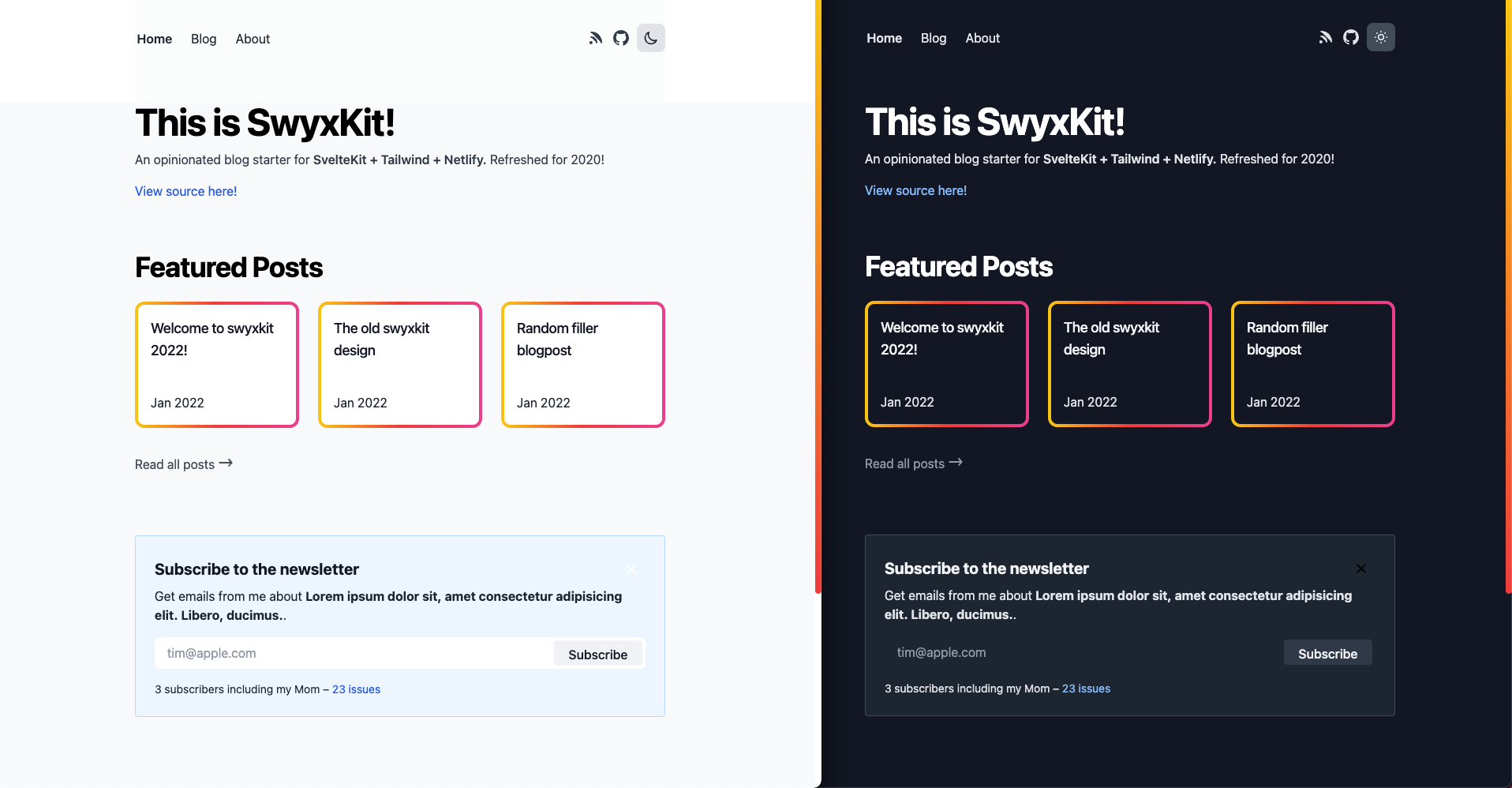
swyxio/swyxkit — dự án frontend — đang có 711 sao GitHub trong nhóm Frontend. An opinionated blog starter for SvelteKit + Tailwind + Netlify. Refreshed for SvelteKit 1.0!
Tóm tắt dựng từ metadata GitHub của chính dự án — chưa có bài review TopGit. Trang sẽ tự động cập nhật khi bài review đầy đủ được xuất bản.
VÌ SAO CHƯA CÓ REVIEW
TopGit viết bài đầy đủ cho repo có nhiều sao nhất và được yêu cầu nhiều nhất. Trang này là snapshot trong thời gian chờ — xem README gốc ở tab READ ME.
All the basic things I think a developer website should have.
Light+Dark mode (manual-toggle-driven as a matter of personal preference but feel free to change ofc)
GitHub-Issues-driven blog with index
Blog content pulled from the GitHub Issues API
Comment and Reaction system from GitHub Issues, rendered with Utterances
🆕 Shortcodes for embedding Tweets and YouTube videos
Consumes markdown/MDSveX
With syntax highlighting (MDSvex uses prism-svelte under the hood)
Fixes for known MDSveX render issue
Renders footnotes thanks to Bishwas-py
RSS (at /rss.xml), and Sitemap (at sitemap.xml) with caching
Performance/Security touches
Fast (check the lighthouse scores) and secure.
Set s-maxage (not max-age) to 1 minute to cache (consider making it 1-7 days on older posts)
For API endpoints as well as pages
Security headers in netlify.toml
X-Content-Type
X-Frame-Options
X-XSS-Protection
CSP: SvelteKit recently added this!
Builds and deploys in ~40 seconds on Netlify
You can see how seriously we take performance on our updates, but also I'm not an expert and PRs to improve are always welcome.
Minor design/UX touches
The devil is in the details.
Blog Index features (/blog)
Blog index supports categories (singletons), and tags (freeform, list of strings)
Blog index facets serialize to URLs for easy copy paste
previously done by @Ak4zh
but since moved to sveltekit-search-params by @paoloricciuti
Blog index search is fuzzy and highlights matches
Error page (try going to URL that doesn't exist)
Including nice error when GitHub API rate limit exceeded (fix by setting GH_TOKEN)
The 404 page includes a link you can click that sends you back to the search index with the search terms (blog post)
Individual Blogpost features (/[post_slug])
2 options for comments:
(default) Utterances, drawing from GitHub Issues that match your post assuming you use the "github issues CMS" workflow we have. We lazy load this for perf.
(available but commented out) a custom Svelte <Comments /> component that are rendered and sanitized
full, feature, and popout bleed layout classes on desktop - feature enabled by default for code samples! (details and code samples here)
Top level blog URLs (/myblog instead of /blog/myblog - why?)
Autogenerated (overridable) og:images via an external service https://github.com/sw-yx/swyxkit/pull/161
Table of Contents for posts that have multiple headings, mobile friendly - done with @vnphanquang's svelte-put/toc
General features
Newsletter signup box - defaulted to Buttondown.email but easy to customize to whatever
Navlink hover effect
Mobile/Responsive styling
Mobile menu with animation
Og:image and meta tags for social unfurls (image generated via https://tailgraph.com/)
Making this easier to maintain and focus on writing not coding.
JSDoc Typechecking
ESLint + Prettier
Nightly lockfile upgrades
Design system sandbox/"Storybook" setup with Histoire. npm run story:dev to view it on http://localhost:6006/.
Overall, this is a partial implementation of https://www.swyx.io/the-surprisingly-high-table-stakes-of-modern-blogs/
Setup
Step 0: Clone project (and deploy)
npx degit https://github.com/sw-yx/swyxkit
export GH_TOKEN=your_gh_token_here # Can be skipped if just trying out this repo casually
npm install
npm run start # Launches site locally at http://localhost:5173/
# you can also npm run dev to spin up histoire at http://localhost:6006/
You should be able to deploy this project straight to Netlify as is, just like this project is. This project recently switched to use sveltejs/adapter-auto, so you should also be able to deploy to Vercel and Cloudflare, but these 2 deploy targets are not regularly tested (please report/help fix issues if you find them)!
However, to have new posts show up, you will need to personalize the siteConfig (see next step) - take note of APPROVED_POSTERS_GH_USERNAME in particular (this is an allowlist of people who can post to the blog by opening a GitHub issue, otherwise any rando can blog and that's not good).
# These are just untested, suggested commands, use your discretion to hook it up or deploy wherever
git init
git add .
git commit -m "initial commit"
gh repo create # Make a new public GitHub repo and name it whatever
git push origin master
ntl init # Use the Netlify cli to deploy, assuming you already installed it and logged in. You can also use `ntl deploy`
Step 1: Personalization Configuration
As you become ready to seriously adopt this, remember to configure /lib/siteConfig.js - just some hardcoded vars I want you to remember to configure.
export const SITE_URL = 'https://swyxkit.netlify.app';
export const APPROVED_POSTERS_GH_USERNAME = ['sw-yx']; // IMPORTANT: change this to at least your GitHub username, or add others if you want
export const GH_USER_REPO = 'sw-yx/swyxkit'; // Used for pulling GitHub issues and offering comments
export const REPO_URL = 'https://github.com/' + GH_USER_REPO;
export const SITE_TITLE = 'SwyxKit';
export const SITE_DESCRIPTION = "swyx's default SvelteKit + Tailwind starter";
export const DEFAULT_OG_IMAGE =
	'https://user-images.githubusercontent.com/6764957/147861359-3ad9438f-41d1-47c8-aa05-95c7d18497f0.png';
export const MY_TWITTER_HANDLE = 'swyx';
export const MY_YOUTUBE = 'https://youtube.com/swyxTV';
export const POST_CATEGORIES = ['Blog']; // Other categories you can consider adding: Talks, Tutorials, Snippets, Podcasts, Notes...
export const GH_PUBLISHED_TAGS = ['Published']; // List of allowed issue labels, only the issues having at least one of these labels will show on the blog.
Of course, you should then go page by page (there aren't that many) and customize some of the other hardcoded items, for example:
Add the Utterances GitHub app to your repo/account to let visitors comment nicely if logged in.
The src/Newsletter.svelte component needs to be wired up to a newsletter service (I like Buttondown and TinyLetter). Or you can remove it of course.
Page Cache-Control policy and SvelteKit maxage
Site favicons (use https://realfavicongenerator.net/ to make all the variants and stick it in /static)
(If migrating content from previous blog) setup Netlify redirects at /static/_redirects
This blog uses GitHub as a CMS - if you are doing any serious development at all, you should give the GH_TOKEN env variable to raise rate limit from 60 to 5000.
A really basic personal access token should be enough and can be created here.
https://docs.github.com/en/rest/overview/resources-in-the-rest-api#rate-limiting
For local dev: run export GH_TOKEN=MY_PERSONAL_ACCESS_TOKEN_FROM_GITHUB before you run npm run start
For cloud deployment: Set the env variables in Netlify (basically go to https://app.netlify.com/sites/YOUR_SITE/settings/deploys#environment )
Step 2: Make your first post
Open a new GitHub issue on your new repo, write some title and markdown in the body, add a Published tag (or any one of the label set in GH_PUBLISHED_TAGS), and then save.
You should see it refetched in local dev or in the deployed site pretty quickly. You can configure SvelteKit to build each blog page up front, or on demand. Up to you to trade off speed and flexibility.
Here's a full reference of the YAML frontmatter that swyxkit recognizes - ALL of this is optional and some of have aliases you can discover in /src/lib/content.js. Feel free to customize/simplify of course.
---
title: my great title
subtitle: my great subtitle
description: my great description
slug: my-title
tags: [foo, bar, baz]
category: blog
image: https://my_image_url.com/img-4.png
date: 2023-04-22
canonical: https://official-site.com/my-title
---

my great intro

## my subtitle

lorem ipsum
If your Published post (any post with one of the labels set in GH_PUBLISHED_TAGS) doesn't show up, you may have forgotten to set APPROVED_POSTERS_GH_USERNAME to your GitHub username in siteConfig.
If all of this is annoying feel free to rip out the GitHub Issues CMS wiring and do your own content pipeline, I'm not your boss. MDSveX is already set up in this repo if you prefer not having a disconnected content toolchain from your codebase (which is fine, I just like having it in a different place for a better editing experience). See also my blogpost on the benefits of using GitHub Issues as CMS.
Optimizations to try after you are done deploying
Customize your JSON+LD for FAQ pages, organization, or products. There is a schema for blogposts, but it is so dead simple that SwyxKit does not include it.
Have a process to submit your sitemap to Google? (or configure robots.txt and hope it works)
Testing: make sure you have run npx playwright install and then you can run npm run test
Further Reading
Why I Enjoy Svelte
Svelte for Sites, React for Apps
Why Tailwind CSS
Moving to a GitHub CMS
How to Setup Svelte with Tailwind
Acknowledgements
Design from Lee Robinson: https://github.com/leerob/leerob.io/
MDSveX from Pngwn is amazing https://mdsvex.pngwn.io/docs#layout
swyxio/swyxkit thuộc nhóm Frontend trên TopGit, cùng 7 topic GitHub. Trang Trending và Topics liệt kê các repo cùng số sao và cùng ngôn ngữ để so sánh.
Đọc thêm về swyxio/swyxkit ở đâu?
Trang TopGit này là một snapshot — tab "Readme" hiển thị nguyên văn README của repo (đã bỏ link, giữ ảnh). Repo GitHub ở github.com/swyxio/swyxkit là nguồn chính thức.
swyxio/swyxkit có bao nhiêu sao?
swyxio/swyxkit có 711 sao GitHub — tải lại trang để xem số mới nhất, hoặc xem trực tiếp github.com/swyxio/swyxkit. TopGit phản chiếu số sao của GitHub nhưng không cam kết đến từng phút.
swyxio/swyxkit có những chủ đề gì?
GitHub topics của swyxio/swyxkit: "hacktoberfest", "netlify", "svelte", "sveltekit", "sveltekit-tailwindcss", "sveltekit-template", "tailwindcss". TopGit xếp repo vào nhóm Frontend.
swyxio/swyxkit có phải mã nguồn mở không?
Có — swyxio/swyxkit phát hành theo license MIT, nghĩa là mã nguồn mở để đọc, fork và (tùy license) tái sử dụng. Mã: github.com/swyxio/swyxkit.
swyxio/swyxkit có trang demo không?
Dự án có trang chủ ở https://swyxkit.netlify.app/. Tab "Readme" ở trang này thường có ảnh chụp và hướng dẫn bắt đầu nhanh.
swyxio/swyxkit còn đang phát triển không?
Commit gần nhất trên swyxio/swyxkit là 1.1 năm trước (theo timestamp GitHub). Repo có 92 fork — một chỉ báo về mức độ quan tâm của cộng đồng.
Đọc đầy đủ README ở tab phía trên.
Chưa chắc swyxkit có hợp với bạn?
Để ChatGPT, Claude hoặc Perplexity tìm hiểu giúp — bấm bên dưới và xem AI nói gì về swyxkit.
 /swyxkit