tangyoha/telegram_media_downloader là dự án hướng lập trình viên trên GitHub với 5.5k sao, viết chủ yếu bằng JavaScript. 基于Dineshkarthik的项目, 电报视频下载,电报资源下载,跨平台,支持web查看下载进度 ,支持bot下发指令下载,支持下载已经加入的私有群但是限制下载的资源, telegram media download,Download media files from a telegram conversation/chat/channel up to 2GiB per file
Tóm tắt dựng từ metadata GitHub của chính dự án — chưa có bài review TopGit. Trang sẽ tự động cập nhật khi bài review đầy đủ được xuất bản.
VÌ SAO CHƯA CÓ REVIEW
TopGit viết bài đầy đủ cho repo có nhiều sao nhất và được yêu cầu nhiều nhất. Trang này là snapshot trong thời gian chờ — xem README gốc ở tab READ ME.
中文 ·
Feature request
·
Report a bug
·
Support: Discussions
&
Telegram Community
Overview
Support two default running
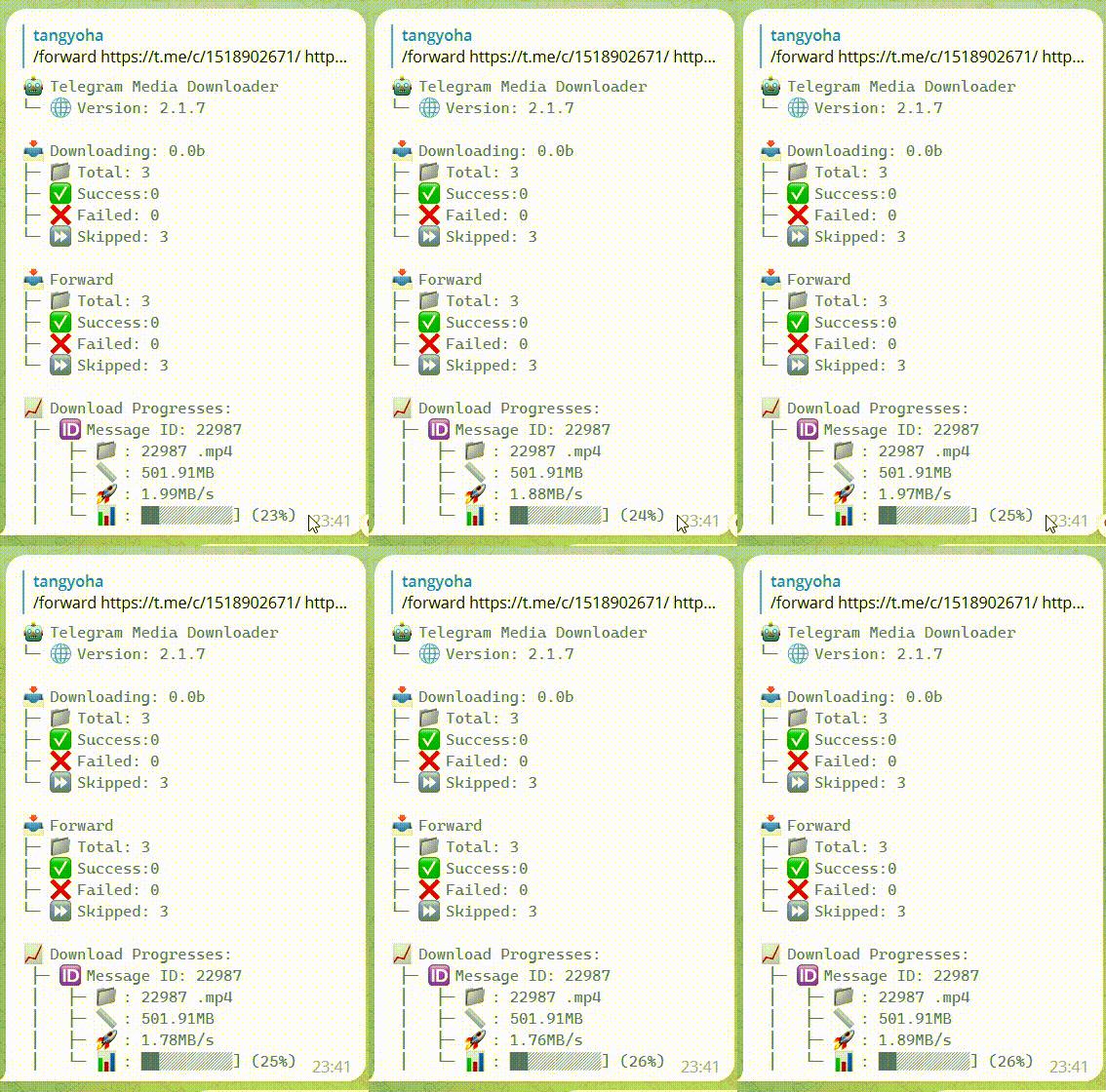
The robot is running, and the command download or forward is issued from the robot
Download as a one-time download tool
UI
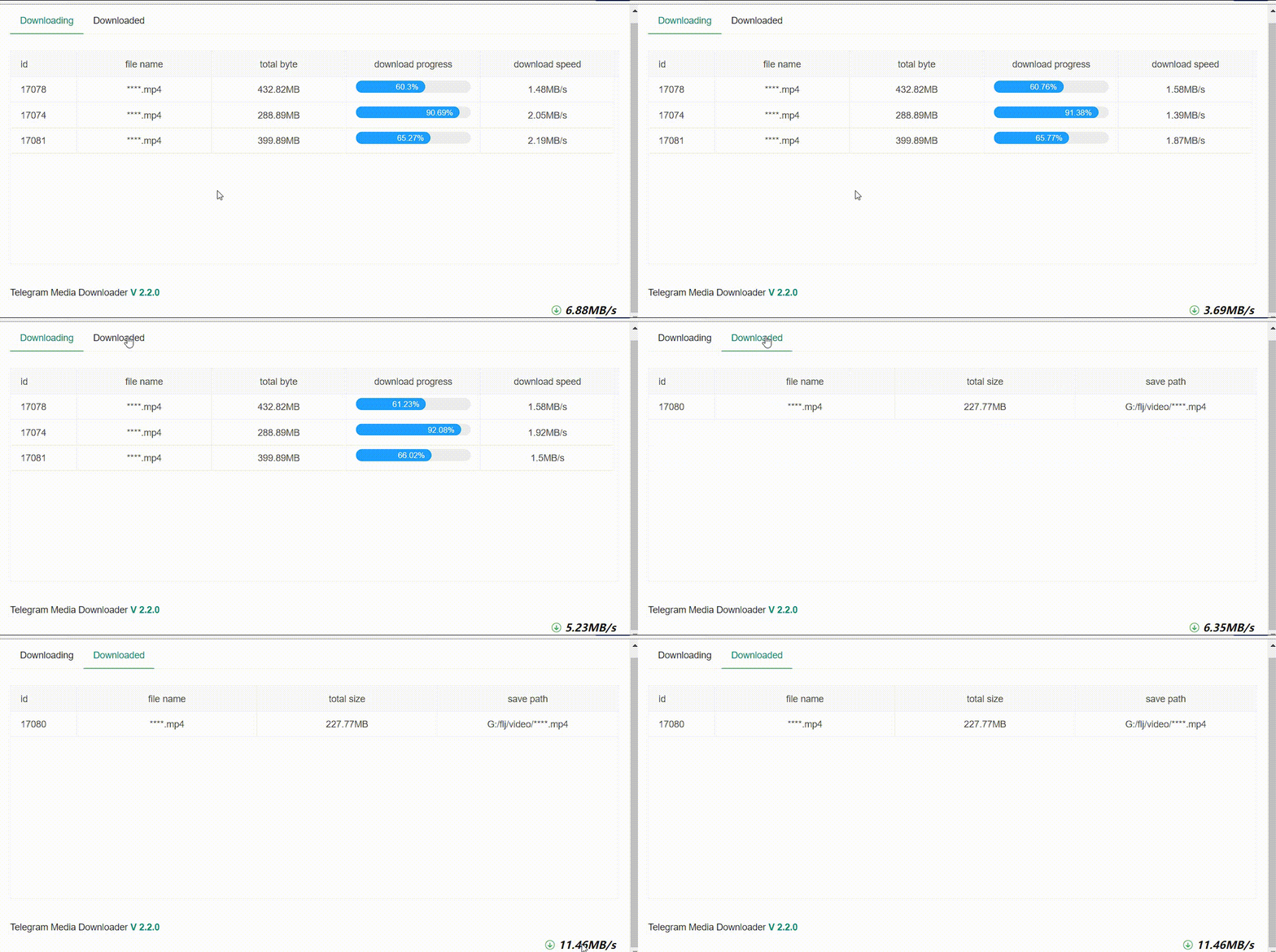
Web page
After running, open a browser and visit localhost:5000
If it is a remote machine, you need to configure web_host: 0.0.0.0
Robot
Need to configure bot_token, please refer to Documentation
Support
Category
Support
Language
Python 3.7 and above
Download media types
audio, document, photo, video, video_note, voice
Version release plan
v2.2.0
Installation
For *nix os distributions with make availability
git clone https://github.com/tangyoha/telegram_media_downloader.git
cd telegram_media_downloader
make install
For Windows which doesn't have make inbuilt
git clone https://github.com/tangyoha/telegram_media_downloader.git
cd telegram_media_downloader
pip3 install -r requirements.txt
Docker
For more detailed installation tutorial, please check the wiki
Make sure you have docker and docker-compose installed
docker pull tangyoha/telegram_media_downloader:latest
mkdir -p ~/app && mkdir -p ~/app/log/ && cd ~/app
wget https://raw.githubusercontent.com/tangyoha/telegram_media_downloader/master/docker-compose.yaml -O docker-compose.yaml
wget https://raw.githubusercontent.com/tangyoha/telegram_media_downloader/master/config.yaml -O config.yaml
wget https://raw.githubusercontent.com/tangyoha/telegram_media_downloader/master/data.yaml -O data.yaml
# vi config.yaml and docker-compose.yaml
vi config.yaml

# The first time you need to start the foreground
# enter your phone number and code, then exit(ctrl + c)
docker-compose run --rm telegram_media_downloader

# After performing the above operations, all subsequent startups will start in the background
docker-compose up -d

# Upgrade
docker pull tangyoha/telegram_media_downloader:latest
cd ~/app
docker-compose down
docker-compose up -d
Upgrade installation
cd telegram_media_downloader
pip3 install -r requirements.txt
Configuration
All the configurations are passed to the Telegram Media Downloader via config.yaml file.
Getting your API Keys:
The very first step requires you to obtain a valid Telegram API key (API id/hash pair):
Visit https://my.telegram.org/apps and log in with your Telegram Account.
Fill out the form to register a new Telegram application.
Done! The API key consists of two parts: api_id and api_hash.
Getting chat id:
1. Using web telegram:
Open https://web.telegram.org/?legacy=1#/im
Now go to the chat/channel and you will see the URL as something like
https://web.telegram.org/?legacy=1#/im?p=u853521067_2449618633394 here 853521067 is the chat id.
https://web.telegram.org/?legacy=1#/im?p=@somename here somename is the chat id.
https://web.telegram.org/?legacy=1#/im?p=s1301254321_6925449697188775560 here take 1301254321 and add -100 to the start of the id => -1001301254321.
https://web.telegram.org/?legacy=1#/im?p=c1301254321_6925449697188775560 here take 1301254321 and add -100 to the start of the id => -1001301254321.
2. Using bot:
Use @username_to_id_bot to get the chat_id of
almost any telegram user: send username to the bot or just forward their message to the bot
any chat: send chat username or copy and send its joinchat link to the bot
public or private channel: same as chats, just copy and send to the bot
api_hash - The api_hash you got from telegram apps
api_id - The api_id you got from telegram apps
bot_token - Your bot token
chat - Chat list
chat_id - The id of the chat/channel you want to download media. Which you get from the above-mentioned steps.
download_filter - Download filter, see How to use Filter
last_read_message_id - If it is the first time you are going to read the channel let it be 0 or if you have already used this script to download media it will have some numbers which are auto-updated after the scripts successful execution. Don't change it.
ids_to_retry - Leave it as it is. This is used by the downloader script to keep track of all skipped downloads so that it can be downloaded during the next execution of the script.
media_types - Type of media to download, you can update which type of media you want to download it can be one or any of the available types.
file_formats - File types to download for supported media types which are audio, document and video. Default format is all, downloads all files.
save_path - The root directory where you want to store downloaded files.
file_path_prefix - Store file subfolders, the order of the list is not fixed, can be randomly combined.
chat_title - Channel or group title, it will be chat id if not exist title.
media_datetime - Media date.
media_type - Media type, also see media_types.
upload_drive - You can upload file to cloud drive.
remote_dir - Where you upload, like drive_id/drive_name.
upload_adapter - Upload file adapter, which can be rclone, aligo. If it is rclone, it supports all rclone servers that support uploading. If it is aligo, it supports uploading Ali cloud disk.
rclone_path - RClone exe path, see How to use rclone
before_upload_file_zip - Zip file before upload, default false.
after_upload_file_delete - Delete file after upload success, default false.
file_name_prefix - Custom file name, use the same as file_path_prefix
message_id - Message id
file_name - File name (may be empty)
caption - The title of the message (may be empty)
file_name_prefix_split - Custom file name prefix symbol, the default is -
max_download_task - The maximum number of task download tasks, the default is 5.
hide_file_name - Whether to hide the web interface file name, default false
web_host - Web host
web_port - Web port
language - Application language, the default is English (EN), optional ZH(Chinese),RU,UA
web_login_secret - Web page login password, if not configured, no login is required to access the web page
log_level - see logging._nameToLevel.
forward_limit - Limit the number of forwards per minute, the default is 33, please do not modify this parameter by default.
allowed_user_ids - Who is allowed to use the robot? The default login account can be used. Please add single quotes to the name with @.
date_format Support custom configuration of media_datetime format in file_path_prefix.see python-datetime
All downloaded media will be stored at the root of save_path.
The specific location reference is as follows:
The complete directory of video download is: save_path/chat_title/media_datetime/media_type.
The order of the list is not fixed and can be randomly combined.
If the configuration is empty, all files are saved under save_path.
Proxy
socks4, socks5, http proxies are supported in this project currently. To use it, add the following to the bottom of your config.yaml file
proxy:
  scheme: socks5
  hostname: 127.0.0.1
  port: 1234
  username: your_username(delete the line if none)
  password: your_password(delete the line if none)
If your proxy doesn’t require authorization you can omit username and password. Then the proxy will automatically be enabled.
Contributing
Contributing Guidelines
Read through our contributing guidelines to learn about our submission process, coding rules and more.
Want to Help?
Want to file a bug, contribute some code, or improve documentation? Excellent! Read up on our guidelines for contributing.
Code of Conduct
Help us keep Telegram Media Downloader open and inclusive. Please read and follow our Code of Conduct.
tangyoha/telegram_media_downloader có bao nhiêu sao?
tangyoha/telegram_media_downloader có 5.5k sao GitHub — tải lại trang để xem số mới nhất, hoặc xem trực tiếp github.com/tangyoha/telegram_media_downloader. TopGit phản chiếu số sao của GitHub nhưng không cam kết đến từng phút.
tangyoha/telegram_media_downloader có những chủ đề gì?
GitHub topics của tangyoha/telegram_media_downloader: "cosplatfrom", "cross-platform", "downloader", "flask", "media-downloader", "telegram-bot". TopGit xếp repo vào nhóm Developer Tools.
tangyoha/telegram_media_downloader còn đang phát triển không?
Commit gần nhất trên tangyoha/telegram_media_downloader là 5 tháng trước (theo timestamp GitHub). Repo có 631 fork — một chỉ báo về mức độ quan tâm của cộng đồng.
tangyoha/telegram_media_downloader là gì?
tangyoha/telegram_media_downloader (tangyoha/telegram_media_downloader) là dự án JavaScript trên GitHub. Theo mô tả gốc: 基于Dineshkarthik的项目, 电报视频下载,电报资源下载,跨平台,支持web查看下载进度 ,支持bot下发指令下载,支持下载已经加入的私有群但是限制下载的资源, telegram media download,Download media files from a telegram conversation/chat/channel up to 2GiB per file
tangyoha/telegram_media_downloader so với các dự án Developer Tools khác thế nào?
tangyoha/telegram_media_downloader được TopGit xếp vào nhóm Developer Tools, với 5.5k sao GitHub và viết bằng JavaScript. Xem trang chủ đề Developer Tools trên TopGit để so sánh với các dự án tương tự theo số sao và mức độ hoạt động.
tangyoha/telegram_media_downloader viết bằng ngôn ngữ gì?
tangyoha/telegram_media_downloader chủ yếu viết bằng JavaScript. Trường "language" của GitHub dựa trên phần lớn byte ở nhánh mặc định.
Vì sao tangyoha/telegram_media_downloader được xếp vào nhóm Developer Tools?
TopGit xếp tangyoha/telegram_media_downloader vào nhóm Developer Tools dựa trên GitHub topics và mô tả của repo (gắn thẻ: "cosplatfrom", "cross-platform", "downloader"). Việc phân loại dựa trên metadata thật của repo, không phải đoán theo cảm tính biên tập.
Đọc đầy đủ README ở tab phía trên.
telegram_media_downloader có đáng để bạn bỏ thời gian?
ChatGPT, Claude và Perplexity đều đọc được trang này. Hỏi thử xem họ nghĩ gì về telegram_media_downloader.
 /telegram_media_downloader