Là một dự án di động, termux/termux-x11 đã đạt 5.0k sao trên GitHub, ngôn ngữ C. Termux X-server add-on.
Tóm tắt dựng từ metadata GitHub của chính dự án — chưa có bài review TopGit. Trang sẽ tự động cập nhật khi bài review đầy đủ được xuất bản.
VÌ SAO CHƯA CÓ REVIEW
TopGit viết bài đầy đủ cho repo có nhiều sao nhất và được yêu cầu nhiều nhất. Trang này là snapshot trong thời gian chờ — xem README gốc ở tab READ ME.
git clone https://github.com/termux/termux-x11
cd termux-x11
git submodule update --init --recursive
How does it work?
Just like any other X server.
Setup Instructions
Termux:X11 requires Android 8 or later. It consists of an Android app and a companion termux package, and you must install both.
The Android app is available via the nightly release tag of this repository. Download and install termux-x11-universal-debug.apk.
The companion termux package is available from the termux graphical repository. You can ensure it's enabled and install this package with pkg i x11-repo && pkg i termux-x11-nightly. If you need to, you can also download a .deb or *.tar.xz from the same nightly release tag as above.
Avoiding slowdowns
Android gives less CPU time to apps that aren't on screen — install the sharedUid APK to avoid this
Android gives less CPU time to apps that aren't on screen. Once Termux:X11 opens, Android treats Termux itself as no longer being on screen, so things running inside Termux (like your desktop apps) can slow down.
To avoid this, install termux-x11-universal-sharedUid-debug.apk instead of the regular one (same nightly release tag or CI artifacts). This variant runs as part of Termux itself, so Android keeps treating it as one app and doesn't slow it down.
This variant only works with the Termux app installed from GitHub, not F-Droid or Google Play — those are signed with different keys, and a shared UID requires matching signatures.
Finally, most people will want to use a desktop environment with Termux:X11. If you don't know what that means or don't know which one to pick, run pkg i xfce (also from x11-repo) to install a good one to start with. The rest of these instructions will assume that your goal is to run an XFCE desktop, or that you can modify the instructions as you follow them for your actual goal.
Running Graphical Applications
You can start your desired graphical application by doing:
In this case you can save TERMUX_X11_XSTARTUP somewhere in .bashrc or other script and not type it every time you invoke termux-x11.
If you're done using Termux:X11 just simply exit it through its notification drawer by expanding the Termux:X11 notification then "Exit"
But you should pay attention that termux-x11 command is still running and can not be killed this way.
For some reason some devices output only black screen with cursor instead of normal output so you should pass -legacy-drawing option.
Each display normally shares the single Termux:X11 window. Pass -tag <tag> to open a display as its own Android window instead:
termux-x11 :1 -tag main -xstartup "xfce4-session"
termux-x11 :2 -tag second -xstartup "xfce4-session"
Re-running a tag brings its window back to front instead of opening a duplicate.
To bring up a tagged window's activity:
am start --user 0 -n com.termux.x11/com.termux.x11.MainActivity -d main
Using with proot environment
If you plan to use the program with proot, keep in mind that you need to launch proot/proot-distro with the --shared-tmp option.
If passing this option is not possible, set the TMPDIR environment variable to point to the directory that corresponds to /tmp in the target container.
If you are using proot-distro you should know that it is possible to start termux-x11 command from inside proot container.
Example, run in a Termux shell (not inside the proot container):
If you plan to use the program with chroot or unshare, you must run it as root and set the TMPDIR environment variable to point to the directory that corresponds to /tmp in the target container.
This directory must be accessible from the shell from which you launch termux-x11, i.e. it must be in the same SELinux context, same mount namespace, and so on.
Also you must set XKB_CONFIG_ROOT environment variable pointing to container's /usr/share/X11/xkb directory, otherwise you will have xkbcomp-related errors.
You can get loader for nightly build from an artifact of last successful build
Force stopping X server (running in termux background, not an activity)
termux-x11's X server runs in process with name "termux-x11". You can kill it by
pkill -f termux-x11
Closing Android activity (running in foreground, not X server)
am broadcast -a com.termux.x11.ACTION_STOP -p com.termux.x11
To close a window opened with -tag:
am broadcast -a com.termux.x11.ACTION_STOP -p com.termux.x11 --es document_tag main
Opening Termux:X11 activity from command line
am start --user 0 -n com.termux.x11/com.termux.x11.MainActivity
Logs
If you need to obtain logs from the com.termux.x11 application,
set the TERMUX_X11_DEBUG environment variable to 1, like this:
TERMUX_X11_DEBUG=1 termux-x11 :0
The log obtained in this way can be quite long.
It's better to redirect the output of the command to a file right away.
Notification
In Android 13, posting notifications was restricted so you should explicitly let Termux:X11 show you notifications.
Video
img_enable-notifications.webm
Preferences:
You can access preferences menu three ways:
By clicking "PREFERENCES" button on main screen when no client connected.
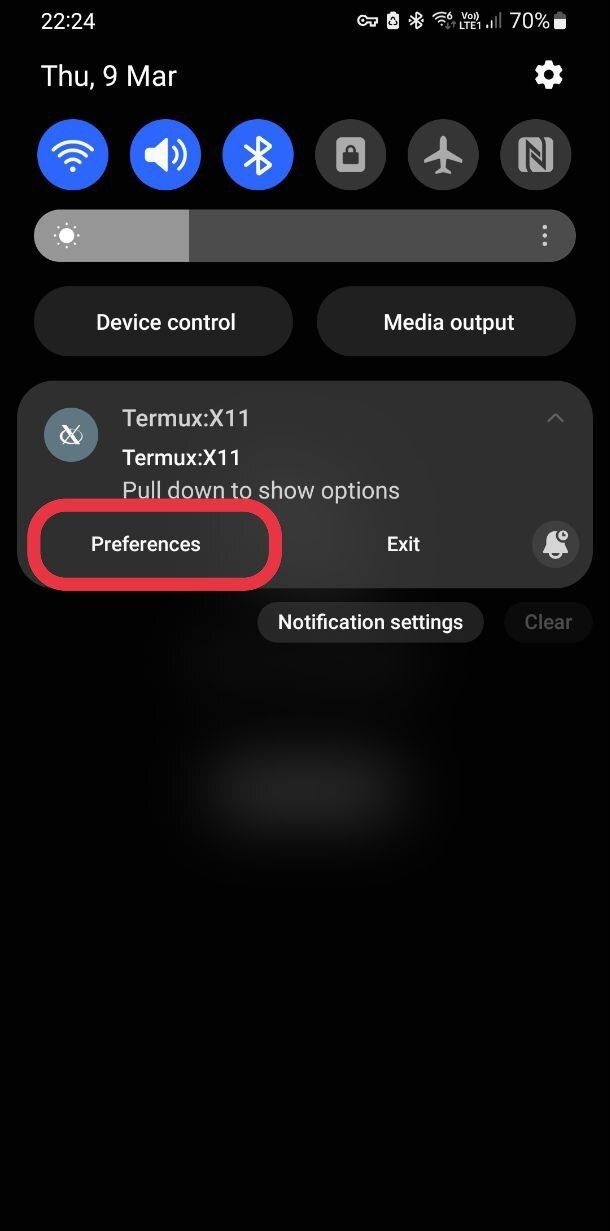
By clicking "Preferences" button in notification, if available.
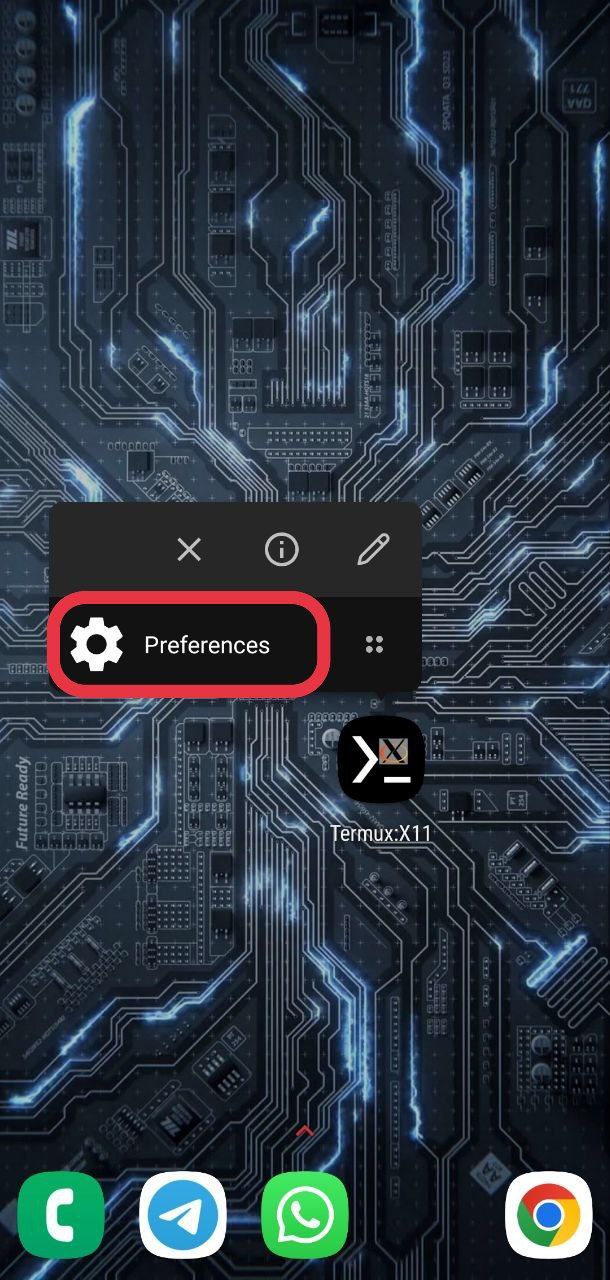
By clicking "Preferences" application shortcut (long tap `Termux:X11` icon in launcher).
Toggling keyboard
Just press "Back" button.
Touch gestures
Touchpad emulation mode.
In touchpad emulation mode you can use the following gestures:
Tap for click
Double tap for double click
Two-finger tap for right click
Three-finger tap for middle click
Two-finger vertical swipe for vertical scroll
Two-finger horizontal swipe for horizontal scroll
Three-finger swipe down to show-hide additional keys bar.
Simulated touchscreen mode.
In simulated touchscreen mode you can use the following gestures:
Single tap for left button click.
Long tap for mouse holding.
Double tap for double click
Two-finger tap for right click
Three-finger tap for middle click
Two-finger vertical swipe for vertical scroll
Two-finger horizontal swipe for horizontal scroll
Three-finger swipe down to show-hide additional keys bar.
Font or scaling is too big!
Some apps may have issues with X server regarding DPI. please see https://wiki.archlinux.org/title/HiDPI on how to override application-specific DPI or scaling.
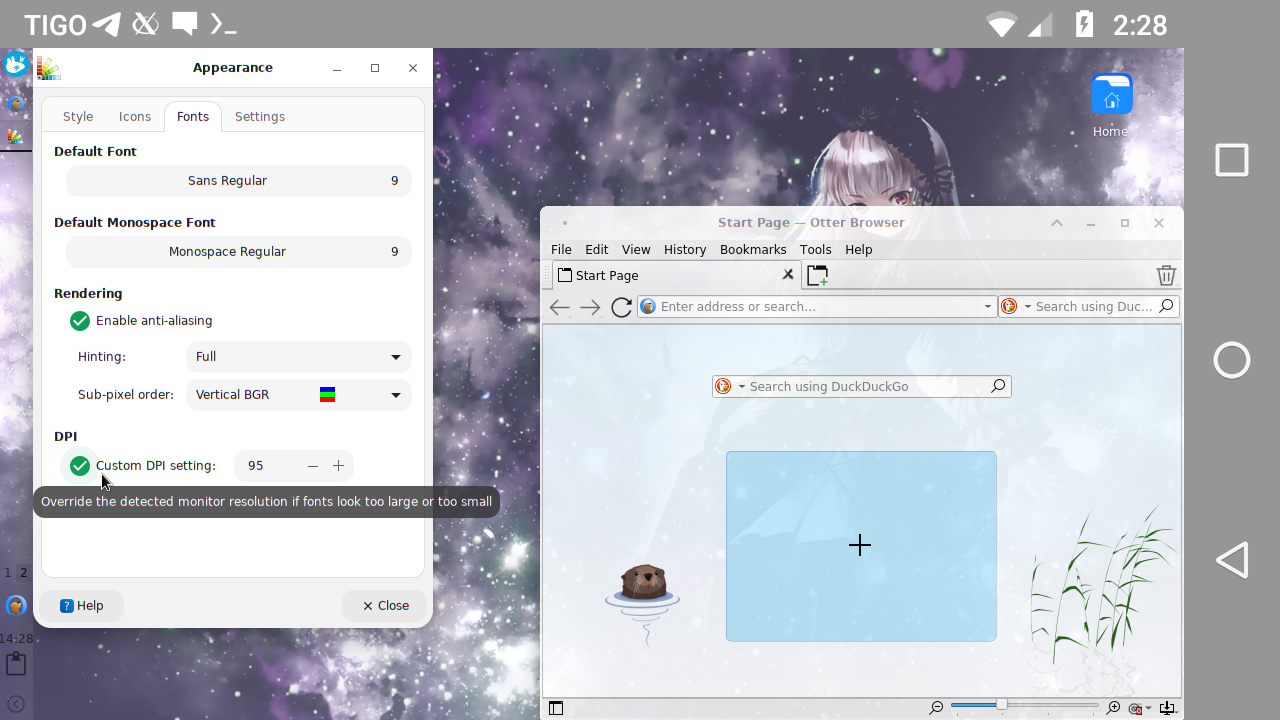
You can fix this in your window manager settings (in the case of xfce4 and lxqt via Applications Menu > Settings > Appearance). Look for the DPI value, if it is disabled enable it and adjust its value until the fonts are the appropriate size.
Screenshot
Also you can start termux-x11 with -dpi option.
termux-x11 :1 -xstartup "xfce4-session" -dpi 120
Changing, dumping and restoring preferences from commandline
It is possible to change preferences of termux-x11 from command line.
termux-x11-nightly package contains termux-x11-preference tool which can be used like
Use termux-x11-preference list to dump current preferences.
Use termux-x11-preference list > file to dump current preferences to file.
Use termux-x11-preference < file to restore preferences from file.
Use termux-x11-preference "fullscreen"="false" "showAdditionalKbd"="true" to disable fullscreen and enable additional key bar. The full list of preferences you can modify is available with termux-x11-preference list command. You can specify one or more preferences here.
Termux:X11 activity should be available in background or foreground, otherwise termux-x11-preference tool will hang indefinitely.
In the case if there is Store preferences for secondary displays separately preference active termux-x11-preference will use/modify preferences of display where Termux:X11 activity is currently opened.
Using with 3rd party apps
It is possible to use Termux:X11 with 3rd party apps.
Check how shell-loader/src/main/java/com/termux/x11/Loader.java works.
termux/termux-x11 thuộc nhóm Mobile trên TopGit, cùng 5 topic GitHub. Trang Trending và Topics liệt kê các repo cùng số sao và cùng ngôn ngữ để so sánh.
Đọc thêm về termux/termux-x11 ở đâu?
Trang TopGit này là một snapshot — tab "Readme" hiển thị nguyên văn README của repo (đã bỏ link, giữ ảnh). Repo GitHub ở github.com/termux/termux-x11 là nguồn chính thức.
termux/termux-x11 có phải mã nguồn mở không?
Có — termux/termux-x11 phát hành theo license GPL-3.0, nghĩa là mã nguồn mở để đọc, fork và (tùy license) tái sử dụng. Mã: github.com/termux/termux-x11.
termux/termux-x11 có trang demo không?
Dự án có trang chủ ở https://termux.dev. Tab "Readme" ở trang này thường có ảnh chụp và hướng dẫn bắt đầu nhanh.
termux/termux-x11 dùng license gì?
termux/termux-x11 phát hành theo license GPL-3.0. Nên mở file LICENSE trên GitHub để xác nhận — license metadata đôi khi lệch với thực tế dự án.
termux/termux-x11 là gì?
termux/termux-x11 (termux/termux-x11) là dự án C trên GitHub. Theo mô tả gốc: Termux X-server add-on.
Vì sao termux/termux-x11 được xếp vào nhóm Mobile?
TopGit xếp termux/termux-x11 vào nhóm Mobile dựa trên GitHub topics và mô tả của repo (gắn thẻ: "android", "graphics", "linux"). Việc phân loại dựa trên metadata thật của repo, không phải đoán theo cảm tính biên tập.
Đọc đầy đủ README ở tab phía trên.
Vẫn đang phân vân về termux-x11?
Một cú bấm sẽ gửi câu hỏi kèm trang này cho AI — xem AI nói gì về termux-x11.
 /termux-x11