terryma/vim-multiple-cursors — 7.9k★ trên GitHub (Vim script). True Sublime Text style multiple selections for Vim
Tóm tắt dựng từ metadata GitHub của chính dự án — chưa có bài review TopGit. Trang sẽ tự động cập nhật khi bài review đầy đủ được xuất bản.
VÌ SAO CHƯA CÓ REVIEW
TopGit viết bài đầy đủ cho repo có nhiều sao nhất và được yêu cầu nhiều nhất. Trang này là snapshot trong thời gian chờ — xem README gốc ở tab READ ME.
❗ This plugin is deprecated, use vim-visual-multi instead ❗
vim-multiple-cursors
Contents
About
Installation
Quick Start
Mapping
Settings
Interactions with other plugins
Highlight
FAQ
Contributing
Credit
About
There have been many attempts at bringing Sublime Text's awesome multiple selection feature into Vim, but none so far have been in my opinion a faithful port that is simplistic to use, yet powerful and intuitive enough for an existing Vim user. vim-multiple-cursors is yet another attempt at that.
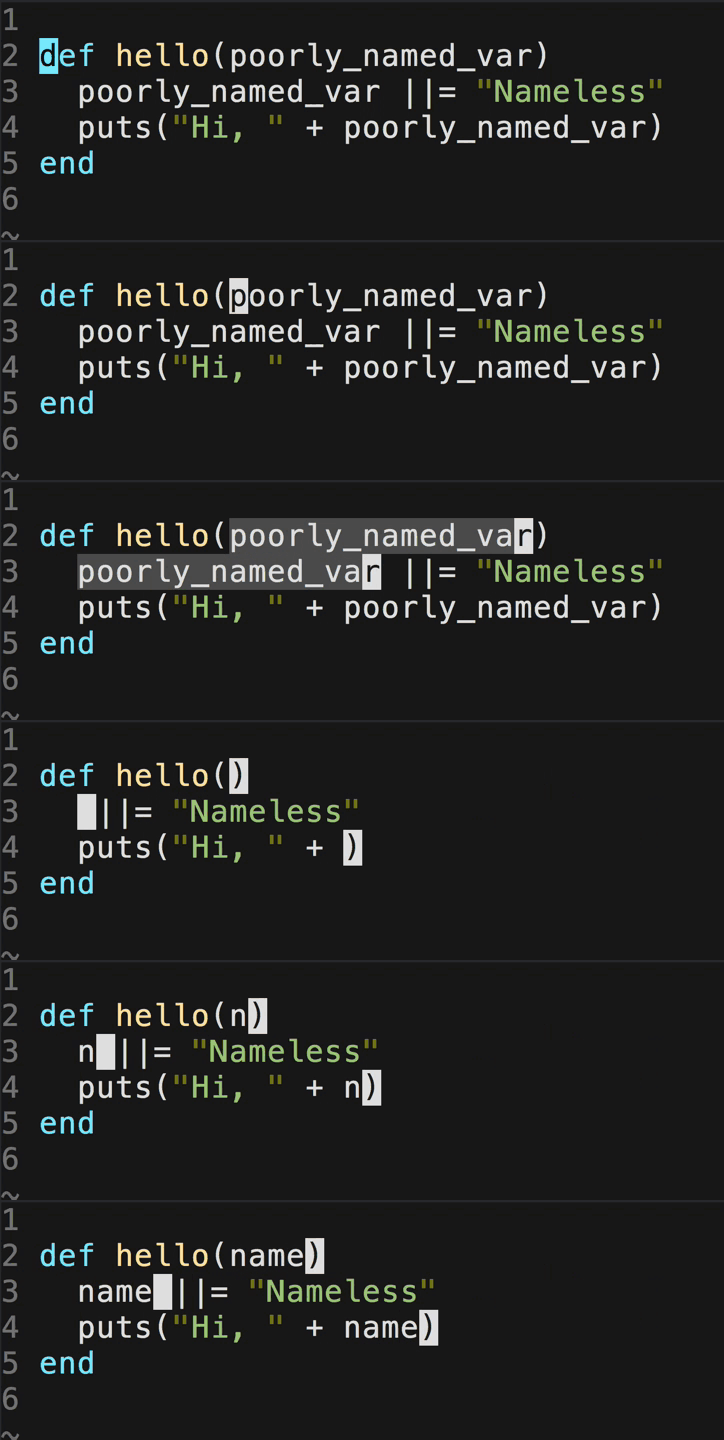
It's great for quick refactoring
Vim command sequence: fp<C-n><C-n><C-n>cname
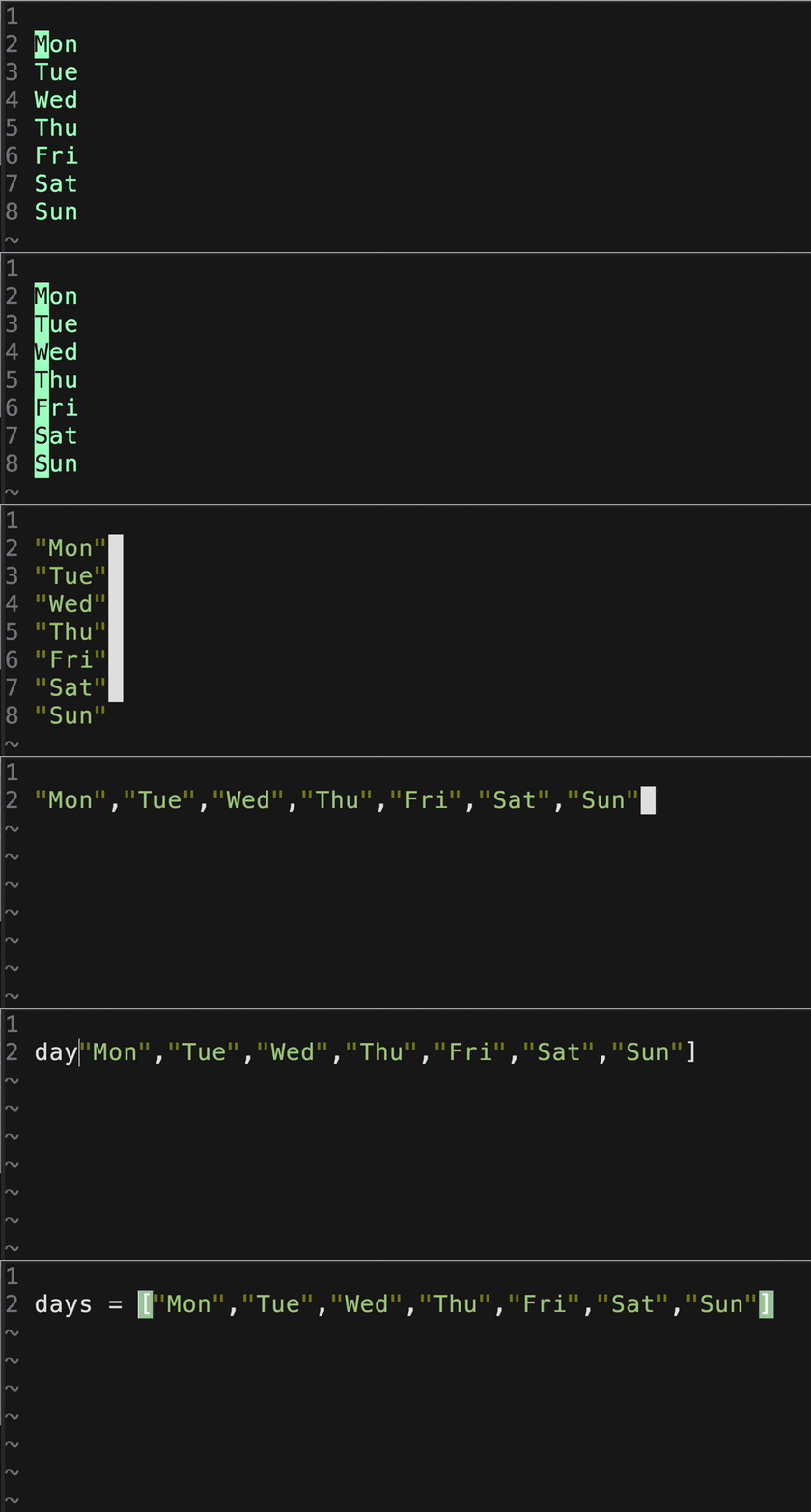
Add a cursor to each line of your visual selection
Vim command sequence: vip<C-n>i"<Right><Right><Right>",<Esc>vipgJ$r]Idays = [
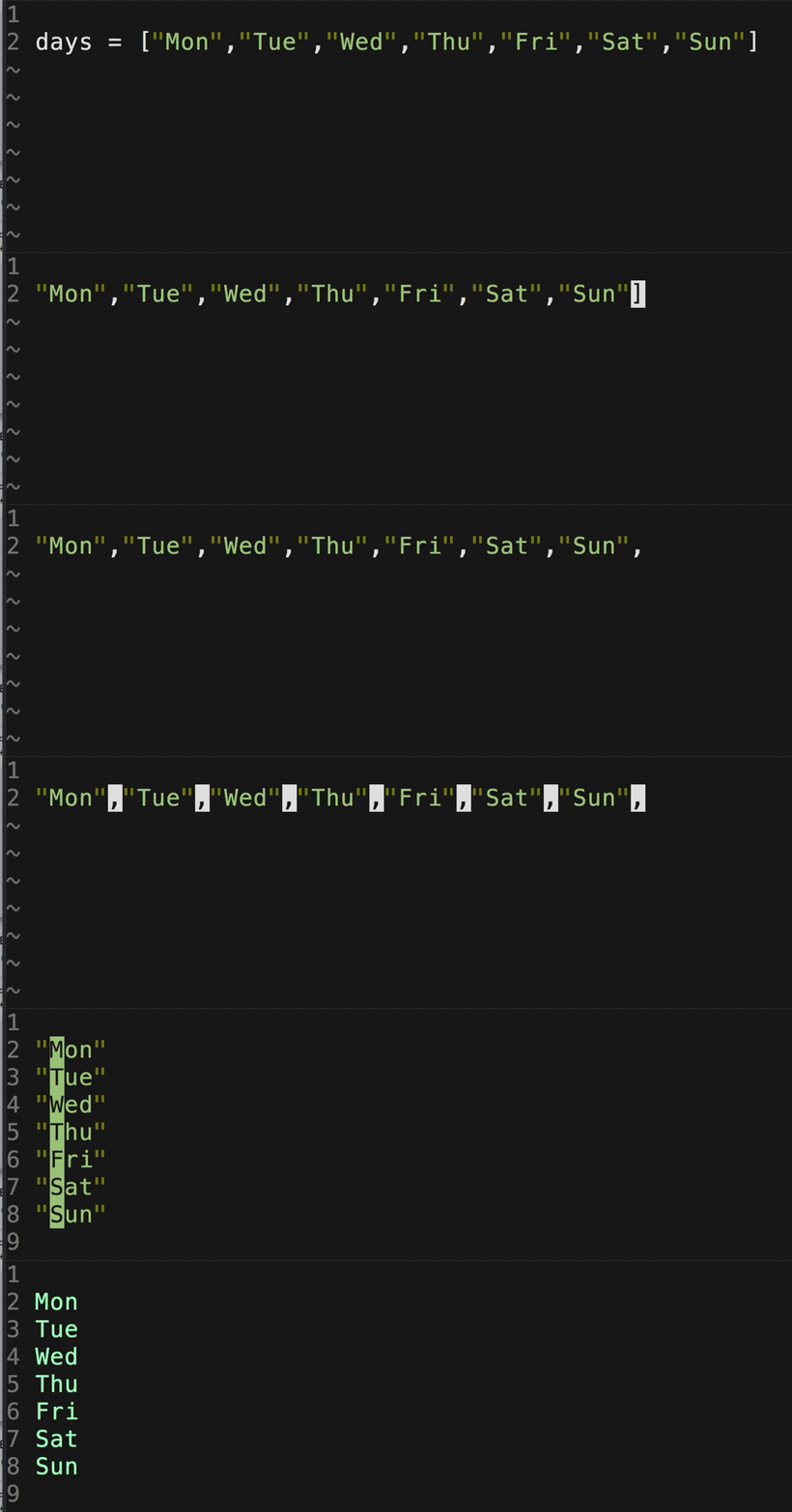
Match characters from visual selection
Vim command sequence: df[$r,0f,v<C-n>…<C-n>c<CR><Up><Del><Right><Right><Right><Del>
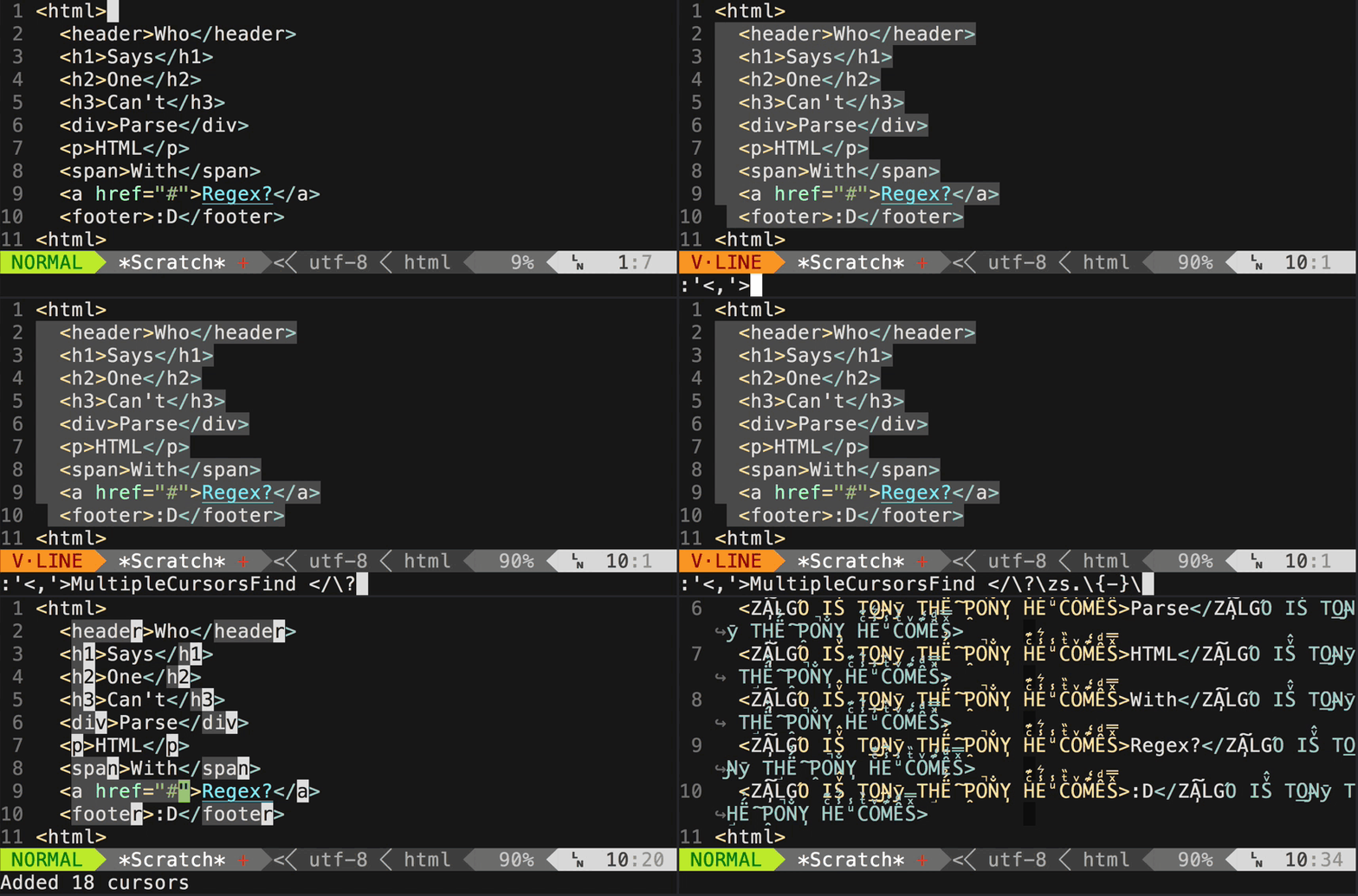
Use the command to match regexp
To see what keystrokes are used for the above examples, see the wiki page.
Installation
Install using Pathogen, Vundle, Neobundle, vim-plug, or your favorite Vim package manager.
start: <C-n> start multicursor and add a virtual cursor + selection on the match
next: <C-n> add a new virtual cursor + selection on the next match
skip: <C-x> skip the next match
prev: <C-p> remove current virtual cursor + selection and go back on previous match
select all: <A-n> start multicursor and directly select all matches
You can now change the virtual cursors + selection with visual mode commands.
For instance: c, s, I, A work without any issues.
You could also go to normal mode by pressing v and use normal commands there.
At any time, you can press <Esc> to exit back to regular Vim.
NOTE: start with g<C-n> to match without boundaries (behaves like g* instead of *)
visual mode when multiple lines are selected
start: <C-n> add virtual cursors on each line
You can now change the virtual cursors with normal mode commands.
For instance: ciw.
command
The command MultipleCursorsFind accepts a range and a pattern (regexp), it creates a visual cursor at the end of each match.
If no range is passed in, then it defaults to the entire buffer.
Mapping
If you don't like the plugin taking over your key bindings, you can turn it off and reassign them the way you want:
let g:multi_cursor_use_default_mapping=0

" Default mapping
let g:multi_cursor_start_word_key      = '<C-n>'
let g:multi_cursor_select_all_word_key = '<A-n>'
let g:multi_cursor_start_key           = 'g<C-n>'
let g:multi_cursor_select_all_key      = 'g<A-n>'
let g:multi_cursor_next_key            = '<C-n>'
let g:multi_cursor_prev_key            = '<C-p>'
let g:multi_cursor_skip_key            = '<C-x>'
let g:multi_cursor_quit_key            = '<Esc>'
NOTE: Please make sure to always map something to g:multi_cursor_quit_key, otherwise you'll have a tough time quitting from multicursor mode.
Settings
Currently there are four additional global settings one can tweak:
g:multi_cursor_support_imap (Default: 1)
If set to 0, insert mappings won't be supported in Insert mode anymore.
g:multi_cursor_exit_from_visual_mode (Default: 0)
If set to 1, then pressing g:multi_cursor_quit_key in Visual mode will quit and
delete all existing cursors, just skipping normal mode with multiple cursors.
g:multi_cursor_exit_from_insert_mode (Default: 0)
If set to 1, then pressing g:multi_cursor_quit_key in Insert mode will quit and
delete all existing cursors, just skipping normal mode with multiple cursors.
Any key in this map (values are ignored) will cause multi-cursor Normal mode
to pause for map completion just like normal vim. Otherwise keys mapped in
normal mode will "fail to replay" when multiple cursors are active.
For example: {'d':1} makes normal-mode command dw work in multi-cursor mode.
The default list contents should work for anybody, unless they have remapped a
key from an operator-pending command to a non-operator-pending command or
vice versa.
These keys must be manually listed because vim doesn't provide a way to
automatically see which keys start mappings, and trying to run motion commands
such as j as if they were operator-pending commands can break things.
Other plugins may be incompatible in insert mode.
That is why we provide hooks to disable those plug-ins when vim-multiple-cursors is active:
For example, if you are using Neocomplete,
add this to your vimrc to prevent conflict:
function! Multiple_cursors_before()
  if exists(':NeoCompleteLock')==2
    exe 'NeoCompleteLock'
  endif
endfunction

function! Multiple_cursors_after()
  if exists(':NeoCompleteUnlock')==2
    exe 'NeoCompleteUnlock'
  endif
endfunction
Plugins themselves can register User autocommands on MultipleCursorsPre and
MultipleCursorsPost for automatic integration.
Highlight
The plugin uses the highlight group multiple_cursors_cursor and multiple_cursors_visual to highlight the virtual cursors and their visual selections respectively. You can customize them by putting something similar like the following in your vimrc:
" Default highlighting (see help :highlight and help :highlight-link)
highlight multiple_cursors_cursor term=reverse cterm=reverse gui=reverse
highlight link multiple_cursors_visual Visual
FAQ
Q Pressing i after selecting words with C-n makes the plugin hang, why?
A When selecting words with C-n, the plugin behaves like in visual mode.
Once you pressed i, you can still press I to insert text.
QALT+n doesn't seem to work in VIM but works in gVIM, why?
A This is a well known terminal/Vim issue, different terminal have different ways to send Alt+key.
Try adding this in your .vimrc and make sure to replace the string:
if !has('gui_running')
  map "in Insert mode, type Ctrl+v Alt+n here" <A-n>
endif
A Try setting set selection=inclusive in your ~/.gvimrc
A Alternatively, you can just temporarily disable exclusive selection whenever the plugin is active:
augroup MultipleCursorsSelectionFix
    autocmd User MultipleCursorsPre  if &selection ==# 'exclusive' | let g:multi_cursor_save_selection = &selection | set selection=inclusive | endif
    autocmd User MultipleCursorsPost if exists('g:multi_cursor_save_selection') | let &selection = g:multi_cursor_save_selection | unlet g:multi_cursor_save_selection | endif
augroup END
Q deoplete insert giberrish, how to fix this?
A use the Multiple_cursors functions, add this in your vimrc:
    func! Multiple_cursors_before()
      if deoplete#is_enabled()
        call deoplete#disable()
        let g:deoplete_is_enable_before_multi_cursors = 1
      else
        let g:deoplete_is_enable_before_multi_cursors = 0
      endif
    endfunc
    func! Multiple_cursors_after()
      if g:deoplete_is_enable_before_multi_cursors
        call deoplete#enable()
      endif
    endfunc
Q is it also working on Mac?
A On Mac OS, MacVim is known to work.
Q How can I select n keywords with several keystrokes? 200<C-n> does not work.
A You can use :MultipleCursorsFind keyword. I have this binding in my vimrc:
terryma/vim-multiple-cursors có 7.9k sao GitHub — tải lại trang để xem số mới nhất, hoặc xem trực tiếp github.com/terryma/vim-multiple-cursors. TopGit phản chiếu số sao của GitHub nhưng không cam kết đến từng phút.
terryma/vim-multiple-cursors có tag gì không?
Bản đồng bộ chưa ghi nhận topic GitHub nào cho terryma/vim-multiple-cursors. GitHub topics hiển thị ở thanh bên phải trang repo — đó là nơi đáng kiểm tra nhất.
terryma/vim-multiple-cursors còn đang phát triển không?
Commit gần nhất trên terryma/vim-multiple-cursors là 6.3 năm trước (theo timestamp GitHub). Repo có 242 fork — một chỉ báo về mức độ quan tâm của cộng đồng.
terryma/vim-multiple-cursors là gì?
terryma/vim-multiple-cursors (terryma/vim-multiple-cursors) là dự án Vim script trên GitHub. Theo mô tả gốc: True Sublime Text style multiple selections for Vim
terryma/vim-multiple-cursors viết bằng ngôn ngữ gì?
terryma/vim-multiple-cursors chủ yếu viết bằng Vim script. Trường "language" của GitHub dựa trên phần lớn byte ở nhánh mặc định.
Đọc đầy đủ README ở tab phía trên.
Chưa chắc vim-multiple-cursors có hợp với bạn?
Để ChatGPT, Claude hoặc Perplexity tìm hiểu giúp — bấm bên dưới và xem AI nói gì về vim-multiple-cursors.

 /vim-multiple-cursors