Điểm qua tesseract-ocr/tesstrain: 723 sao trên GitHub, viết chủ yếu bằng Python. Train Tesseract LSTM with make
Tóm tắt dựng từ metadata GitHub của chính dự án — chưa có bài review TopGit. Trang sẽ tự động cập nhật khi bài review đầy đủ được xuất bản.
VÌ SAO CHƯA CÓ REVIEW
TopGit viết bài đầy đủ cho repo có nhiều sao nhất và được yêu cầu nhiều nhất. Trang này là snapshot trong thời gian chờ — xem README gốc ở tab READ ME.
Training workflow for Tesseract 5 as a Makefile for dependency tracking.
Installation
Auxiliaries
Leptonica, Tesseract
Windows
Python
Language data
Usage
Choose the model name
Provide ground truth data
Train
Change directory assumptions
Make model files (traineddata)
Plotting CER
License
Installation
Auxiliaries
You will need at least GNU make (minimal version 4.2), wget, find, bash, and unzip.
Leptonica, Tesseract
You will need a recent version (>= 5.3) of tesseract built with the
training tools and matching leptonica bindings.
Build
instructions
and more can be found in the Tesseract User Manual.
Windows
Install the latest tesseract (e.g. from https://digi.bib.uni-mannheim.de/tesseract/), and make sure that tesseract is added to your PATH.
Install Python 3
Install Git SCM to Windows - it provides a lot of linux utilities on Windows (e.g. find, unzip, rm) and put C:\Program Files\Git\usr\bin to the beginning of your PATH variable (temporarily you can do it in cmd with set PATH=C:\Program Files\Git\usr\bin;%PATH% - unfortunately there are several Windows tools with the same name as on linux (find, sort) with different behavior/functionality and there is need to avoid them during training.
Install winget/Windows Package Manager and then run winget install ezwinports.make and winget install wget to install missing tools.
Python
You need a recent version of Python 3.x. For image processing the Python library Pillow is used.
If you don't have a global installation, please use the provided requirements file pip install -r requirements.txt.
Language data
Tesseract expects some configuration data (a file radical-stroke.txt and *.unicharset for all scripts) in DATA_DIR.
To fetch them:
make tesseract-langdata
(While this step is only needed once and implicitly included in the training target,
you might want to run it explicitly beforehand.)
Usage
Choose the model name
Choose a name for your model. By convention, Tesseract stack models including
language-specific resources use (lowercase) three-letter codes defined in
ISO 639 with additional
information separated by underscore. E.g., chi_tra_vert for traditional
Chinese with vertical typesetting. Language-independent (i.e. script-specific)
models use the capitalized name of the script type as an identifier. E.g.,
Hangul_vert for Hangul script with vertical typesetting. In the following,
the model name is referenced by MODEL_NAME.
Provide ground truth data
Place ground truth consisting of line images and transcriptions in the folder
data/MODEL_NAME-ground-truth. This list of files will be split into training and
evaluation data, the ratio is defined by the RATIO_TRAIN variable.
Images must be TIFF and have the extension .tif or PNG and have the
extension .png, .bin.png, or .nrm.png.
Transcriptions must be single-line plain text and have the same name as the
line image but with the image extension replaced by .gt.txt.
The repository contains a ZIP archive with sample ground truth, see
ocrd-testset.zip. Extract it to ./data/foo-ground-truth and run
make training.
NOTE: If you want to generate line images for transcription from a full
page, see tips in issue 7 and
in particular @Shreeshrii's shell
script.
Train
Run
make training MODEL_NAME=name-of-the-resulting-model
which is a shortcut for
make unicharset lists proto-model tesseract-langdata training MODEL_NAME=name-of-the-resulting-model
Run make help to see all the possible targets and variables:
  Targets

    unicharset       Create unicharset
    charfreq         Show character histogram
    lists            Create lists of lstmf filenames for training and eval
    training         Start training (i.e. create .checkpoint files)
    traineddata      Create best and fast .traineddata files from each .checkpoint file
    proto-model      Build the proto model
    tesseract-langdata  Download stock unicharsets
    evaluation       Evaluate .checkpoint models on eval dataset via lstmeval
    plot             Generate train/eval error rate charts from training log
    clean            Clean all generated files

  Variables

    MODEL_NAME         Name of the model to be built. Default: foo
    START_MODEL        Name of the model to continue from (i.e. fine-tune). Default: ''
    PROTO_MODEL        Name of the prototype model. Default: OUTPUT_DIR/MODEL_NAME.traineddata
    WORDLIST_FILE      Optional file for dictionary DAWG. Default: OUTPUT_DIR/MODEL_NAME.wordlist
    NUMBERS_FILE       Optional file for number patterns DAWG. Default: OUTPUT_DIR/MODEL_NAME.numbers
    PUNC_FILE          Optional file for punctuation DAWG. Default: OUTPUT_DIR/MODEL_NAME.punc
    DATA_DIR           Data directory for output files, proto model, start model, etc. Default: data
    OUTPUT_DIR         Output directory for generated files. Default: DATA_DIR/MODEL_NAME
    GROUND_TRUTH_DIR   Ground truth directory. Default: OUTPUT_DIR-ground-truth
    TESSDATA_REPO      Tesseract model repo to use (_fast or _best). Default: _best
    TESSDATA           Path to the directory containing START_MODEL.traineddata
                       (for example tesseract-ocr/tessdata_best). Default: ./usr/share/tessdata
    MAX_ITERATIONS     Max iterations. Default: 10000
    EPOCHS             Set max iterations based on the number of lines for training. Default: none
    DEBUG_INTERVAL     Debug Interval. Default:  0
    LEARNING_RATE      Learning rate. Default: 0.0001 with START_MODEL, otherwise 0.002
    NET_SPEC           Network specification (in VGSL) for new model from scratch. Default: [1,36,0,1 Ct3,3,16 Mp3,3 Lfys48 Lfx96 Lrx96 Lfx256 O1c###]
    FINETUNE_TYPE      Fine-tune Training Type - Impact, Plus, Layer or blank. Default: ''
    LANG_TYPE          Language Type - Indic, RTL or blank. Default: ''
    PSM                Page segmentation mode. Default: 13
    RANDOM_SEED        Random seed for shuffling of the training data. Default: 0
    RATIO_TRAIN        Ratio of train / eval training data. Default: 0.90
    TARGET_ERROR_RATE  Stop training if the character error rate (CER in percent) gets below this value. Default: 0.01
    LOG_FILE           File to copy training output to and read plot figures from. Default: OUTPUT_DIR/training.log
Choose training regime
First, decide what kind of training
you want.
Fine-tuning: select (and install) a START_MODEL
From scratch: specify a NET_SPEC (see documentation)
Change directory assumptions
To override the default path name requirements, just set the respective variables in the above list:
make training MODEL_NAME=name-of-the-resulting-model DATA_DIR=/data GROUND_TRUTH_DIR=/data/GT
If you want to use shell variables to override the make variables (for example because
you are running tesstrain from a script or other makefile), then you can use the -e flag:
MODEL_NAME=name-of-the-resulting-model DATA_DIR=/data GROUND_TRUTH_DIR=/data/GT make -e training
Make model files (traineddata)
When the training is finished, it will write a traineddata file which can be used
for text recognition with Tesseract. Note that this file does not include a
dictionary. The tesseract executable therefore prints a warning.
It is also possible to create additional traineddata files from intermediate
training results (the so-called checkpoints). This can even be done while the
training is still running. Example:
# Add MODEL_NAME and OUTPUT_DIR like for the training.
make traineddata
This will create two directories tessdata_best and tessdata_fast in OUTPUT_DIR
with a best (double based) and fast (int based) model for each checkpoint.
It is also possible to create models for selected checkpoints only. Examples:
# Make traineddata for the checkpoint files of the last three weeks.
make traineddata CHECKPOINT_FILES="$(find data/foo -name '*.checkpoint' -mtime -21)"

# Make traineddata for the last two checkpoint files.
make traineddata CHECKPOINT_FILES="$(ls -t data/foo/checkpoints/*.checkpoint | head -2)"

# Make traineddata for all checkpoint files with CER better than 1 %.
make traineddata CHECKPOINT_FILES="$(ls data/foo/checkpoints/*[^1-9]0.*.checkpoint)"
Add MODEL_NAME and OUTPUT_DIR and replace data/foo with the output directory if needed.
Plotting CER
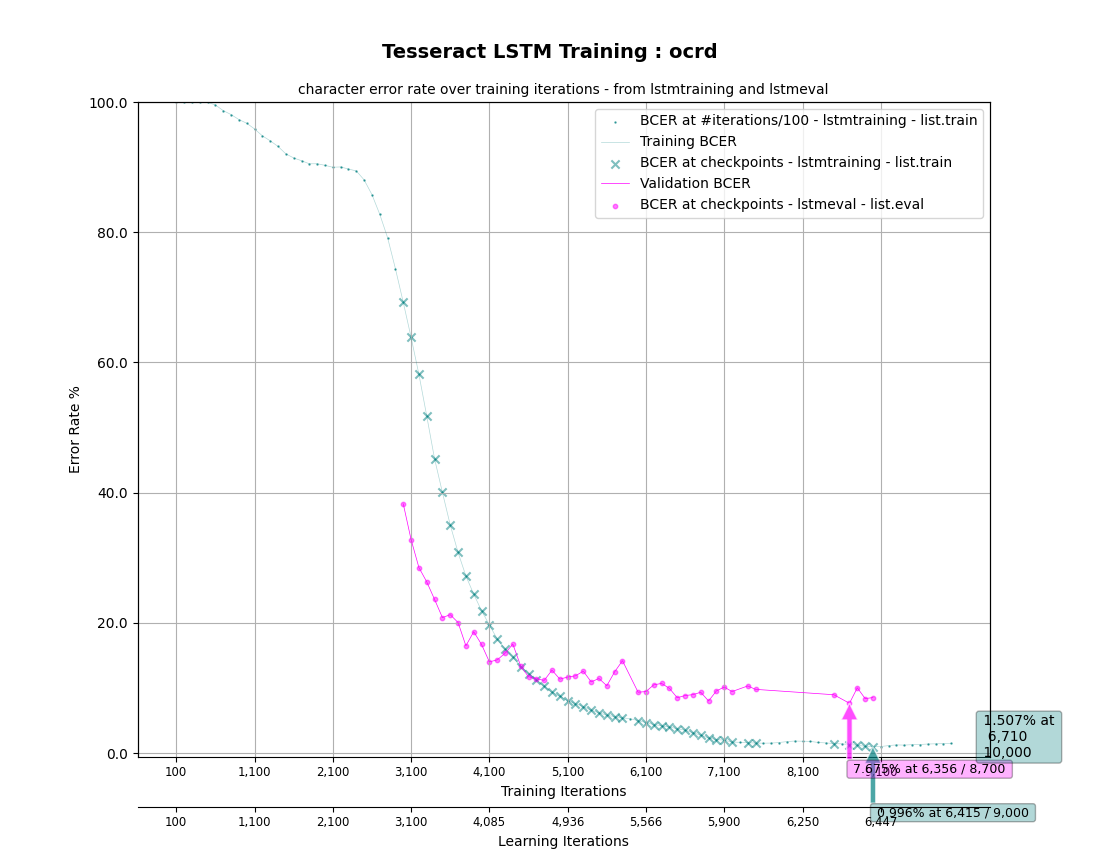
Training and Evaluation Character Error Rate (CER) can be plotted using Matplotlib:
# Make OUTPUT_DIR/MODEL_FILE.plot_*.png
make plot
All the variables defined above apply, but there is no explicit dependency on training.
Still, the target depends on the LOG_FILE captured during training (just will not trigger
training itself). Besides analysing the log file, this also directly evaluates the trained models
(for each checkpoint) on the eval dataset. The latter is also available as an independent target
evaluation:
# Make OUTPUT_DIR/eval/MODEL_FILE*.*.log
make evaluation
Plotting can even be done while training is still running, and will depict the training status
up to that point. (It can be rerun any time the LOG_FILE has changed or new checkpoints written.)
As an example, use the training data provided in ocrd-testset.zip to do some
training and generate the plots:
unzip ocrd-testset.zip -d data/ocrd-ground-truth
make training MODEL_NAME=ocrd START_MODEL=deu_latf TESSDATA=~/tessdata_best MAX_ITERATIONS=10000 &
# Make data/ocrd/ocrd.plot_cer.png and plot_log.png (repeat during/after training)
make plot MODEL_NAME=ocrd
Which should then look like this:
License
Software is provided under the terms of the Apache 2.0 license.
Sample training data provided by Deutsches Textarchiv is in the public domain.
Trang TopGit này là một snapshot — tab "Readme" hiển thị nguyên văn README của repo (đã bỏ link, giữ ảnh). Repo GitHub ở github.com/tesseract-ocr/tesstrain là nguồn chính thức.
tesseract-ocr/tesstrain có bao nhiêu sao?
tesseract-ocr/tesstrain có 723 sao GitHub — tải lại trang để xem số mới nhất, hoặc xem trực tiếp github.com/tesseract-ocr/tesstrain. TopGit phản chiếu số sao của GitHub nhưng không cam kết đến từng phút.
tesseract-ocr/tesstrain có những chủ đề gì?
GitHub topics của tesseract-ocr/tesstrain: "hacktoberfest", "ocr", "tesseract", "training". TopGit xếp repo vào nhóm mã nguồn mở.
tesseract-ocr/tesstrain còn đang phát triển không?
Commit gần nhất trên tesseract-ocr/tesstrain là 1.5 năm trước (theo timestamp GitHub). Repo có 219 fork — một chỉ báo về mức độ quan tâm của cộng đồng.
tesseract-ocr/tesstrain viết bằng ngôn ngữ gì?
tesseract-ocr/tesstrain chủ yếu viết bằng Python. Trường "language" của GitHub dựa trên phần lớn byte ở nhánh mặc định.
Đọc đầy đủ README ở tab phía trên.
Chưa chắc tesstrain có hợp với bạn?
Để ChatGPT, Claude hoặc Perplexity tìm hiểu giúp — bấm bên dưới và xem AI nói gì về tesstrain.
 /tesstrain