thedaviddias/skill-check — 194★ trên GitHub (TypeScript). Linter for agent skill files
Tóm tắt dựng từ metadata GitHub của chính dự án — chưa có bài review TopGit. Trang sẽ tự động cập nhật khi bài review đầy đủ được xuất bản.
VÌ SAO CHƯA CÓ REVIEW
TopGit viết bài đầy đủ cho repo có nhiều sao nhất và được yêu cầu nhiều nhất. Trang này là snapshot trong thời gian chờ — xem README gốc ở tab READ ME.
brew tap thedaviddias/skill-check https://github.com/thedaviddias/skill-check
brew install skill-check
Commands
Command
Description
skill-check [path|github-url]
Shorthand for skill-check check [path|github-url]
skill-check check [path|github-url]
Run validation (and optional security scan)
skill-check split-body [path]
Preview/apply section-based body split into references/*.md
skill-check new <name>
Scaffold a new skill directory with SKILL.md template
skill-check watch [path]
Watch local paths for changes and re-run validation on save
skill-check diff <a> <b>
Compare diagnostics between two skill directories
skill-check report [path|github-url]
Generate a markdown health report
skill-check rules [id]
List all rules, or show detail for a specific rule
skill-check security-scan [path|github-url]
Run security scan via agent-scan (mcp-scan)
skill-check init
Create skill-check.config.json template
check options
Flag
Description
--fix
Apply safe automatic fixes for supported findings
--fix --interactive
Prompt before applying each fix (TTY only)
--baseline <path>
Compare against a previous JSON run and show new/fixed counts
--format <fmt>
Output format (see below)
--share
Render a share card (text format only)
--share-out <path>
Save a share image file (default: ./skill-check-share.png)
--no-open
Skip auto-opening HTML reports
--no-security-scan
Skip the security scan
--security-scan-verbose
Show full raw agent-scan output (default is compact summary)
--strict
Treat warnings as errors
--lenient
Relax selected strict rules
--fail-on-warning
Exit non-zero when warnings exist
Output Formats
Format
Description
text
Colorized terminal output with ASCII tables, severity badges, and quality scores (default)
json
Machine-readable output including quality scores and optional baseline diff
sarif
SARIF format for security tooling and GitHub Code Scanning
html
Self-contained HTML report with scores, filtering, and dark mode
github
::error / ::warning annotations for GitHub Actions
HTML reports are written to skill-check-report.html (or output.reportPath). In an interactive terminal the report opens in your browser automatically; use --no-open to skip.
View locally:npx skill-check . --format html or open the file directly: open skill-check-report.html (macOS).
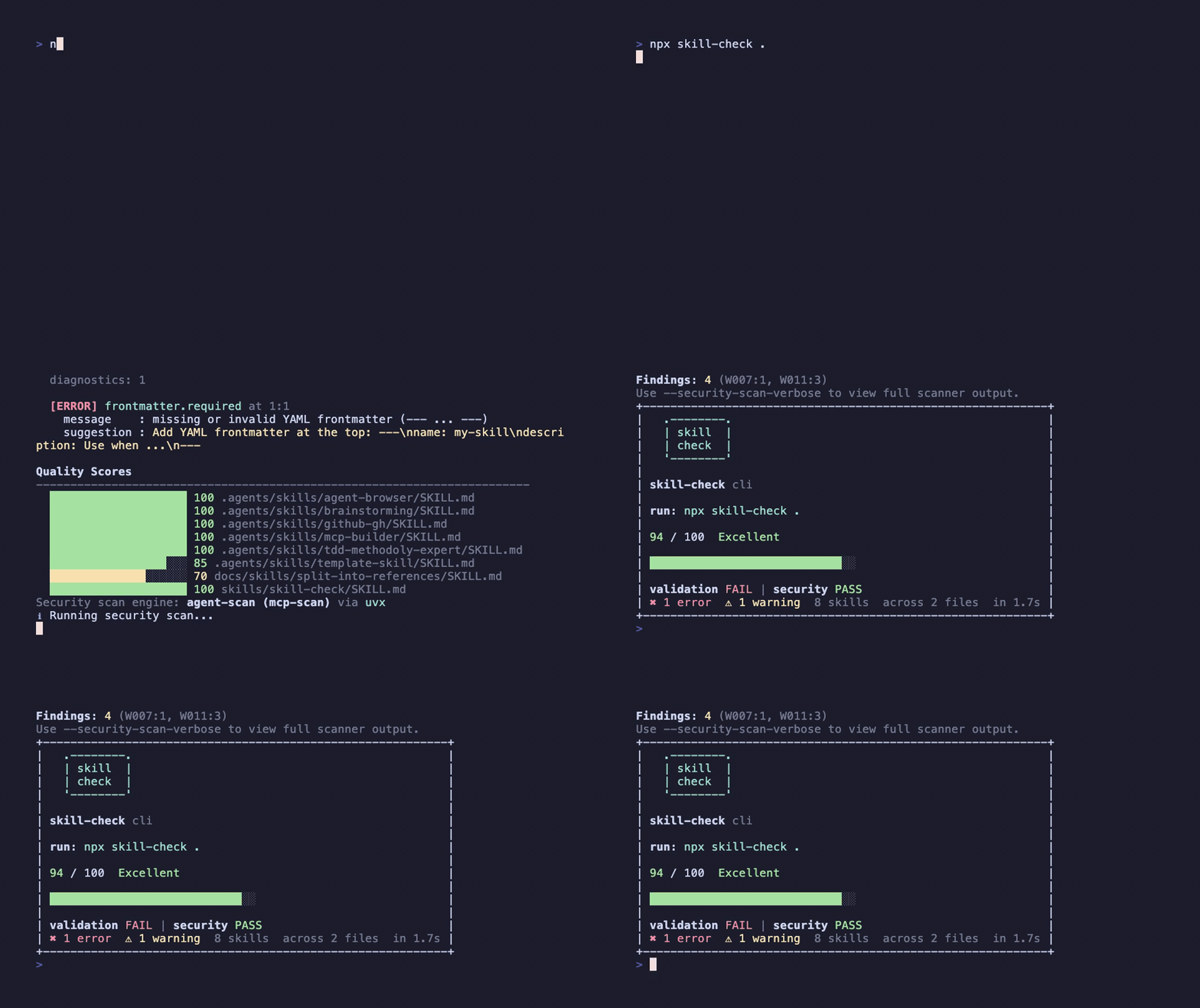
The text formatter includes quality score bars per skill, colorized severity badges, and a share-friendly shield card with the exact runnable npx skill-check ... command (including GitHub URL targets when used).
An ASCII CLI banner is shown in interactive text mode; set SKILL_CHECK_NO_BANNER=1 to disable it.
Quality Scores
Every check run computes a quality score (0-100) per skill based on five weighted categories:
Category
Weight
What it measures
Frontmatter
30%
Required fields, naming, ordering
Description
30%
Length, "Use when" phrasing
Body
20%
Line/token limits
Links
10%
Broken local and reference links
File
10%
Trailing newlines, formatting
Scores appear in text, html, and json output.
Duplicate Detection
When multiple skills share the same name or identical description, check emits duplicates.name / duplicates.description warnings so agents can reliably differentiate skills.
Output shows how many diagnostics are new, fixed, or unchanged.
Development Quick Start
pnpm install
pnpm run check
pnpm run report
Generate real CLI outputs from multi-skill fixtures:
pnpm run smoke:cli
Smoke output files are written to reports/smoke/.
Smoke includes a real security scan run by default.
Smoke also includes a real --fix run on a temp copy of the failing mixed fixture.
You can control smoke output colors with SMOKE_COLOR=always|auto|never.
You can set SMOKE_SECURITY_SCAN=0 to skip security smoke and SMOKE_SECURITY_SCAN_RUNNER=auto|local|uvx|pipx to choose the runner (default: pipx).
Use SMOKE_SECURITY_SCAN_SKILLS=/path/to/skills to override the skills path scanned in smoke mode.
Create config with guided setup:
npx skill-check init --interactive
Security Scan
skill-check can validate repos or direct skills directories:
check runs the security scan by default.
If dependencies are missing, skill-check automatically installs scanner dependencies by default.
Use --no-installs to hard-block automatic installs.
By default, skill-check prints a compact security summary; use --security-scan-verbose for full scanner details.
Creates an ephemeral shallow clone (git clone --depth 1) in a temp directory.
Cleans up the checkout automatically after the command finishes.
Shows remote preparation progress on stderr (spinner in TTY, [remote] status lines in non-TTY/CI).
Keeps security scan enabled by default (same as local path behavior).
Does not support --fix for URL targets (read-only workflow).
watch and diff are local-path only in this version.
Auto-fix Coverage
--fix currently handles deterministic formatting/metadata issues:
frontmatter.required
frontmatter.name_required
frontmatter.description_required
frontmatter.name_matches_directory
frontmatter.name_slug_format
frontmatter.field_order
description.use_when_phrase
description.min_recommended_length
file.trailing_newline_single
Rules requiring human intent (content quality, max-length trimming, broken links, or oversized bodies) remain manual and are reported after fixes are applied.
Use --fix --interactive for per-diagnostic approval prompts (requires TTY).
Split Oversized Skill Bodies
When body.max_lines fails, use split-body to extract ## sections into references/*.md.
Split is deterministic and section-based (## headings).
If a long body has no ## headings, the command reports a blocked plan and explains what to add.
split-body is local-path only (no GitHub URL mutation flow in v1).
After writing, run npx skill-check check <skill-dir-or-file> --no-security-scan.
For editorial cleanup, use docs/skills/split-into-references/SKILL.md or the published copy.
GitHub Action
Use skill-check directly in workflows:
Marketplace status: not listed in GitHub Marketplace yet.
Supported usage today is direct repo tags (uses: thedaviddias/skill-check@v1 or @v1.x.y).
See docs/github-action-publishing.md for the publication playbook.
sarif-file: absolute path to SARIF file when format=sarif
command: full command used for execution
format=sarif cannot be combined with security-scan=true in the action because security scan output is not SARIF.
Action Release Checklist
Ensure main contains the desired action.yml and github-action/index.js.
Create and push an immutable version tag (example: v1.2.0).
Move the major tag to the latest stable release (v1 -> v1.2.0 commit).
Verify a workflow using uses: thedaviddias/skill-check@v1 resolves the updated action.
Rules Reference
Run skill-check rules to see all built-in rules with severity and fixable status.
Run skill-check rules <id> for detail on a specific rule.
Rule
Default
Fixable
frontmatter.required
error
yes
frontmatter.name_required
error
yes
frontmatter.description_required
error
yes
frontmatter.name_matches_directory
error
yes
frontmatter.name_slug_format
error
yes
frontmatter.name_max_length
error
no
frontmatter.field_order
error
yes
frontmatter.unknown_fields
warn
no
frontmatter.compatibility_max_length
warn
no
frontmatter.metadata_string_values
warn
no
frontmatter.allowed_tools_format
warn
no
description.non_empty
error
no
description.max_length
error
no
description.use_when_phrase
warn
yes
description.min_recommended_length
warn
yes
body.max_lines
error
no
body.max_tokens
warn
no
file.trailing_newline_single
warn
yes
links.local_markdown_resolves
warn
no
links.references_resolve
warn
no
duplicates.name
warn
no
duplicates.description
warn
no
All rules emit actionable suggestion text to guide fixes.
Releasing
Releases are automated with semantic-release. Pushing to main (after CI passes) runs the release workflow: commits are analyzed for Conventional Commits (fix:, feat:, BREAKING CHANGE:), the version is bumped, CHANGELOG.md is updated, the package is published to npm, and a GitHub release is created.
Commit messages are validated locally by commitlint (enforced by the commit-msg hook). Use fix:, feat:, docs:, chore:, etc.
npm auth: Use npm Trusted Publishing (OIDC) so you don’t need NPM_TOKEN. On npmjs.com go to the skill-check package → Settings → Trusted publishing → add a GitHub Actions publisher with workflow filename publish.yml (exact name, including extension). Then the workflow can publish without any npm token. Alternatively, set the NPM_TOKEN repository secret for token-based publish.
To simulate a release locally (without publishing): pnpm run release:dry-run. It will fail verifyConditions without NPM_TOKEN and GITHUB_TOKEN; in CI both are set.
Docs
docs/quickstart.md
docs/github-action-publishing.md
docs/config.md
docs/rules.md
docs/plugins.md
docs/migration-from-agent-forge.md
Contributing
Contributions are welcome. Please read CONTRIBUTING.md before opening a pull request.
Contributors
Thanks goes to these people (emoji key):
David Dias 💻 📖 🚧
This project follows the all-contributors specification.
thedaviddias/skill-check thuộc nhóm Developer Tools trên TopGit, cùng 6 topic GitHub. Trang Trending và Topics liệt kê các repo cùng số sao và cùng ngôn ngữ để so sánh.
Đọc thêm về thedaviddias/skill-check ở đâu?
Trang TopGit này là một snapshot — tab "Readme" hiển thị nguyên văn README của repo (đã bỏ link, giữ ảnh). Repo GitHub ở github.com/thedaviddias/skill-check là nguồn chính thức.
thedaviddias/skill-check có bao nhiêu sao?
thedaviddias/skill-check có 194 sao GitHub — tải lại trang để xem số mới nhất, hoặc xem trực tiếp github.com/thedaviddias/skill-check. TopGit phản chiếu số sao của GitHub nhưng không cam kết đến từng phút.
thedaviddias/skill-check có những chủ đề gì?
GitHub topics của thedaviddias/skill-check: "ai-agents", "checker", "linter", "skill", "skillmd", "skills". TopGit xếp repo vào nhóm Developer Tools.
thedaviddias/skill-check còn đang phát triển không?
Commit gần nhất trên thedaviddias/skill-check là 6 tháng trước (theo timestamp GitHub). Repo có 8 fork — một chỉ báo về mức độ quan tâm của cộng đồng.
thedaviddias/skill-check viết bằng ngôn ngữ gì?
thedaviddias/skill-check chủ yếu viết bằng TypeScript. Trường "language" của GitHub dựa trên phần lớn byte ở nhánh mặc định.
Vì sao thedaviddias/skill-check được xếp vào nhóm Developer Tools?
TopGit xếp thedaviddias/skill-check vào nhóm Developer Tools dựa trên GitHub topics và mô tả của repo (gắn thẻ: "ai-agents", "checker", "linter"). Việc phân loại dựa trên metadata thật của repo, không phải đoán theo cảm tính biên tập.
Đọc đầy đủ README ở tab phía trên.
Vẫn đang phân vân về skill-check?
Một cú bấm sẽ gửi câu hỏi kèm trang này cho AI — xem AI nói gì về skill-check.

 /skill-check