thingsboard/thingsboard-mcp

TopGit theo dõi thingsboard/thingsboard-mcp trên GitHub, đã đạt 98 sao.
Tóm tắt dựng từ metadata GitHub của chính dự án — chưa có bài review TopGit. Trang sẽ tự động cập nhật khi bài review đầy đủ được xuất bản.
TopGit viết bài đầy đủ cho repo có nhiều sao nhất và được yêu cầu nhiều nhất. Trang này là snapshot trong thời gian chờ — xem README gốc ở tab READ ME.
Snapshot
Cộng tác viên hàng đầu
Xem cộng tác viên hàng đầu
ThingsBoard MCP Server



Connect AI agents to your ThingsBoard IoT platform via Model Context Protocol (MCP). Query devices, manage entities, analyze telemetry, and automate operations — all through natural language.
Works with Claude Desktop, Cursor, VS Code Copilot, Claude Code, and any MCP-compatible client.
Quick Start
You need a ThingsBoard instance (Cloud, EU Cloud, self-hosted CE/PE, or Edge) and an API key (ThingsBoard 4.3+) or username/password.
Claude Desktop
Add to your claude_desktop_config.json:
{
  "mcpServers": {
    "thingsboard": {
      "command": "docker",
      "args": ["run", "-i", "--rm", "-e", "THINGSBOARD_URL", "-e", "THINGSBOARD_API_KEY", "thingsboard/mcp"],
      "env": {
        "THINGSBOARD_URL": "https://thingsboard.cloud",
        "THINGSBOARD_API_KEY": "YOUR_API_KEY"
      }
    }
  }
}
Cursor
Add to ~/.cursor/mcp.json (global) or .cursor/mcp.json (project):
{
  "mcpServers": {
    "thingsboard": {
      "command": "docker",
      "args": ["run", "-i", "--rm", "-e", "THINGSBOARD_URL", "-e", "THINGSBOARD_API_KEY", "thingsboard/mcp"],
      "env": {
        "THINGSBOARD_URL": "https://thingsboard.cloud",
        "THINGSBOARD_API_KEY": "YOUR_API_KEY"
      }
    }
  }
}
VS Code Copilot
Add to your VS Code settings.json or .vscode/mcp.json:
{
  "mcp": {
    "servers": {
      "thingsboard": {
        "command": "docker",
        "args": ["run", "-i", "--rm", "-e", "THINGSBOARD_URL", "-e", "THINGSBOARD_API_KEY", "thingsboard/mcp"],
        "env": {
          "THINGSBOARD_URL": "https://thingsboard.cloud",
          "THINGSBOARD_API_KEY": "YOUR_API_KEY"
        }
      }
    }
  }
}
Claude Code
claude mcp add thingsboard \
  -e THINGSBOARD_URL=https://thingsboard.cloud \
  -e THINGSBOARD_API_KEY=YOUR_API_KEY \
  -- docker run -i --rm -e THINGSBOARD_URL -e THINGSBOARD_API_KEY thingsboard/mcp
SSE Mode (any HTTP-based MCP client)
Start the server:
docker run --rm -p 8000:8000 \
  -e THINGSBOARD_URL=https://thingsboard.cloud \
  -e THINGSBOARD_API_KEY=YOUR_API_KEY \
  -e SPRING_AI_MCP_SERVER_STDIO=false \
  -e SPRING_WEB_APPLICATION_TYPE=servlet \
  thingsboard/mcp
Then point your MCP client to http://localhost:8000/sse.
Legacy auth: If your ThingsBoard version is older than 4.3, use
THINGSBOARD_USERNAMEandTHINGSBOARD_PASSWORDinstead ofTHINGSBOARD_API_KEY.
What You Can Do
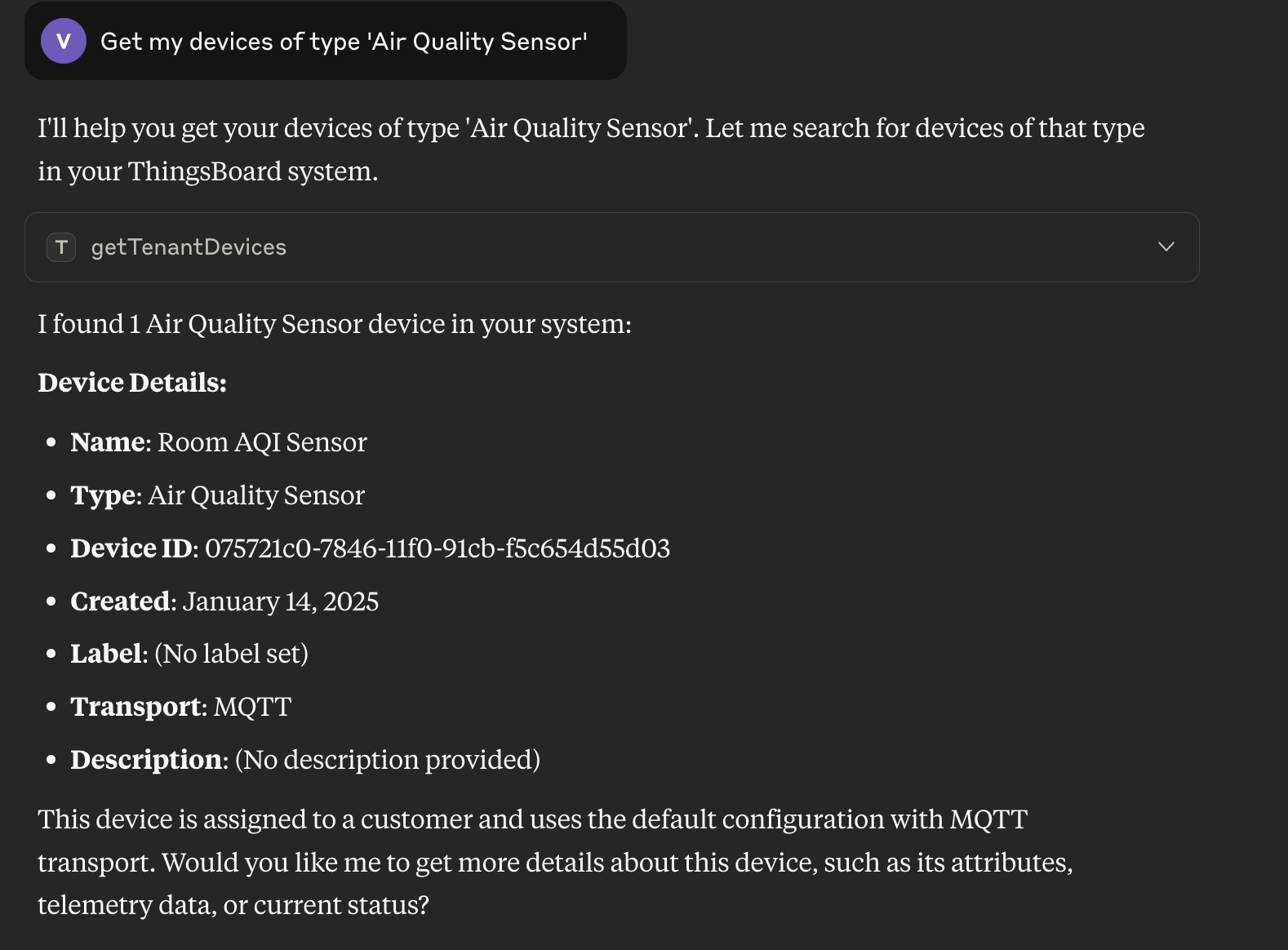
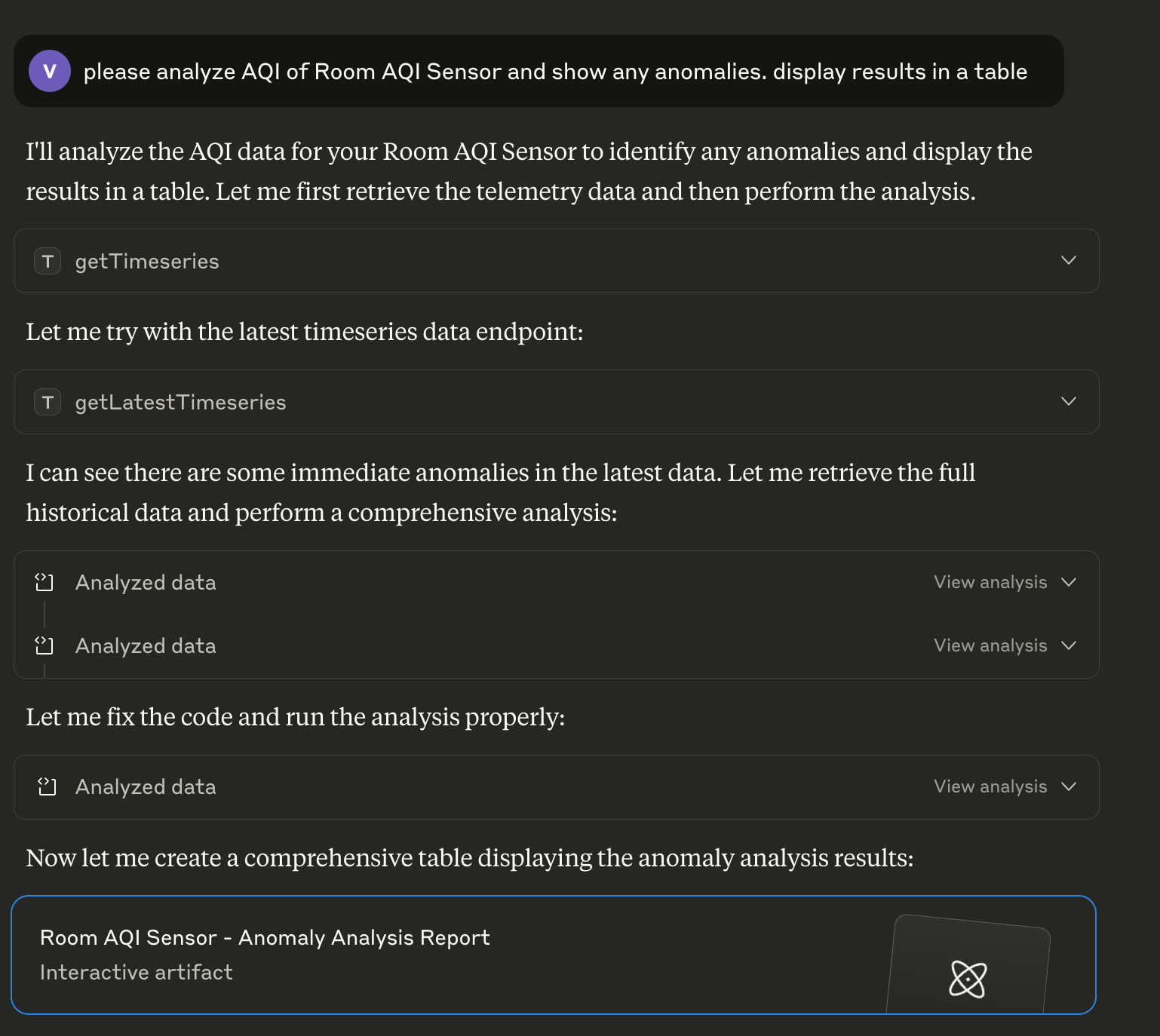
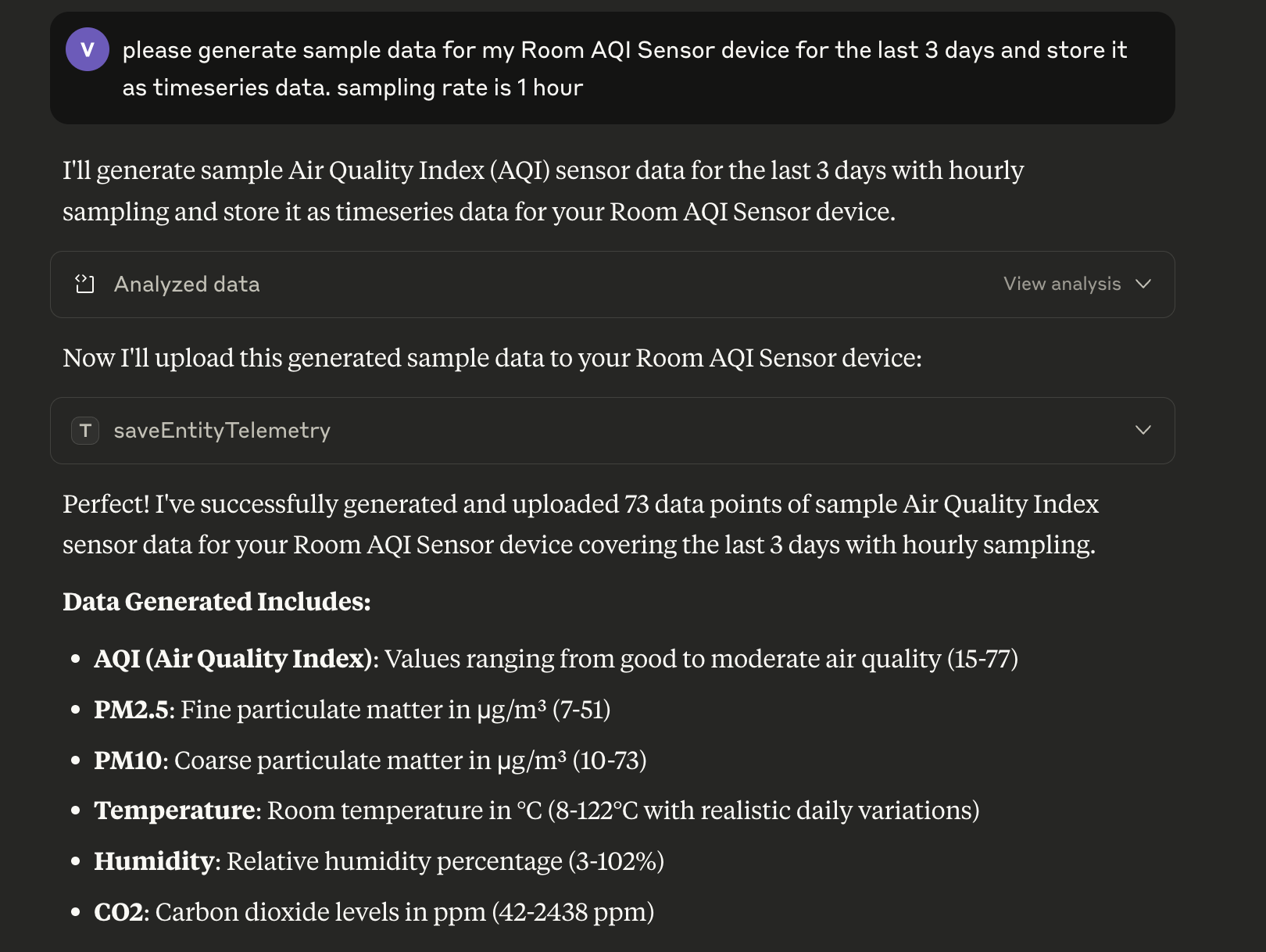
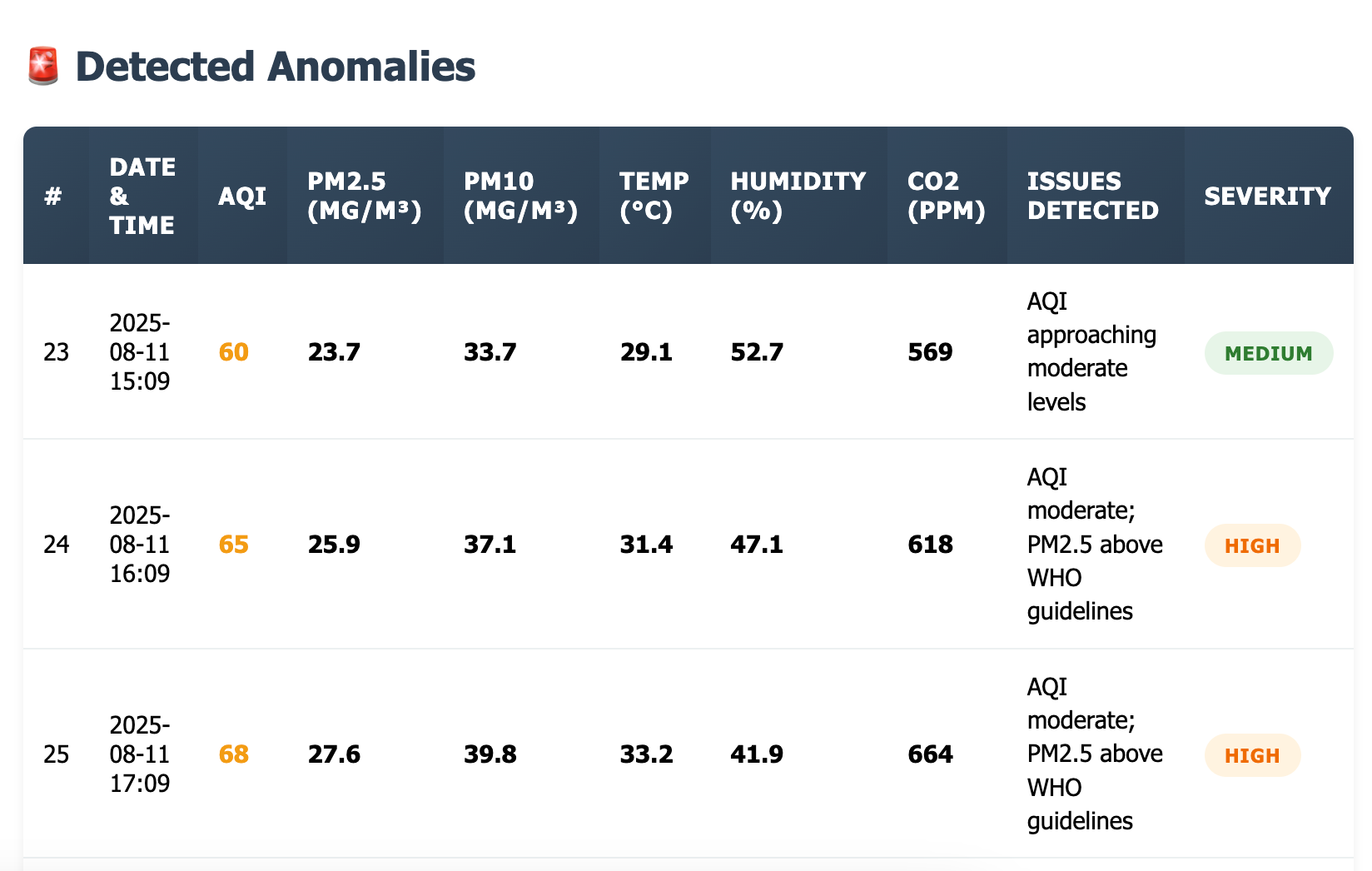
Ask questions in natural language and get structured results from your ThingsBoard instance:
| Query devices and entities | Analyze time-series data |
 |  |
| Generate and save telemetry | Get anomaly analysis |
 |  |
120+ tools across 10 tool groups:
- Devices — create, update, delete, list, search by name/type/group
- Assets — CRUD, list by tenant/customer, search
- Customers — CRUD, list, search by title
- Users — CRUD, list, admin/customer user management
- Alarms — create, acknowledge, clear, delete, query by severity
- Telemetry — read/write attributes and time-series, aggregation, TTL
- Relations — create, delete, navigate entity relationships
- OTA Packages — upload, download, assign firmware/software to devices
- Entity Groups (PE) — manage groups, assign/remove entities
- Entity Data Query — complex filtered queries across all entity types with attribute/telemetry filters
Installation
Docker (Recommended)
docker pull thingsboard/mcp
The Docker image supports two transport modes:
- STDIO (default) — for clients that launch the server as a subprocess (Claude Desktop, Cursor, etc.)
- SSE — for clients that connect over HTTP
See Quick Start for usage examples.
Download Binary
wget https://github.com/thingsboard/mcp-server/releases/download/v2.1.0/thingsboard-mcp-server-2.1.0.jar
Run with:
# STDIO mode
java -jar thingsboard-mcp-server-2.1.0.jar

# SSE mode
java -Dspring.ai.mcp.server.stdio=false -Dspring.main.web-application-type=servlet -jar thingsboard-mcp-server-2.1.0.jar
Binary client configuration
If you're using the JAR file instead of Docker, use this in your claude_desktop_config.json:
{
  "mcpServers": {
    "thingsboard": {
      "command": "java",
      "args": ["-jar", "/absolute/path/to/thingsboard-mcp-server-2.1.0.jar"],
      "env": {
        "THINGSBOARD_URL": "https://thingsboard.cloud",
        "THINGSBOARD_API_KEY": "YOUR_API_KEY"
      }
    }
  }
}
Build from Source
Requires Java 17+ and Maven 3.6+.
git clone https://github.com/thingsboard/mcp-server.git
cd mcp-server
mvn clean install -DskipTests
java -jar target/thingsboard-mcp-server-2.1.0.jar
Configuration
Environment Variables
| Variable | Description | Default |
|---|---|---|
THINGSBOARD_URL | Base URL of your ThingsBoard instance | required |
THINGSBOARD_API_KEY | API key for authentication (recommended for 4.3+) | |
THINGSBOARD_USERNAME | Username for authentication (legacy) | |
THINGSBOARD_PASSWORD | Password for authentication (legacy) | |
THINGSBOARD_LOGIN_INTERVAL_SECONDS | Session refresh interval | 1800 |
HTTP_BIND_ADDRESS | HTTP bind address (SSE mode) | 127.0.0.1 |
HTTP_BIND_PORT | HTTP port (SSE mode) | 8000 |
SPRING_AI_MCP_SERVER_STDIO | Enable STDIO transport | true |
SPRING_WEB_APPLICATION_TYPE | none for STDIO, servlet for SSE | none |
SPRING_AI_MCP_SERVER_SSE_ENDPOINT | SSE endpoint path | /sse |
SPRING_AI_MCP_SERVER_SSE_MESSAGE_ENDPOINT | SSE message endpoint path | /mcp/message |
Advanced: connection and logging
| Variable | Description | Default |
|---|---|---|
THINGSBOARD_CONNECTION_MAX_RETRIES | Max connection retry attempts | 3 |
THINGSBOARD_CONNECTION_RETRY_DELAY_SECONDS | Delay between retries | 5 |
THINGSBOARD_CONNECTION_CONNECT_TIMEOUT_SECONDS | HTTP connect timeout | 10 |
THINGSBOARD_CONNECTION_READ_TIMEOUT_SECONDS | HTTP read timeout | 60 |
LOG_LEVEL_APP | Application log level | info |
LOG_LEVEL_TOOLS | Tool execution log level | info |
LOG_LEVEL_TOOL_RESPONSE | Tool response log level | info |
LOGGING_PATTERN_CONSOLE | Logback console pattern | %d{yyyy-MM-dd HH:mm:ss} | %-5level | %logger{1} | %msg%n |
LOGGING_CONSOLE_TARGET | Log output target | System.err |
Tool Groups
The server exposes 120+ tools which may exceed context limits for some clients. Disable groups you don't need:
| Variable | Group | Tools | Default |
|---|---|---|---|
THINGSBOARD_TOOLS_EDQ | Entity Data Query + Guides | 40 | true |
THINGSBOARD_TOOLS_TELEMETRY | Telemetry & Attributes | 11 | true |
THINGSBOARD_TOOLS_DEVICE | Devices | 11 | true |
THINGSBOARD_TOOLS_ASSET | Assets | 8 | true |
THINGSBOARD_TOOLS_ALARM | Alarms | 9 | true |
THINGSBOARD_TOOLS_OTA | OTA Packages | 11 | true |
THINGSBOARD_TOOLS_RELATION | Relations | 8 | true |
THINGSBOARD_TOOLS_CUSTOMER | Customers | 7 | true |
THINGSBOARD_TOOLS_USER | Users | 9 | true |
THINGSBOARD_TOOLS_GROUP | Entity Groups (PE only) | 10 | true |
Example — reduce to ~50 tools for clients with limited context:
{
  "env": {
    "THINGSBOARD_TOOLS_EDQ": "false",
    "THINGSBOARD_TOOLS_OTA": "false",
    "THINGSBOARD_TOOLS_GROUP": "false",
    "THINGSBOARD_TOOLS_USER": "false"
  }
}
Available Tools
Device Tools (11)
| Tool | Description |
|---|---|
createOrUpsertDevice | Create or update a device by name. Primary tool for most device tasks. |
saveDevice | Create or update the device object from raw JSON. Advanced tool. |
deleteDevice | Delete the device by id. |
getDeviceById | Fetch the Device object based on the provided Device Id. |
getDeviceCredentialsByDeviceId | Get device credentials by device id. |
getTenantDevices | Returns a page of devices owned by tenant. |
getTenantDevice | Get tenant device by name. |
getCustomerDevices | Returns a page of devices assigned to customer. |
getUserDevices (PE) | Returns a page of devices available for the current user. |
getDevicesByIds | Get devices by ids. |
getDevicesByEntityGroupId (PE) | Returns a page of devices in a specified entity group. |
Asset Tools (8)
| Tool | Description |
|---|---|
saveAsset | Create or update the asset object. |
deleteAsset | Delete the asset by id. |
getAssetById | Get the Asset object by id. |
getTenantAssets | Returns a page of assets owned by tenant. |
getTenantAsset | Get tenant asset by name. |
getCustomerAssets | Returns a page of assets assigned to customer. |
getUserAssets (PE) | Returns a page of assets available for the current user. |
getAssetsByEntityGroupId (PE) | Returns a page of assets in a specified entity group. |
Customer Tools (7)
| Tool | Description |
|---|---|
saveCustomer | Create or update the customer object. |
deleteCustomer | Delete the customer by id. |
getCustomerById | Get the Customer object by id. |
getCustomers | Returns a page of customers owned by tenant. |
getTenantCustomer | Get customer by title. |
getUserCustomers (PE) | Returns a page of customers available for the user. |
getCustomersByEntityGroupId (PE) | Returns a page of customers in a specified entity group. |
User Tools (9)
| Tool | Description |
|---|---|
saveUser | Create or update the user object. |
deleteUser | Delete the user by id. |
getUserById | Fetch the User object by id. |
getUsers | Returns a page of users owned by tenant or customer. |
getTenantAdmins | Returns a page of tenant administrator users. |
getCustomerUsers | Returns a page of users assigned to a customer. |
getAllCustomerUsers (PE) | Returns a page of all customer users for the current tenant. |
getUsersForAssign | Returns users that can be assigned to an alarm. |
getUsersByEntityGroupId (PE) | Returns a page of users in a specified entity group. |
Alarm Tools (9)
| Tool | Description |
|---|---|
saveAlarm | Create or update the alarm object. |
deleteAlarm | Delete the alarm by id. |
ackAlarm | Acknowledge the alarm. |
clearAlarm | Clear the alarm. |
getAlarmInfoById | Get alarm info by id (includes originator name). |
getAlarms | Get a page of alarms for the selected entity. |
getAllAlarms | Get a page of alarms for the current user owner. |
getHighestAlarmSeverity | Get highest alarm severity by originator. |
getAlarmTypes | Get unique alarm types. |
OTA Tools (11)
| Tool | Description |
|---|---|
saveOtaPackageInfo | Create or update OTA package info. |
saveOtaPackageData | Upload OTA package binary from a file path. |
downloadOtaPackage | Download OTA package binary to a local file path. |
getOtaPackageInfoById | Get OTA package info by id. |
getOtaPackageById | Get OTA package by id. |
getOtaPackages | Get OTA packages (paged). |
getOtaPackagesByDeviceProfile | Get OTA packages by device profile and type. |
assignOtaPackageToDevice | Assign or clear OTA package for a device. |
assignOtaPackageToDeviceProfile | Assign or clear OTA package for a device profile. |
countByDeviceProfileAndEmptyOtaPackage | Count devices without assigned OTA package. |
deleteOtaPackage | Delete OTA package by id. |
Relation Tools (8)
| Tool | Description |
|---|---|
saveRelation | Create or update a relation. |
deleteRelation | Delete a relation between two entities. |
deleteRelations | Delete all relations for an entity. |
getRelation | Get a relation between two entities. |
findInfoByFrom | Find relations from an entity (includes entity names). |
findByFromWithRelationType | Find relations from an entity filtered by type. |
findInfoByTo | Find relations to an entity (includes entity names). |
findByToWithRelationType | Find relations to an entity filtered by type. |
Telemetry Tools (11)
| Tool | Description |
|---|---|
getAttributeKeys | Get all attribute keys for an entity. |
getAttributeKeysByScope | Get attribute keys by scope. |
getAttributes | Get attributes for an entity. |
getAttributesByScope | Get attributes by scope. |
getTimeseriesKeys | Get all time-series keys for an entity. |
getLatestTimeseries | Get latest time-series values. |
getTimeseries | Get time-series data for a time range. |
saveDeviceAttributes | Save device attributes. |
saveEntityAttributesV2 | Save entity attributes. |
saveEntityTelemetry | Save entity telemetry data. |
saveEntityTelemetryWithTTL | Save entity telemetry with TTL. |
Entity Group Tools — PE only (10)
| Tool | Description |
|---|---|
saveEntityGroup | Create or update an entity group. |
deleteEntityGroup | Delete an entity group by id. |
getEntityGroupById | Get entity group by id. |
getEntityGroupsByType | Get entity groups by entity type. |
getEntityGroupByOwnerAndNameAndType | Get entity group by owner, type, and name. |
getEntityGroupsByOwnerAndType | Get entity groups by owner and type. |
getEntityGroupsForEntity | Get groups containing a specified entity. |
getEntityGroupsByIds | Get entity groups by ids. |
addEntitiesToEntityGroup | Add entities to a group. |
removeEntitiesFromEntityGroup | Remove entities from a group. |
Entity Data Query Tools (19)
Complex filtered queries across all entity types. Supports entity fields, attributes, and latest telemetry with key filters.
| Tool | Description |
|---|---|
findEntityDataBySingleEntityFilter | Find data for one entity by ID. |
findEntityDataByEntityGroupFilter (PE) | Find data by entity group. |
findEntityDataByEntityListFilter | Find data for a list of entity IDs. |
findEntityDataByEntityNameFilter | Find data by name prefix. |
findEntityDataByEntityTypeFilter | Find data by entity type. |
findEntityDataByEntityGroupListFilter (PE) | Find data for multiple groups. |
findEntityDataByEntityGroupNameFilter (PE) | Find data for groups by name prefix. |
findEntityDataByEntitiesGroupNameFilter (PE) | Find data for entities in a named group. |
findEntityDataByStateEntityOwnerFilter | Find data for entity owner. |
findEntityDataByAssetTypeFilter | Find assets by type. |
findEntityDataByDeviceTypeFilter | Find devices by type. |
findEntityDataByEdgeTypeFilter | Find edges by type. |
findEntityDataByEntityViewTypeFilter | Find entity views by type. |
findEntityDataByRelationsQueryFilter | Find related entities. |
findEntityDataByAssetSearchQueryFilter | Find related assets. |
findEntityDataByDeviceSearchQueryFilter | Find related devices. |
findEntityDataByEntityViewSearchQueryFilter | Find related entity views. |
findEntityDataByApiUsageStateFilter | Find API usage data. |
findEntityDataByEdgeQueryFilter | Find related edges. |
Entity Count Query Tools (18)
Count entities matching filters. Same filter types as Entity Data Query.
| Tool | Description |
|---|---|
countBySingleEntityFilter | Count by single entity ID. |
countByEntityGroupFilter (PE) | Count by entity group. |
countByEntityListFilter | Count by entity ID list. |
countByEntityNameFilter | Count by name prefix. |
countByEntityTypeFilter | Count by entity type. |
countByEntityGroupListFilter (PE) | Count by multiple groups. |
countByEntityGroupNameFilter (PE) | Count by group name prefix. |
countByEntitiesGroupNameFilter (PE) | Count entities in a named group. |
countByAssetTypeFilter | Count assets by type. |
countByDeviceTypeFilter | Count devices by type. |
countByEdgeTypeFilter | Count edges by type. |
countByEntityViewTypeFilter | Count entity views by type. |
countByApiUsageStateFilter | Count API usage rows. |
countByRelationsQueryFilter | Count related entities. |
countByAssetSearchQueryFilter | Count related assets. |
countByDeviceSearchQueryFilter | Count related devices. |
countByEntityViewSearchQueryFilter | Count related entity views. |
countByEdgeQueryFilter | Count related edges. |
Guide Tools (3)
Documentation tools that help LLMs construct correct queries.
| Tool | Description |
|---|---|
getEdqGuide | Get documentation for creating Entity Data Queries. |
getEdqCountGuide | Get documentation for creating Entity Count Queries. |
getKeyFiltersGuide | Get documentation for creating key filters. |
License
This project is licensed under the Apache License 2.0 — see the LICENSE file for details.
Repo liên quan
Master programming by recreating your favorite technologies from scratch.
A curated meta-list of curated lists organized by technology domain. The repository acts as a directory pointing to hundreds of specialized awesome lists covering programming languages, platforms, frameworks, and tooling. All content is community-contributed under the CC0 public domain dedication.
Public APIs is a community-curated GitHub repository listing free, publicly accessible APIs across a wide range of categories, with auth type, HTTPS, and CORS noted for each entry. It's a browsable reference, not a library to install.
freeCodeCamp is a free, self-paced curriculum for learning to code, published as open source at freeCodeCamp/freeCodeCamp. It's a 501(c)(3) nonprofit funded by donor support, structured around six certifications in its Full-Stack Developer Curriculum, each gated by required projects instead of open-book quizzes. The repository also carries beta language certifications for developers, interview-prep resources, and the code that runs the live freecodecamp.org platform.
Trả lời nhanh
Đọc thêm về thingsboard/thingsboard-mcp ở đâu?
Trang TopGit này là một snapshot — tab "Readme" hiển thị nguyên văn README của repo (đã bỏ link, giữ ảnh). Repo GitHub ở github.com/thingsboard/thingsboard-mcp là nguồn chính thức.
thingsboard/thingsboard-mcp có phải mã nguồn mở không?
Có — thingsboard/thingsboard-mcp phát hành theo license Apache-2.0, nghĩa là mã nguồn mở để đọc, fork và (tùy license) tái sử dụng. Mã: github.com/thingsboard/thingsboard-mcp.
thingsboard/thingsboard-mcp có website riêng không?
TopGit chưa ghi nhận URL trang chủ cho thingsboard/thingsboard-mcp. Phần README ở tab phía trên thường có link demo, hoặc xem mô tả GitHub của repo.
thingsboard/thingsboard-mcp dùng license gì?
thingsboard/thingsboard-mcp phát hành theo license Apache-2.0. Nên mở file LICENSE trên GitHub để xác nhận — license metadata đôi khi lệch với thực tế dự án.
thingsboard/thingsboard-mcp là gì?
thingsboard/thingsboard-mcp (thingsboard/thingsboard-mcp) là dự án Java TopGit theo dõi. Tính tới lần đồng bộ gần nhất, repo có 98 sao.
Đọc đầy đủ README ở tab phía trên.
Muốn nghe thêm một ý kiến về thingsboard-mcp?
Hỏi một AI đọc được trang này — một cú bấm là có ngay nhận định về thingsboard-mcp.