Thysrael/Horizon là dự án Developer Tools trên GitHub, viết chủ yếu bằng Python, với 8.9k sao. 📡 Your own AI-powered news radar. Generates daily briefings in English & Chinese. | 用 AI 构建你专属的新闻雷达
Tóm tắt dựng từ metadata GitHub của chính dự án — chưa có bài review TopGit. Trang sẽ tự động cập nhật khi bài review đầy đủ được xuất bản.
VÌ SAO CHƯA CÓ REVIEW
TopGit viết bài đầy đủ cho repo có nhiều sao nhất và được yêu cầu nhiều nhất. Trang này là snapshot trong thời gian chờ — xem README gốc ở tab READ ME.
📡 Your own AI-powered news radar. Generates daily briefings in English & Chinese. | 构建你专属的 AI 新闻雷达
📖 Live Demo · 📋 Configuration Guide · 简体中文 · 日本語
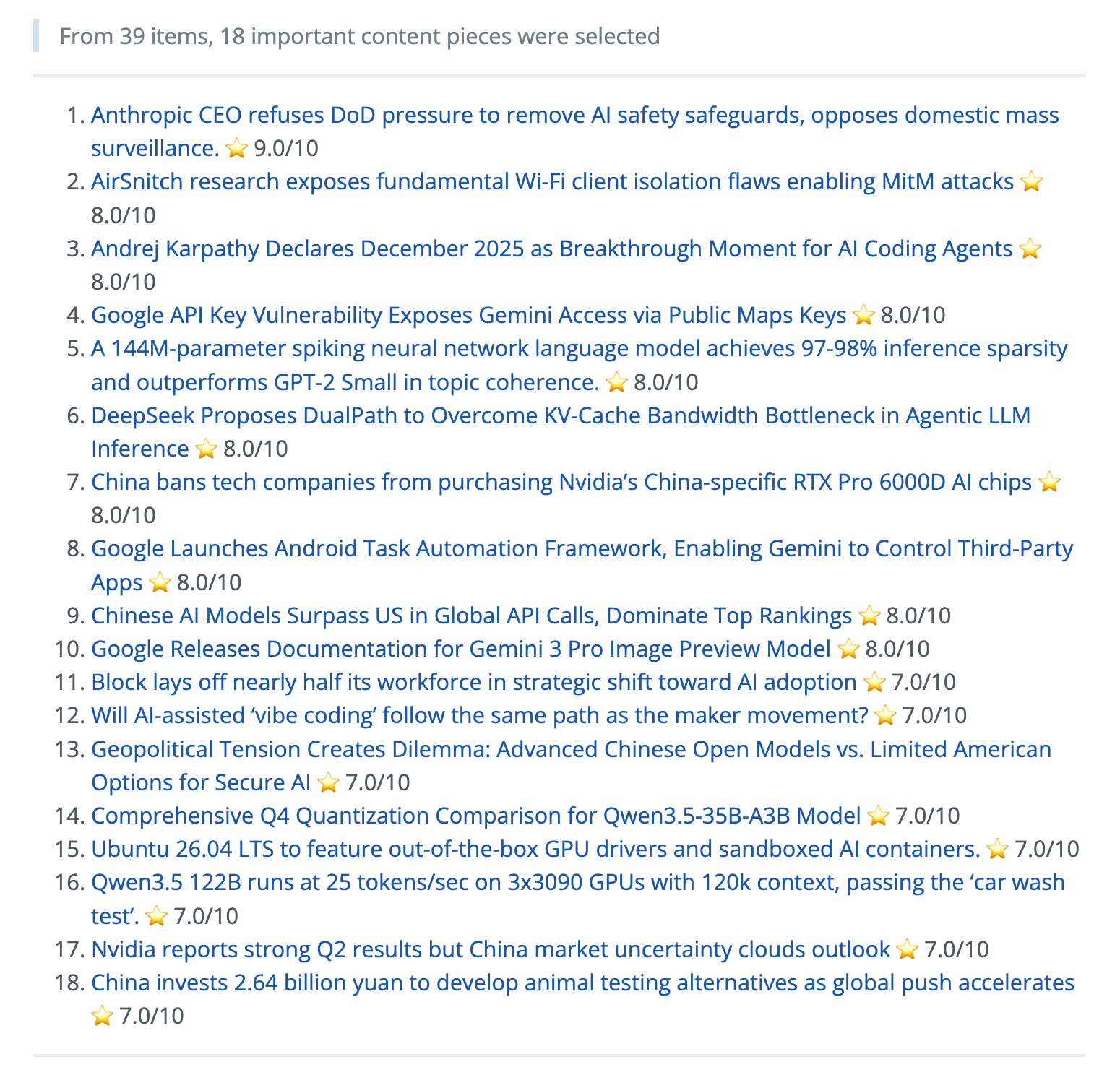
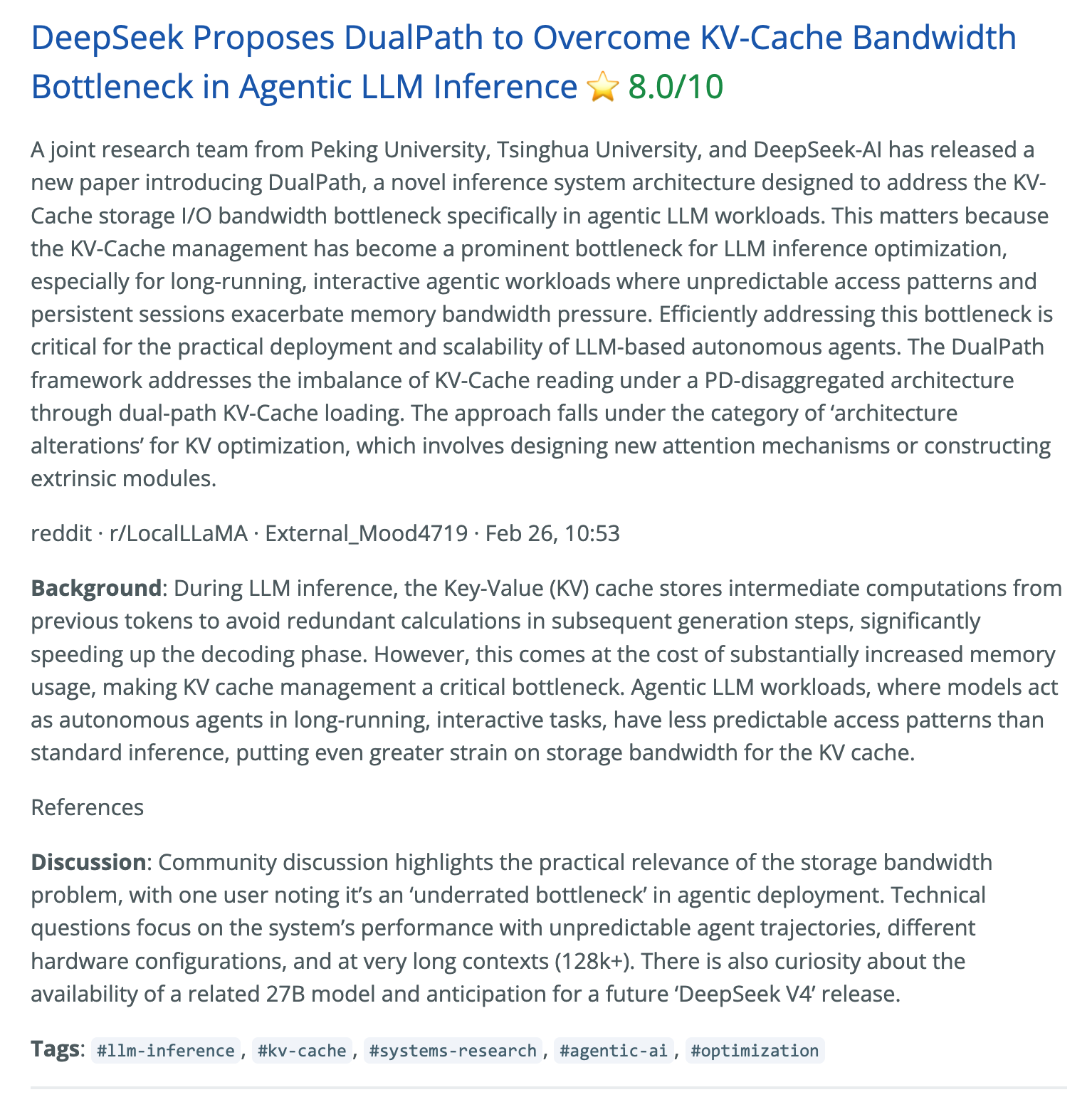
Screenshots
Ranked Daily Briefing
Context, Summary & Discussion
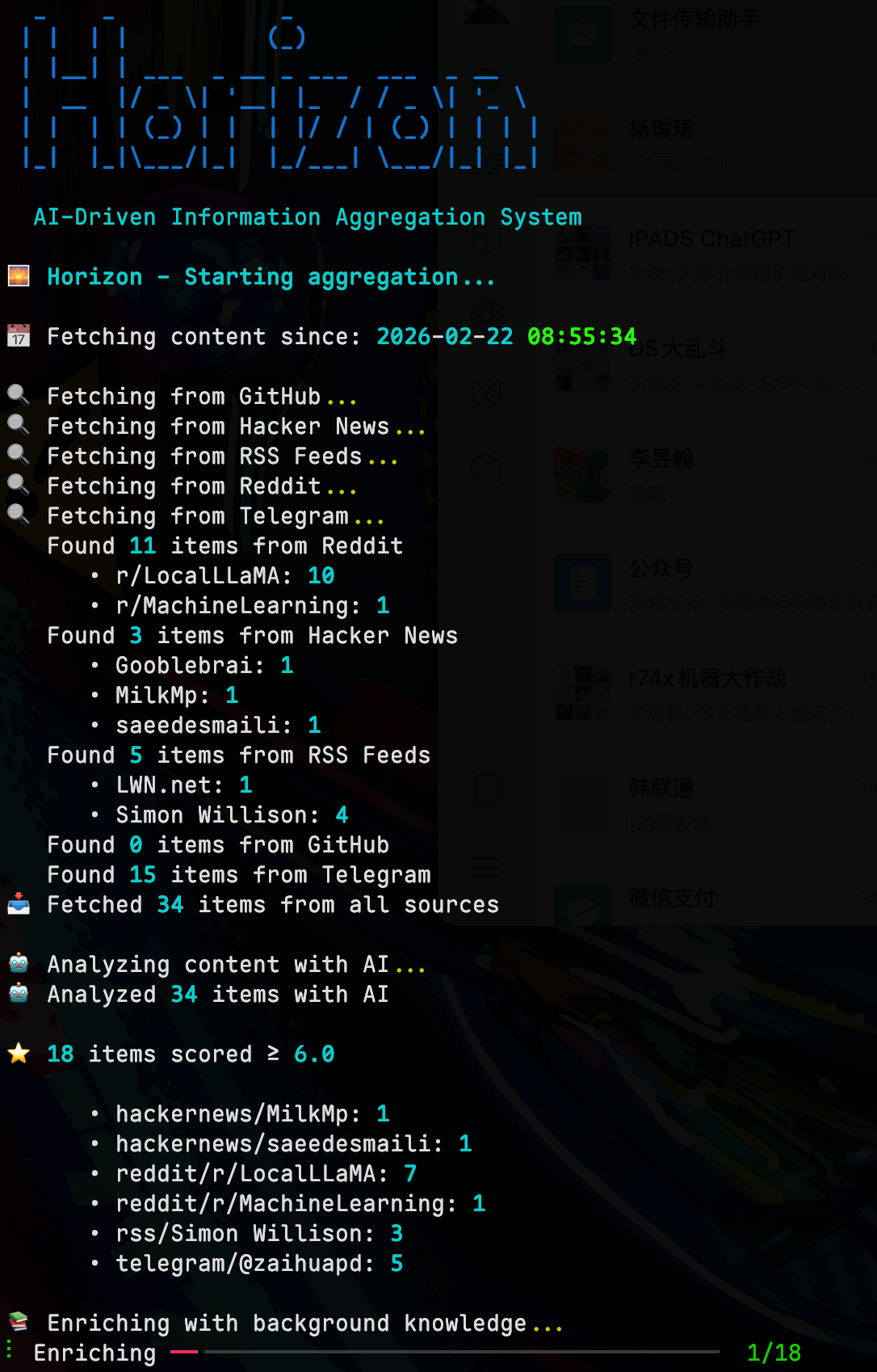
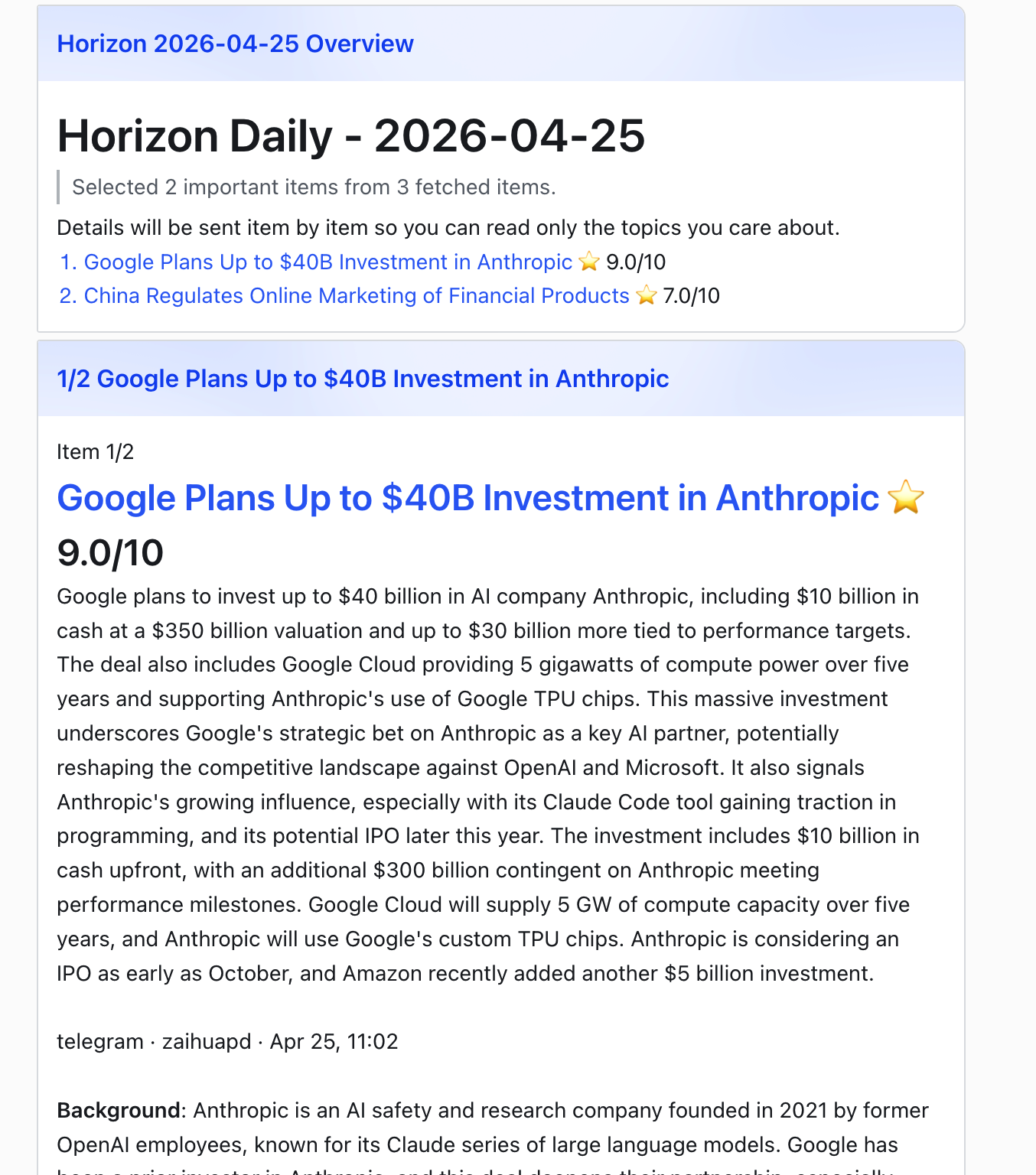
More Screenshots
Terminal Output
Feishu Notification
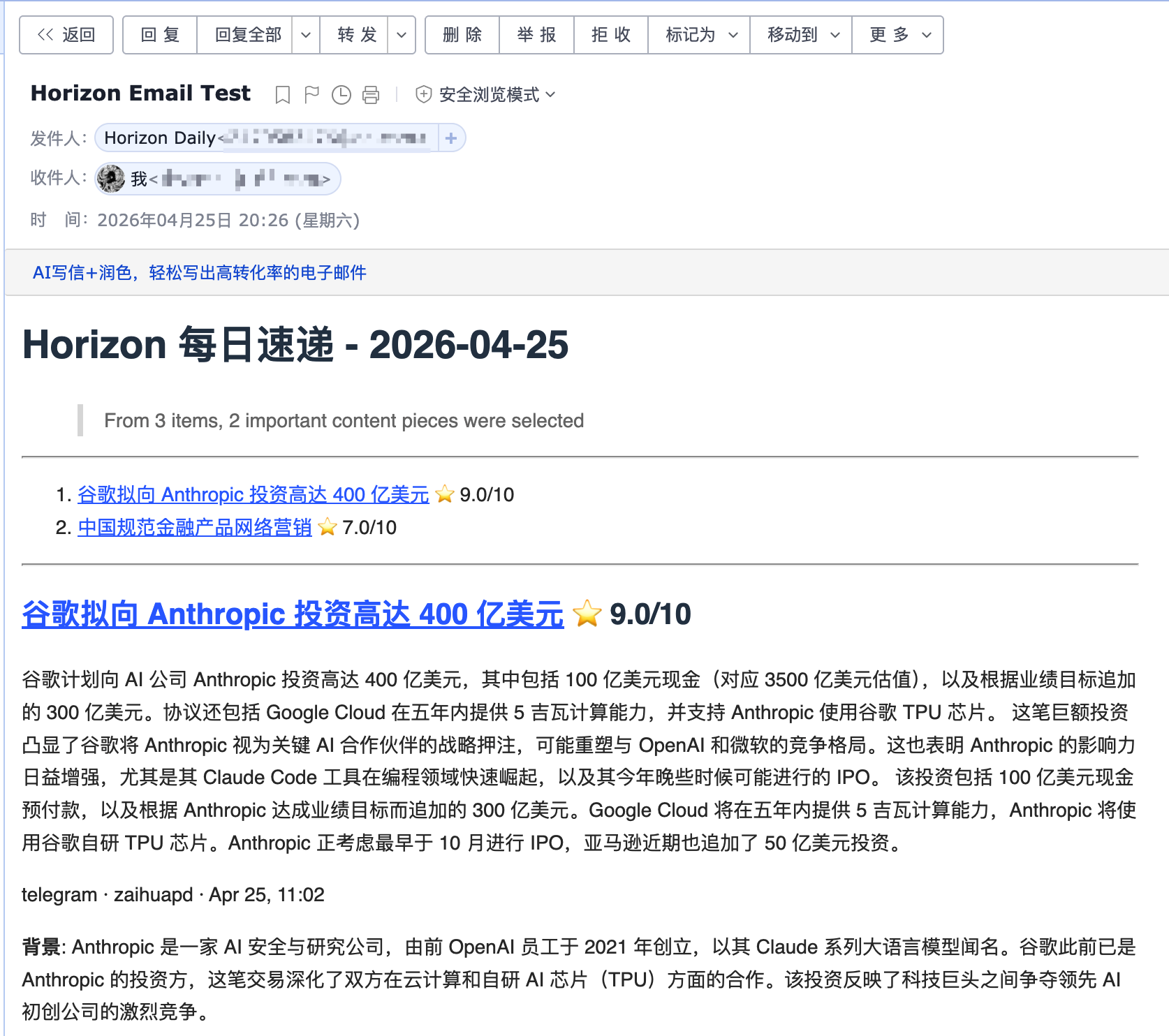
Email Delivery
Why Horizon?
Good news is scattered; bad news is endless. Horizon gives you a personal first pass over Hacker News, Reddit, Telegram, RSS, and GitHub: it fetches, deduplicates, scores, filters, and enriches stories with background context and community discussion.
But Horizon is not just another summarizer. AI is great at reducing noise, but news still needs human taste: the sources you trust, the comments that change how you read a story, and the hidden gems only people can share. Horizon keeps that human layer in the loop with customizable sources, processing profiles, models, languages, delivery channels, comment summaries, and a community source hub.
Features
📡 Watch Your Own Sources — Track Hacker News, RSS, Reddit, Telegram, Twitter/X, GitHub releases or user activity, and OpenBB financial news watchlists in one pipeline
🤖 Turn Noise Into a Reading List — Analyze each item with a stable processing profile and apply your own filter threshold
🔗 Merge Repeated Stories — Deduplicate the same story across platforms before it reaches your briefing
🔍 Understand the Background — Add web-researched context for unfamiliar concepts, companies, projects, and technical terms
💬 Read the Conversation — Collect and summarize community comments from Hacker News, Reddit, and other supported sources
🌐 Publish in Two Languages — Generate English and Chinese daily briefings from the same source set
📝 Ship a Daily Site — Publish generated Markdown as a GitHub Pages daily briefing site
📧 Deliver by Email — Run a self-hosted SMTP/IMAP newsletter with automatic subscribe and unsubscribe handling
🔔 Push to Chat or Automations — Send templated results to Feishu/Lark, DingTalk, Slack, Discord, or custom webhook endpoints
🧙 Start From Your Interests — Use the setup wizard to generate a personalized source configuration
⚙️ Tune the Radar — Customize sources, processing profiles, models, languages, and delivery channels
Define — Configure sources, processing profiles, models, languages, and delivery.
Fetch — Pull latest content from all configured sources concurrently.
Deduplicate — Merge items pointing to the same story or URL across platforms.
Analyze & Filter — Select a profile, analyze each item with its prompt, and apply the configured user threshold.
Enrich — Generate the profile's configured content blocks, using only tools allowed for each block.
Summarize — Render localized titles, leads, sections, and cited sources as a Markdown briefing.
Deliver — Publish the result to GitHub Pages, email, webhooks such as Feishu, MCP, or local files.
Quick Start
1. Install
Option A: Local Installation
git clone https://github.com/Thysrael/Horizon.git
cd Horizon

# Install with uv (recommended)
uv sync

# Install test/development extras when needed
uv sync --extra dev

# Or with pip
pip install -e .
dev is currently defined as an optional extra in pyproject.toml, so use uv sync --extra dev for pytest and other development dependencies.
If you want the optional OpenBB financial-news source, install its extra too:
uv sync --extra openbb
If openbb pulls packages without wheels on your machine, install the SDK manually with binaries only:
git clone https://github.com/Thysrael/Horizon.git
cd Horizon

# Optional: build with comma-separated extras before the first run
docker compose build --build-arg EXTRAS=trafilatura horizon
Multiple extras may be supplied as EXTRAS=trafilatura,openbb. The twitter extra also requires a Playwright browser and system packages, which the current Dockerfile does not install.
2. Configure
Option A: Interactive wizard (recommended)
uv run horizon-wizard
The wizard asks about your interests (e.g. "LLM inference", "嵌入式", "web security") and auto-generates data/config.json. See Interactive Wizard for CLI options.
Option B: Manual configuration
cp .env.example .env          # Add your API keys
cp data/config.example.json data/config.json  # Customize your sources
An explicit source profile uses that profile directly. Omit it or set it to
"auto" to let AI match the item against all available profiles. Set it to an
array such as ["tech-news", "finance-news"] to restrict AI matching to those
profiles. See
Processing Profiles for profile structure and behavior.
Per-profile user preferences such as score thresholds and topic deduplication
belong in processing.profile_settings, not in the profile files.
Balanced digest (optional)
Limit the final digest size and prevent one category from dominating the
results. Categories come from source configuration such as
sources.rss[].category.
Any string value in data/config.json can reference environment variables with ${VAR_NAME}. This is useful for values such as ai.base_url, private RSS feed URLs, webhook endpoints, or custom header templates.
For the full reference, see the Configuration Guide.
3. Run
A. Local installation
uv run horizon [OPTIONS]
B. Docker
docker compose run --rm horizon [OPTIONS]
Option
Default
Description
--hours N
24
Fetch from last N hours
-d, --data-dir PATH
data
Path to the data directory
-c, --config PATH
<data-dir>/config.json
Path to config file
-l, --log-level LEVEL
WARNING
Logging level (DEBUG/INFO/WARNING/ERROR/CRITICAL)
--data-dir changes the state directory, including summaries, subscribers, and the default config location; --config changes only the config file. The generated report is saved to data/summaries/ (or <data-dir>/summaries/ if --data-dir is set). See Configuration Paths for combining both flags and initializing a custom config location.
4. Automate (Optional)
Horizon works great as a GitHub Actions cron job. See .github/workflows/daily-summary.yml for a ready-to-use workflow that generates and deploys your daily briefing to GitHub Pages automatically.
Supported Sources
Source
What it fetches
Comments
Hacker News
Top stories by score
Yes (top N comments)
RSS / Atom
Any RSS or Atom feed
—
Reddit
Subreddits + user posts
Yes (top N comments)
Telegram
Public channel messages
—
Twitter / X
Tweets from specific users
Yes (top N replies)
GitHub
User events & repo releases
—
OpenBB
Financial company news by watchlist/provider
—
Where Your Briefing Goes
Horizon can publish or deliver the generated briefing in several ways:
Channel
What it does
GitHub Pages Daily Site
Copies generated Markdown into docs/ so GitHub Pages can publish a daily-updated briefing site
Email Subscription
Sends the daily briefing to subscribers and handles subscribe/unsubscribe requests through SMTP/IMAP
Webhook Notification
Pushes success or failure results to Feishu/Lark, DingTalk, Slack, Discord, or any custom webhook endpoint
MCP Server
Exposes Horizon pipeline steps as tools so AI assistants can fetch, score, filter, enrich, summarize, and run the full workflow
For setup details, see the Configuration Guide. For MCP tool references and client setup, see src/mcp/README.md and src/mcp/integration.md.
Supported By
Horizon is an open-source project maintained in spare time. If you'd like to support the project or be listed here, feel free to open an issue or email me.
Supporter
Details
Compshare currently supports Horizon. Compshare is UCloud's AI cloud platform, offering cost-effective monthly and pay-as-you-go domestic model agent plans starting from RMB 49/month, as well as stable officially relayed overseas models. It supports Claude Code, Codex, and API usage, with enterprise-grade high concurrency, 24/7 technical support, and self-service invoicing.
Register through their link to receive a free RMB 5 trial credit.
Documentation
Guide
Description
Configuration
AI providers, sources, profiles, filtering, email, webhook, GitHub Pages, and MCP setup
Processing Profiles
Profile routing, prompts, runtime filtering preferences, enrichment blocks, and tools
Scoring
How Horizon evaluates and ranks news items
Scrapers
Source scraper details and extension notes
Extractors
Full article extraction for RSS sources
MCP Tools
Tool reference for MCP-compatible clients
Project Status
Horizon already supports the full daily briefing loop: multi-source collection, profile-driven analysis and enrichment, deduplication, comment summaries, bilingual generation, GitHub Pages publishing, email delivery, webhook delivery, Docker deployment, MCP integration, and the setup wizard.
Planned improvements:
More source types, such as Discord
Publish releases on GitHub
Publish the package to PyPI for pip install
Contributing
Contributions are welcome. See CONTRIBUTING.md for code, documentation, and source-sharing guidelines.
Share Sources
Want to share valuable source discoveries with the Horizon community? Please submit them through horizon1123.top.
Acknowledgements
Special thanks to LINUX.DO for providing a promotion platform.
Special thanks to HelloGitHub for valuable guidance and suggestions.
Special thanks to AIGC Link for the promotions on XiaoHongShu.
Thysrael/Horizon thuộc nhóm Developer Tools trên TopGit, cùng 8 topic GitHub. Trang Trending và Topics liệt kê các repo cùng số sao và cùng ngôn ngữ để so sánh.
Đọc thêm về Thysrael/Horizon ở đâu?
Trang TopGit này là một snapshot — tab "Readme" hiển thị nguyên văn README của repo (đã bỏ link, giữ ảnh). Repo GitHub ở github.com/Thysrael/Horizon là nguồn chính thức.
Thysrael/Horizon có phải mã nguồn mở không?
Có — Thysrael/Horizon phát hành theo license MIT, nghĩa là mã nguồn mở để đọc, fork và (tùy license) tái sử dụng. Mã: github.com/Thysrael/Horizon.
Thysrael/Horizon có trang demo không?
Dự án có trang chủ ở https://thysrael.github.io/Horizon/. Tab "Readme" ở trang này thường có ảnh chụp và hướng dẫn bắt đầu nhanh.
Thysrael/Horizon dùng license gì?
Thysrael/Horizon phát hành theo license MIT. Nên mở file LICENSE trên GitHub để xác nhận — license metadata đôi khi lệch với thực tế dự án.
Thysrael/Horizon là gì?
Thysrael/Horizon (Thysrael/Horizon) là dự án Python trên GitHub. Theo mô tả gốc: 📡 Your own AI-powered news radar. Generates daily briefings in English & Chinese. | 用 AI 构建你专属的新闻雷达
Vì sao Thysrael/Horizon được xếp vào nhóm Developer Tools?
TopGit xếp Thysrael/Horizon vào nhóm Developer Tools dựa trên GitHub topics và mô tả của repo (gắn thẻ: "aggregator", "feishu-bot", "llm"). Việc phân loại dựa trên metadata thật của repo, không phải đoán theo cảm tính biên tập.
Đọc đầy đủ README ở tab phía trên.
Vẫn đang phân vân về Horizon?
Một cú bấm sẽ gửi câu hỏi kèm trang này cho AI — xem AI nói gì về Horizon.
 /Horizon