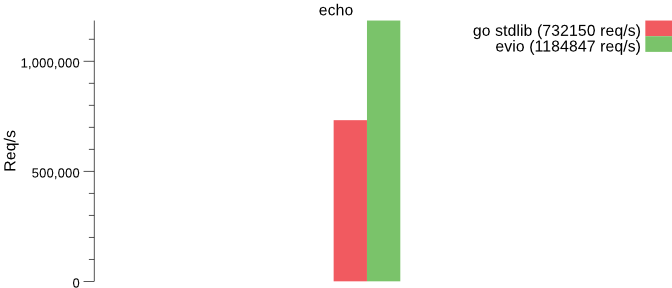
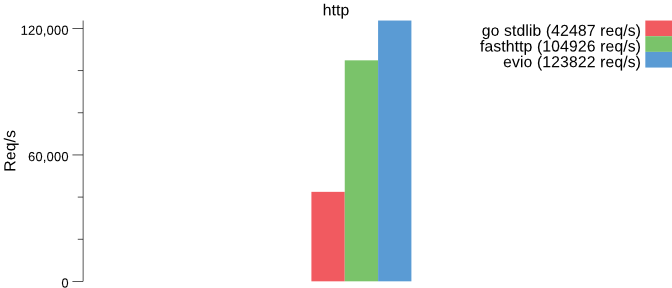
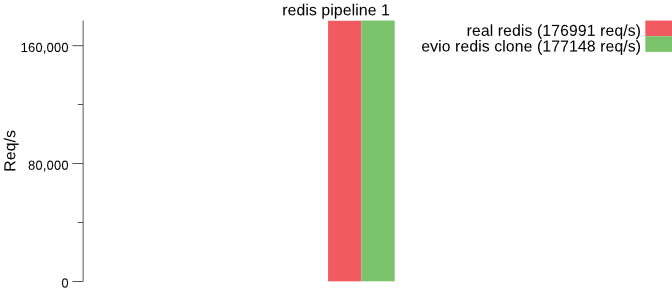
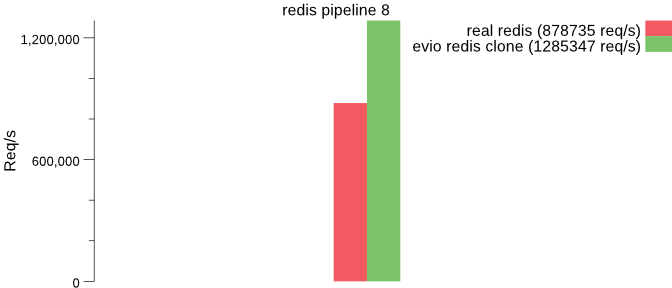
Trên GitHub, tidwall/evio đã đạt 6.0k sao, ngôn ngữ Go. Fast event-loop networking for Go
Tóm tắt dựng từ metadata GitHub của chính dự án — chưa có bài review TopGit. Trang sẽ tự động cập nhật khi bài review đầy đủ được xuất bản.
VÌ SAO CHƯA CÓ REVIEW
TopGit viết bài đầy đủ cho repo có nhiều sao nhất và được yêu cầu nhiều nhất. Trang này là snapshot trong thời gian chờ — xem README gốc ở tab READ ME.
evio is an event loop networking framework that is fast and small. It makes direct epoll and kqueue syscalls rather than using the standard Go net package, and works in a similar manner as libuv and libevent.
The goal of this project is to create a server framework for Go that performs on par with Redis and Haproxy for packet handling. It was built to be the foundation for Tile38 and a future L7 proxy for Go.
Please note: Evio should not be considered as a drop-in replacement for the standard Go net or net/http packages.
Features
Fast single-threaded or multithreaded event loop
Built-in load balancing options
Simple API
Low memory usage
Supports tcp, udp, and unix sockets
Allows multiple network binding on the same event loop
Flexible ticker event
Fallback for non-epoll/kqueue operating systems by simulating events with the net package
SO_REUSEPORT socket option
Getting Started
Installing
To start using evio, install Go and run go get:
$ go get -u github.com/tidwall/evio
This will retrieve the library.
Usage
Starting a server is easy with evio. Just set up your events and pass them to the Serve function along with the binding address(es). Each connections is represented as an evio.Conn object that is passed to various events to differentiate the clients. At any point you can close a client or shutdown the server by return a Close or Shutdown action from an event.
Example echo server that binds to port 5000:
package main

import "github.com/tidwall/evio"

func main() {
	var events evio.Events
	events.Data = func(c evio.Conn, in []byte) (out []byte, action evio.Action) {
		out = in
		return
	}
	if err := evio.Serve(events, "tcp://localhost:5000"); err != nil {
		panic(err.Error())
	}
}
Here the only event being used is Data, which fires when the server receives input data from a client.
The exact same input data is then passed through the output return value, which is then sent back to the client.
Connect to the echo server:
$ telnet localhost 5000
Events
The event type has a bunch of handy events:
Serving fires when the server is ready to accept new connections.
Opened fires when a connection has opened.
Closed fires when a connection has closed.
Detach fires when a connection has been detached using the Detach return action.
Data fires when the server receives new data from a connection.
Tick fires immediately after the server starts and will fire again after a specified interval.
Multiple addresses
A server can bind to multiple addresses and share the same event loop.
All incoming and outgoing packets are not buffered and sent individually.
The Opened and Closed events are not availble for UDP sockets, only the Data event.
Multithreaded
The events.NumLoops options sets the number of loops to use for the server.
A value greater than 1 will effectively make the server multithreaded for multi-core machines.
Which means you must take care when synchonizing memory between event callbacks.
Setting to 0 or 1 will run the server as single-threaded.
Setting to -1 will automatically assign this value equal to runtime.NumProcs().
Load balancing
The events.LoadBalance options sets the load balancing method.
Load balancing is always a best effort to attempt to distribute the incoming connections between multiple loops.
This option is only available when events.NumLoops is set.
Random requests that connections are randomly distributed.
RoundRobin requests that connections are distributed to a loop in a round-robin fashion.
LeastConnections assigns the next accepted connection to the loop with the least number of active connections.
SO_REUSEPORT
Servers can utilize the SO_REUSEPORT option which allows multiple sockets on the same host to bind to the same port.
Trang TopGit này là một snapshot — tab "Readme" hiển thị nguyên văn README của repo (đã bỏ link, giữ ảnh). Repo GitHub ở github.com/tidwall/evio là nguồn chính thức.
tidwall/evio có bao nhiêu sao?
tidwall/evio có 6.0k sao GitHub — tải lại trang để xem số mới nhất, hoặc xem trực tiếp github.com/tidwall/evio. TopGit phản chiếu số sao của GitHub nhưng không cam kết đến từng phút.
tidwall/evio có những chủ đề gì?
GitHub topics của tidwall/evio: "networking". TopGit xếp repo vào nhóm mã nguồn mở.
tidwall/evio có website riêng không?
TopGit chưa ghi nhận URL trang chủ cho tidwall/evio. Phần README ở tab phía trên thường có link demo, hoặc xem mô tả GitHub của repo.
tidwall/evio còn đang phát triển không?
Commit gần nhất trên tidwall/evio là 3 tháng trước (theo timestamp GitHub). Repo có 492 fork — một chỉ báo về mức độ quan tâm của cộng đồng.
tidwall/evio dùng license gì?
tidwall/evio phát hành theo license MIT. Nên mở file LICENSE trên GitHub để xác nhận — license metadata đôi khi lệch với thực tế dự án.
tidwall/evio viết bằng ngôn ngữ gì?
tidwall/evio chủ yếu viết bằng Go. Trường "language" của GitHub dựa trên phần lớn byte ở nhánh mặc định.
Đọc đầy đủ README ở tab phía trên.
Vẫn đang phân vân về evio?
Một cú bấm sẽ gửi câu hỏi kèm trang này cho AI — xem AI nói gì về evio.
 /evio
/evio