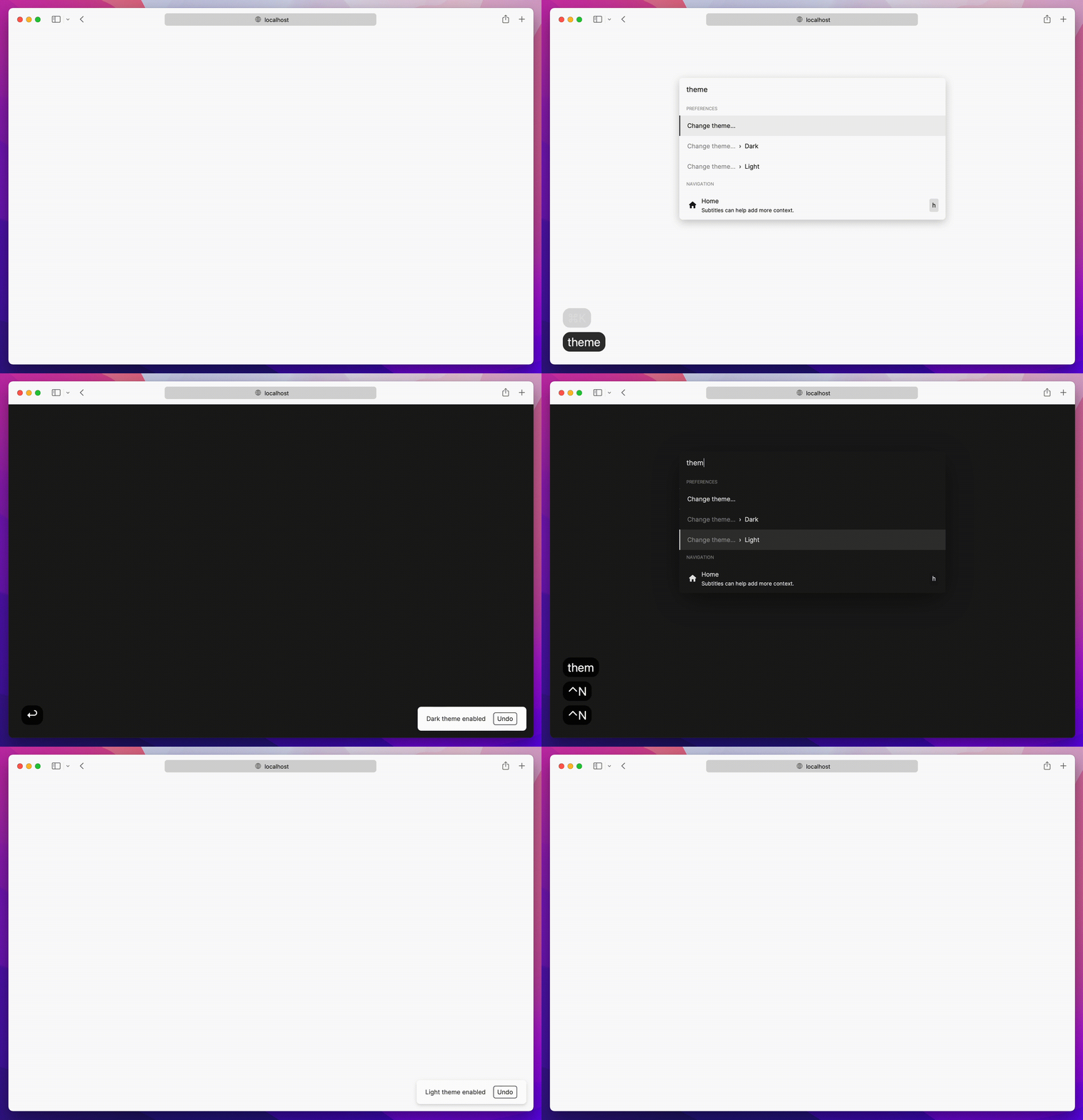
5.2k sao GitHub và vẫn tăng — timc1/kbar là dự án TypeScript mà TopGit đang theo dõi trên nền tảng. fast, portable, and extensible cmd+k interface for your site
Tóm tắt dựng từ metadata GitHub của chính dự án — chưa có bài review TopGit. Trang sẽ tự động cập nhật khi bài review đầy đủ được xuất bản.
VÌ SAO CHƯA CÓ REVIEW
TopGit viết bài đầy đủ cho repo có nhiều sao nhất và được yêu cầu nhiều nhất. Trang này là snapshot trong thời gian chờ — xem README gốc ở tab READ ME.
kbar is a simple plug-n-play React component to add a fast, portable, and extensible command + k (command palette) interface to your site.
Background
Command + k interfaces are used to create a web experience where any type of action users would be able to do via clicking can be done through a command menu.
With macOS's Spotlight and Linear's command + k experience in mind, kbar aims to be a simple
abstraction to add a fast and extensible command + k menu to your site.
Features
Built in animations and fully customizable components
Keyboard navigation support; e.g. control + n or control + p for the navigation wizards
Keyboard shortcuts support for registering keystrokes to specific actions; e.g. hit t
for Twitter, hit ? to immediate bring up documentation search
Nested actions enable creation of rich navigation experiences; e.g. hit backspace to navigate to
the previous action
Performance as a first class priority; tens of thousands of actions? No problem.
History management; easily add undo and redo to each action
Built in screen reader support
A simple data structure which enables anyone to easily build their own custom components
Usage
Have a fully functioning command menu for your site in minutes. First, install kbar.
npm install kbar
There is a single provider which you will wrap your app around; you do not have to wrap your
entire app; however, there are no performance implications by doing so.
// app.tsx
import { KBarProvider } from "kbar";

function MyApp() {
  return (
    <KBarProvider>
      // ...
    </KBarProvider>
  );
}
Let's add a few default actions. Actions are the core of kbar – an action define what to execute
when a user selects it.
Next, we will pull in the provided UI components from kbar:
// app.tsx
import {
  KBarProvider,
  KBarPortal,
  KBarPositioner,
  KBarAnimator,
  KBarSearch,
  useMatches,
  NO_GROUP
} from "kbar";

// ...
  return (
    <KBarProvider actions={actions}>
      <KBarPortal> // Renders the content outside the root node
        <KBarPositioner> // Centers the content
          <KBarAnimator> // Handles the show/hide and height animations
            <KBarSearch /> // Search input
          </KBarAnimator>
        </KBarPositioner>
      </KBarPortal>
      <MyApp />
    </KBarProvider>;
  );
}
At this point hitting cmd+k (macOS) or ctrl+k (Linux/Windows) will animate in a search input and nothing more.
kbar provides a few utilities to render a performant list of search results.
useMatches at its core returns a flattened list of results and group name based on the current
search query; i.e. ["Section name", Action, Action, "Another section name", Action, Action]
KBarResults renders a performant virtualized list of these results
Combine the two utilities to create a powerful search interface:
Hit cmd+k (macOS) or ctrl+k (Linux/Windows) and you should see a primitive command menu. kbar allows you to have full control over all
aspects of your command menu – refer to the docs to get
an understanding of further capabilities. Looking forward to see what you build.
Used by
Listed are some of the various usages of kbar in the wild – check them out! Create a PR to add your
site below.
Outline
zenorocha.com
griko.id
lavya.me
OlivierAlexander.com
dhritigabani.me
jpedromagalhaes
animo
tobyb.xyz
higoralves.dev
coderdiaz.dev
NextUI
evm.codes
filiphalas.com
benslv.dev
vortex
ladislavprix
pixiebrix
nfaustino.com
bradleyyeo.com
andredevries.dev
about-ebon
frankrocha.dev
cameronbrill.me
codaxx.ml
jeremytenjo.com
villivald.com
maxthestranger
koripallopaikat
alexcarpenter.me
hackbar
web3kbar
burakgur
ademilter.com
anasaraid.me
daniloleal.co
hyperround
Omnivore
tiagohermano.dev
tryapis.com
fillout.com
vinniciusgomes.dev
Contributing to kbar
Contributions are welcome!
New features
Please open a new issue so we can discuss prior to moving
forward.
Bug fixes
Please open a new Pull Request for the given bug fix.
Nits and spelling mistakes
Please open a new issue for things like spelling mistakes
and README tweaks – we will group the issues together and tackle them as a group. Please do not
create a PR for it!
timc1/kbar thuộc nhóm Frontend trên TopGit, cùng 6 topic GitHub. Trang Trending và Topics liệt kê các repo cùng số sao và cùng ngôn ngữ để so sánh.
Đọc thêm về timc1/kbar ở đâu?
Trang TopGit này là một snapshot — tab "Readme" hiển thị nguyên văn README của repo (đã bỏ link, giữ ảnh). Repo GitHub ở github.com/timc1/kbar là nguồn chính thức.
timc1/kbar có bao nhiêu sao?
timc1/kbar có 5.2k sao GitHub — tải lại trang để xem số mới nhất, hoặc xem trực tiếp github.com/timc1/kbar. TopGit phản chiếu số sao của GitHub nhưng không cam kết đến từng phút.
timc1/kbar có phải mã nguồn mở không?
Có — timc1/kbar phát hành theo license MIT, nghĩa là mã nguồn mở để đọc, fork và (tùy license) tái sử dụng. Mã: github.com/timc1/kbar.
timc1/kbar còn đang phát triển không?
Commit gần nhất trên timc1/kbar là 1.1 năm trước (theo timestamp GitHub). Repo có 203 fork — một chỉ báo về mức độ quan tâm của cộng đồng.
timc1/kbar dùng license gì?
timc1/kbar phát hành theo license MIT. Nên mở file LICENSE trên GitHub để xác nhận — license metadata đôi khi lệch với thực tế dự án.
timc1/kbar là gì?
timc1/kbar (timc1/kbar) là dự án TypeScript trên GitHub. Theo mô tả gốc: fast, portable, and extensible cmd+k interface for your site
timc1/kbar viết bằng ngôn ngữ gì?
timc1/kbar chủ yếu viết bằng TypeScript. Trường "language" của GitHub dựa trên phần lớn byte ở nhánh mặc định.
Đọc đầy đủ README ở tab phía trên.
Muốn nghe thêm một ý kiến về kbar?
Hỏi một AI đọc được trang này — một cú bấm là có ngay nhận định về kbar.
 /kbar
/kbar