timescale/pgai

timescale/pgai là dự án PLpgSQL với 5.8k sao trong nhóm AI Tools. A suite of tools to develop RAG, semantic search, and other AI applications more easily with PostgreSQL
Tóm tắt dựng từ metadata GitHub của chính dự án — chưa có bài review TopGit. Trang sẽ tự động cập nhật khi bài review đầy đủ được xuất bản.
TopGit viết bài đầy đủ cho repo có nhiều sao nhất và được yêu cầu nhiều nhất. Trang này là snapshot trong thời gian chờ — xem README gốc ở tab READ ME.
Snapshot
Cộng tác viên hàng đầu
Xem cộng tác viên hàng đầu


Power your RAG and Agentic applications with PostgreSQL
As of February 2026, this project is no longer being maintained or supported.
A Python library that transforms PostgreSQL into a robust, production-ready retrieval engine for RAG and Agentic applications.
-
🔄 Automatically create and synchronize vector embeddings from PostgreSQL data and S3 documents. Embeddings update automatically as data changes.
-
🤖 Semantic Catalog: Enable natural language to SQL with AI. Automatically generate database descriptions and power text-to-SQL for agentic applications.
-
🔍 Powerful vector and semantic search with pgvector and pgvectorscale.
-
🛡️ Production-ready out-of-the-box: Supports batch processing for efficient embedding generation, with built-in handling for model failures, rate limits, and latency spikes.
-
🐘 Works with any PostgreSQL database, including Timescale Cloud, Amazon RDS, Supabase and more.
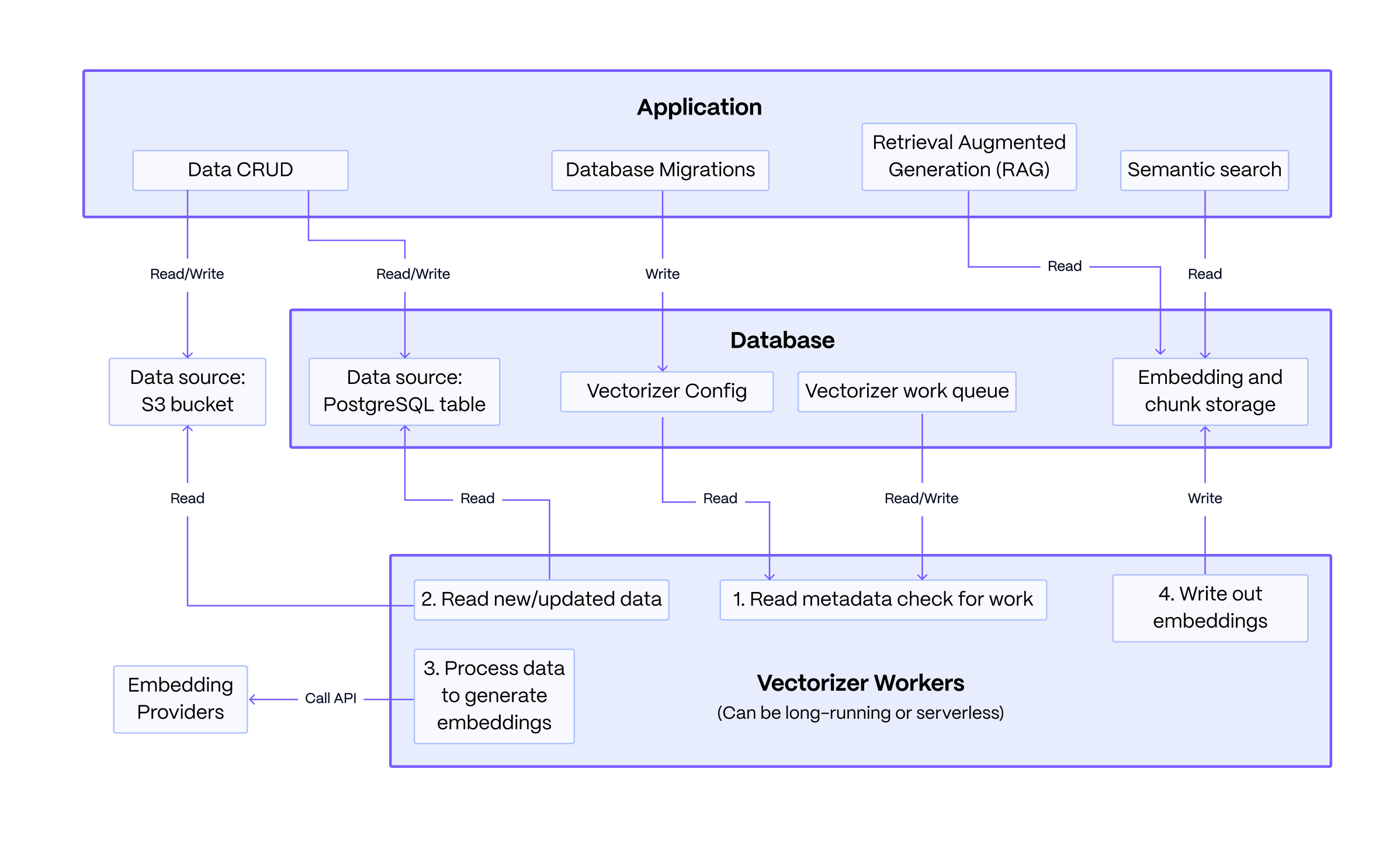
Basic Architecture: The system consists of an application you write, a PostgreSQL database, and stateless vectorizer workers. The application defines a vectorizer configuration to embed data from sources like PostgreSQL or S3. The workers read this configuration, processes the data queue into embeddings and chunked text, and writes the results back. The application then queries this data to power RAG and semantic search.
The key strength of this architecture lies in its resilience: data modifications made by the application are decoupled from the embedding process, ensuring that failures in the embedding service do not affect the core data operations.
install
First, install the pgai package.
pip install pgai
Then, install the pgai database components. You can do this from the terminal using the CLI or in your Python application code using the pgai python package.
# from the cli
pgai install -d <database-url>

# or from the python package, often done as part of your application setup
import pgai
pgai.install(DB_URL)
If you are not on Timescale Cloud you will also need to run the pgai vectorizer worker. Install the dependencies for it via:
pip install "pgai[vectorizer-worker]"
If you are using the semantic catalog, you will need to run:
pip install "pgai[semantic-catalog]"
Quick Start
This quickstart demonstrates how pgai Vectorizer enables semantic search and RAG over PostgreSQL data by automatically creating and synchronizing embeddings as data changes.
Looking for text-to-SQL? Check out the Semantic Catalog quickstart to transform natural language questions into SQL queries.
The key "secret sauce" of pgai Vectorizer is its declarative approach to embedding generation. Simply define your pipeline and let Vectorizer handle the operational complexity of keeping embeddings in sync, even when embedding endpoints are unreliable. You can define a simple version of the pipeline as follows:
CREATE TABLE IF NOT EXISTS wiki (
    id INTEGER PRIMARY KEY GENERATED ALWAYS AS IDENTITY,
    url TEXT NOT NULL,
    title TEXT NOT NULL,
    text TEXT NOT NULL
)

SELECT ai.create_vectorizer(
     'wiki'::regclass,
     loading => ai.loading_column(column_name=>'text'),
     destination => ai.destination_table(target_table=>'wiki_embedding_storage'),
     embedding => ai.embedding_openai(model=>'text-embedding-ada-002', dimensions=>'1536')
    )
The vectorizer will automatically create embeddings for all the rows in the
wiki table, and, more importantly, will keep the embeddings synced with the
underlying data as it changes. Think of it almost like declaring an index on
the wiki table, but instead of the database managing the index datastructure
for you, the Vectorizer is managing the embeddings.
Running the quick start
Prerequisites:
- A PostgreSQL database (docker instructions).
- An OpenAI API key (we use openai for embedding in the quick start, but you can use multiple providers).
Create a .env file with the following:
OPENAI_API_KEY=<your-openai-api-key>
DB_URL=<your-database-url>
You can download the full python code and requirements.txt from the quickstart example and run it in the same directory as the .env file.
Click here for a bash script to run the quickstart
curl -O https://raw.githubusercontent.com/timescale/pgai/main/examples/quickstart/main.py
curl -O https://raw.githubusercontent.com/timescale/pgai/main/examples/quickstart/requirements.txt
python -m venv venv
source venv/bin/activate
pip install -r requirements.txt
python main.py
Click to expand sample output
Search results 1:
[WikiSearchResult(id=7,
                  url='https://en.wikipedia.org/wiki/Aristotle',
                  title='Aristotle',
                  text='Aristotle (;  Aristotélēs, ; 384–322\xa0BC) was an '
                       'Ancient Greek philosopher and polymath. His writings '
                       'cover a broad range of subjects spanning the natural '
                       'sciences, philosophy, linguistics, economics, '
                       'politics, psychology and the arts. As the founder of '
                       'the Peripatetic school of philosophy in the Lyceum in '
                       'Athens, he began the wider Aristotelian tradition that '
                       'followed, which set the groundwork for the development '
                       'of modern science.\n'
                       '\n'
                       "Little is known about Aristotle's life. He was born in "
                       'the city of Stagira in northern Greece during the '
                       'Classical period. His father, Nicomachus, died when '
                       'Aristotle was a child, and he was brought up by a '
                       "guardian. At 17 or 18 he joined Plato's Academy in "
                       'Athens and remained there till the age of 37 (). '
                       'Shortly after Plato died, Aristotle left Athens and, '
                       'at the request of Philip II of Macedon, tutored his '
                       'son Alexander the Great beginning in 343 BC. He '
                       'established a library in the Lyceum which helped him '
                       'to produce many of his hundreds of books on papyru',
                  chunk='Aristotle (;  Aristotélēs, ; 384–322\xa0BC) was an '
                        'Ancient Greek philosopher and polymath. His writings '
                        'cover a broad range of subjects spanning the natural '
                        'sciences, philosophy, linguistics, economics, '
                        'politics, psychology and the arts. As the founder of '
                        'the Peripatetic school of philosophy in the Lyceum in '
                        'Athens, he began the wider Aristotelian tradition '
                        'that followed, which set the groundwork for the '
                        'development of modern science.',
                  distance=0.22242502364217387)]
Search results 2:
[WikiSearchResult(id=41,
                  url='https://en.wikipedia.org/wiki/pgai',
                  title='pgai',
                  text='pgai is a Python library that turns PostgreSQL into '
                       'the retrieval engine behind robust, production-ready '
                       'RAG and Agentic applications. It does this by '
                       'automatically creating vector embeddings for your data '
                       'based on the vectorizer you define.',
                  chunk='pgai is a Python library that turns PostgreSQL into '
                        'the retrieval engine behind robust, production-ready '
                        'RAG and Agentic applications. It does this by '
                        'automatically creating vector embeddings for your '
                        'data based on the vectorizer you define.',
                  distance=0.13639101792546204)]
RAG response:
The main thing pgai does right now is generating vector embeddings for data in PostgreSQL databases based on the vectorizer defined by the user, enabling the creation of robust RAG and Agentic applications.
Code walkthrough
Install the pgai database components
Pgai requires a few catalog tables and functions to be installed into the database. This is done using the pgai.install function, which will install the necessary components into the ai schema of the database.
pgai.install(DB_URL)
Create the vectorizer
This defines the vectorizer, which tells the system how to create the embeddings from the text column in the wiki table. The vectorizer creates a view wiki_embedding that we can query for the embeddings (as we'll see below).
async def create_vectorizer(conn: psycopg.AsyncConnection):
    async with conn.cursor() as cur:
        await cur.execute("""
            SELECT ai.create_vectorizer(
                'wiki'::regclass,
                if_not_exists => true,
                loading => ai.loading_column(column_name=>'text'),
                embedding => ai.embedding_openai(model=>'text-embedding-ada-002', dimensions=>'1536'),
                destination => ai.destination_table(view_name=>'wiki_embedding')
            )
        """)
    await conn.commit()
Run the vectorizer worker
In this example, we run the vectorizer worker once to create the embeddings for the existing data.
worker = Worker(DB_URL, once=True)
worker.run()
In a real application, we would not call the worker manually like this every time we want to create the embeddings. Instead, we would run the worker in the background and it would run continuously, polling for work from the vectorizer.
You can run the worker in the background from the application, the cli, or docker. See the vectorizer worker documentation for more details.
Search the wiki articles using semantic search
This is standard pgvector semantic search in PostgreSQL. The search is performed against the wiki_embedding view, which is created by the vectorizer and includes all the columns from the wiki table plus the embedding column and the chunk text. This function returns both the entire text column from the wiki table and smaller chunks of the text that are most relevant to the query.
@dataclass
class WikiSearchResult:
    id: int
    url: str
    title: str
    text: str
    chunk: str
    distance: float

async def _find_relevant_chunks(client: AsyncOpenAI, query: str, limit: int = 1) -> List[WikiSearchResult]:
    # Generate embedding for the query using OpenAI's API
    response = await client.embeddings.create(
        model="text-embedding-ada-002",
        input=query,
        encoding_format="float",
    )

    embedding = np.array(response.data[0].embedding)

    # Query the database for the most similar chunks using pgvector's cosine distance operator (<=>)
    async with pool.connection() as conn:
        async with conn.cursor(row_factory=class_row(WikiSearchResult)) as cur:
            await cur.execute("""
                SELECT w.id, w.url, w.title, w.text, w.chunk, w.embedding <=> %s as distance
                FROM wiki_embedding w
                ORDER BY distance
                LIMIT %s
            """, (embedding, limit))

            return await cur.fetchall()
Insert a new article into the wiki table
This code is notable for what it is not doing. This is a simple insert of a new article into the wiki table. We did not need to do anything different to create the embeddings, the vectorizer worker will take care of updating the embeddings as the data changes.
def insert_article_about_pgai(conn: psycopg.AsyncConnection):
    async with conn.cursor(row_factory=class_row(WikiSearchResult)) as cur:
        await cur.execute("""
            INSERT INTO wiki (url, title, text) VALUES
            ('https://en.wikipedia.org/wiki/pgai', 'pgai', 'pgai is a Python library that turns PostgreSQL into the retrieval engine behind robust, production-ready RAG and Agentic applications. It does this by automatically creating vector embeddings for your data based on the vectorizer you define.')
        """)
    await conn.commit()
Perform RAG with the LLM
This code performs RAG with the LLM. It uses the _find_relevant_chunks function defined above to find the most relevant chunks of text from the wiki table and then uses the LLM to generate a response.
    query = "What is the main thing pgai does right now?"
    relevant_chunks = await _find_relevant_chunks(client, query)
    context = "\n\n".join(
        f"{chunk.title}:\n{chunk.text}"
        for chunk in relevant_chunks
    )
    prompt = f"""Question: {query}

Please use the following context to provide an accurate response:

{context}

Answer:"""

    response = await client.chat.completions.create({
        model: "gpt-4o-mini",
        messages: [{ role: "user", content: prompt }],
    })
    print("RAG response:")
    print(response.choices[0].message.content)
Next steps
More RAG and Vectorization Examples
- FastAPI + psycopg quickstart
- Vectorizer overview and worker documentation
- Vectorizer API reference
Text-to-SQL with Semantic Catalog
- Semantic Catalog Quickstart - Learn how to use the semantic catalog to translate natural language to SQL for agentic applications.
Features
Our pgai Python library lets you work with embeddings generated from your data:
- Automatically create and sync vector embeddings for your data using the vectorizer.
- Load data from a column in your table or from a file, s3 bucket, etc.
- Create multiple embeddings for the same data with different models and parameters for testing and experimentation.
- Customize how your embedding pipeline parses, chunks, formats, and embeds your data.
You can use the vector embeddings to:
- Perform semantic search using pgvector.
- Implement Retrieval Augmented Generation (RAG)
- Perform high-performance, cost-efficient ANN search on large vector workloads with pgvectorscale, which complements pgvector.
Text-to-SQL with Semantic Catalog: Transform natural language into accurate SQL queries. The semantic catalog generates database descriptions automatically, lets a human in the loop review and improve the descriptions and stores SQL examples and business facts. This enables LLMs to understand your schema and data context. See the semantic catalog for more details.
We also offer a PostgreSQL extension that can perform LLM model calling directly from SQL. This is often useful for use cases like classification, summarization, and data enrichment on your existing data.
A configurable vectorizer pipeline
The vectorizer is designed to be flexible and customizable. Each vectorizer defines a pipeline for creating embeddings from your data. The pipeline is defined by a series of components that are applied in sequence to the data:
- Loading: First, you define the source of the data to embed. It can be the data stored directly in a column of the source table or a URI referenced in a column of the source table that points to a file, s3 bucket, etc.
- Parsing: Then, you define the way the data is parsed if it is a non-text document such as a PDF, HTML, or markdown file.
- Chunking: Next, you define the way text data is split into chunks.
- Formatting: Then, for each chunk, you define the way the data is formatted before it is sent for embedding. For example, you can add the title of the document as the first line of the chunk.
- Embedding: Finally, you specify the LLM provider, model, and the parameters to be used when generating the embeddings.
Supported embedding models
The following models are supported for embedding:
- Ollama
- OpenAI
- Voyage AI
- Cohere
- Huggingface
- Mistral
- Azure OpenAI
- AWS Bedrock
- Vertex AI
The devil is in the error handling
Simply creating vector embeddings is easy and straightforward. The challenge is that LLMs are somewhat unreliable and the endpoints exhibit intermittent failures and/or degraded performance. A critical part of properly handling failures is that your primary data-modification operations (INSERT, UPDATE, DELETE) should not be dependent on the embedding operation. Otherwise, your application will be down every time the endpoint is slow or fails and your user experience will suffer.
Normally, you would need to implement a custom MLops pipeline to properly handle endpoint failures. This commonly involves queuing system like Kafka, specialized workers, and other infrastructure for handling the queue and retrying failed requests. This is a lot of work and it is easy to get wrong.
With pgai, you can skip all that and focus on building your application because the vectorizer is managing the embeddings for you. We have built in queueing and retry logic to handle the various failure modes you can encounter. Because we do this work in the background, the primary data modification operations are not dependent on the embedding operation. This is why pgai is production-ready out of the box.
Many specialized vector databases create embeddings for you. However, they typically fail when embedding endpoints are down or degraded, placing the burden of error handling and retries back on you.
Resources
Why we built it
- Vector Databases Are the Wrong Abstraction
- pgai: Giving PostgreSQL Developers AI Engineering Superpowers
Quick start guides
- Semantic Catalog (Text-to-SQL) - Learn how to use the semantic catalog to improve the translation of natural language to SQL for agentic applications.
- The vectorizer quick start above
- Quick start with OpenAI
- Quick start with VoyageAI
Tutorials about pgai vectorizer
- How to Automatically Create & Update Embeddings in PostgreSQL—With One SQL Query
- [video] Auto Create and Sync Vector Embeddings in 1 Line of SQL
- Which OpenAI Embedding Model Is Best for Your RAG App With Pgvector?
- Which RAG Chunking and Formatting Strategy Is Best for Your App With Pgvector
- Parsing All the Data With Open-Source Tools: Unstructured and Pgai
Contributing
We welcome contributions to pgai! See the Contributing page for more information.
Get involved
pgai is still at an early stage. Now is a great time to help shape the direction of this project; we are currently deciding priorities. Have a look at the list of features we're thinking of working on. Feel free to comment, expand the list, or hop on the Discussions forum.
To get started, take a look at how to contribute and how to set up a dev/test environment.
About Timescale
Timescale is a PostgreSQL database company. To learn more visit the timescale.com.
Timescale Cloud is a high-performance, developer focused, cloud platform that provides PostgreSQL services for the most demanding AI, time-series, analytics, and event workloads. Timescale Cloud is ideal for production applications and provides high availability, streaming backups, upgrades over time, roles and permissions, and great security.
Repo liên quan
Dify is an open-source LLM app platform that packages a visual workflow/agent builder, RAG pipeline, model provider management, and app-level APIs into one self-hostable (or cloud) stack, aimed at teams who want to skip stitching those pieces together themselves.
User-friendly AI Interface (Supports Ollama, OpenAI API, ...)
LangChain is a Python framework (MIT-licensed) for assembling LLM-powered apps and agents from standard components: model wrappers, prompts, retrieval, tools, and chain/graph orchestration handed off to LangGraph. It's for developers gluing together model providers and data sources, not for a single prompt-response call.
AutoGPT is an open-source platform for building, deploying, and running AI agents that automate complete workflows. Users can define tasks in plain English using AutoPilot or visually construct steps with the Build interface. The project offers both a managed, hosted platform that handles infrastructure and model access, and a self-hosting option where users provide their own infrastructure and API keys. AutoGPT agents are designed to automate tasks across various domains, including executive operations, sales, and engineering, and integrate with over 45 platforms like Gmail and GitHub. While its `autogpt_platform/` component is licensed under Polyform Shield, the original `classic/` agent and other parts of the project use the MIT License.
Trả lời nhanh
Cùng nhóm AI Tools còn repo nào?
timescale/pgai thuộc nhóm AI Tools trên TopGit, cùng 4 topic GitHub. Trang Trending và Topics liệt kê các repo cùng số sao và cùng ngôn ngữ để so sánh.
Đọc thêm về timescale/pgai ở đâu?
Trang TopGit này là một snapshot — tab "Readme" hiển thị nguyên văn README của repo (đã bỏ link, giữ ảnh). Repo GitHub ở github.com/timescale/pgai là nguồn chính thức.
timescale/pgai có bao nhiêu sao?
timescale/pgai có 5.8k sao GitHub — tải lại trang để xem số mới nhất, hoặc xem trực tiếp github.com/timescale/pgai. TopGit phản chiếu số sao của GitHub nhưng không cam kết đến từng phút.
timescale/pgai có phải mã nguồn mở không?
Có — timescale/pgai phát hành theo license PostgreSQL, nghĩa là mã nguồn mở để đọc, fork và (tùy license) tái sử dụng. Mã: github.com/timescale/pgai.
timescale/pgai còn đang phát triển không?
Commit gần nhất trên timescale/pgai là 2 tháng trước (theo timestamp GitHub). Repo có 315 fork — một chỉ báo về mức độ quan tâm của cộng đồng.
timescale/pgai dùng license gì?
timescale/pgai phát hành theo license PostgreSQL. Nên mở file LICENSE trên GitHub để xác nhận — license metadata đôi khi lệch với thực tế dự án.
timescale/pgai là gì?
timescale/pgai (timescale/pgai) là dự án PLpgSQL trên GitHub. Theo mô tả gốc: A suite of tools to develop RAG, semantic search, and other AI applications more easily with PostgreSQL
timescale/pgai viết bằng ngôn ngữ gì?
timescale/pgai chủ yếu viết bằng PLpgSQL. Trường "language" của GitHub dựa trên phần lớn byte ở nhánh mặc định.
Đọc đầy đủ README ở tab phía trên.