tmux-plugins/tmux-logging — 1.3k★ trên GitHub (Shell). Easy logging and screen capturing for Tmux.
Tóm tắt dựng từ metadata GitHub của chính dự án — chưa có bài review TopGit. Trang sẽ tự động cập nhật khi bài review đầy đủ được xuất bản.
VÌ SAO CHƯA CÓ REVIEW
TopGit viết bài đầy đủ cho repo có nhiều sao nhất và được yêu cầu nhiều nhất. Trang này là snapshot trong thời gian chờ — xem README gốc ở tab READ ME.
Logging of all output in the current pane
After you start logging, everything that's typed and all the output will be
saved to a file. Convenient for keeping track of your work.
Current pane "Screen Capture"
All the text visible in the current pane is saved to a file. Like a
screenshot, but textual.
Save a complete history of current pane
Everything that has been typed and all the output since the creation of the
current pane can be saved to a file.
Clear pane history with prefix + alt + c
Tested and working on Linux, OSX and Cygwin.
1. Logging
Toggle (start/stop) logging in the current pane.
Key binding: prefix + shift + p
File name format: tmux-#{session_name}-#{window_index}-#{pane_index}-%Y%m%dT%H%M%S.log
File path: $HOME (user home dir)
Example file: ~/tmux-my-session-0-1-20140527T165614.log
2. "Screen Capture"
Save visible text, in the current pane. Equivalent of a "textual screenshot".
Key binding: prefix + alt + p
File name format: tmux-screen-capture-#{session_name}-#{window_index}-#{pane_index}-%Y%m%dT%H%M%S.log
File path: $HOME (user home dir)
Example file: tmux-screen-capture-my-session-0-1-20140527T165614.log
3. Save complete history
Save complete pane history to a file. Convenient if you retroactively remember
you need to log/save all the work.
Key binding: prefix + alt + shift + p
File name format: tmux-history-#{session_name}-#{window_index}-#{pane_index}-%Y%m%dT%H%M%S.log
File path: $HOME (user home dir)
Example file: tmux-history-my-session-0-1-20140527T165614.log
NOTE: this functionality depends on the value of history-limit - the number
of lines Tmux keeps in the scrollback buffer. Only what Tmux kept will also be saved,
to a file.
Use set -g history-limit 50000 in .tmux.conf, with modern computers
it is ok to set this option to a high number.
4. Clear pane history
Key binding: prefix + alt + c
This is just a convenience key binding.
Installation with Tmux Plugin Manager (recommended)
Add plugin to the list of TPM plugins in .tmux.conf:
set -g @plugin 'tmux-plugins/tmux-logging'
Hit prefix + I to fetch the plugin and source it.
You should now have all tmux-logging key bindings defined.
# type this in terminal
$ tmux source-file ~/.tmux.conf
You should now have all tmux-logging key bindings defined.
Installing ansifilter (recommended for OSX users)
If you're on OSX, it is recommended to install ansifilter:
$ brew install ansifilter
ansifilter
is a program specialized for removing (or working with) ANSI codes.
It helps with removing ANSI codes from the log. If ansifilter is not present,
ANSI codes are removed with sed.
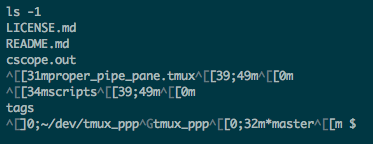
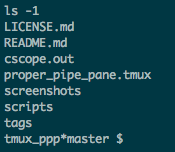
This feature improves the default pipe-pane logging mechanism by stripping
ANSI codes. This is how the plain pipe-pane log output looks like if you're
using terminal with coloring:
Garbled characters are called ANSI codes. They enable colors in terminal, but
are just making 'noise' in the textual log output.
A user will probably want to filter ANSI codes out of the log. Here's the same
log as above when this plugin is used:
Configuration Docs
Changing default options.
Other plugins
You might also find these useful:
resurrect - restore tmux
environment after system restart
pain control - useful standard
bindings for controlling panes
sessionist - lightweight
tmux utils for switching and creating sessions
tmux-plugins/tmux-logging có 1.3k sao GitHub — tải lại trang để xem số mới nhất, hoặc xem trực tiếp github.com/tmux-plugins/tmux-logging. TopGit phản chiếu số sao của GitHub nhưng không cam kết đến từng phút.
tmux-plugins/tmux-logging có tag gì không?
Bản đồng bộ chưa ghi nhận topic GitHub nào cho tmux-plugins/tmux-logging. GitHub topics hiển thị ở thanh bên phải trang repo — đó là nơi đáng kiểm tra nhất.
tmux-plugins/tmux-logging còn đang phát triển không?
Commit gần nhất trên tmux-plugins/tmux-logging là 2.3 năm trước (theo timestamp GitHub). Repo có 126 fork — một chỉ báo về mức độ quan tâm của cộng đồng.
tmux-plugins/tmux-logging là gì?
tmux-plugins/tmux-logging (tmux-plugins/tmux-logging) là dự án Shell trên GitHub. Theo mô tả gốc: Easy logging and screen capturing for Tmux.
tmux-plugins/tmux-logging viết bằng ngôn ngữ gì?
tmux-plugins/tmux-logging chủ yếu viết bằng Shell. Trường "language" của GitHub dựa trên phần lớn byte ở nhánh mặc định.
Đọc đầy đủ README ở tab phía trên.
tmux-logging có đáng để bạn bỏ thời gian?
ChatGPT, Claude và Perplexity đều đọc được trang này. Hỏi thử xem họ nghĩ gì về tmux-logging.
 /tmux-logging