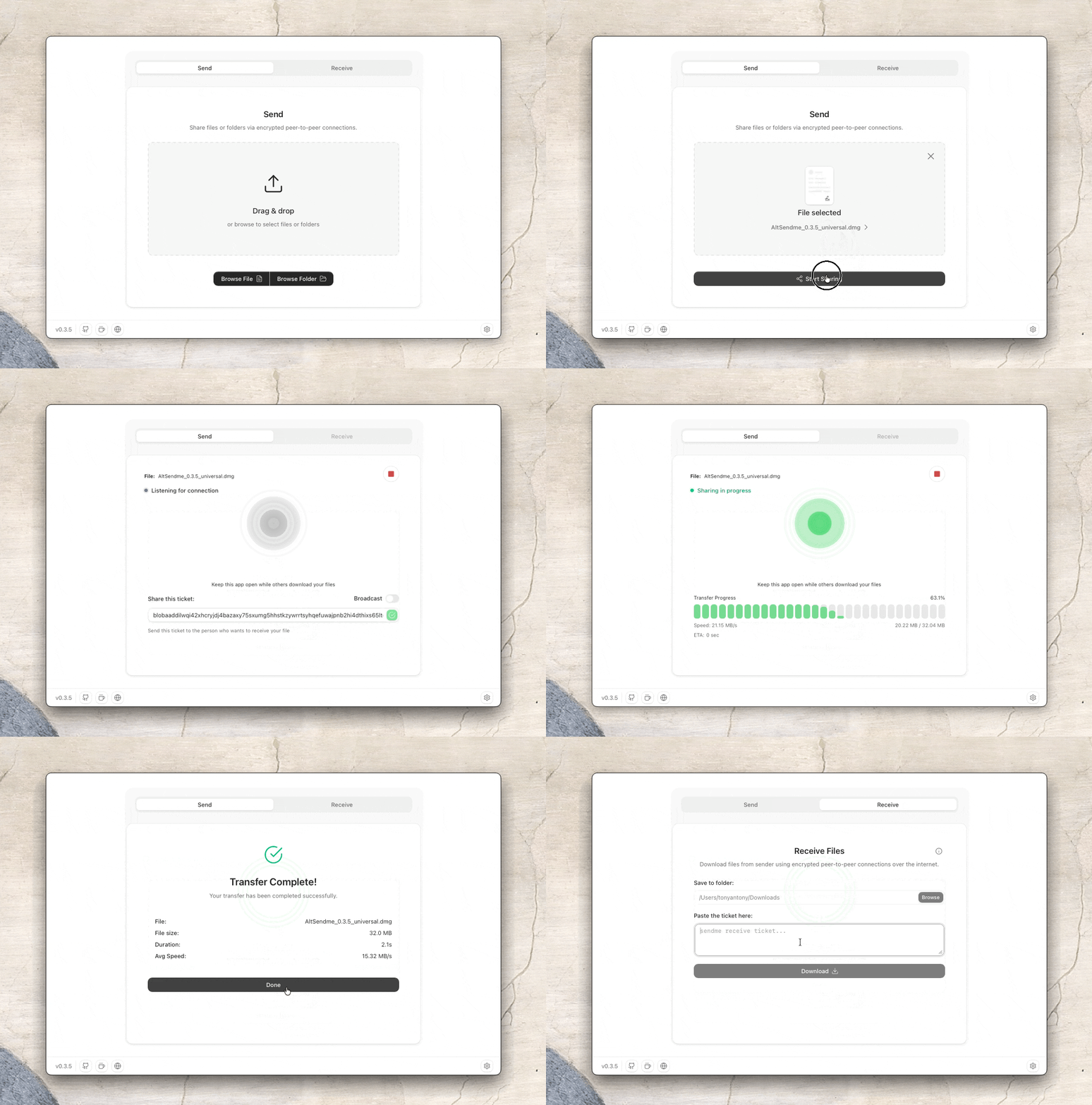
Snapshot của tonyantony300/alt-sendme: 9.1k★ · TypeScript · Developer Tools. Send files and folders anywhere in the world without storing in cloud - any size, any format, no accounts, no restrictions ( previously Altsendme )
Tóm tắt dựng từ metadata GitHub của chính dự án — chưa có bài review TopGit. Trang sẽ tự động cập nhật khi bài review đầy đủ được xuất bản.
VÌ SAO CHƯA CÓ REVIEW
TopGit viết bài đầy đủ cho repo có nhiều sao nhất và được yêu cầu nhiều nhất. Trang này là snapshot trong thời gian chờ — xem README gốc ở tab READ ME.
Language: English | 中文 | Русский | Português | Español | Deutsch | Français | 日本語 | 한국어 | Polski | العربية
File transfer doesn't need to be complicated
A free and open-source file transfer tool that harnesses the power of cutting-edge peer-to-peer networking, letting you transfer files directly without storing them on cloud servers.
Why rely on WeTransfer, Dropbox, or Google Drive when you can reliably and easily transfer files directly, end-to-end encrypted and without revealing any personal information?
Features
Send anywhere, from anything - Desktop, Android, terminal, or browser - start on one platform, receive on any other.
Transfer anything, any size - Files or entire directories, verified end-to-end with BLAKE3 integrity checks.
Fast enough to matter - Saturates multi-gigabit connections for lightning-fast transfers.
Private by default - No accounts, no sign-ups, no tracking, no ads.
Direct device-to-device transfer - Files move directly between your devices, avoiding corporate cloud storage where data is the price.
End-to-end encryption, always on - Every transfer uses QUIC with TLS 1.3; relays only see encrypted traffic even if they are involved.
Cryptographic authentication - Every ticket verifies you're connected to the intended sender before any files transfer.
Resumable & broadcastable - Interrupted transfers resume automatically; share the same file with any number of peers at once.
Preview before you download - See what you're receiving before you download it.
Paired devices - Pair computers and Android phones once in Settings → Devices, then send files without copying tickets each time.
Featherlight - Tiny installs, minimal web footprint.
Free & open source - No upload costs, no size limits, community-driven.
Real-world stats
Metric
Reported
Largest transfer
452 GB
Fastest large transfer
54 GB @ 123 MB/s (~1 Gbps)
High-speed bulk transfer
328 GB @ 93 MB/s
Peak speed measured
125 MB/s (1 Gbps)
Transfer throughput depends on your device, network, and connection path.
Installation
The easiest way to get started is by downloading one of the following versions for your respective operating system:
Platform
Recommended
Other formats
Size
💻 Windows (x64)
Setup.exe
MSI, Portable ZIP
~10 MB
💻 macOS (Universal)
DashBeam.dmg
Apple Silicon, Intel
~15 MB
💻 Linux (amd64)
DashBeam.deb
.rpm, AppImage
~13 MB
📱 Android (arm64)
DashBeam.apk
armv7, universal
~50 MB
⌨️ CLI
Downloads
-
~4-5 MB
🌐 Web (Limited throughput)
app.dashbeam.net
-
~2 MB
More options at GitHub Releases or in Downloads page.
Running into problems? See Troubleshooting for common issues and how to collect logs.
Partners
We're looking for Partners to join our mission! Partner with us and support while we push the boundaries of peer-to-peer file transfer.
DashBeam is built on Iroh, a modern peer-to-peer networking stack that simplifies direct device-to-device communication. In practice, that means devices talk over encrypted QUIC, files move with content-addressed blobs, and relays help when a direct path isn’t available.
The building blocks
Piece
What it does here
Blobs (iroh-blobs)
Store and stream file data; every chunk is verified with BLAKE3
Tickets
One string that tells a peer who to dial and what to fetch
Endpoints
Each device’s Iroh identity (Ed25519 key → endpoint id)
QUIC + TLS 1.3
Encrypted transport; multiplexing without head-of-line blocking
Relays + hole punching
Bootstrap connections across NATs; prefer direct, fall back to relay
Control protocol (pairing)
Long-lived channel to remember devices and deliver share invites
Blobs
Files aren’t uploaded to a server. They’re published as blobs: opaque byte sequences addressed by a BLAKE3 hash.
A link is that 32-byte hash: if the hash matches, the content matches.
Folders and large files use a HashSeq (a blob that points at other blobs).
The sender is the provider; the receiver is the requester. Either side can do both.
Tickets
A share ticket is a single token that packs:
The sender’s endpoint id (so you know you’re talking to the right device)
Enough address / relay info to dial them
The blob hash to download
You only connect to people you share a ticket with: no broadcasting your IP to strangers. That’s the default “cozy network” model Iroh encourages, vs. flooding discovery to the whole swarm.
Connecting across networks
When two devices need to meet:
Each registers with a public (or self-hosted) relay so peers can find a path through firewalls and NATs.
Iroh tries QUIC hole punching to upgrade to a direct peer-to-peer link.
If a direct path works, traffic goes device-to-device. If not, the relay stays in the path as a fallback UDP hop.
Either way, the payload is end-to-end encrypted. Relays see ciphertext, not your files. More on Iroh relays →
QUIC & encryption
QUIC (UDP-based, same foundation as HTTP/3) brings TLS 1.3 into the transport. For DashBeam that buys encryption and authentication, multiple streams with shared congestion control, and fast reconnects when you’ve talked to a peer before.
Paired devices
Pairing doesn’t replace tickets; it delivers them for you.
Devices exchange a short pairing code (the host’s endpoint id) over a dedicated control ALPN.
Each side proves identity by signing connection-bound keying material with its device secret, then remembers the peer locally.
A persistent control connection keeps presence (online/offline).
When you share, DashBeam still creates a normal one-time blob ticket; choosing a paired device ships that ticket as an in-app invite instead of making you copy-paste it.
Manual tickets and the sendme CLI keep working exactly as before.
Self-hosting relays and discovery
For how to run your own iroh relay and discovery server, configure DashBeam to use them, and how mixed public/self-hosted setups behave, see infra/README.md (relay: infra/relay/README.md, discovery: infra/dns/README.md).
Development
See CONTRIBUTING.md for prerequisites, local setup, build instructions, and testing.
Join our Discord to contribute
The best way to contribute is to join our Discord and say hi. Introduce yourself and share what skills or interests you have - whether that’s coding, testing, design, or something else. You can also raise issues, suggest fixes, or pitch ideas. Maintainers are there to guide you every step of the way.
It’s the best place to get context, align on direction, and collaborate with the community.
License
AGPL-3.0
Privacy Policy
See PRIVACY.md for information about how DashBeam handles your data and privacy.
Contributors
Contact
Reach me here for suggestions, feedback or media related communication.
Thank you for checking out this project! If you find it useful, consider giving it a star and helping spread the word.
tonyantony300/alt-sendme thuộc nhóm Developer Tools trên TopGit, cùng 12 topic GitHub. Trang Trending và Topics liệt kê các repo cùng số sao và cùng ngôn ngữ để so sánh.
Đọc thêm về tonyantony300/alt-sendme ở đâu?
Trang TopGit này là một snapshot — tab "Readme" hiển thị nguyên văn README của repo (đã bỏ link, giữ ảnh). Repo GitHub ở github.com/tonyantony300/alt-sendme là nguồn chính thức.
tonyantony300/alt-sendme có bao nhiêu sao?
tonyantony300/alt-sendme có 9.1k sao GitHub — tải lại trang để xem số mới nhất, hoặc xem trực tiếp github.com/tonyantony300/alt-sendme. TopGit phản chiếu số sao của GitHub nhưng không cam kết đến từng phút.
tonyantony300/alt-sendme có phải mã nguồn mở không?
Có — tonyantony300/alt-sendme phát hành theo license AGPL-3.0, nghĩa là mã nguồn mở để đọc, fork và (tùy license) tái sử dụng. Mã: github.com/tonyantony300/alt-sendme.
tonyantony300/alt-sendme còn đang phát triển không?
Commit gần nhất trên tonyantony300/alt-sendme là 4 ngày trước (theo timestamp GitHub). Repo có 558 fork — một chỉ báo về mức độ quan tâm của cộng đồng.
tonyantony300/alt-sendme dùng license gì?
tonyantony300/alt-sendme phát hành theo license AGPL-3.0. Nên mở file LICENSE trên GitHub để xác nhận — license metadata đôi khi lệch với thực tế dự án.
tonyantony300/alt-sendme là gì?
tonyantony300/alt-sendme (tonyantony300/alt-sendme) là dự án TypeScript trên GitHub. Theo mô tả gốc: Send files and folders anywhere in the world without storing in cloud - any size, any format, no accounts, no restrictions ( previously Altsendme )
tonyantony300/alt-sendme viết bằng ngôn ngữ gì?
tonyantony300/alt-sendme chủ yếu viết bằng TypeScript. Trường "language" của GitHub dựa trên phần lớn byte ở nhánh mặc định.
Đọc đầy đủ README ở tab phía trên.
Chưa chắc alt-sendme có hợp với bạn?
Để ChatGPT, Claude hoặc Perplexity tìm hiểu giúp — bấm bên dưới và xem AI nói gì về alt-sendme.
 /alt-sendme