Snapshot của uber-archive/image-diff: 2.4k★ · JavaScript. Create image differential between two images
Tóm tắt dựng từ metadata GitHub của chính dự án — chưa có bài review TopGit. Trang sẽ tự động cập nhật khi bài review đầy đủ được xuất bản.
VÌ SAO CHƯA CÓ REVIEW
TopGit viết bài đầy đủ cho repo có nhiều sao nhất và được yêu cầu nhiều nhất. Trang này là snapshot trong thời gian chờ — xem README gốc ở tab READ ME.
We no longer have any active maintainers on this project and as a result have halted maintenance.
As a replacement, please see alternative projects like looks-same and pixelmatch:
https://github.com/gemini-testing/looks-same
https://github.com/mapbox/pixelmatch
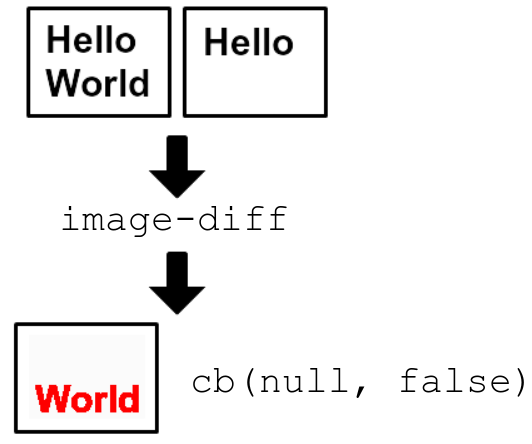
Create image differential between two images
This was created as part of a visual regression project.
Getting Started
Requirements
image-diff depends on ImageMagick.
Please install this before continuing.
Setup
Install the module with: npm install image-diff
var imageDiff = require('image-diff');
imageDiff({
  actualImage: 'checkerboard.png',
  expectedImage: 'white.png',
  diffImage: 'difference.png',
}, function (err, imagesAreSame) {
  // error will be any errors that occurred
  // imagesAreSame is a boolean whether the images were the same or not
  // diffImage will have an image which highlights differences
});
Documentation
image-diff exposes the function imageDiff as its export.
imageDiff(options, cb)
Create an differential image between multiple images
options Object
options.actualImage String - Path to actual image file
options.actualImage must exist
options.expectedImage String - Path to expected image file
If options.expectedImage does not exist, a transparent image with the same height/width will be created.
options.diffImage String - Optional path to output differential image
options.shadow Boolean - Optional flag to indicate if we should draw a shadow of the unchanged parts of the images
For example, if an image is + and we diff with -, then the image will have | be red but also contain a faded -
By default, this options is false meaning a shadow will not be drawn
cb Function - Error-first function to handle diff result
cb should have the signature function (err, imagesAreSame)
err Error|null - If there was an error in diffing, this will be it
imagesAreSame Boolean - Indicates that images are same or not
imageDiff.getFullResult(options, cb)
Same as imageDiff but yields a fuller result
options Object - See imageDiff#options
cb Function - Error-first function to handle diff result
cb should have the signature function (err, result)
err Error|null - If there was an error in diffing, this will be it
result Object
total Float - Root mean square pixel difference across all pixels
Value can range from 0 (no difference) to 655535 (every pixel is different)
percentage Float - Normalized total difference
Value can range from 0.00 (no difference) to 1.00 (every pixel is different)
More info here: http://www.imagemagick.org/discourse-server/viewtopic.php?f=1&t=17284
Example:
var imageDiff = require('image-diff');
imageDiff.getFullResult({
  actualImage: 'checkerboard.png',
  expectedImage: 'white.png',
  diffImage: 'difference.png',
}, function (err, result) {
  // result = {total: 46340.2, difference: 0.707107}
});
imageDiff.getRawResult(options, cb)
Same as imageDiff but yields raw CLI result
options Object - See imageDiff#options
cb Function - Error-first function to handle diff result
cb should have the signature function (err, result)
err Error|null - If there was an error in diffing, this will be it
result String - Result from ImageMagick's compare command
Example output can be found here: http://www.imagemagick.org/discourse-server/viewtopic.php?f=1&t=17284
CLI usage
We offer an image-diff executable to diff from the CLI. When images match, its exit code will be 0. When they don't match, then it will be non-zero (e.g. 1).
$ image-diff --help

  Usage: image-diff [options] <actual-image> <expected-image> [diff-image]

  Options:

    -h, --help     output usage information
    -V, --version  output the version number
    --shadow       Draw a shadow of unchanges parts on diff image
Example usage:
# Images don't match
image-diff checkerboard.png white.png diff.png
echo $?
# 1
# We can look at `diff.png` for the diff result

# Images do match
image-diff checkerboard.png white.png
echo $?
# 0
Contributing
In lieu of a formal styleguide, take care to maintain the existing coding style. Add unit tests for any new or changed functionality. Lint via grunt and test via npm test.
Attribution
The font used for the example image is Arial 30pt bold and Courier New 38pt.
Trang TopGit này là một snapshot — tab "Readme" hiển thị nguyên văn README của repo (đã bỏ link, giữ ảnh). Repo GitHub ở github.com/uber-archive/image-diff là nguồn chính thức.
uber-archive/image-diff có phải mã nguồn mở không?
Có — uber-archive/image-diff phát hành theo license MIT, nghĩa là mã nguồn mở để đọc, fork và (tùy license) tái sử dụng. Mã: github.com/uber-archive/image-diff.
uber-archive/image-diff có tag gì không?
Bản đồng bộ chưa ghi nhận topic GitHub nào cho uber-archive/image-diff. GitHub topics hiển thị ở thanh bên phải trang repo — đó là nơi đáng kiểm tra nhất.
uber-archive/image-diff có website riêng không?
TopGit chưa ghi nhận URL trang chủ cho uber-archive/image-diff. Phần README ở tab phía trên thường có link demo, hoặc xem mô tả GitHub của repo.
uber-archive/image-diff còn đang phát triển không?
Commit gần nhất trên uber-archive/image-diff là 9.0 năm trước (theo timestamp GitHub). Repo có 95 fork — một chỉ báo về mức độ quan tâm của cộng đồng.
uber-archive/image-diff dùng license gì?
uber-archive/image-diff phát hành theo license MIT. Nên mở file LICENSE trên GitHub để xác nhận — license metadata đôi khi lệch với thực tế dự án.
Đọc đầy đủ README ở tab phía trên.
Vẫn đang phân vân về image-diff?
Một cú bấm sẽ gửi câu hỏi kèm trang này cho AI — xem AI nói gì về image-diff.
 /image-diff