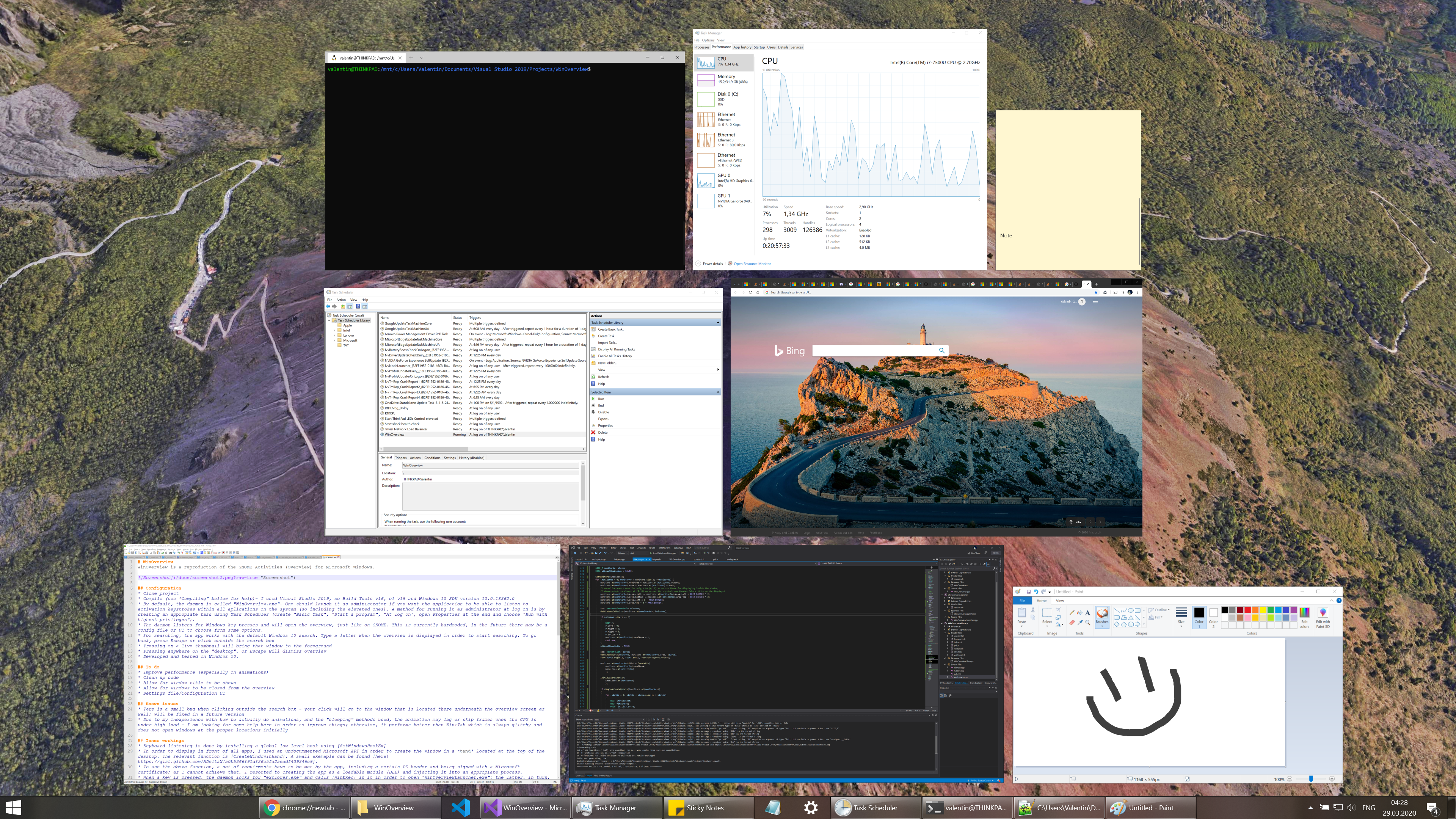
valinet/WinOverview là một trong những repo mã nguồn mở mà TopGit theo dõi, hiện có 48 sao, viết chủ yếu bằng C++. WinOverview is a reproduction of the GNOME Activities (Overview) for Microsoft Windows.
Tóm tắt dựng từ metadata GitHub của chính dự án — chưa có bài review TopGit. Trang sẽ tự động cập nhật khi bài review đầy đủ được xuất bản.
VÌ SAO CHƯA CÓ REVIEW
TopGit viết bài đầy đủ cho repo có nhiều sao nhất và được yêu cầu nhiều nhất. Trang này là snapshot trong thời gian chờ — xem README gốc ở tab READ ME.
WinOverview is a reproduction of the GNOME Activities (Overview) for Microsoft Windows.
Configuration
Clone project
Compile (see "Compiling" bellow for help)- I used Visual Studio 2019, so Build Tools v16, cl v19 and Windows 10 SDK version 10.0.18362.0
By default, the daemon is called "WinOverview.exe". One should launch it as administrator if you want the application to be able to listen to activation keystrokes within all aplications on the system (so including the elevated ones). A method for running it as administrator at log on is by creating an appropiate task using Task Scheduler (create "Basic Task", "Start a program", "At log on", open Properties at the end and choose "Run with highest privileges").
The daemon listens for Windows key presses and will open the overview, just like on GNOME. This is currently hardcoded, in the future there may be a config file or UI to choose from some options.
For searching, the app works with the default Windows 10 search. Type a letter when the overview is displayed in order to start searching. To go back, press Escape or click outside the search box
Pressing on a live thumbnail will bring that window to the foreground
Pressing anywhere on the "desktop", or Escape will dismiss overview
Developed and tested on Windows 10.
To do
Improve performance (especially on animations)
Clean up code
Allow for window title to be shown
Allow for windows to be closed from the overview
Settings file/Configuration UI
Known issues
There is a small bug when clicking outside the search box - your click will go to the window that is located there underneath the overview screen as well; will be fixed in a future version
Due to my inexperience with how to actually do animations, and the "sleeping" methods used, the animation may lag or skip frames when the CPU is under high load - I am looking for some help here in order to improve things; otherwise, it performs better than Win+Tab which is always glitchy and does not open windows at the proper locations initially
Inner workings (in no particular order)
Keyboard listening is done by installing a global low level hook using SetWindowsHookEx
In order to display in front of all apps, I used an undocummented Microsoft API in order to create the window in a band located at the top of the desktop. The relevant function is CreateWindowInBand. A small exemaple can be found here.
To use the above function, a set of requirments have to be met by the app, including a certain PE header and being signed with a Microsoft certificate; as I cannot achieve that, I resorted to creating the app as a loadable module (DLL) and injecting it into an appropiate process.
When a key is pressed, the daemon looks for "explorer.exe" and calls WinExec in it in order to open "WinOverviewLauncher.exe"; the latter, in turn, spawns an instance of "C:\Windows\System32\RuntimeBroker.exe" and injects the library into it. For injecting, I used the CreateRemoteThread technique as described here.
Using WinExec in explorer is required as RuntimeBroker.exe does not run with this method successfully on an administrator account; furthermore, it is safer not to have all the application elevated anyway. I tried lowering my token's privileges but I was unable to have any success with it.
When the overview screen is closed, RuntimeBroker.exe terminates, and so does WinOverviewLauncher.exe, leaving only the daemon WinOverview.exe to monitor and repeat the cycle again.
IPC is possible only one way, from daemon to RuntimeBroker.exe - for this, I needed to identify all the windows I create in the DLL (one per each monitor); because RuntimeBroker.exe is an immersive process, EnumWindows won't find it. FindWindowEx is able to find it, but it is not a recommended solution because the window list may change between subsequent function calls (for this project it would suffice, but a better solution is preferable). Thus, I had to resort to using yet another undocumented API, NtUserBuildHwndList from win32u.dll. Someone was so awesome to provide a functional snippet here.
The desktop background is BitBlt'ed from the desktop hWnd. In order to obtain it, a special message is sent to Program Manager. This technique is described here.
Criteria for windows that are displayed in the overview is: it has to be visible (so not minimized - IsIconic), it has to be shown in AltTab (an explanaition on how to determine that can be found here) and it has to be on the screen the respective screen for which we are enumerating (use MonitorFromWindow). Furthermore, one has to exclude suspended Modern apps (some apps in Windows 10 remain "running", but suspended after closing them, so they still show in Task Manager - these produce false positives when enumerating the windows); in order to exclude this apps, the cloaked attribute has to be false (use DwmGetWindowAttribute and ask for DWMWA_CLOAKED).
Thumbnails for the running applications are captured efficiently using the Thumbnails API of the Desktop Window Manager; basically, we register an association of the area of our window and the window we want drawn, and when the compositor renders the desktop, it will draw the respective window in the area that we specified in the association
Instead (or along) with displaying the desktop wallpaper as the background of the overview, one can blur the background using yet more undocumented APIs, this time [SetWindowCompositionAttribute] (to be fair, for this one, there is a similar API called DwmSetWindowAttribute, but one still does not know how to call this APIs) - there is a commented section which you can use to enable this in the code, based on the examples from here, here, and here.
The window layout algorithm is taken straight from GNOME's sources and converted to C++ (which meant strong typing the variables, basically). Available here.
Motion is smoothed using easing functions. More info here.
This project taught me so much in many areas, hopefully the code helps you learn and better understand how some of this low level stuff works.
Compiling
Method 1 - using Visual Studio
Open solution in Visual Studio 2019.
Build solution.
If you want to run the application from Visual Studio, I recommend running VS as administrator and setting either "WinOverview" or "WinOverviewLibrary" as startup project.
Method 2 - without Visual Studio, just Microsoft C++ compiler
This instructions are outdated, as there are now more files in the archive, but they can come handy, so I left them here.
Install Build Tools for Visual Studio 2019 from: https://visualstudio.microsoft.com/thank-you-downloading-visual-studio/?sku=BuildTools&rel=16 - when installing, make sure to install a Windows 10 SDK as well
After installation, hit Start and type to open Developer Command Prompt for Visual Studio 2019.
Go to cloned folder and enter subdirectory "Overview" (where source files .cpp and header files .h will be present)
First, compile the resources (icon and version info) into a resource file:
rc /nologo Overview.rc
Then, issue a command like the following (it will generate Overview.exe):
If it does not work, maybe the compiler does not see either the header path, the libraries path, or both; issue a command like the following - replace those paths with locations for Windows header files and libs:
You can change the app icon by replacing the "icon.ico" with your own icon file and recompiling - I included the default icon that Visual Studio suggests due to licensing issues
Acknowledgments
Thanks to GNOME team for providing a great, easily portable code for displaying the live previews on screen - check out https://gitlab.gnome.org/GNOME/gnome-shell/-/blob/master/js/ui/workspace.js
Thanks to Microsoft for providing a powerful and versatile API (Win32)
Trang TopGit này là một snapshot — tab "Readme" hiển thị nguyên văn README của repo (đã bỏ link, giữ ảnh). Repo GitHub ở github.com/valinet/WinOverview là nguồn chính thức.
valinet/WinOverview có bao nhiêu sao?
valinet/WinOverview có 48 sao GitHub — tải lại trang để xem số mới nhất, hoặc xem trực tiếp github.com/valinet/WinOverview. TopGit phản chiếu số sao của GitHub nhưng không cam kết đến từng phút.
valinet/WinOverview có những chủ đề gì?
GitHub topics của valinet/WinOverview: "windows". TopGit xếp repo vào nhóm mã nguồn mở.
valinet/WinOverview còn đang phát triển không?
Commit gần nhất trên valinet/WinOverview là 6.3 năm trước (theo timestamp GitHub). Repo có 7 fork — một chỉ báo về mức độ quan tâm của cộng đồng.
valinet/WinOverview viết bằng ngôn ngữ gì?
valinet/WinOverview chủ yếu viết bằng C++. Trường "language" của GitHub dựa trên phần lớn byte ở nhánh mặc định.
Đọc đầy đủ README ở tab phía trên.
Vẫn đang phân vân về WinOverview?
Một cú bấm sẽ gửi câu hỏi kèm trang này cho AI — xem AI nói gì về WinOverview.
 /WinOverview