wagoodman/bridgy

wagoodman/bridgy là dự án mã nguồn mở trên GitHub, viết chủ yếu bằng Python, với 415 sao. cloud inventory + ssh + tmux + sshfs
Tóm tắt dựng từ metadata GitHub của chính dự án — chưa có bài review TopGit. Trang sẽ tự động cập nhật khi bài review đầy đủ được xuất bản.
TopGit viết bài đầy đủ cho repo có nhiều sao nhất và được yêu cầu nhiều nhất. Trang này là snapshot trong thời gian chờ — xem README gốc ở tab READ ME.
Snapshot
Cộng tác viên hàng đầu
Xem cộng tác viên hàng đầu
bridgy

 (WIP/beta)
TL;DR: bridgy = ssh + tmux + sshfs + cloud inventory search
Just get me to my ec2 box with a simple search. Multiple matches? Just ssh into all matching instances via tmux.
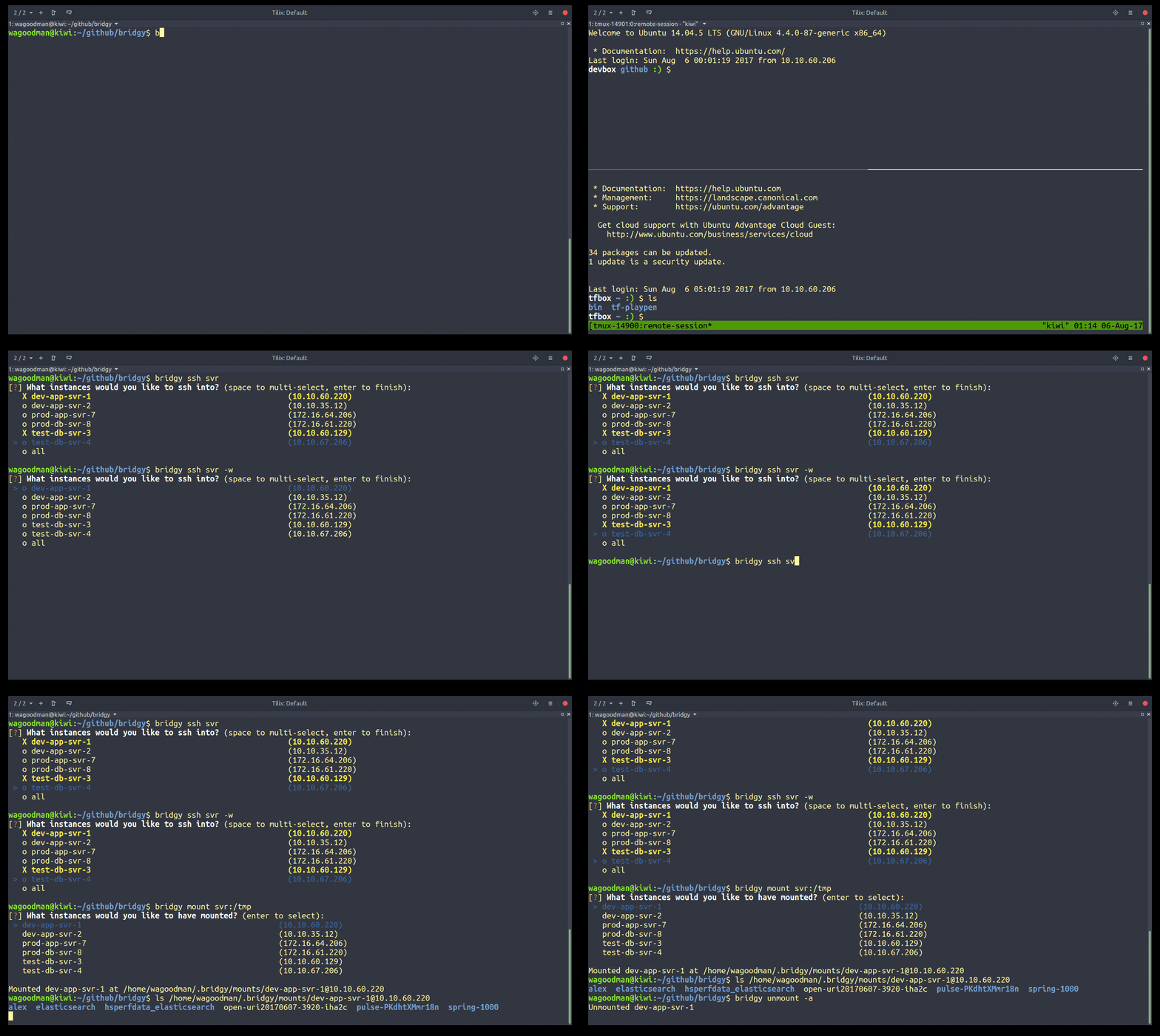
Features:
- Custom inventory sources:
- AWS (supports matching by tag, dns, or instance-id)
- GCP
- New Relic
- CSV
- Ansible inventory
- Search against multiple inventory sources simultaneously
- Connect to inventory sources via a bastion/jumpbox
- Fuzzy search against the inventory
- Prompt for single/multi selection for matched hosts in inventory
- Open multiple ssh connections via tmux (splits or tabs)
- Configure custom tmux layouts (via config)
- Seamless connection via bastion (via config)
- Setup sshfs mount to a remote dir
- Run custom command on login (via config)
- Run arbitrary ansible playbooks
- Push / pull files (via ansible fetch/copy task)
- Ssh tunnel to hosts
- ECS support (exec to container, currently only via new relic inventory)
- Python3 support :)
(Want a feature? Just create an issue describing it)
Installing
Linux
pip install --user bridgy

# optionally support sshing into multiple systems at once
sudo apt install tmux

# optionally support remote mounts
sudo apt install sshfs

# put this into your ~/.bashrc (pip install --user does not put bins in the 'right' spot for everyone: https://github.com/pypa/pip/issues/3813)
export PATH=${HOME}/.local/bin:$PATH
Note: you may still need to add bridgy to your path!
OSX
sudo easy_install pip
pip install --user bridgy --ignore-installed six

# optionally support sshing into multiple systems at once
brew install tmux

# optionally support remote mounts
brew cask install osxfuse
brew install sshfs

# put this into your ~/.bash_profile (pip install --user does not put bins in the 'right' spot for everyone: https://github.com/pypa/pip/issues/3813)
export PATH=${HOME}/.local/bin:$PATH
Windows
¯\_(ツ)_/¯
Getting started
After installing, create a configuration file by running
$ bridgy init
This will create a default ~/.bridgy/config.yml file for you. From there you need to configure inventory sources and other options:
config-schema: 2
inventory:
  source:

    - type: csv
      name: on-site servers
      # CSV files are placed in ~/.bridgy/inventory/csv
      file: somefile.csv
      # requires at least name and address
      fields: name, address

    # Inventory parameters to support querying AWS using boto profiles
    - type: aws
      name: test
      profile: a-boto-profile-name
      region: us-west-2


# define ssh behavior and preferences
ssh:
  user: awesome-user
  options: -C -o ServerAliveInterval=255
  command: sudo -i su - another-user -s /bin/bash
  tmux: false
Now you can ssh into a system referenced from the given inventory sources:
# without tmux
$ bridgy ssh someserver

# with tmux (or set the ssh.tmux=true config option to always use tmux)
$ bridgy ssh -t someserver
That's just to get you started, there is plenty more you can do though!
Have a special multi-pane tmux layout for every system you login to? Drop it in the config, reference it by name:
tmux:
  layout:
    logger:
      - cmd: split-window -h
      - cmd: split-window -h
      - cmd: split-window -v
        run: tail -f /var/log/messages
      - cmd: set-window-option synchronize-panes on
then...
$ bridgy ssh -tl logger awesomebox
Want to remotely mount a dir from your ec2 instance over ssh locally?
$ bridgy mount awesomebox:/appdir
[?] What instances would you like to have mounted? (enter to select):
 > o dev-myawesomeboxname                   (10.10.60.220)
   o qa-myawesomeboxname                    (10.10.63.13)

Mounted dev-myawesomeboxname:/tmp at ~/.bridgy/mounts/dev-myawesomeboxname
Need to connect to your boxes via a jumpbox? Drop in your bastion connection information in the config:
bastion:
  user: some-username
  address: some-ip-or-host
  # optional ssh arguments
  options: -C -o ServerAliveInterval=255 -o FingerprintHash=sha256 -o TCPKeepAlive=yes -o ForwardAgent=yes -p 22222
Need a different bastion for a given inventory source, override it:
inventory:
  source:

    - type: csv
      name: on-site servers
      file: anawesome.csv
      fields: name, address
      # if you need to connect to aws hosts via a bastion, then
      # provide all connectivity info in each inventory item
      # (each inventory source bastion overrides the global bastion configuration)
      bastion:
        user: a-better-username
        address: someotherhost.com
        options: -C -o ServerAliveInterval=60

bastion:
  user: some-username
  address: some-ip-or-host.com
  options: -C -o ServerAliveInterval=255 -o FingerprintHash=sha256 -o TCPKeepAlive=yes -o ForwardAgent=yes -p 22222
The same override functionality is available for ssh options and pattern matchers:
inventory:
  source:

    - type: csv
      name: on-site servers
      include_pattern: .*meh_.*
      file: anawesome.csv
      fields: name, address
      ssh:
        user: a-better-username
        options: -C -o ServerAliveInterval=60

ssh:
  user: some-username
  options: -C -o ServerAliveInterval=255
Want to perform arbitrary tasks? Drop an ansible playbook in config, reference it by name (grab-files):
run:
  grab-files:
    - hosts: app-srv-13, dev-srv
      gather_facts: no
      tasks:
        - name: 'Get secrets.yml'
          fetch:
            src: /appdir/config/secrets.yml
            dest: /tmp/prefix-{{ inventory_hostname }}.secrets.yml
            fail_on_missing: yes
            flat: yes
        - name: 'Get production.rb'
          fetch:
            src: /appdir/config/environments/production.rb
            dest: /tmp/prefix-{{ inventory_hostname }}.production.rb
            fail_on_missing: yes
            flat: yes
        - name: 'Get database.yml'
          fetch:
            src: /appdir/config/database.yml
            dest: /tmp/prefix-{{ inventory_hostname }}.database.yml
            fail_on_missing: yes
            flat: yes
then...
$ bridgy run grab-files

PLAY [app-srv-13, dev-srv] *****************************************************

TASK [Get secrets.yml] ********************************************************
ok: [dev-srv]
ok: [app-srv-13]

TASK [Get production.rb] ******************************************************
ok: [dev-srv]
ok: [app-srv-13]

TASK [Get database.yml] *******************************************************
ok: [dev-srv]
ok: [app-srv-13]

$ ls -1 /tmp | grep prefix
prefix-dev-srv.database.yml
prefix-dev-srv.production.rb
prefix-dev-srv.secrets.yml
prefix-app-srv-13.database.yml
prefix-app-srv-13.production.rb
prefix-app-srv-13.secrets.yml
Want to exec into a running container in ECS? (only via new relic inventory is supported)
$ bridgy exec awesome
[?] What containers would you like to exec into? (enter to select):
 > o dev-myawesomecontainer
   o qa-myawesomecontainer
Config Reference
An exhaustive list of options you can put in the config, with some example values:
config-schema: 2
inventory:

  update_at_start: false      # update the inventory sources on each run
  fuzzy_search: true          # allow for more that partial matching, you only need to get 'close'
  exclude_pattern: '.*qa.*'   # exclude instances that match the given regex
  include_pattern: '.*qa.*'   # include only instances that match the given regex

  # in case you need to use this behind a proxy
  http_proxy: http://someurl.com:80
  https_proxy: http://someurl.com:80

  source:

    # Example with a CSV
    - type: csv
      name: On-site
      # CSV files are placed in ~/.bridgy/inventory/csv
      file: primary-site.csv
      delimiter: '|'
      # requires at least name and address
      fields: index, name, address, other, random, fields

    - type: aws
      name: Offsite
      # ~/.aws/* configs will be referenced by default, but can be overridden here:
      access_key_id: AdfhjskfhdkfjfhskfTQ(fake)
      secret_access_key: ZdhfjkshfkjdhfjshfkhfjsE5xx/dhfjksdhfksjf(fake)
      session_token: someawesometoken(fake)
      region: us-west-2

    # Inventory parameters to support querying AWS using boto profiles
    - type: aws
      name: Offsite DR
      profile: offsite-dr-servers
      region: us-west-2

    # All inventory parameters to support querying New Relic
    - type: newrelic
      name: web-production
      account_number: ACCOUNT_NUMBER
      insights_query_api_key: API_KEY

    # You can always use a specific bastion for each inventory source if you want (that overrides the global bastion)
    - type: aws
      name: Offsite DR
      profile: offsite-dr-servers
      region: us-west-2
      # the real bastion!...
      bastion:
        user: jumper
        address: someothersystem.com
        options: -C -o ServerAliveInterval=30 -o TCPKeepAlive=yes

# define ssh behavior and preferences
ssh:
  user: awesome-user
  # Any valid ssh cli options you would specify to SSH (optional)
  options: -C -o ServerAliveInterval=255
  # Run a command upon logging into any host (optional)
  command: sudo -i su - another_user -s /bin/bash
  # Use Tmux to wrap all ssh sessions (optional)
  tmux: true


# This specifies any SSHFS options for mounting remote directories
sshfs:
  # Any sshfs option that you would specify to sshfs (optional)
  # Tip: if you need to be another user on the remote system you can do so via sudo:
  # options: -o sftp_server="/usr/bin/sudo /usr/lib/openssh/sftp-server"
  options: -o auto_cache,reconnect,no_readahead -C -o TCPKeepAlive=yes -o ServerAliveInterval=255 -o StrictHostKeyChecking=no

# configure your bastion here if it applies to all of your inventory sources
bastion:
  # User to use when SSHing into the bastion host (optional)
  user: johnybgoode
  # Address of the bastion host
  address: zest
  # Any valid cli options you would specify to SSH (optional)
  options: -C -o ServerAliveInterval=255


tmux:
  # You can make multiple panes to a single host by specifying a layout definition. Simply
  # define each tmux command to run and an optional command to run in that pane.
  # Use these layouts by name with the -l cli option (bridgy ssh -l somename host...)
  layout:
    # bridgy ssh -l example host...
    example:
      - cmd: split-window -h
        #run: sleep 1
      - cmd: split-window -h
        #run: sleep 2
      - cmd: split-window -v
        #run: sleep 3

    logger:
      - cmd: split-window -h
      - cmd: split-window -h
        run: sh -c "cd /webapps; exec sh"
      - cmd: split-window -v
        run: sudo su - -c 'tail -f /webapps/app-*/log/production.log'

# ansible specific configuration (for 'run' profiles)
ansible:
  become_user: root
  become_method: sudo

# an example set of ansible tasks to run against select servers (bridgy run grab-files)
run:
  grab-files:
    - hosts: app-srv-13, dev-srv
      gather_facts: no
      tasks:
        - name: 'Get secrets.yml'
          fetch:
            src: /appdir/config/secrets.yml
            dest: /tmp/prefix-{{ inventory_hostname }}.secrets.yml
            fail_on_missing: yes
            flat: yes
Usage
  bridgy init
  bridgy ssh (-t | --tmux) [-adsuvw] [-l LAYOUT] [-i SOURCE] <host>...
  bridgy ssh [-duv] [-i SOURCE] <host>
  bridgy exec (-t | --tmux) [-adsuvw] [-l LAYOUT] [-i SOURCE] <container>...
  bridgy exec [-duv] [-i SOURCE] <container>
  bridgy list-inventory [-i SOURCE]
  bridgy list-mounts
  bridgy mount [-duv] [-i SOURCE] <host>:<remotedir>
  bridgy unmount [-dv] [-i SOURCE] (-a | <host>...)
  bridgy run <task>
  bridgy update [-v] [-i SOURCE]
  bridgy (-h | --help)
  bridgy --version

Sub-commands:
  init          create the ~/.bridgy/config.yml
  ssh           ssh into the selected host(s)
  exec          exec into the selected container(s) (new relic + ecs only)
  mount         use sshfs to mount a remote directory to an empty local directory
  unmount       unmount one or more host sshfs mounts
  list-mounts   show all sshfs mounts
  run           execute the given ansible task defined as playbook yml in ~/.bridgy/config.yml
  update        pull the latest inventory from your cloud provider

Options:
  -a        --all            Automatically use all matched hosts.
  -d        --dry-run        Show all commands that you would have run, but don't run them (implies --verbose).
  -i SOURCE --source SOURCE  Search a subset of inventories by name (comma separated for multiple values)
  -l LAYOUT --layout LAYOUT  Use a configured tmux layout for each host.
  -s        --sync-panes     Synchronize input on all visible panes (tmux :setw synchronize-panes on).
  -t        --tmux           Open all ssh connections in a tmux session.
  -u        --update         pull the latest instance inventory from aws then run the specified command.
  -w        --windows        Use tmux windows instead of panes for each matched host.
  -h        --help           Show this screen.
  -v        --verbose        Show debug information.
  --version                  Show version.

Configuration Options are in ~/.bridgy/config.yml
Repo liên quan
Master programming by recreating your favorite technologies from scratch.
A curated meta-list of curated lists organized by technology domain. The repository acts as a directory pointing to hundreds of specialized awesome lists covering programming languages, platforms, frameworks, and tooling. All content is community-contributed under the CC0 public domain dedication.
Public APIs is a community-curated GitHub repository listing free, publicly accessible APIs across a wide range of categories, with auth type, HTTPS, and CORS noted for each entry. It's a browsable reference, not a library to install.
freeCodeCamp is a free, self-paced curriculum for learning to code, published as open source at freeCodeCamp/freeCodeCamp. It's a 501(c)(3) nonprofit funded by donor support, structured around six certifications in its Full-Stack Developer Curriculum, each gated by required projects instead of open-book quizzes. The repository also carries beta language certifications for developers, interview-prep resources, and the code that runs the live freecodecamp.org platform.
Trả lời nhanh
Đọc thêm về wagoodman/bridgy ở đâu?
Trang TopGit này là một snapshot — tab "Readme" hiển thị nguyên văn README của repo (đã bỏ link, giữ ảnh). Repo GitHub ở github.com/wagoodman/bridgy là nguồn chính thức.
wagoodman/bridgy có những chủ đề gì?
GitHub topics của wagoodman/bridgy: "aws", "ec2", "inventory", "ssh", "sshfs", "tmux". TopGit xếp repo vào nhóm mã nguồn mở.
wagoodman/bridgy có phải mã nguồn mở không?
Có — wagoodman/bridgy phát hành theo license MIT, nghĩa là mã nguồn mở để đọc, fork và (tùy license) tái sử dụng. Mã: github.com/wagoodman/bridgy.
wagoodman/bridgy có website riêng không?
TopGit chưa ghi nhận URL trang chủ cho wagoodman/bridgy. Phần README ở tab phía trên thường có link demo, hoặc xem mô tả GitHub của repo.
wagoodman/bridgy còn đang phát triển không?
Commit gần nhất trên wagoodman/bridgy là 2.8 năm trước (theo timestamp GitHub). Repo có 51 fork — một chỉ báo về mức độ quan tâm của cộng đồng.
wagoodman/bridgy dùng license gì?
wagoodman/bridgy phát hành theo license MIT. Nên mở file LICENSE trên GitHub để xác nhận — license metadata đôi khi lệch với thực tế dự án.
Đọc đầy đủ README ở tab phía trên.
Muốn nghe thêm một ý kiến về bridgy?
Hỏi một AI đọc được trang này — một cú bấm là có ngay nhận định về bridgy.