18 sao GitHub và vẫn tăng — wekan/wekan-gantt-gpl là dự án JavaScript mà TopGit đang theo dõi trên nền tảng. Issues moved to https://github.com/wekan/wekan/issues
Tóm tắt dựng từ metadata GitHub của chính dự án — chưa có bài review TopGit. Trang sẽ tự động cập nhật khi bài review đầy đủ được xuất bản.
VÌ SAO CHƯA CÓ REVIEW
TopGit viết bài đầy đủ cho repo có nhiều sao nhất và được yêu cầu nhiều nhất. Trang này là snapshot trong thời gian chờ — xem README gốc ở tab READ ME.
docker-compose.yml at https://github.com/wekan/wekan/blob/main/docker-compose.yml
Standards
WeKan and Standard for Public Code assessment was made at 2023-11.
Currently Wekan meets 8 out of 16 criteria out of the box.
Some others could be met with small changes.
Code stats
CII Best Practices
Code Climate
Open Hub
OSS Insight
Translate WeKan ® at Transifex
Translations to non-English languages are accepted only at Transifex using webbrowser.
New English strings of new features can be added as PRs to master branch file wekan/imports/i18n/data/en.i18n.json .
WeKan ® feature requests and bugs
Please add most of your questions as GitHub issue: WeKan ® Feature Requests and Bugs.
It's better than at chat where details get lost when chat scrolls up.
Discussions
IRC
Docker: Latest tag has newest release
You can use latest tag to get newest release tag.
See bottom of https://github.com/wekan/wekan/issues/3874
FAQ
NOTE:
Please read the FAQ first
Please don't feed the trolls and spammers that are mentioned in the FAQ :)
About WeKan ®
WeKan ® is a completely Open Source and Free software
collaborative kanban board application with MIT license.
Whether you’re maintaining a personal todo list, planning your holidays with some friends,
or working in a team on your next revolutionary idea, Kanban boards are an unbeatable tool
to keep your things organized. They give you a visual overview of the current state of your project,
and make you productive by allowing you to focus on the few items that matter the most.
Since WeKan ® is a free software, you don’t have to trust us with your data and can
install Wekan on your own computer or server. In fact we encourage you to do
that by providing one-click installation on various platforms.
WeKan ® is used in most countries of the world.
WeKan ® largest user has 30k users using WeKan ® in their company.
WeKan ® has been translated to 154 languages.
Features: WeKan ® has real-time user interface.
Platforms: WeKan ® supports many platforms.
WeKan ® is critical part of new platforms Wekan is currently being integrated to.
Requirements
1 GB RAM minimum free for WeKan ®. Production server should have minimum total 4 GB RAM.
For thousands of users, for example with Docker: 3 frontend servers,
each having 2 CPU and 2 wekan-app containers. One backend wekan-db server with many CPUs.
Enough disk space and alerts about low disk space. If you run out of disk space, MongoDB database gets corrupted.
SECURITY: Updating to newest WeKan ® version very often. Please check you do not have automatic updates of Sandstorm or Snap turned off.
Old versions have security issues because of old versions Node.js etc. Only newest WeKan ® is supported.
WeKan ® on Sandstorm is not usually affected by any Standalone WeKan ® (Snap/Docker/Source) security issues.
Reporting all new bugs immediately.
New features and fixes are added to WeKan ® many times a day.
Backups of WeKan ® database once a day minimum.
Bugs, updates, users deleting list or card, harddrive full, harddrive crash etc can eat your data. There is no undo yet.
Some bugs can cause WeKan ® board to not load at all, requiring manual fixing of database content.
Roadmap and Demo
Roadmap - Public read-only board at WeKan ® demo.
Developer Documentation
There are many companies and individuals contributing code to WeKan ®, to add features and bugfixes
many times a day.
Please add Add new Feature Requests and Bug Reports immediately.
Commercial Support.
We also welcome sponsors for features and bugfixes.
By working directly with WeKan ® you get the benefit of active maintenance and new features added by growing WeKan ® developer community.
Getting Started with Development
The main branch uses Meteor 3.5 with Node.js 24.x.
See CHANGELOG.md for the latest runtime updates.
To contribute, create a fork and run ./build.sh (or ./build.bat on Windows) as detailed here. Once you're ready, please test your code and submit a pull request (PR).
Please refer to the developer documentation for more information.
First-Time Setup for Development
Prerequisites
Before building WeKan from source, ensure you have:
Git - for cloning the repository
Node.js 24.x - WeKan requires Node.js 24.x
Meteor - the JavaScript framework WeKan is built with
Installing Node.js 24.x
# Using nvm (recommended)
curl -o- https://raw.githubusercontent.com/nvm-sh/nvm/v0.39.0/install.sh | bash
source ~/.zshrc  # or ~/.bashrc
nvm install 24
nvm use 24
Installing Meteor
curl https://install.meteor.com/ | sh
Building WeKan
The build.sh script shows a two-level menu. The top level groups options into categories:
1) Setup 2) Dev server 3) Tests 4) Docker 5) Tools 6) Quit
You pick a category number, then the item number inside it (each submenu also has a Back entry). Building from source is a three-stage process:
Setup -> Install dependencies - Downloads all required Meteor packages and npm modules
Setup -> Build WeKan - Compiles the application
Dev server -> localhost:3000 - Starts the development server at http://localhost:3000
# Clone your fork
git clone [email protected]:YOUR_USERNAME/wekan.git
cd wekan

# Make the script executable
chmod +x build.sh

# Step 1: Install dependencies (Setup -> Install dependencies)
./build.sh
# Press 1 (Setup) and Enter, then 1 (Install dependencies) and Enter

# Step 2: Build WeKan (Setup -> Build WeKan, after dependencies complete)
./build.sh
# Press 1 (Setup) and Enter, then 2 (Build WeKan) and Enter

# Step 3: Run WeKan in development mode (Dev server -> localhost:3000)
./build.sh
# Press 2 (Dev server) and Enter, then 1 (localhost:3000) and Enter
If a dev server is already running on that port, the Dev server options stop it automatically and start a fresh server on the same port.
WSL Users
WSL users can use Snap Candidate. See install docs.
The development server will start at http://localhost:3000. Any changes you make to the source code will automatically trigger a rebuild and refresh your browser.
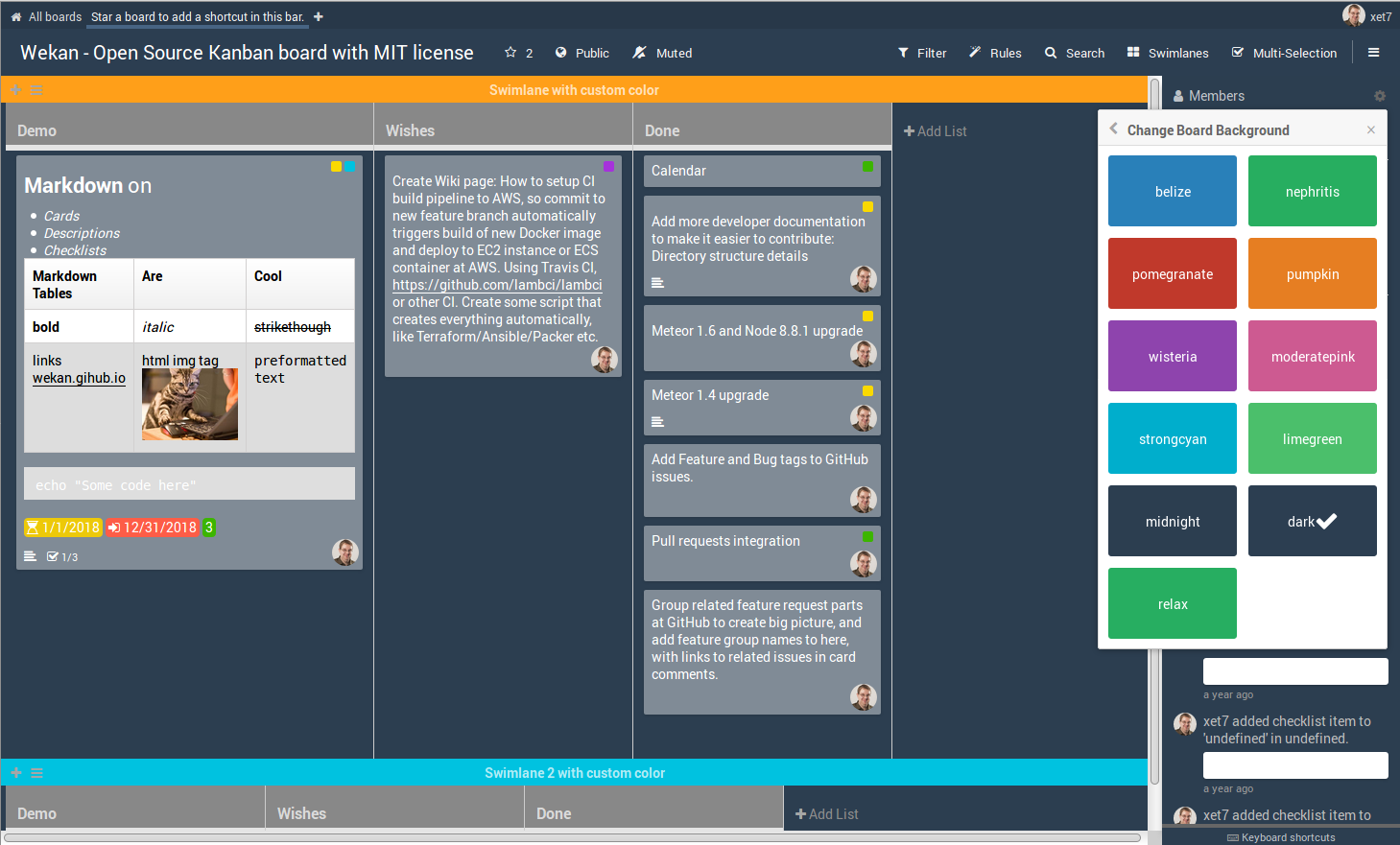
Screenshot
More screenshots at Features page
License
WeKan ® is released under the very permissive MIT license, and made
with Meteor.
Trang TopGit này là một snapshot — tab "Readme" hiển thị nguyên văn README của repo (đã bỏ link, giữ ảnh). Repo GitHub ở github.com/wekan/wekan-gantt-gpl là nguồn chính thức.
wekan/wekan-gantt-gpl có phải mã nguồn mở không?
Có — wekan/wekan-gantt-gpl phát hành theo license MIT, nghĩa là mã nguồn mở để đọc, fork và (tùy license) tái sử dụng. Mã: github.com/wekan/wekan-gantt-gpl.
wekan/wekan-gantt-gpl có trang demo không?
Dự án có trang chủ ở https://wekan.fi. Tab "Readme" ở trang này thường có ảnh chụp và hướng dẫn bắt đầu nhanh.
wekan/wekan-gantt-gpl dùng license gì?
wekan/wekan-gantt-gpl phát hành theo license MIT. Nên mở file LICENSE trên GitHub để xác nhận — license metadata đôi khi lệch với thực tế dự án.
wekan/wekan-gantt-gpl là gì?
wekan/wekan-gantt-gpl (wekan/wekan-gantt-gpl) là dự án JavaScript trên GitHub. Theo mô tả gốc: Issues moved to https://github.com/wekan/wekan/issues
Đọc đầy đủ README ở tab phía trên.
Vẫn đang phân vân về wekan-gantt-gpl?
Một cú bấm sẽ gửi câu hỏi kèm trang này cho AI — xem AI nói gì về wekan-gantt-gpl.
 /wekan-gantt-gpl