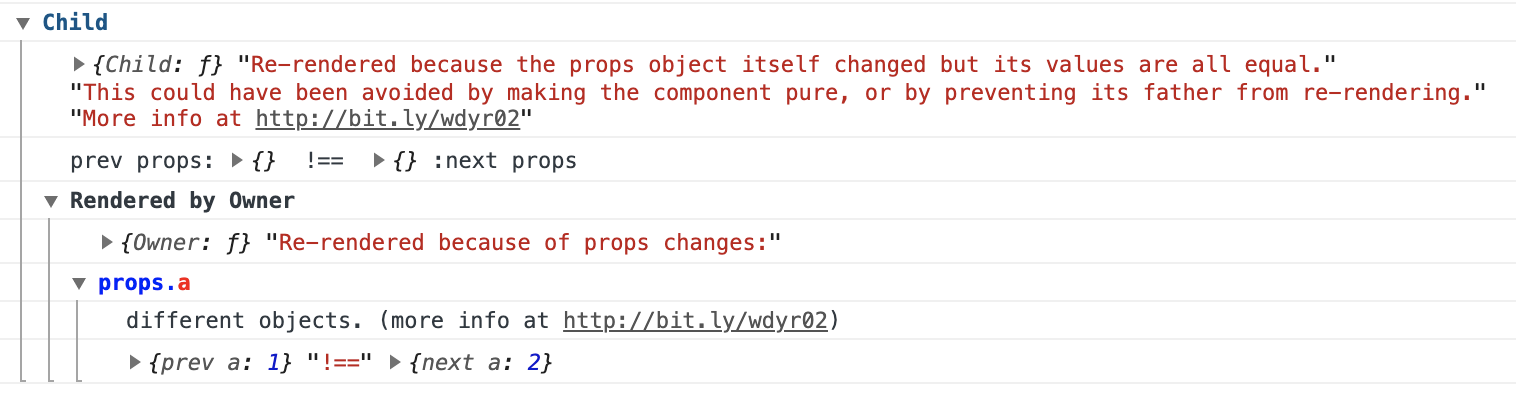
Điểm qua welldone-software/why-did-you-render: 12.5k sao trên GitHub, viết chủ yếu bằng JavaScript, thuộc nhóm Frontend. why-did-you-render by Welldone Software monkey patches React to notify you about potentially avoidable re-renders. (Works with React Native as well.)
Tóm tắt dựng từ metadata GitHub của chính dự án — chưa có bài review TopGit. Trang sẽ tự động cập nhật khi bài review đầy đủ được xuất bản.
VÌ SAO CHƯA CÓ REVIEW
TopGit viết bài đầy đủ cho repo có nhiều sao nhất và được yêu cầu nhiều nhất. Trang này là snapshot trong thời gian chờ — xem README gốc ở tab READ ME.
why-did-you-render by Welldone Software monkey patches React to notify you about potentially avoidable re-renders. (Works with React Native as well.)
For example, if you pass style={{width: '100%'}} to a big memo component it would always re-render on every element creation:
<MemoBigList style={{width: '100%'}}/>
It can also help you to simply track when and why a certain component re-renders.
[!CAUTION]
The library was not tested with React Compiler at all. I believe it's completely incompatible with it.
[!CAUTION]
Not all re-renders are "bad". Sometimes shenanigan to reduce re-renders can either hurt your App's performance or have a negligible effect, in which case it would be just a waste of your efforts, and complicate your code. Try to focus on heavier components when optimizing and use the React DevTools Profiler to measure the effects of any changes.
[!NOTE]
I've joined the React team, specifically working on React tooling. This role has opened up exciting opportunities to enhance the developer experience for React users— and your input could offer valuable insights to help me with this effort. Please join the conversation in the discussion thread!
Setup
The latest version of the library was tested (unit tests and E2E) with React@19 only.
For React 18, please see the readme for version @^8.
For React 17 and React 16, please see the readme for version @^7.
Add the plugin as listed below and start react-native packager as usual. Default env for babel is "development". If you do not use expo when working with react-native, the following method will help you.
Import wdyr as the first import (even before react-hot-loader if you use it):
index.js:
import './wdyr'; // <--- first import

import 'react-hot-loader';

import React from 'react';
import ReactDOM from 'react-dom';
// ...
import {App} from './app';
// ...
ReactDOM.render(<App/>, document.getElementById('root'));
If you use trackAllPureComponents, all pure components (React.PureComponent or React.memo) will be tracked.
Otherwise, add whyDidYouRender = true to ad-hoc components to track them. (f.e Component.whyDidYouRender = true)
More information about what is tracked can be found in Tracking Components.
Can't see any WDYR logs? Check out the troubleshooting section or search in the issues.
Custom Hooks
Also, tracking custom hooks is possible by using trackExtraHooks. For example if you want to track useSelector from React Redux:
wdyr.js:
import React from 'react';

// For react-native you might want to use
// the __DEV__ flag instead of process.env.NODE_ENV === 'development'
if (process.env.NODE_ENV === 'development') {
  const whyDidYouRender = require('@welldone-software/why-did-you-render');
  const ReactRedux = require('react-redux');
  whyDidYouRender(React, {
    trackAllPureComponents: true,
    trackExtraHooks: [
      [ReactRedux, 'useSelector']
    ]
  });
}
Notice that there's currently a problem with rewriting exports of imported files in webpack. A quick workaround can help with it: #85 - trackExtraHooks cannot set property.
Read More
Why Did You Render Mr. Big Pure React Component???
Common fixing scenarios this library can help with
React Hooks - Understand and fix hooks issues
Why Did You Render v4 Released! - TypeScript support, Custom hooks tracking (like React-Redux’s useSelector), Tracking of all pure components.
Integration With Other Libraries
Next.js example
React-Redux With Hooks
Mobx is currently not supported
React-Native flipper plugin made by @allen-hsu
Sandbox
You can test the library in the official sandbox.
And another official sandbox with hooks tracking
Tracking Components
You can track all pure components (React.PureComponent or React.memo) using the trackAllPureComponents: true option.
You can also manually track any component you want by setting whyDidYouRender on them like this:
class BigList extends React.Component {
  static whyDidYouRender = true
  render(){
    return (
      //some heavy render you want to ensure doesn't happen if its not necessary
    )
  }
}
Or for functional components:
const BigListPureComponent = props => (
  <div>
    //some heavy component you want to ensure doesn't happen if its not necessary
  </div>
)
BigListPureComponent.whyDidYouRender = true
You can also pass an object to specify more advanced tracking settings:
Notice: exclude takes priority over both include and manually set whyDidYouRender =
trackAllPureComponents
(default: false)
You can track all pure components (both React.memo and React.PureComponent components)
Notice: You can exclude the tracking of any specific component with whyDidYouRender = false
trackHooks
(default: true)
You can turn off tracking of hooks changes.
Understand and fix hook issues.
trackExtraHooks
(default: [])
Track custom hooks:
whyDidYouRender(React, {
  trackExtraHooks: [
    // notice that 'useSelector' is a named export
    [ReactRedux, 'useSelector'],
  ]
});
This feature is rewriting exports of imported files. There is currently a problem with that approach in webpack. A workaround is available here: #85 - trackExtraHooks cannot set property
logOwnerReasons
(default: true)
One way of fixing re-render issues is preventing the component's owner from re-rendering.
This option is true by default and it lets you view the reasons why an owner component re-renders.
logOnDifferentValues
(default: false)
Normally, you only want logs about component re-renders when they could have been avoided.
With this option, it is possible to track all re-renders.
For example:
render(<BigListPureComponent a={1}/>)
render(<BigListPureComponent a={2}/>)
// will only log if you use {logOnDifferentValues: true}
hotReloadBufferMs
(default: 500)
Time in milliseconds to ignore updates after a hot reload is detected.
When a hot reload is detected, we ignore all updates for hotReloadBufferMs to not spam the console.
onlyLogs
(default: false)
If you don't want to use console.group to group logs you can print them as simple logs.
Controls the colors used in the console notifications
notifier
(default: defaultNotifier that is exposed from the library)
You can create a custom notifier if the default one does not suite your needs.
getAdditionalOwnerData
(default: undefined)
You can provide a function that harvests additional data from the original react element. The object returned from this function will be added to the ownerDataMap which can be accessed later within your notifier function override.
Troubleshooting
No tracking
If you are in production, WDYR is probably disabled.
Maybe no component is tracked
Check out Tracking Components once again.
If you only track pure components using trackAllPureComponents: true then you would only track either (React.PureComponent or React.memo), maybe none of your components are pure so none of them will get tracked.
Maybe you have no issues
Try causing an issue by temporary rendering the whole app twice in it's entry point:
There's currently a problem with rewriting exports of imported files in webpack. A quick workaround can help with it: #85 - trackExtraHooks cannot set property.
React-Redux connect HOC is spamming the console
Since connect hoists statics, if you add WDYR to the inner component, it is also added to the HOC component where complex hooks are running.
To fix this, add the whyDidYouRender = true static to a component after the connect:
  const SimpleComponent = ({a}) => <div data-testid="foo">{a.b}</div>)
  // not before the connect:
  // SimpleComponent.whyDidYouRender = true
  const ConnectedSimpleComponent = connect(
    state => ({a: state.a})
  )(SimpleComponent)
  // after the connect:
  SimpleComponent.whyDidYouRender = true
Sourcemaps
To see the library's sourcemaps use the source-map-loader.
Credit
Inspired by the following previous work:
github.com/maicki/why-did-you-update (no longer public) which I had the chance to maintain for some time.
https://github.com/garbles/why-did-you-update where A deep dive into React perf debugging is credited for the idea.
welldone-software/why-did-you-render thuộc nhóm Frontend trên TopGit, cùng 10 topic GitHub. Trang Trending và Topics liệt kê các repo cùng số sao và cùng ngôn ngữ để so sánh.
Đọc thêm về welldone-software/why-did-you-render ở đâu?
Trang TopGit này là một snapshot — tab "Readme" hiển thị nguyên văn README của repo (đã bỏ link, giữ ảnh). Repo GitHub ở github.com/welldone-software/why-did-you-render là nguồn chính thức.
welldone-software/why-did-you-render có bao nhiêu sao?
welldone-software/why-did-you-render có 12.5k sao GitHub — tải lại trang để xem số mới nhất, hoặc xem trực tiếp github.com/welldone-software/why-did-you-render. TopGit phản chiếu số sao của GitHub nhưng không cam kết đến từng phút.
welldone-software/why-did-you-render có phải mã nguồn mở không?
Có — welldone-software/why-did-you-render phát hành theo license MIT, nghĩa là mã nguồn mở để đọc, fork và (tùy license) tái sử dụng. Mã: github.com/welldone-software/why-did-you-render.
welldone-software/why-did-you-render có trang demo không?
Dự án có trang chủ ở https://www.npmjs.com/package/@welldone-software/why-did-you-render. Tab "Readme" ở trang này thường có ảnh chụp và hướng dẫn bắt đầu nhanh.
welldone-software/why-did-you-render là gì?
welldone-software/why-did-you-render (welldone-software/why-did-you-render) là dự án JavaScript trên GitHub. Theo mô tả gốc: why-did-you-render by Welldone Software monkey patches React to notify you about potentially avoidable re-renders. (Works with React Native as well.)
welldone-software/why-did-you-render so với các dự án Frontend khác thế nào?
welldone-software/why-did-you-render được TopGit xếp vào nhóm Frontend, với 12.5k sao GitHub và viết bằng JavaScript. Xem trang chủ đề Frontend trên TopGit để so sánh với các dự án tương tự theo số sao và mức độ hoạt động.
Đọc đầy đủ README ở tab phía trên.
Vẫn đang phân vân về why-did-you-render?
Một cú bấm sẽ gửi câu hỏi kèm trang này cho AI — xem AI nói gì về why-did-you-render.

 /why-did-you-render