xmartlabs/fountain

xmartlabs/fountain hiện có 169 sao trên GitHub.
Tóm tắt dựng từ metadata GitHub của chính dự án — chưa có bài review TopGit. Trang sẽ tự động cập nhật khi bài review đầy đủ được xuất bản.
TopGit viết bài đầy đủ cho repo có nhiều sao nhất và được yêu cầu nhiều nhất. Trang này là snapshot trong thời gian chờ — xem README gốc ở tab READ ME.
Snapshot
Cộng tác viên hàng đầu
Xem cộng tác viên hàng đầu




A smart and simple way to work with paged endpoints. To see an example of how to use it, check out the introducing Fountain posts: part one and part two.
Atention: since all of Fountain functionalities are present in android official Paging3 library, Fountain is deprecated and we recommend using that tool.
Overview
Fountain is an Android Kotlin library conceived to make your life easier when dealing with paged endpoint services, where the paging is based on incremental page numbers (e.g. 1, 2, 3, ...). It uses the Google Android Architecture Components, mainly the Android Paging Library to make it easier to work with paged services.
The main goal of the library is to easily provide a Listing component from a common service specification. Listing provides essentially five elements to take control of the paged list:
data class Listing<T>(
    val pagedList: LiveData<PagedList<T>>,
    val networkState: LiveData<NetworkState>,
    val refreshState: LiveData<NetworkState>,
    val refresh: () -> Unit,
    val retry: () -> Unit
)
- pagedList: A changing data stream of type
Trepresented as aLiveDataof aPagedList. - networkState: A stream that notifies network state changes, such as when a new page started loading (so you can show a spinner in the UI).
- refresh: A refresh function, to refresh all data.
- refreshState: A stream that notifies the status of the refresh request.
- retry: A retry function to execute if something failed.
Basically, you could manage all data streams with a Listing component, which is awesome!
It's really flexible and useful to display the paged list entities and reflect the network status changes in the UI.
This library was designed to work with paged endpoints. However, it also supports working with not paged endpoints. That means that you can use all Listing features in services that return a list that's not paged.
Fountain provides two ways to generate a Listing component from paged services:
- Network support: Provides a
Listingbased on a common Retrofit service implementation. Note entities won't be saved in memory nor disk. - Cache + Network support: Provides a
Listingwith cache support using a common Retrofit service implementation, and aDataSourcefor caching the data. We recommend you use Room to provide theDataSource, because it will be easier. However, you could use any otherDataSource.
Fountain supports 2 types of Retrofit service adapters:
- A RxJava2 Retrofit adapter.
- A Coroutine Retrofit adapter.
It also supports not using any of them, as you could work with a simple Retrofit call.
Download
Add library to project dependencies with JitPack.
repositories {
    maven { url "https://jitpack.io" }
}

dependencies {
    // This dependency is required only if you want to use a Retrofit service without a special adapter.
    implementation 'com.github.xmartlabs.fountain:fountain-retrofit:0.5.0'

    // This dependency is required only if you want to use a Coroutine retrofit adapter.
    implementation 'com.github.xmartlabs.fountain:fountain-coroutines:0.5.0'

    // This dependency is required only if you want to use a RxJava2 retrofit adapter.
    implementation 'com.github.xmartlabs.fountain:fountain-rx2:0.5.0'
}
Fountain is using Kotlin 1.3, if you are using Kotlin 1.2.X, please use Fountain 0.4.0.
Despite Fountain is in experimental state, we believe the API won't receive major changes.
Usage
You can read the full documentation.
Factory constructors
There's one static factory object class for each each dependency.
- FountainCoroutines: Used to get a Listing from a Retrofit service which uses a Coroutine adapter.
- FountainRetrofit: Used to get a Listing from a Retrofit service without using a special adapter.
- FountainRx: Used to get a Listing from a Retrofit service which uses a RxJava2 adapter.
Each static factory has the same constructors with different params:
createNetworkListing: A constructor to get aListingcomponent from a common paged Retrofit service implementation.createNotPagedNetworkListing: A constructor to get aListingcomponent from a common not paged Retrofit service implementation.createNetworkWithCacheSupportListing: A constructor to get aListingcomponent with cache support from a common paged Retrofit service implementation.createNotPagedNetworkWithCacheSupportListing: A constructor to get aListingcomponent with cache support from a common not paged Retrofit service implementation.
Network support
Provides a Listing based on a common Retrofit service implementation.
In this mode the fetched entities are volatile, they won't be saved in memory nor disk.
Network support for paged endpoints
The Listing with network support for paged endpoints can be obtained invoking createNetworkListing from the static factory class.
It requires only one argument, a NetworkDataSourceAdapter, which provides all operations that the library will use to handle the paging.
The NetworkDataSourceAdapter contains two main functions: a method to check if a page can be fetched and a property to fetch it.
interface NetworkDataSourceAdapter<PageFetcher> {
  val pageFetcher: PageFetcher

  @CheckResult
  fun canFetch(page: Int, pageSize: Int): Boolean
}
PageFetcher is a structure that provides a way to fetch a page from a service call.
There is one page fetcher per library adapter, we will refer to any of them as PageFetcher throughout the documentation.
interface RetrofitPageFetcher<T : ListResponse<*>> {
  fun fetchPage(page: Int, pageSize: Int): Call<T>
}

interface CoroutinePageFetcher<T : ListResponse<*>> {
  fun fetchPage(page: Int, pageSize: Int): Deferred<T>
}

interface RxPageFetcher<T : ListResponse<*>> {
  fun fetchPage(page: Int, pageSize: Int): Single<T>
}
Network support for not paged endpoints
The Listing with network support for not paged endpoints can be obtained invoking createNetworkListing from the static factory class.
It requires only one argument, a NotPagedPageFetcher, which provides a method to fetch the data from a service source.
There is one NotPagedPageFetcher per library adapter, we will refer to any of them as NotPagedPageFetcher throughout the documentation.
interface NotPagedRetrifitPageFetcher<T : ListResponse<*>> {
  fun fetchData(): Call<T>
}

interface NotPagedCoroutinePageFetcher<T : ListResponse<*>> {
  fun fetchData(): Deferred<T>
}

interface NotPagedRxPageFetcher<T : ListResponse<*>> {
  fun fetchData(): Single<T>
}
List Responses
The library defines a common service response type which is used to fetch the pages.
interface ListResponse<T> {
  fun getElements(): List<T>
}
Additionally, there are other response types that can be used when the service provides more information in the response.
ListResponseWithEntityCount: Used when the service provides the amount of entities.
interface ListResponseWithEntityCount<T> : ListResponse<T> {
  fun getEntityCount() : Long
}
ListResponseWithPageCount: Used when the service provides the amount of pages.
interface ListResponseWithPageCount<T> : ListResponse<T> {
  fun getPageCount(): Long
}
If you use either ListResponseWithPageCount or ListResponseWithEntityCount you can convert a PageFetcher to a NetworkDataSourceAdapter.
That means that if the response has the number of pages or entities you can get a NetworkDataSourceAdapter without implementing the canFetch method.
To do that Fountain provides some extensions:
fun <ServiceResponse : ListResponseWithEntityCount<*>>
    PageFetcher<ServiceResponse>.toTotalEntityCountNetworkDataSourceAdapter(firstPage: Int)
fun <ServiceResponse : ListResponseWithPageCount<*>>
    PageFetcher<ServiceResponse>.toTotalPageCountNetworkDataSourceAdapter(firstPage: Int)
Cache + Network support
Provides a Listing with cache support using a common Retrofit service implementation, and a DataSource for caching the data.
Cache + Network support for paged endpoints
The Listing with network and cache support for paged endpoints can be obtained invoking createNetworkWithCacheSupportListing from the static factory class.
It has two required components:
- A
NetworkDataSourceAdapter<out ListResponse<NetworkValue>>to fetch all pages. - A
CachedDataSourceAdapter<NetworkValue, DataSourceValue>to update theDataSource. It's the interface that the library will use to take control of theDataSource.
Cache + Network support for not paged endpoints
The Listing with network and cache support for not paged endpoints can be obtained invoking createNotPagedNetworkWithCacheSupportListing from the static factory class.
It has two required components:
- A
NotPagedPageFetcher<out ListResponse<NetworkValue>>to fetch the data. - A
CachedDataSourceAdapter<NetworkValue, DataSourceValue>to update theDataSource. It's the interface that the library will use to take control of theDataSource.
CachedDataSourceAdapter
interface CachedDataSourceAdapter<NetworkValue, DataSourceValue> {
  fun getDataSourceFactory(): DataSource.Factory<*, DataSourceValue>

  @WorkerThread
  fun saveEntities(response: List<NetworkValue>)

  @WorkerThread
  fun dropEntities()

  @WorkerThread
  fun runInTransaction(transaction: () -> Unit)
}
It has only four methods that you should implement:
getDataSourceFactorywill be used to list the cached elements. The returned value is used to create theLivePagedListBuilder.runInTransactionwill be used to apply multipleDataSourceoperations in a single transaction. That means that if something fails, all operations will fail.saveEntitieswill be invoked to save all entities into theDataSource. This will be executed in a transaction.dropEntitieswill be used to delete all cached entities from theDataSource. This will be executed in a transaction.
Caching strategy
The pagination strategy that Fountain is using can be seen in the following image:
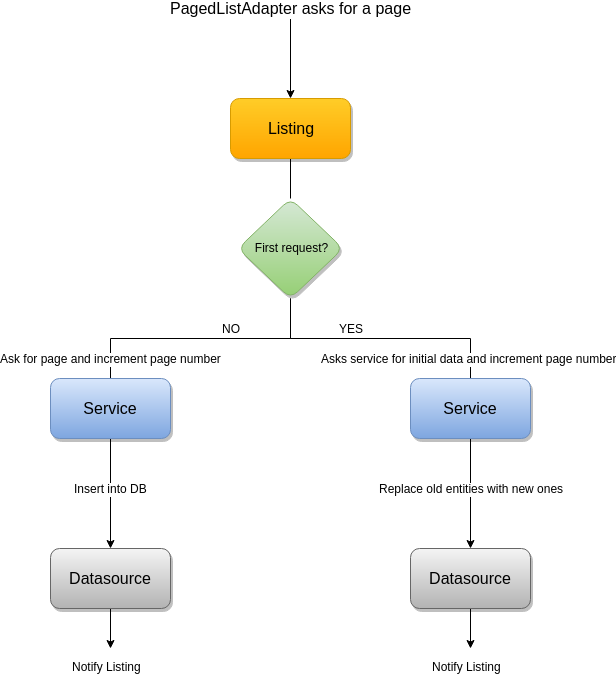
It starts with an initial service data request.
By default the initial data requested is three pages, but this value can be changed, in the PagedList.Config, using the setInitialLoadSizeHint method.
This parameter can be set in the factory constructor method.
When the service data comes from the service, all data is refreshed in the DataSource using the CachedDataSourceAdapter.
Note that the Listing component will notify that data changed.
After that, the Android Paging Library will require pages when the local data is running low.
When a new page is required, the paging library will invoke a new service call, and will use the CachedDataSourceAdapter to save the returned data into the DataSource.
Architecture recommendations
It's strongly recommended to integrate this component in a MVVM architecture combined with the Repository Pattern.
The Listing component should be provided by the repository.
The ViewModel, can use the different Listing elements, provided by the repository, to show the data and the network changes in the UI.
You can take a look at the example project to see how everything comes together.
Getting involved
- If you want to contribute please feel free to submit pull requests.
- If you have a feature request please open an issue.
- If you found a bug check older issues before submitting a new one.
- If you need help or would like to ask a general question, use StackOverflow. (Tag
fountain).
Before contributing, please check the CONTRIBUTING file.
Changelog
The changelog for this project can be found in the CHANGELOG file.
About
Made with ❤️ by XMARTLABS
Repo liên quan
Master programming by recreating your favorite technologies from scratch.
A curated meta-list of curated lists organized by technology domain. The repository acts as a directory pointing to hundreds of specialized awesome lists covering programming languages, platforms, frameworks, and tooling. All content is community-contributed under the CC0 public domain dedication.
Public APIs is a community-curated GitHub repository listing free, publicly accessible APIs across a wide range of categories, with auth type, HTTPS, and CORS noted for each entry. It's a browsable reference, not a library to install.
freeCodeCamp is a free, self-paced curriculum for learning to code, published as open source at freeCodeCamp/freeCodeCamp. It's a 501(c)(3) nonprofit funded by donor support, structured around six certifications in its Full-Stack Developer Curriculum, each gated by required projects instead of open-book quizzes. The repository also carries beta language certifications for developers, interview-prep resources, and the code that runs the live freecodecamp.org platform.
Trả lời nhanh
Đọc thêm về xmartlabs/fountain ở đâu?
Trang TopGit này là một snapshot — tab "Readme" hiển thị nguyên văn README của repo (đã bỏ link, giữ ảnh). Repo GitHub ở github.com/xmartlabs/fountain là nguồn chính thức.
xmartlabs/fountain có bao nhiêu sao?
xmartlabs/fountain có 169 sao GitHub — tải lại trang để xem số mới nhất, hoặc xem trực tiếp github.com/xmartlabs/fountain. TopGit phản chiếu số sao của GitHub nhưng không cam kết đến từng phút.
xmartlabs/fountain có phải mã nguồn mở không?
TopGit chưa ghi nhận license cho xmartlabs/fountain. Phần lớn repo public trên GitHub là mã nguồn mở, nhưng điều khoản khác nhau từng repo — mở file LICENSE để xác nhận.
xmartlabs/fountain còn được duy trì không?
TopGit chưa ghi nhận lần push gần đây của xmartlabs/fountain. Xem lịch sử commit trực tiếp trên GitHub để biết thông tin chính xác nhất.
xmartlabs/fountain là gì?
xmartlabs/fountain (xmartlabs/fountain) là dự án đa ngôn ngữ TopGit theo dõi. Tính tới lần đồng bộ gần nhất, repo có 169 sao.
xmartlabs/fountain viết bằng ngôn ngữ gì?
Dữ liệu TopGit chưa ghi nhận ngôn ngữ chính cho xmartlabs/fountain. Xem danh sách file trên GitHub để biết chi tiết.
Đọc đầy đủ README ở tab phía trên.
Chưa chắc fountain có hợp với bạn?
Để ChatGPT, Claude hoặc Perplexity tìm hiểu giúp — bấm bên dưới và xem AI nói gì về fountain.