zhanghai/MaterialColdStart là một trong những repo mã nguồn mở mà TopGit theo dõi, hiện có 1.2k sao, viết chủ yếu bằng Shell. Utilize the window background during cold start time to make your app look faster.
Tóm tắt dựng từ metadata GitHub của chính dự án — chưa có bài review TopGit. Trang sẽ tự động cập nhật khi bài review đầy đủ được xuất bản.
VÌ SAO CHƯA CÓ REVIEW
TopGit viết bài đầy đủ cho repo có nhiều sao nhất và được yêu cầu nhiều nhất. Trang này là snapshot trong thời gian chờ — xem README gốc ở tab READ ME.
Utilize the window background during cold start time (the time between user launches your app and Activity.onCreate() is called) to make your app look faster.
This project comes with some templates for Material Designed apps, but you can also roll your own if you wish.
Preview
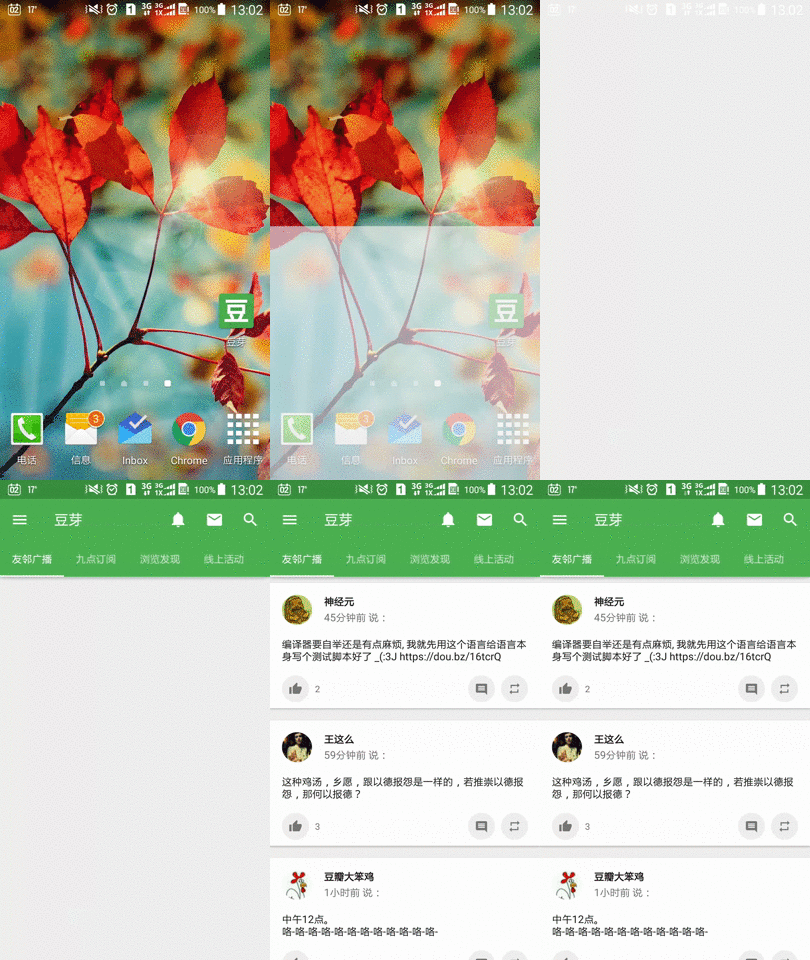
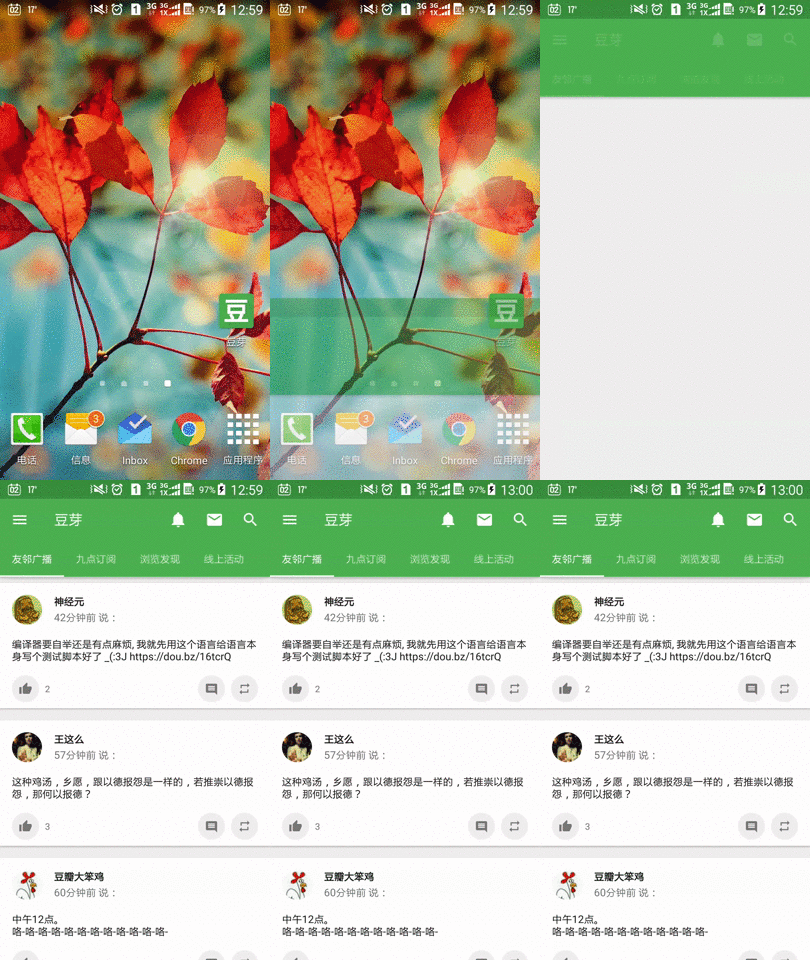
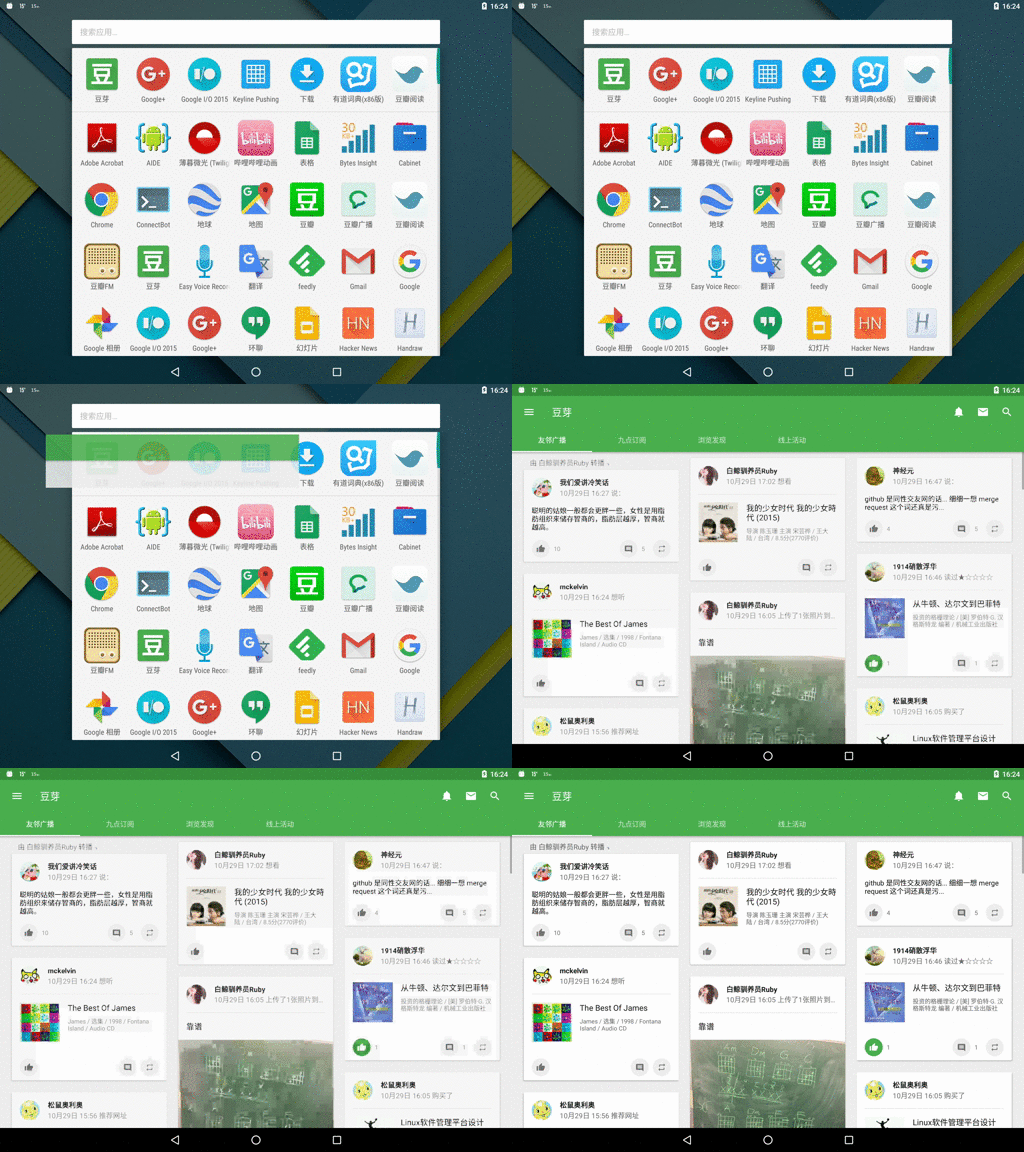
Blank cold start (Glitch on status bar and appbar) v.s. Material cold start (Preserves visual consistency):
(I deliberately picked a slower device to show the effect clearer, but this improvement is also delightful on faster devices.)
When your app process is cached in memory but main activity is relaunched, this technique gives the illusion of a much quicker start up.
Notice the small period of time when appbar and status bar is "drawn" but no text is shown — this is the trick.
Without the help of our cold start window background, users will see a glitch of whiteness over the appbar and statusbar.
Inspiration
This project was inspired by the pro-tip Use cold start time effectively with a branded launch theme — Pro-tip by +Ian Lake.
But instead of using a short transient product logo as preview, I want to use a background with an AppBar on it, just like the old days with framework-managed ActionBar, which gives user the illusion of a quicker start up and ensures visual consistency.
This project has been around in my mind for several months, until I found my way to generate drawables with templates.
Implementation
This project generates nine-patch drawables for use as android:windowBackground.
Why nine-patch?
Only static drawables can be loaded by framework as preview, and all other drawables will only retain aspect ratio when width/height is set. So we need to use nine-patch.
How to generate nine-patch?
However, nine-patches need to be bitmaps, but we have various dimension sizes changing with configuration, and we still have to retain the one-pixel border while scaling up the content area.
I don't want to keep a separate file for each combination of configuration (which can be 20 if you support tablet), but instead use a single template for nine-patch generation. After a lot of (painful) trial-and-error with XSLT and sed, I suddenly found the good old bash (which is string-oriented) a viable solution for this problem.
The solution, a "new" format called shsvg (Shell SVG), is implemented as in zhanghai/AndroidSVGScripts and used by this project.
Usage
Note: To generate your own image assets, you will probably need a Linux installation. I may upload some pre-built assets later.
(Optional) Adjust the appbar height (and more if you want). The default configuration assumes that your app have a TabLayout. If however your app does not, you need to modify each window_background_statusbar_toolbar_tab.9.shsvg.conf file in the given raw directories and change the APPBAR_HEIGHT from 112 to 64 and 104 to 56.
Run gen-png.sh and copy the output in gen/ to your res directory. (requires bash, bc, gcalccmd (from gnome-calculator) and inkscape)
Finally in your MainActivity.java, set the theme back for the normal window background, which will be transitioned into:
public class MainActivity extends AppCompatActivity {

    @Override
    protected void onCreate(Bundle savedInstanceState) {

        // Make sure this line comes before calling super.onCreate().
        setTheme(R.style.AppTheme);

        super.onCreate(savedInstanceState);
    }
}
Enjoy the updated cold start experience!
Pre-built assets
// TODO
License
Copyright 2015 Zhang Hai

Licensed under the Apache License, Version 2.0 (the "License");
you may not use this file except in compliance with the License.
You may obtain a copy of the License at

   http://www.apache.org/licenses/LICENSE-2.0

Unless required by applicable law or agreed to in writing, software
distributed under the License is distributed on an "AS IS" BASIS,
WITHOUT WARRANTIES OR CONDITIONS OF ANY KIND, either express or implied.
See the License for the specific language governing permissions and
limitations under the License.
Trang TopGit này là một snapshot — tab "Readme" hiển thị nguyên văn README của repo (đã bỏ link, giữ ảnh). Repo GitHub ở github.com/zhanghai/MaterialColdStart là nguồn chính thức.
zhanghai/MaterialColdStart có phải mã nguồn mở không?
TopGit chưa ghi nhận license cho zhanghai/MaterialColdStart. Phần lớn repo public trên GitHub là mã nguồn mở, nhưng điều khoản khác nhau từng repo — mở file LICENSE để xác nhận.
zhanghai/MaterialColdStart có website riêng không?
TopGit chưa ghi nhận URL trang chủ cho zhanghai/MaterialColdStart. Phần README ở tab phía trên thường có link demo, hoặc xem mô tả GitHub của repo.
zhanghai/MaterialColdStart là gì?
zhanghai/MaterialColdStart (zhanghai/MaterialColdStart) là dự án Shell trên GitHub. Theo mô tả gốc: Utilize the window background during cold start time to make your app look faster.
Đọc đầy đủ README ở tab phía trên.
Vẫn đang phân vân về MaterialColdStart?
Một cú bấm sẽ gửi câu hỏi kèm trang này cho AI — xem AI nói gì về MaterialColdStart.
 /MaterialColdStart