aimeos/aimeos-typo3 sits at 1.6k stars on GitHub, written primarily in PHP. TYPO3 e-commerce extension for ultra fast online shops, scalable marketplaces, complex B2B applications and #gigacommerce
Snapshot summary built from the project's own GitHub metadata — there's no written TopGit review yet. The page will update automatically when a full review is published.
WHY NO REVIEW YET
TopGit writes full reviews for the most-starred, most-requested repositories. This page is a snapshot until then — see the READ ME tab for the original README in full.
Aimeos is THE professional, full-featured and
high performance e-commerce extension for TYPO3! You can install it in your
existing TYPO3 web site within 5 minutes and can adapt, extend, overwrite
and customize anything to your needs.
Table Of Contents
Installation
Composer
DDev or Colima
TER
TYPO3 setup
Database setup
Security
Page setup
Download the Aimeos Page Tree file
Go to the Import View
Upload the page tree file
Go to the import view
Import the page tree
SEO-friendly URLs
License
Links
Installation
This document is for the latest Aimeos TYPO3 25.10 release and later.
Stable release: 26.04 (TYPO3 13/14 LTS)
LTS release: 25.10 (TYPO3 12/13 LTS)
Composer
Note: composer 2.2+ is required!
The latest TYPO3 version can be installed via composer. This is especially useful, if you want to create new TYPO3 installations automatically or play with the latest code. You need to install the composer package first, if it isn't already available:
To install the TYPO3 base distribution first, execute this command:
composer create-project typo3/cms-base-distribution myshop
# or install a specific TYPO3 version:
composer create-project "typo3/cms-base-distribution:^13" myshop
It will install TYPO3 into the ./myshop/ directory. Change into the directory and install TYPO3 using:
./vendor/bin/typo3 setup
Open the TYPO3 URL in your browser and follow the setup steps. Afterwards, install the Aimeos extension using:
composer req -W aimeos/aimeos-typo3:~25.10
If composer complains that one or more packages can't be installed because the required minimum stability isn't met, add this to your composer.json:
If you don't want to add the Aimeos demo data, you should remove --option=setup/default/demo:1 from the Aimeos setup command.
If you experience any errors with the database, please check the Database Setup section below.
DDev
Note: Installation instructions for TYPO3 with ddev or Colima can be found here:
TYPO3 with ddev or colima
TER Extension
If you want to install Aimeos into a traditionally installed TYPO3 ("legacy installation"), the Aimeos extension from the TER is recommended. You can download and install it directly from the Extension Manager of your TYPO3 instance.
Log into the TYPO3 backend
Click on "Admin Tools::Extensions" in the left navigation
Click the icon with the little plus sign left from the Aimeos list entry
Afterwards, you have to execute the update script of the extension to create the required database structure:
Click on "Admin Tools::Upgrade"
Click "Run Upgrade Wizard" in the "Upgrade Wizard" tile
Click "Execute"
Aimeos Distribution
For new TYPO3 installations, there is a 1-click Aimeos distribution available, too. Choose the Aimeos distribution from the list of available distributions in the Extension Manager and you will get a completely set up shop system including demo data for a quick start.
TYPO3 Setup
Security
Since TYPO3 9.5.14+ implements SameSite cookie handling and restricts when browsers send cookies to your site. This is a problem when customers are redirected from external payment provider domain. Then, there's no session available on the confirmation page. To circumvent that problem, you need to set the configuration option cookieSameSite to None in your ./typo3conf/LocalConfiguration.php or ./config/system/settings.php:
    'FE' => [
        'cookieSameSite' => 'None'
    ]
Site Setup
TYPO3 10+ requires a site configuration which you have to add in "Site Management" > "Sites" available in the left navigation. When creating a root page (a page with a globe icon), a basic site configuration is automatically created (see below at Go to the Import View).
Page Setup
Download the Aimeos Page Tree file
The page setup for an Aimeos web shop is easy, if you import the example page tree for TYPO3 10/11. You can download the version you need from here:
25.10+ page tree and later
24.10 page tree
Note: The Aimeos layout expects Bootstrap providing the grid layout!
In order to upload and install the file, follow the following steps:
Go to the Import View
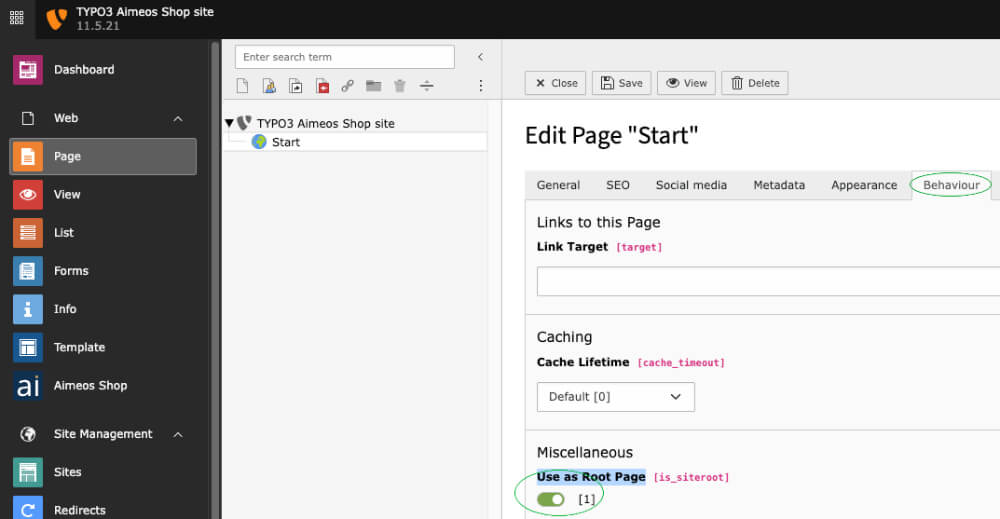
Note: It is recommended to import the Aimeos page tree to a page that is defined as "root page". To create a root page, simply create a new page and, in the "Edit page properties", activate the "Use as Root Page" option under "Behaviour". The icon of the root page will change to a globe. This will also create a basic site configuration. Don't forget to also create a typoscript root template and include the bootstrap templates with it!
In "Web::Page", right-click on the root page (the one with the globe)
Click on "More options..."
Click on "Import"
Upload the page tree file
In the page import dialog
Select the "Upload" tab (2nd one)
Click on the "Select" dialog
Choose the T3D file you've downloaded
Press the "Upload files" button
Import the page tree
In Import / Export view
Select the uploaded file from the drop-down menu
Click on the "Preview" button
The pages that will be imported are shown below
Click on the "Import" button that has appeared
Confirm to import the pages
Now you have a new page "Shop" in your page tree including all required sub-pages.
SEO-friendly URLs
TYPO3 9.5 and later can create SEO friendly URLs if you add the rules to the site config:
https://aimeos.org/docs/latest/typo3/setup/#seo-urls
License
The Aimeos TYPO3 extension is licensed under the terms of the GPL Open Source
license and is available for free.
The most recent commit recorded on aimeos/aimeos-typo3 was 4 months ago, based on the GitHub push timestamp. The repository has 719 forks — one of the better signals of community interest.
How many stars does aimeos/aimeos-typo3 have?
aimeos/aimeos-typo3 has 1.6k GitHub stars — refresh the page for the live number, or check github.com/aimeos/aimeos-typo3. TopGit mirrors GitHub's count but does not claim minute-by-minute accuracy.
Is aimeos/aimeos-typo3 open source?
Yes — aimeos/aimeos-typo3 ships under the GPL-3.0 license, which makes its source code freely readable (and, depending on license terms, forkable and reusable). Source: github.com/aimeos/aimeos-typo3.
What else is in the Frontend space?
aimeos/aimeos-typo3 is tracked by TopGit under the Frontend category, alongside 15 GitHub-tagged topics. Trending and Topics pages list peer repositories of comparable stars and language.
What topics is aimeos/aimeos-typo3 associated with?
The project maintains a homepage at https://aimeos.org/TYPO3. The README tab on this page also usually contains screenshots and a quickstart.
Where do I read more about aimeos/aimeos-typo3?
This TopGit page is a snapshot — the READ ME tab shows the project's own README content (links stripped, images preserved). The GitHub repository at github.com/aimeos/aimeos-typo3 is the definitive source.
Read full README in the tab above.
Want a second opinion on aimeos-typo3?
Ask an AI that can read this page — one click and you get its take on aimeos-typo3.

 /aimeos-typo3