Được TopGit lập chỉ mục từ metadata GitHub: aimeos/aimeos-typo3 có 1.6k sao, viết chủ yếu bằng PHP. TYPO3 e-commerce extension for ultra fast online shops, scalable marketplaces, complex B2B applications and #gigacommerce
Tóm tắt dựng từ metadata GitHub của chính dự án — chưa có bài review TopGit. Trang sẽ tự động cập nhật khi bài review đầy đủ được xuất bản.
VÌ SAO CHƯA CÓ REVIEW
TopGit viết bài đầy đủ cho repo có nhiều sao nhất và được yêu cầu nhiều nhất. Trang này là snapshot trong thời gian chờ — xem README gốc ở tab READ ME.
Aimeos is THE professional, full-featured and
high performance e-commerce extension for TYPO3! You can install it in your
existing TYPO3 web site within 5 minutes and can adapt, extend, overwrite
and customize anything to your needs.
Table Of Contents
Installation
Composer
DDev or Colima
TER
TYPO3 setup
Database setup
Security
Page setup
Download the Aimeos Page Tree file
Go to the Import View
Upload the page tree file
Go to the import view
Import the page tree
SEO-friendly URLs
License
Links
Installation
This document is for the latest Aimeos TYPO3 25.10 release and later.
Stable release: 26.04 (TYPO3 13/14 LTS)
LTS release: 25.10 (TYPO3 12/13 LTS)
Composer
Note: composer 2.2+ is required!
The latest TYPO3 version can be installed via composer. This is especially useful, if you want to create new TYPO3 installations automatically or play with the latest code. You need to install the composer package first, if it isn't already available:
To install the TYPO3 base distribution first, execute this command:
composer create-project typo3/cms-base-distribution myshop
# or install a specific TYPO3 version:
composer create-project "typo3/cms-base-distribution:^13" myshop
It will install TYPO3 into the ./myshop/ directory. Change into the directory and install TYPO3 using:
./vendor/bin/typo3 setup
Open the TYPO3 URL in your browser and follow the setup steps. Afterwards, install the Aimeos extension using:
composer req -W aimeos/aimeos-typo3:~25.10
If composer complains that one or more packages can't be installed because the required minimum stability isn't met, add this to your composer.json:
If you don't want to add the Aimeos demo data, you should remove --option=setup/default/demo:1 from the Aimeos setup command.
If you experience any errors with the database, please check the Database Setup section below.
DDev
Note: Installation instructions for TYPO3 with ddev or Colima can be found here:
TYPO3 with ddev or colima
TER Extension
If you want to install Aimeos into a traditionally installed TYPO3 ("legacy installation"), the Aimeos extension from the TER is recommended. You can download and install it directly from the Extension Manager of your TYPO3 instance.
Log into the TYPO3 backend
Click on "Admin Tools::Extensions" in the left navigation
Click the icon with the little plus sign left from the Aimeos list entry
Afterwards, you have to execute the update script of the extension to create the required database structure:
Click on "Admin Tools::Upgrade"
Click "Run Upgrade Wizard" in the "Upgrade Wizard" tile
Click "Execute"
Aimeos Distribution
For new TYPO3 installations, there is a 1-click Aimeos distribution available, too. Choose the Aimeos distribution from the list of available distributions in the Extension Manager and you will get a completely set up shop system including demo data for a quick start.
TYPO3 Setup
Security
Since TYPO3 9.5.14+ implements SameSite cookie handling and restricts when browsers send cookies to your site. This is a problem when customers are redirected from external payment provider domain. Then, there's no session available on the confirmation page. To circumvent that problem, you need to set the configuration option cookieSameSite to None in your ./typo3conf/LocalConfiguration.php or ./config/system/settings.php:
    'FE' => [
        'cookieSameSite' => 'None'
    ]
Site Setup
TYPO3 10+ requires a site configuration which you have to add in "Site Management" > "Sites" available in the left navigation. When creating a root page (a page with a globe icon), a basic site configuration is automatically created (see below at Go to the Import View).
Page Setup
Download the Aimeos Page Tree file
The page setup for an Aimeos web shop is easy, if you import the example page tree for TYPO3 10/11. You can download the version you need from here:
25.10+ page tree and later
24.10 page tree
Note: The Aimeos layout expects Bootstrap providing the grid layout!
In order to upload and install the file, follow the following steps:
Go to the Import View
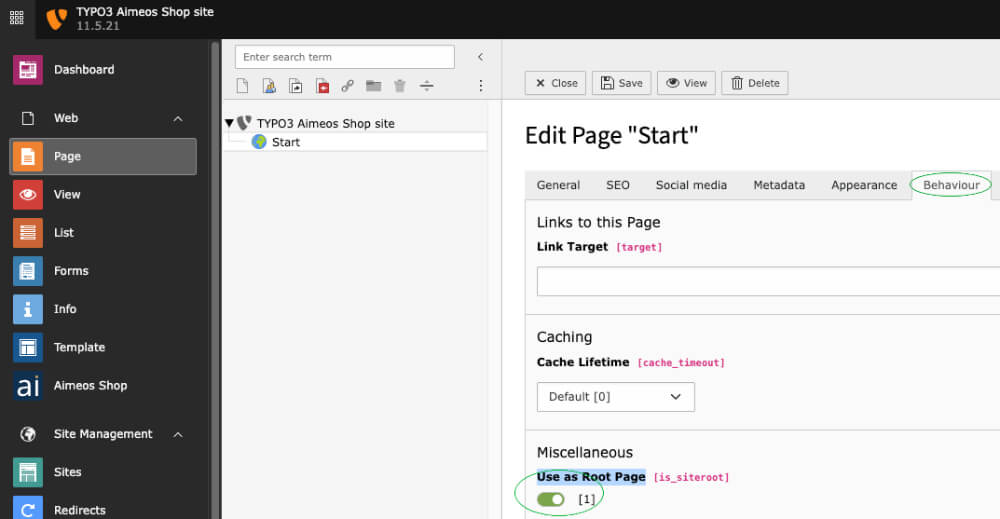
Note: It is recommended to import the Aimeos page tree to a page that is defined as "root page". To create a root page, simply create a new page and, in the "Edit page properties", activate the "Use as Root Page" option under "Behaviour". The icon of the root page will change to a globe. This will also create a basic site configuration. Don't forget to also create a typoscript root template and include the bootstrap templates with it!
In "Web::Page", right-click on the root page (the one with the globe)
Click on "More options..."
Click on "Import"
Upload the page tree file
In the page import dialog
Select the "Upload" tab (2nd one)
Click on the "Select" dialog
Choose the T3D file you've downloaded
Press the "Upload files" button
Import the page tree
In Import / Export view
Select the uploaded file from the drop-down menu
Click on the "Preview" button
The pages that will be imported are shown below
Click on the "Import" button that has appeared
Confirm to import the pages
Now you have a new page "Shop" in your page tree including all required sub-pages.
SEO-friendly URLs
TYPO3 9.5 and later can create SEO friendly URLs if you add the rules to the site config:
https://aimeos.org/docs/latest/typo3/setup/#seo-urls
License
The Aimeos TYPO3 extension is licensed under the terms of the GPL Open Source
license and is available for free.
aimeos/aimeos-typo3 có 1.6k sao GitHub — tải lại trang để xem số mới nhất, hoặc xem trực tiếp github.com/aimeos/aimeos-typo3. TopGit phản chiếu số sao của GitHub nhưng không cam kết đến từng phút.
Có — aimeos/aimeos-typo3 phát hành theo license GPL-3.0, nghĩa là mã nguồn mở để đọc, fork và (tùy license) tái sử dụng. Mã: github.com/aimeos/aimeos-typo3.
aimeos/aimeos-typo3 có trang demo không?
Dự án có trang chủ ở https://aimeos.org/TYPO3. Tab "Readme" ở trang này thường có ảnh chụp và hướng dẫn bắt đầu nhanh.
aimeos/aimeos-typo3 còn đang phát triển không?
Commit gần nhất trên aimeos/aimeos-typo3 là 4 tháng trước (theo timestamp GitHub). Repo có 719 fork — một chỉ báo về mức độ quan tâm của cộng đồng.
Cùng nhóm Frontend còn repo nào?
aimeos/aimeos-typo3 thuộc nhóm Frontend trên TopGit, cùng 15 topic GitHub. Trang Trending và Topics liệt kê các repo cùng số sao và cùng ngôn ngữ để so sánh.
Đọc thêm về aimeos/aimeos-typo3 ở đâu?
Trang TopGit này là một snapshot — tab "Readme" hiển thị nguyên văn README của repo (đã bỏ link, giữ ảnh). Repo GitHub ở github.com/aimeos/aimeos-typo3 là nguồn chính thức.
Đọc đầy đủ README ở tab phía trên.
Muốn nghe thêm một ý kiến về aimeos-typo3?
Hỏi một AI đọc được trang này — một cú bấm là có ngay nhận định về aimeos-typo3.

 /aimeos-typo3