TopGit tracks alvarcarto/url-to-pdf-api on GitHub as part of the Frontend family. The project has 7.1k stars. Web page PDF/PNG rendering done right. Self-hosted service for rendering receipts, invoices, or any content.
Snapshot summary built from the project's own GitHub metadata — there's no written TopGit review yet. The page will update automatically when a full review is published.
WHY NO REVIEW YET
TopGit writes full reviews for the most-starred, most-requested repositories. This page is a snapshot until then — see the READ ME tab for the original README in full.
Web page PDF rendering done right. Microservice for rendering receipts, invoices, or any content. Packaged to an easy API.
⚠️ WARNING ⚠️Don't serve this API publicly to the internet unless you are aware of the
risks. It allows API users to run any JavaScript code inside a Chrome session on the server.
It's fairly easy to expose the contents of files on the server. You have been warned!. See https://github.com/alvarcarto/url-to-pdf-api/issues/12 for background.
⭐️ Features:
Converts any URL or HTML content to a PDF file or an image (PNG/JPEG)
Rendered with Headless Chrome, using Puppeteer. The PDFs should match to the ones generated with a desktop Chrome.
Sensible defaults but everything is configurable.
Single-page app (SPA) support. Waits until all network requests are finished before rendering.
Easy deployment to Heroku. We love Lambda but...Deploy to Heroku button.
Usage is as simple as https://url-to-pdf-api.herokuapp.com/api/render?url=http://google.com. There's also a POST /api/render if you prefer to send options in the body.
🔍 Why?
This microservice is useful when you need to automatically produce PDF files
for whatever reason. The files could be receipts, weekly reports, invoices,
or any content.
PDFs can be generated in many ways, but one of them is to convert HTML+CSS
content to a PDF. This API does just that.
🚀 Shortcuts:
Examples
API
I want to run this myself
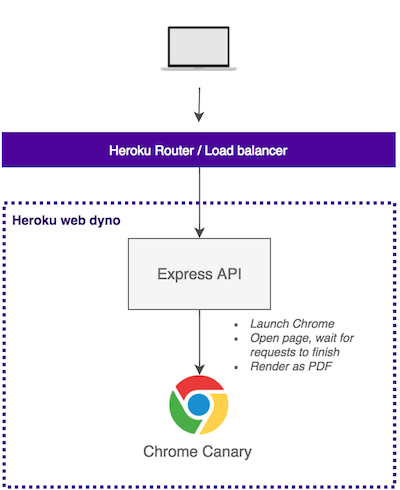
How it works
Local setup is identical except Express API is running on your machine
and requests are direct connections to it.
Good to know
By default, page's @media print CSS rules are ignored. We set Chrome to emulate @media screen to make the default PDFs look more like actual sites. To get results closer to desktop Chrome, add &emulateScreenMedia=false query parameter. See more at Puppeteer API docs.
Chrome is launched with --no-sandbox --disable-setuid-sandbox flags to fix usage in Heroku. See this issue.
Heavy pages may cause Chrome to crash if the server doesn't have enough RAM.
Docker image for this can be found here: https://github.com/restorecommerce/pdf-rendering-srv
Examples
⚠️ Restrictions ⚠️:
For security reasons the urls have been restricted and HTML rendering is disabled. For full demo, run this app locally or deploy to Heroku.
The demo Heroku app runs on a free dyno which sleep after idle. A request to sleeping dyno may take even 30 seconds.
To understand the API options, it's useful to know how Puppeteer
is internally used by this API. The render code
is quite simple, check it out. Render flow:
page.setViewport(options) where options matches viewport.*.
Possiblypage.emulateMedia('screen') if emulateScreenMedia=true is set.
Render url or html.
If url is defined, page.goto(url, options) is called and options match goto.*.
Otherwise page.setContent(html, options) is called where html is taken from request body, and options match goto.*.
Possiblypage.waitFor(numOrStr) if e.g. waitFor=1000 is set.
PossiblyScroll the whole page to the end before rendering if e.g. scrollPage=true is set.
Useful if you want to render a page which lazy loads elements.
Render the output
If output is pdf rendering is done with page.pdf(options) where options matches pdf.*.
Else if output is screenshot rendering is done with page.screenshot(options) where options matches screenshot.*.
GET /api/render
All options are passed as query parameters.
Parameter names match Puppeteer options.
These options are exactly the same as its POST counterpart, but options are
expressed with the dot notation. E.g. ?pdf.scale=2 instead of { pdf: { scale: 2 }}.
The only required parameter is url.
Parameter
Type
Default
Description
url
string
-
URL to render as PDF. (required)
output
string
pdf
Specify the output format. Possible values: pdf , screenshot or html.
emulateScreenMedia
boolean
true
Emulates @media screen when rendering the PDF.
enableGPU
boolean
false
When set, enables chrome GPU. For windows user, this will always return false. See https://developers.google.com/web/updates/2017/04/headless-chrome
ignoreHttpsErrors
boolean
false
Ignores possible HTTPS errors when navigating to a page.
scrollPage
boolean
false
Scroll page down before rendering to trigger lazy loading elements.
waitFor
number or string
-
Number in ms to wait before render or selector element to wait before render.
attachmentName
string
-
When set, the content-disposition headers are set and browser will download the PDF instead of showing inline. The given string will be used as the name for the file.
viewport.width
number
1600
Viewport width.
viewport.height
number
1200
Viewport height.
viewport.deviceScaleFactor
number
1
Device scale factor (could be thought of as dpr).
viewport.isMobile
boolean
false
Whether the meta viewport tag is taken into account.
viewport.hasTouch
boolean
false
Specifies if viewport supports touch events.
viewport.isLandscape
boolean
false
Specifies if viewport is in landscape mode.
cookies[0][name]
string
-
Cookie name (required)
cookies[0][value]
string
-
Cookie value (required)
cookies[0][url]
string
-
Cookie url
cookies[0][domain]
string
-
Cookie domain
cookies[0][path]
string
-
Cookie path
cookies[0][expires]
number
-
Cookie expiry in unix time
cookies[0][httpOnly]
boolean
-
Cookie httpOnly
cookies[0][secure]
boolean
-
Cookie secure
cookies[0][sameSite]
string
-
Strict or Lax
goto.timeout
number
30000
Maximum navigation time in milliseconds, defaults to 30 seconds, pass 0 to disable timeout.
goto.waitUntil
string
networkidle0
When to consider navigation succeeded. Options: load, domcontentloaded, networkidle0, networkidle2. load - consider navigation to be finished when the load event is fired. domcontentloaded - consider navigation to be finished when the DOMContentLoaded event is fired. networkidle0 - consider navigation to be finished when there are no more than 0 network connections for at least 500 ms. networkidle2 - consider navigation to be finished when there are no more than 2 network connections for at least 500 ms.
pdf.scale
number
1
Scale of the webpage rendering.
pdf.printBackground
boolean
false
Print background graphics.
pdf.displayHeaderFooter
boolean
false
Display header and footer.
pdf.headerTemplate
string
-
HTML template to use as the header of each page in the PDF. Currently Puppeteer basically only supports a single line of text and you must use pdf.margins+CSS to make the header appear! See https://github.com/alvarcarto/url-to-pdf-api/issues/77.
pdf.footerTemplate
string
-
HTML template to use as the footer of each page in the PDF. Currently Puppeteer basically only supports a single line of text and you must use pdf.margins+CSS to make the footer appear! See https://github.com/alvarcarto/url-to-pdf-api/issues/77.
pdf.landscape
boolean
false
Paper orientation.
pdf.pageRanges
string
-
Paper ranges to print, e.g., '1-5, 8, 11-13'. Defaults to the empty string, which means print all pages.
pdf.format
string
A4
Paper format. If set, takes priority over width or height options.
pdf.width
string
-
Paper width, accepts values labeled with units.
pdf.height
string
-
Paper height, accepts values labeled with units.
pdf.fullPage
boolean
-
Create PDF in a single page
pdf.margin.top
string
-
Top margin, accepts values labeled with units.
pdf.margin.right
string
-
Right margin, accepts values labeled with units.
pdf.margin.bottom
string
-
Bottom margin, accepts values labeled with units.
pdf.margin.left
string
-
Left margin, accepts values labeled with units.
screenshot.fullPage
boolean
true
When true, takes a screenshot of the full scrollable page.
screenshot.type
string
png
Screenshot image type. Possible values: png, jpeg
screenshot.quality
number
-
The quality of the JPEG image, between 0-100. Only applies when screenshot.type is jpeg.
screenshot.omitBackground
boolean
false
Hides default white background and allows capturing screenshots with transparency.
screenshot.clip.x
number
-
Specifies x-coordinate of top-left corner of clipping region of the page.
screenshot.clip.y
number
-
Specifies y-coordinate of top-left corner of clipping region of the page.
All options are passed in a JSON body object.
Parameter names match Puppeteer options.
These options are exactly the same as its GET counterpart.
Body
The only required parameter is url.
{
  // Url to render. Either url or html is required
  url: "https://google.com",

  // Either "pdf" or "screenshot"
  output: "pdf",

  // HTML content to render. Either url or html is required
  html: "<html><head></head><body>Your content</body></html>",

  // If we should emulate @media screen instead of print
  emulateScreenMedia: true,

  // If we should ignore HTTPS errors
  ignoreHttpsErrors: false,

  // If true, page is scrolled to the end before rendering
  // Note: this makes rendering a bit slower
  scrollPage: false,

  // Passed to Puppeteer page.waitFor()
  waitFor: null,

  // Passsed to Puppeteer page.setCookies()
  cookies: [{ ... }]

  // Passed to Puppeteer page.setViewport()
  viewport: { ... },

  // Passed to Puppeteer page.goto() as the second argument after url
  goto: { ... },

  // Passed to Puppeteer page.pdf()
  pdf: { ... },

  // Passed to Puppeteer page.screenshot()
  screenshot: { ... },
}
HTML to render is sent in body. All options are passed in query parameters.
Supports exactly the same query parameters as GET /api/render, except url
paremeter.
Health check endpoint used for monitoring if the service is still up and running.
curl -XGET http://localhost:9000/healthcheck
Development
To get this thing running, you have two options: run it in Heroku, or locally.
The code requires Node 8+ (async, await).
1. Heroku deployment
Scroll this readme up to the Deploy to Heroku -button. Click it and follow
instructions.
WARNING:Heroku dynos have a very low amount of RAM. Rendering heavy pages
may cause Chrome instance to crash inside Heroku dyno. 512MB should be
enough for most real-life use cases such as receipts. Some news sites may need
even 2GB of RAM.
2. Local development
First, clone the repository and cd into it.
cp .env.sample .env
Fill in the blanks in .env
npm install
npm start Start express server locally
Server runs at http://localhost:9000 or what $PORT env defines
Techstack
Node 8+ (async, await), written in ES7
Express.js app with a nice internal architecture, based on these conventions.
How active is development on alvarcarto/url-to-pdf-api?
The most recent commit recorded on alvarcarto/url-to-pdf-api was 2.8 years ago, based on the GitHub push timestamp. The repository has 778 forks — one of the better signals of community interest.
How many stars does alvarcarto/url-to-pdf-api have?
alvarcarto/url-to-pdf-api has 7.1k GitHub stars — refresh the page for the live number, or check github.com/alvarcarto/url-to-pdf-api. TopGit mirrors GitHub's count but does not claim minute-by-minute accuracy.
What else is in the Frontend space?
alvarcarto/url-to-pdf-api is tracked by TopGit under the Frontend category, alongside 10 GitHub-tagged topics. Trending and Topics pages list peer repositories of comparable stars and language.
What language is alvarcarto/url-to-pdf-api written in?
alvarcarto/url-to-pdf-api is written primarily in HTML. GitHub's language field is based on the largest share of bytes in the default branch.
What topics is alvarcarto/url-to-pdf-api associated with?
GitHub's repository topics for alvarcarto/url-to-pdf-api: "chrome", "headless", "headless-chrome", "heroku", "heroku-button", "html", "invoice", "pdf", "puppeteer", "receipt". TopGit's editorial category is Frontend.
Where do I read more about alvarcarto/url-to-pdf-api?
This TopGit page is a snapshot — the READ ME tab shows the project's own README content (links stripped, images preserved). The GitHub repository at github.com/alvarcarto/url-to-pdf-api is the definitive source.
Why is alvarcarto/url-to-pdf-api categorized under Frontend?
TopGit places alvarcarto/url-to-pdf-api in the Frontend category based on its GitHub topics and description (tagged: "chrome", "headless", "headless-chrome"). Categories are assigned from real repository metadata, not editorial guesswork.
Read full README in the tab above.
Want a second opinion on url-to-pdf-api?
Ask an AI that can read this page — one click and you get its take on url-to-pdf-api.

 /url-to-pdf-api