Được TopGit lập chỉ mục từ metadata GitHub: alvarcarto/url-to-pdf-api có 7.1k sao, viết chủ yếu bằng HTML. Web page PDF/PNG rendering done right. Self-hosted service for rendering receipts, invoices, or any content.
Tóm tắt dựng từ metadata GitHub của chính dự án — chưa có bài review TopGit. Trang sẽ tự động cập nhật khi bài review đầy đủ được xuất bản.
VÌ SAO CHƯA CÓ REVIEW
TopGit viết bài đầy đủ cho repo có nhiều sao nhất và được yêu cầu nhiều nhất. Trang này là snapshot trong thời gian chờ — xem README gốc ở tab READ ME.
Web page PDF rendering done right. Microservice for rendering receipts, invoices, or any content. Packaged to an easy API.
⚠️ WARNING ⚠️Don't serve this API publicly to the internet unless you are aware of the
risks. It allows API users to run any JavaScript code inside a Chrome session on the server.
It's fairly easy to expose the contents of files on the server. You have been warned!. See https://github.com/alvarcarto/url-to-pdf-api/issues/12 for background.
⭐️ Features:
Converts any URL or HTML content to a PDF file or an image (PNG/JPEG)
Rendered with Headless Chrome, using Puppeteer. The PDFs should match to the ones generated with a desktop Chrome.
Sensible defaults but everything is configurable.
Single-page app (SPA) support. Waits until all network requests are finished before rendering.
Easy deployment to Heroku. We love Lambda but...Deploy to Heroku button.
Usage is as simple as https://url-to-pdf-api.herokuapp.com/api/render?url=http://google.com. There's also a POST /api/render if you prefer to send options in the body.
🔍 Why?
This microservice is useful when you need to automatically produce PDF files
for whatever reason. The files could be receipts, weekly reports, invoices,
or any content.
PDFs can be generated in many ways, but one of them is to convert HTML+CSS
content to a PDF. This API does just that.
🚀 Shortcuts:
Examples
API
I want to run this myself
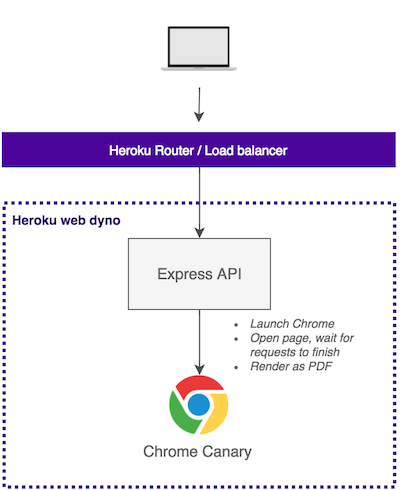
How it works
Local setup is identical except Express API is running on your machine
and requests are direct connections to it.
Good to know
By default, page's @media print CSS rules are ignored. We set Chrome to emulate @media screen to make the default PDFs look more like actual sites. To get results closer to desktop Chrome, add &emulateScreenMedia=false query parameter. See more at Puppeteer API docs.
Chrome is launched with --no-sandbox --disable-setuid-sandbox flags to fix usage in Heroku. See this issue.
Heavy pages may cause Chrome to crash if the server doesn't have enough RAM.
Docker image for this can be found here: https://github.com/restorecommerce/pdf-rendering-srv
Examples
⚠️ Restrictions ⚠️:
For security reasons the urls have been restricted and HTML rendering is disabled. For full demo, run this app locally or deploy to Heroku.
The demo Heroku app runs on a free dyno which sleep after idle. A request to sleeping dyno may take even 30 seconds.
To understand the API options, it's useful to know how Puppeteer
is internally used by this API. The render code
is quite simple, check it out. Render flow:
page.setViewport(options) where options matches viewport.*.
Possiblypage.emulateMedia('screen') if emulateScreenMedia=true is set.
Render url or html.
If url is defined, page.goto(url, options) is called and options match goto.*.
Otherwise page.setContent(html, options) is called where html is taken from request body, and options match goto.*.
Possiblypage.waitFor(numOrStr) if e.g. waitFor=1000 is set.
PossiblyScroll the whole page to the end before rendering if e.g. scrollPage=true is set.
Useful if you want to render a page which lazy loads elements.
Render the output
If output is pdf rendering is done with page.pdf(options) where options matches pdf.*.
Else if output is screenshot rendering is done with page.screenshot(options) where options matches screenshot.*.
GET /api/render
All options are passed as query parameters.
Parameter names match Puppeteer options.
These options are exactly the same as its POST counterpart, but options are
expressed with the dot notation. E.g. ?pdf.scale=2 instead of { pdf: { scale: 2 }}.
The only required parameter is url.
Parameter
Type
Default
Description
url
string
-
URL to render as PDF. (required)
output
string
pdf
Specify the output format. Possible values: pdf , screenshot or html.
emulateScreenMedia
boolean
true
Emulates @media screen when rendering the PDF.
enableGPU
boolean
false
When set, enables chrome GPU. For windows user, this will always return false. See https://developers.google.com/web/updates/2017/04/headless-chrome
ignoreHttpsErrors
boolean
false
Ignores possible HTTPS errors when navigating to a page.
scrollPage
boolean
false
Scroll page down before rendering to trigger lazy loading elements.
waitFor
number or string
-
Number in ms to wait before render or selector element to wait before render.
attachmentName
string
-
When set, the content-disposition headers are set and browser will download the PDF instead of showing inline. The given string will be used as the name for the file.
viewport.width
number
1600
Viewport width.
viewport.height
number
1200
Viewport height.
viewport.deviceScaleFactor
number
1
Device scale factor (could be thought of as dpr).
viewport.isMobile
boolean
false
Whether the meta viewport tag is taken into account.
viewport.hasTouch
boolean
false
Specifies if viewport supports touch events.
viewport.isLandscape
boolean
false
Specifies if viewport is in landscape mode.
cookies[0][name]
string
-
Cookie name (required)
cookies[0][value]
string
-
Cookie value (required)
cookies[0][url]
string
-
Cookie url
cookies[0][domain]
string
-
Cookie domain
cookies[0][path]
string
-
Cookie path
cookies[0][expires]
number
-
Cookie expiry in unix time
cookies[0][httpOnly]
boolean
-
Cookie httpOnly
cookies[0][secure]
boolean
-
Cookie secure
cookies[0][sameSite]
string
-
Strict or Lax
goto.timeout
number
30000
Maximum navigation time in milliseconds, defaults to 30 seconds, pass 0 to disable timeout.
goto.waitUntil
string
networkidle0
When to consider navigation succeeded. Options: load, domcontentloaded, networkidle0, networkidle2. load - consider navigation to be finished when the load event is fired. domcontentloaded - consider navigation to be finished when the DOMContentLoaded event is fired. networkidle0 - consider navigation to be finished when there are no more than 0 network connections for at least 500 ms. networkidle2 - consider navigation to be finished when there are no more than 2 network connections for at least 500 ms.
pdf.scale
number
1
Scale of the webpage rendering.
pdf.printBackground
boolean
false
Print background graphics.
pdf.displayHeaderFooter
boolean
false
Display header and footer.
pdf.headerTemplate
string
-
HTML template to use as the header of each page in the PDF. Currently Puppeteer basically only supports a single line of text and you must use pdf.margins+CSS to make the header appear! See https://github.com/alvarcarto/url-to-pdf-api/issues/77.
pdf.footerTemplate
string
-
HTML template to use as the footer of each page in the PDF. Currently Puppeteer basically only supports a single line of text and you must use pdf.margins+CSS to make the footer appear! See https://github.com/alvarcarto/url-to-pdf-api/issues/77.
pdf.landscape
boolean
false
Paper orientation.
pdf.pageRanges
string
-
Paper ranges to print, e.g., '1-5, 8, 11-13'. Defaults to the empty string, which means print all pages.
pdf.format
string
A4
Paper format. If set, takes priority over width or height options.
pdf.width
string
-
Paper width, accepts values labeled with units.
pdf.height
string
-
Paper height, accepts values labeled with units.
pdf.fullPage
boolean
-
Create PDF in a single page
pdf.margin.top
string
-
Top margin, accepts values labeled with units.
pdf.margin.right
string
-
Right margin, accepts values labeled with units.
pdf.margin.bottom
string
-
Bottom margin, accepts values labeled with units.
pdf.margin.left
string
-
Left margin, accepts values labeled with units.
screenshot.fullPage
boolean
true
When true, takes a screenshot of the full scrollable page.
screenshot.type
string
png
Screenshot image type. Possible values: png, jpeg
screenshot.quality
number
-
The quality of the JPEG image, between 0-100. Only applies when screenshot.type is jpeg.
screenshot.omitBackground
boolean
false
Hides default white background and allows capturing screenshots with transparency.
screenshot.clip.x
number
-
Specifies x-coordinate of top-left corner of clipping region of the page.
screenshot.clip.y
number
-
Specifies y-coordinate of top-left corner of clipping region of the page.
All options are passed in a JSON body object.
Parameter names match Puppeteer options.
These options are exactly the same as its GET counterpart.
Body
The only required parameter is url.
{
  // Url to render. Either url or html is required
  url: "https://google.com",

  // Either "pdf" or "screenshot"
  output: "pdf",

  // HTML content to render. Either url or html is required
  html: "<html><head></head><body>Your content</body></html>",

  // If we should emulate @media screen instead of print
  emulateScreenMedia: true,

  // If we should ignore HTTPS errors
  ignoreHttpsErrors: false,

  // If true, page is scrolled to the end before rendering
  // Note: this makes rendering a bit slower
  scrollPage: false,

  // Passed to Puppeteer page.waitFor()
  waitFor: null,

  // Passsed to Puppeteer page.setCookies()
  cookies: [{ ... }]

  // Passed to Puppeteer page.setViewport()
  viewport: { ... },

  // Passed to Puppeteer page.goto() as the second argument after url
  goto: { ... },

  // Passed to Puppeteer page.pdf()
  pdf: { ... },

  // Passed to Puppeteer page.screenshot()
  screenshot: { ... },
}
HTML to render is sent in body. All options are passed in query parameters.
Supports exactly the same query parameters as GET /api/render, except url
paremeter.
Health check endpoint used for monitoring if the service is still up and running.
curl -XGET http://localhost:9000/healthcheck
Development
To get this thing running, you have two options: run it in Heroku, or locally.
The code requires Node 8+ (async, await).
1. Heroku deployment
Scroll this readme up to the Deploy to Heroku -button. Click it and follow
instructions.
WARNING:Heroku dynos have a very low amount of RAM. Rendering heavy pages
may cause Chrome instance to crash inside Heroku dyno. 512MB should be
enough for most real-life use cases such as receipts. Some news sites may need
even 2GB of RAM.
2. Local development
First, clone the repository and cd into it.
cp .env.sample .env
Fill in the blanks in .env
npm install
npm start Start express server locally
Server runs at http://localhost:9000 or what $PORT env defines
Techstack
Node 8+ (async, await), written in ES7
Express.js app with a nice internal architecture, based on these conventions.
alvarcarto/url-to-pdf-api có 7.1k sao GitHub — tải lại trang để xem số mới nhất, hoặc xem trực tiếp github.com/alvarcarto/url-to-pdf-api. TopGit phản chiếu số sao của GitHub nhưng không cam kết đến từng phút.
alvarcarto/url-to-pdf-api có những chủ đề gì?
GitHub topics của alvarcarto/url-to-pdf-api: "chrome", "headless", "headless-chrome", "heroku", "heroku-button", "html", "invoice", "pdf", "puppeteer", "receipt". TopGit xếp repo vào nhóm Frontend.
alvarcarto/url-to-pdf-api còn đang phát triển không?
Commit gần nhất trên alvarcarto/url-to-pdf-api là 2.6 năm trước (theo timestamp GitHub). Repo có 778 fork — một chỉ báo về mức độ quan tâm của cộng đồng.
alvarcarto/url-to-pdf-api viết bằng ngôn ngữ gì?
alvarcarto/url-to-pdf-api chủ yếu viết bằng HTML. Trường "language" của GitHub dựa trên phần lớn byte ở nhánh mặc định.
Cùng nhóm Frontend còn repo nào?
alvarcarto/url-to-pdf-api thuộc nhóm Frontend trên TopGit, cùng 10 topic GitHub. Trang Trending và Topics liệt kê các repo cùng số sao và cùng ngôn ngữ để so sánh.
Đọc thêm về alvarcarto/url-to-pdf-api ở đâu?
Trang TopGit này là một snapshot — tab "Readme" hiển thị nguyên văn README của repo (đã bỏ link, giữ ảnh). Repo GitHub ở github.com/alvarcarto/url-to-pdf-api là nguồn chính thức.
Vì sao alvarcarto/url-to-pdf-api được xếp vào nhóm Frontend?
TopGit xếp alvarcarto/url-to-pdf-api vào nhóm Frontend dựa trên GitHub topics và mô tả của repo (gắn thẻ: "chrome", "headless", "headless-chrome"). Việc phân loại dựa trên metadata thật của repo, không phải đoán theo cảm tính biên tập.
Đọc đầy đủ README ở tab phía trên.
url-to-pdf-api có đáng để bạn bỏ thời gian?
ChatGPT, Claude và Perplexity đều đọc được trang này. Hỏi thử xem họ nghĩ gì về url-to-pdf-api.
 /url-to-pdf-api