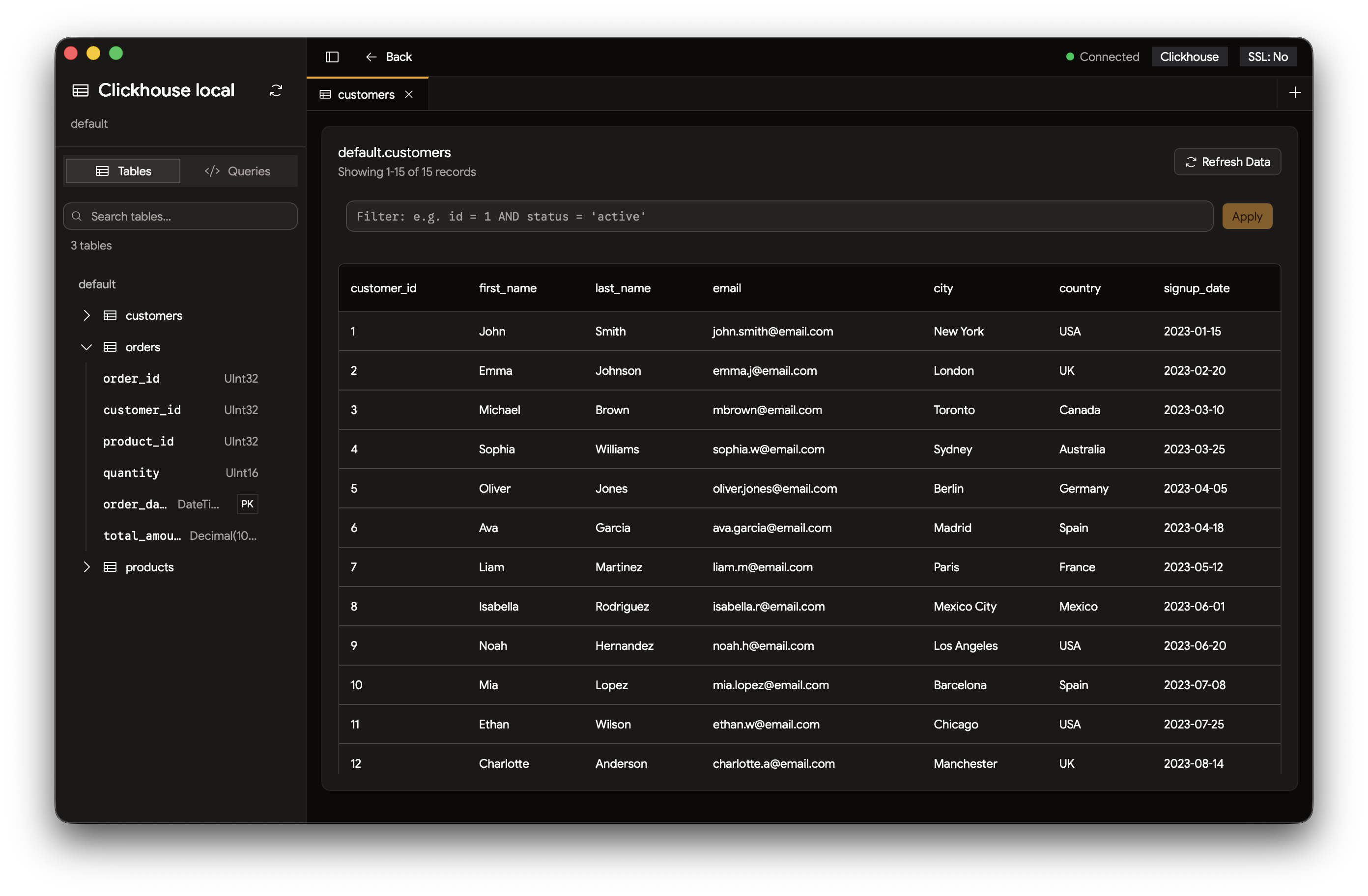
457 GitHub stars and counting — amalshaji/dbcooper is a TypeScript project TopGit is tracking across repositories on the platform. A database client for PostgreSQL, SQLite, Redis, and ClickHouse, built with Tauri, React, and TypeScript.
Snapshot summary built from the project's own GitHub metadata — there's no written TopGit review yet. The page will update automatically when a full review is published.
WHY NO REVIEW YET
TopGit writes full reviews for the most-starred, most-requested repositories. This page is a snapshot until then — see the READ ME tab for the original README in full.
A database client for PostgreSQL, MySQL, MariaDB, MongoDB, SQLite, DuckDB, Redis, ClickHouse, and Cloudflare D1, built with Tauri, React, and TypeScript.
Stable macOS releases are signed and notarized by Apple, so they can be installed
and opened normally without bypassing Gatekeeper.
Features
Check out the full list of features on our documentation site.
Docker databases
From the Connections screen, DBcooper can:
Create PostgreSQL 17, MySQL 8.4, MariaDB 11.4, MongoDB 7.0, Redis 7, or ClickHouse 25.8 in a Docker container and save a ready-to-use connection.
Link a compatible PostgreSQL, MySQL, MariaDB, MongoDB, Redis, or ClickHouse container that already exists in the current Docker context, including Docker Compose services.
Copy the complete connection string for a Docker-managed connection.
Stop and restart the linked container from the connection menu.
Databases created by DBcooper use a persistent named volume. Quitting DBcooper
stops the container without removing the container or its data, and opening the
connection starts it again. Deleting a connection also preserves Docker data
unless you explicitly choose to remove it.
Linking an existing container requires its database port to be published to the
host. DBcooper reads standard image environment variables, including Docker
secret-style *_FILE values, and lets you review the detected connection fields
before saving.
FAQ
Find answers to common questions on our documentation site.
# Install dependencies
bun install

# Run in development mode
bun run tauri dev

# After changing icon.png or src-tauri/macos/AppIcon.png
# regenerate every platform icon and the macOS asset catalog
bun run icons

# Build for production
bun run tauri build

# Test D1 against a disposable local Wrangler database
bun run test:d1-local
MCP server for external agents
DBcooper includes an opt-in, token-authenticated MCP server for external coding agents. See docs/mcp.md for setup and curl examples.
Cloudflare D1
To create a D1 connection:
Open the Cloudflare dashboard Account home, find the account, open its menu, and choose Copy account ID. See Cloudflare's Account ID guide.
Go to My Profile → API Tokens → Create Token → Create Custom Token. Under permissions, choose Account → D1 → Read for browsing and querying, or Edit if DBcooper should edit rows or create tables. Scope the token to the account from step 1. See Cloudflare's API token guide.
Create the token and copy its secret immediately. Cloudflare shows the secret only once, so store it securely.
In New Connection, choose Cloudflare D1, enter the Account ID and token, select Load databases, then choose a database from the list.
The in-app connection form links to the same Cloudflare D1 setup guide.
D1 connections use Cloudflare's HTTPS API directly and do not support SSH tunnels. Cloudflare applies a global API limit of 1,200 requests per five minutes per user; DBcooper surfaces rate-limit responses and does not automatically replay D1 requests. Because the API transports results as JSON, integers outside JavaScript's safe integer range may lose precision when displayed.
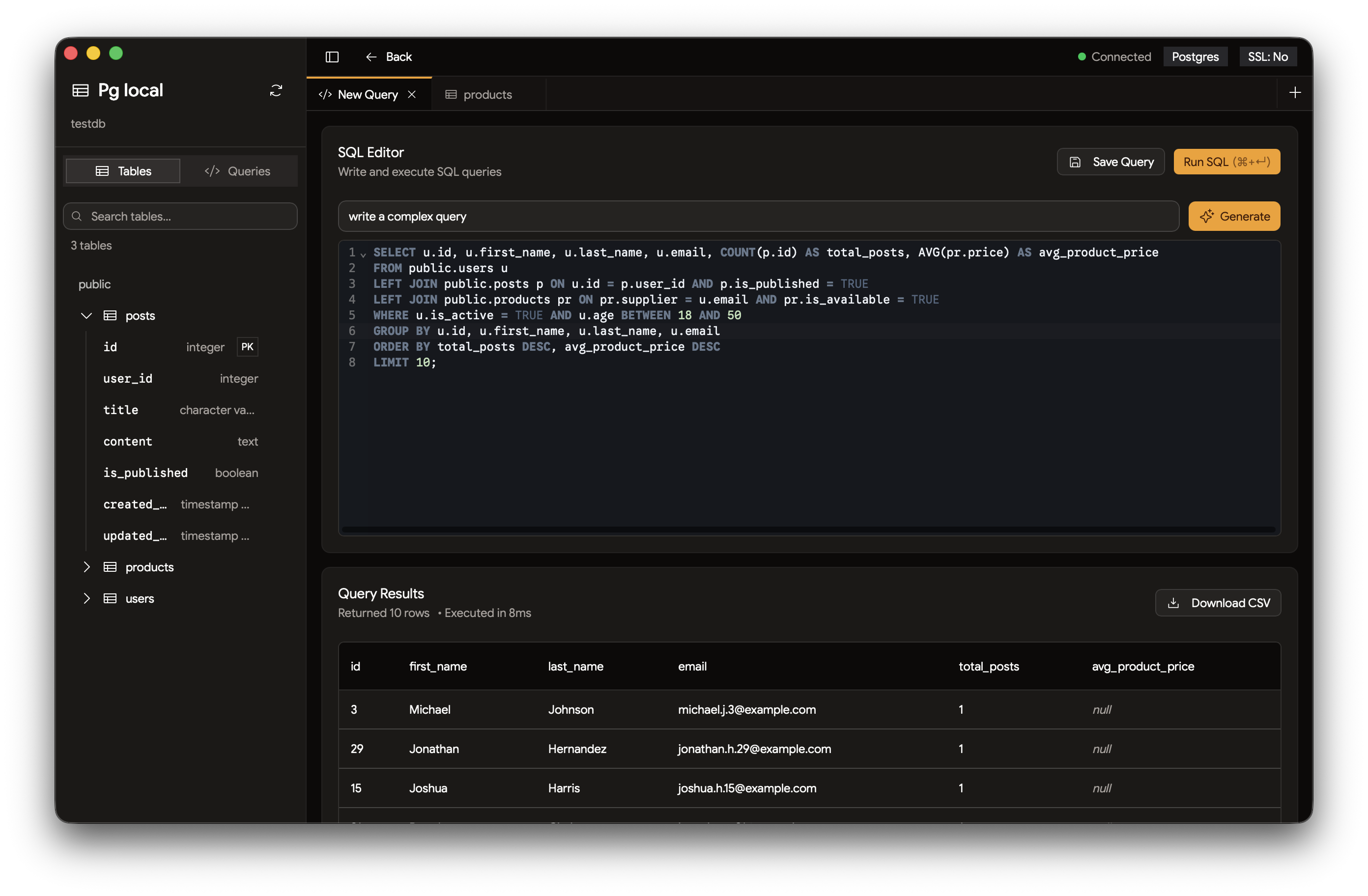
AI SQL Generation
To use AI-powered SQL generation:
Go to Settings (gear icon) and choose an AI provider:
OpenAI-compatible API: configure an API key, endpoint, and model.
Claude Code, Codex CLI, or opencode: DBcooper uses your local CLI install and existing login.
In the Query Editor, you'll see an instruction input above the SQL editor:
Type a natural language description (e.g., "show all users with posts from last week")
Click Generate or press Enter
Review the generated SQL before running it
The AI receives your instruction, existing editor SQL, and selected table/column schema metadata for accurate query generation.
Building
The app is configured to build for macOS ARM (Apple Silicon). The build process:
Creates optimized production bundles
Signs the app with a Developer ID certificate and submits it to Apple for notarization
Staples the notarization ticket to the app bundle
Generates signed updater artifacts
Releases
Releases are automated via GitHub Actions. To publish a new version:
Update version in src-tauri/tauri.conf.json
Prepare the release notes in RELEASE_NOTES.md
Open a focused PR, add the release label, and wait for all checks to pass
Merge the PR into main
Confirm GitHub Actions created the version tag at the release merge commit and built a draft release
Replace the draft's generic body with RELEASE_NOTES.md
Validate the DMG, updater archive, signature, and latest.json, then smoke-test installation and the in-app update from the previous stable version on a clean supported Mac
Publish the draft and verify the Homebrew cask update and a fresh installation or upgrade
Canary releases
Every commit merged into main publishes a signed canary after the test suite
passes. Canary versions use the next patch version with a build suffix, such as
v0.0.64-canary.142.
Canary updates are disabled by default. To receive them, open Settings and enable
Canary updates. Disable the setting to return to the stable channel; if the
installed canary is newer than the latest stable release, DBcooper will wait for
the next newer stable release instead of downgrading.
Required Secrets
Set these in your GitHub repository settings:
APPLE_CERTIFICATE - Base64-encoded Developer ID Application certificate (.p12)
APPLE_CERTIFICATE_PASSWORD - Password for the certificate archive
APPLE_ID - Apple ID used to submit the app for notarization
APPLE_PASSWORD - App-specific password for the Apple ID
APPLE_TEAM_ID - Apple Developer team identifier
TAURI_SIGNING_PRIVATE_KEY - Contents of the Tauri updater signing key file
TAURI_SIGNING_PRIVATE_KEY_PASSWORD - Password for the updater signing key
The most recent commit recorded on amalshaji/dbcooper was 19 days ago, based on the GitHub push timestamp. The repository has 31 forks — one of the better signals of community interest.
How many stars does amalshaji/dbcooper have?
amalshaji/dbcooper has 457 GitHub stars — refresh the page for the live number, or check github.com/amalshaji/dbcooper. TopGit mirrors GitHub's count but does not claim minute-by-minute accuracy.
Is amalshaji/dbcooper open source?
Yes — amalshaji/dbcooper ships under the MIT license, which makes its source code freely readable (and, depending on license terms, forkable and reusable). Source: github.com/amalshaji/dbcooper.
What else is in the Data space?
amalshaji/dbcooper is tracked by TopGit under the Data category, alongside 7 GitHub-tagged topics. Trending and Topics pages list peer repositories of comparable stars and language.
What is amalshaji/dbcooper?
amalshaji/dbcooper (amalshaji/dbcooper) is a TypeScript project on GitHub. From the project's own README: A database client for PostgreSQL, SQLite, Redis, and ClickHouse, built with Tauri, React, and TypeScript.
What language is amalshaji/dbcooper written in?
amalshaji/dbcooper is written primarily in TypeScript. GitHub's language field is based on the largest share of bytes in the default branch.
What license does amalshaji/dbcooper use?
amalshaji/dbcooper is released under the MIT license. Always verify the LICENSE file directly on GitHub for the authoritative terms — license strings can be edited out of sync with a project's actual stance.
Where do I read more about amalshaji/dbcooper?
This TopGit page is a snapshot — the READ ME tab shows the project's own README content (links stripped, images preserved). The GitHub repository at github.com/amalshaji/dbcooper is the definitive source.
Read full README in the tab above.
Is dbcooper worth your time?
ChatGPT, Claude and Perplexity can all read this page. Ask one of them what it makes of dbcooper.

 /dbcooper