ashutosh1919/masterPortfolio — 4.2k★ on GitHub (JavaScript). 🔥 The Complete Customizable Software Developer Portfolio Template which lets you showcase your work and provides each and every detail about you as Software Developer.
Snapshot summary built from the project's own GitHub metadata — there's no written TopGit review yet. The page will update automatically when a full review is published.
WHY NO REVIEW YET
TopGit writes full reviews for the most-starred, most-requested repositories. This page is a snapshot until then — see the READ ME tab for the original README in full.
A clean, beautiful, responsive, and 100% customizable portfolio template for Software Developers!
If you want to discuss about something, you can ask on my Discord Server.
:star: Star us on GitHub — it helps!
Sections 📚
✔️ Summary and About me
✔️ Skills
✔️ Open Source Projects Connected with Github
✔️ Experience
✔️ Certifications 🏆
✔️ Blogs
✔️ Education
✔️ Contact me
✔️ Resume Viewer
To view a live example, click here
Table of Contents
Clone and Use
Customizing
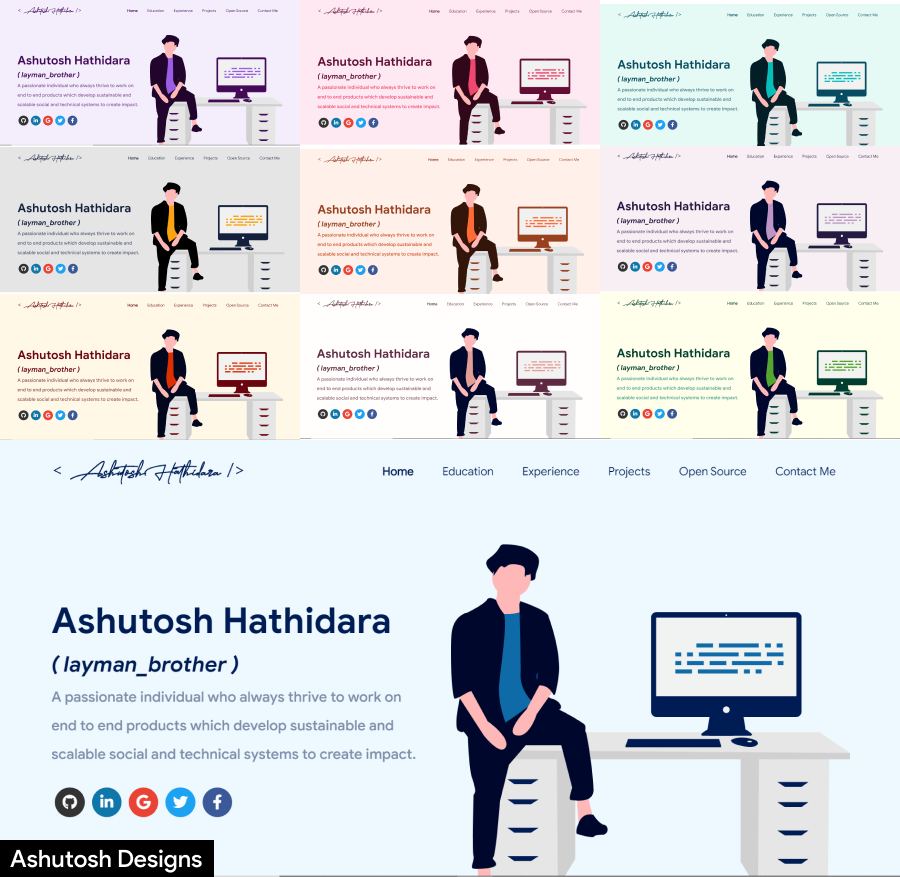
Choose Theme
Deployment
Technologies Used
Illustrations
License
Contributors
References
Clone and Use 📋
The website is completely built on react-js library of javascript and that's why we need nodejs and npm installed
While installing nodejs and npm, try to install versions which are equal or greater than the versions mentioned in badges above
In case you want to help developing it or simply saving it, you can fork the repository just by clicking the button on the top-right corner of this page
After the successful installation of nodejs and npm, clone the repository into your local system using below command:
This will clone the whole repository in your system.
To download required dependencies to your system, navigate to the directory where the cloned repository resides and execute following command:
npm install
Now the project is ready to use
You can check it using npm start, it will open the website locally on your browser.
Customize it to make your own portfolio ✏️
In this project, there are basically 4 things that you need to change to customize this to anyone else's portfolio: package.json, Personal Information, Github Information and Splash Logo.
package.json
Open this file, which is in the main cloned directory, choose any "name" and change "homepage " to https://<your-github-username>.github.io. Do not forget the https://, otherwise fonts will not load.
Personal Information
You will find src/portfolio.js file which contains the complete information about the user. The file looks something like below:
// Home Page
const greeting = {
    ...
}

// Social Media
const socialMediaLinks = {
    ...
}

...
You can change the personal information, experience, education, social media, certifications, blog information, contact information etc. in src/portfolio.js to directly reflect them in portfolio website.
How to change the icons on homepage under what i do section?
This section pulls data from skills in portfolio.js file.
Visit this website: https://icon-sets.iconify.design/
Search for the skill you are looking to add.
Select the icon of your choice.
Copy the text beside Selected Icon and replace it with fontAwesomeClassName of that particular softwareSkill.
How to use custom images instead of Iconify Icons?
Add a valid image file into the public/skills folder
Insert the image name into the imageSrc attribute of the particular softwareSkill
Remove the fontAwesomeClassName property or leave it empty because it takes precedence over imageSrc
Add custom styling to the img using the style Property
How to Change the Icons on Education page under Basic Qualification and Certifications?
The icons for this section are pulled from the competitiveSites array in the portfolio.js file.
Visit the Simple Icons website.
Search for the competitive site you want to add an icon for.
Select the icon you want to use.
Copy the text beside Selected Icon and replace it with iconifyClassname of that particular competitive site.
How to Use Custom Images Instead of Simple Icons for Competitive Sites
Place the custom image file in the public/skills folder.
Update the imageSrc attribute of the corresponding competitive site with the name of your custom image (e.g., imageSrc: "customImage.png").
Remove the iconifyClassname property or leave it empty, as the imageSrc property takes precedence over iconifyClassname.
Optionally, add custom styling to the <img> tag using the style property to adjust size, positioning, etc.
Github Information
You will find git_data_fetcher.mjs file in the main directory of the repository. This file is used to fetch the data (Pull requests, Issues, Organizations, Pinned projects etc.) from your github.
In the project you will see a env.example file, create a new file named .env and copy contents of env.example into it. In that file, you will see the following environment variables
You can get a github token as described here. Give all permissions while generating token. Add your github username and the token generated in GITHUB_USERNAME and GITHUB_TOKEN variables in the .env file.
Now, you need to run following command. (Make sure you executed npm install before this)
Warning: Treat your tokens like passwords and keep them secret. When working with the API, use tokens as environment variables instead of hardcoding them into your programs.
node git_data_fetcher.mjs
This will fetch all the data from your github and it will automatically replace my data with yours.
Whenever you want to update the github related information on the website you need to run this command.
Splash Logo
Note here that if you click my portfolio, you can see animating the logo at the beginning. I have designed that logo in Figma and then animated it using css.
Therefore, this part of portfolio is not customizable. But don't worry we have a solution to this problem. You have below two alternatives:
If you want to design your own logo, then you can design it using Figma or Adobe XD or Adobe Illustrator or Inkscape. If you want to animate it, you can refer to ./src/components/Loader directory which contains js and css files which animates the logo
If you don't want Splash screen or you don't know how to design logo, then this option is for you
You can open src/portfolio.js file and at the top of this file you will see settings component as below:
Now, if you see your website using npm start, it will directly open home rather than animating logo splash screen
If you design your logo in future, then edit the files in ./src/components/Loader and then revert isSplash to true in src/portfolio.js.
Other
You need to change the website title and other descriptions in public/index.html
You can define your own favicon in public/icons directory. If you don't have a favicon, you can generate favicons from Favicon Generator and Favicon IO
You can also edit your website preview (known as description image). Run your site locally, take a screenshot and replace with public/icons/desc.png. Note that your screenshot should be 1280x640 for better preview.
Choose Theme 🌈
You can take a look at src/theme.js file where all available themes are mentioned with their respective color codes
At the bottom of this file you will see the below code:
export const chosenTheme = blueTheme;
You need to change the name from blueTheme to whatever theme you want to set your website to
You can define new theme similarly as other themes and you can assign name of that new defined theme to chosenTheme
That's it. You just need to change the theme name and the code will take care of everything else
Run npm start to check if everything is ok.
Resume 📃
If you want to display your resume, go to the /src/assets/docs/ directory.
Paste your resume there and copy your resume's file name.
Also, keep in mind that your resume must be in A4 size.
Now, go to /src/pages/resume/Resume.js.
In the import section, find:
import myResumePdf from "../../assets/docs/Ashutosh_Hathidara_Resume_ML.pdf"
and replace "Ashutosh_Hathidara_Resume_ML.pdf" with your resume file name.
Launch the project and go to the route /resume to view your resume.
Deployment 📦
Once you are done with your setup and have successfully completed all steps above, you need to put your website online!
I highly recommend using Github Pages to achieve this the EASIEST WAY.
To deploy your website, you have two options. First you need to create a github repository with the name <your-github-username>.github.io. Please don't give it any other name.
Now, you need to generate a production build and deploy the website.
Option 1:
Run npm run build to generate the production build folder.
Enter the build folder, git init and push the generated code to the master branch of your new repository on github. That's it. It's Done.
You may need to git init and force push at every new build.
Option 2 (will not work with user pages):
Run npm run deploy to build and create a branch called gh-pages. It will push the build files to that branch.
The last step in deploying is to enable Github Pages in settings of the repository and select gh-pages branch.
Now, your website is successfully deployed and you can visit it at <your-github-username>.github.io.
If you are stuck somewhere and want to observe the deployment process in depth, then please watch below video.
Technologies used 🛠️
React
graphql
apollo-boost
baseui
react-reveal
styled-components
illustrations 🍥
UnDraw
License 📄
This project is licensed under the MIT License - see the LICENSE.md file for details.
Contributors ✨
Ashutosh Hathidara 💻 📖 🎨 🚧 🤔
Daniel Marostica 📖 🎨
Dinesh Nadimpalli 💻
Jivthesh M R 📖
Jatin Chauhan 💻
Jainam Desai 💻 💬
Miftaul Mannan 💻
Ashutosh Mishra 💻
Tamojit 📖 💻 🎨
Prabin Karki 💻
Praveen Kumar Purushothaman 📖
paul 💻
Sandip Dhang 💻
Jawad Moustadif 💻
Priyansh Khandelwal 💻 🎨
Abdessalam Bahafid 💻
Dhruv Krishna Vaid 💻 📖 🤔 💬
KasRoudra 💻
Albert Einstein 📖
Suraj Pratap 📖
Sai Teja 💻 📖 🚧 🤔
Anirudh Panda 💻
Md Hidayat Rasool 📖
Siddhant Sadangi 📖
Anoop V 💻
Aakash Singh 💻
Angélica Herrera Alba 💻
David Minkovski 🤔 💻
Carmine Di Gruttola 🤔 📣
Vyom Rana 💻
Parth Chawande 💻
Armaan 📖
Varun Dhand 💻
VJS Pranavasri 💻
Rahul Kushwaha 💻
Adam Bouhrara 💻
Ratnesh Kumar 💻 📖
Tobi 📖
SAKSHAM JOSHI 🎨 💻 📖
References 👏🏻
Some Design and Implementation Ideas are taken from Saad Pasta's Portfolio Project.
The Logo of MasterPortfolio is inspired from prettier-logo for prettier designed by @ianstormtaylor.
How does ashutosh1919/masterPortfolio compare to other Frontend projects?
ashutosh1919/masterPortfolio is tracked by TopGit in the Frontend category, with 4.2k GitHub stars and written in JavaScript. Browse the Frontend topic page on TopGit to compare it against similar projects by stars and activity.
Is ashutosh1919/masterPortfolio open source?
Yes — ashutosh1919/masterPortfolio ships under the MIT license, which makes its source code freely readable (and, depending on license terms, forkable and reusable). Source: github.com/ashutosh1919/masterPortfolio.
What else is in the Frontend space?
ashutosh1919/masterPortfolio is tracked by TopGit under the Frontend category, alongside 20 GitHub-tagged topics. Trending and Topics pages list peer repositories of comparable stars and language.
What is ashutosh1919/masterPortfolio?
ashutosh1919/masterPortfolio (ashutosh1919/masterPortfolio) is a JavaScript project on GitHub. From the project's own README: 🔥 The Complete Customizable Software Developer Portfolio Template which lets you showcase your work and provides each and every detail about you as Software Developer.
Where do I read more about ashutosh1919/masterPortfolio?
This TopGit page is a snapshot — the READ ME tab shows the project's own README content (links stripped, images preserved). The GitHub repository at github.com/ashutosh1919/masterPortfolio is the definitive source.
Why is ashutosh1919/masterPortfolio categorized under Frontend?
TopGit places ashutosh1919/masterPortfolio in the Frontend category based on its GitHub topics and description (tagged: "best-portfolio-website", "best-website", "css3"). Categories are assigned from real repository metadata, not editorial guesswork.
Read full README in the tab above.
Want a second opinion on masterPortfolio?
Ask an AI that can read this page — one click and you get its take on masterPortfolio.

 /masterPortfolio