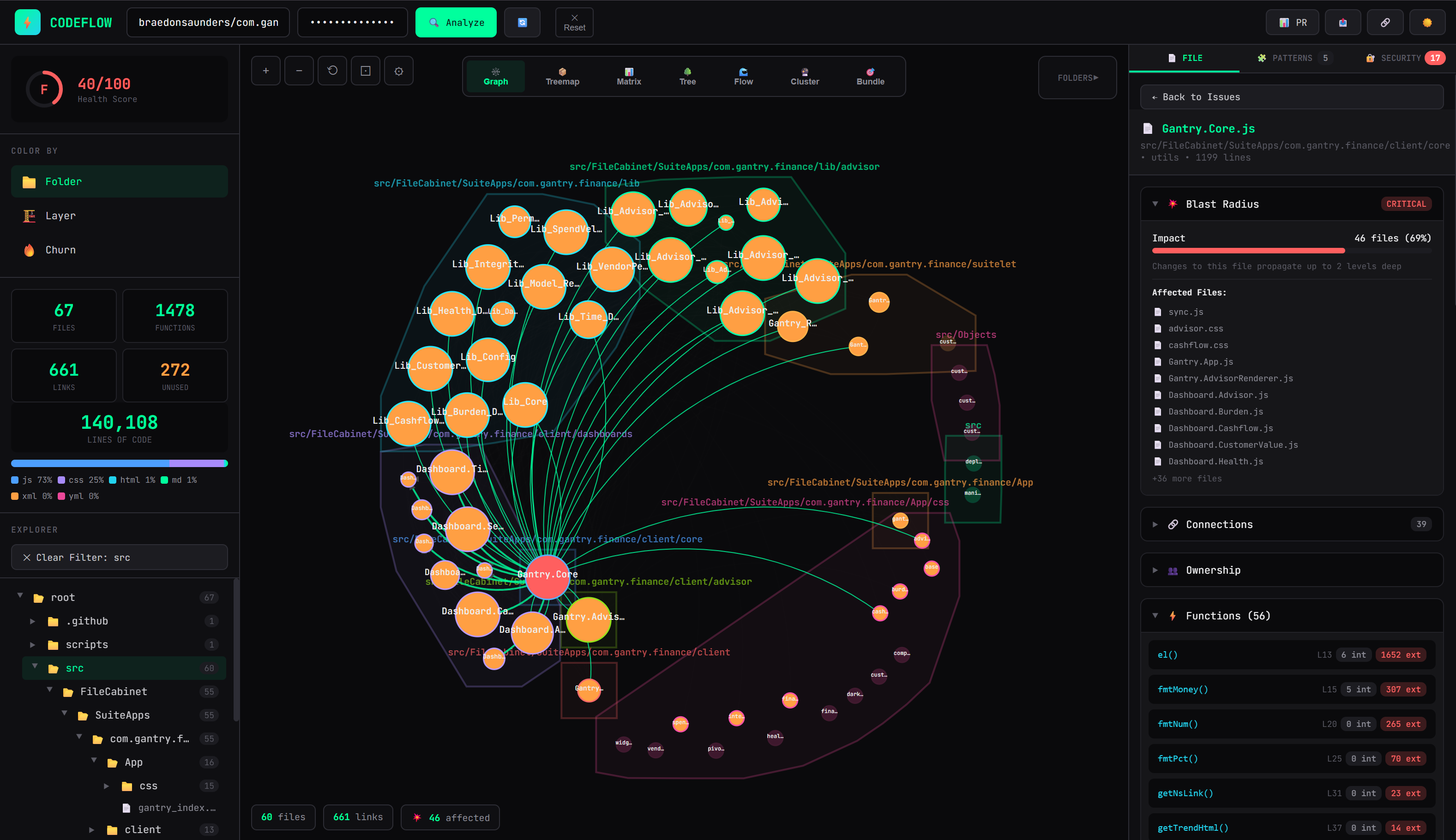
braedonsaunders/codeflow is an open-source project on GitHub with 4.9k stars, written primarily in HTML. Paste any GitHub URL → interactive architecture map. See how files connect, find what breaks if you change something. No install, no accounts — runs entirely in your browser.
Snapshot summary built from the project's own GitHub metadata — there's no written TopGit review yet. The page will update automatically when a full review is published.
WHY NO REVIEW YET
TopGit writes full reviews for the most-starred, most-requested repositories. This page is a snapshot until then — see the READ ME tab for the original README in full.
Zero setup. No installation. Just paste a GitHub URL.
Try it Now · Report Bug · Request Feature
Why CodeFlow?
Ever opened a new codebase and felt completely lost? CodeFlow turns any GitHub repository or local codebase into an interactive architecture map in seconds.
No installation required — runs entirely in your browser
No data collection — your code never leaves your machine
No accounts — just paste a URL or select local files and go
Works offline — analyze local files without internet
Paste URL / Select Files -> See Architecture -> Make Better Decisions
Features
Interactive Dependency Graph
See how your files connect at a glance. Click any node to highlight its dependencies. Drag, zoom, and explore.
Blast Radius Analysis
"If I change this file, what breaks?" — CodeFlow answers this instantly. Select any file and see exactly how many files would be affected by changes.
Code Ownership
Know who owns what. See the top contributors for any file based on git history. Perfect for code reviews and knowing who to ask.
Security Scanner
Automatic detection of:
Hardcoded secrets & API keys
SQL injection vulnerabilities
Dangerous eval() usage
Debug statements in production code
Test files, fixtures, docs/, and common tooling directories (.github/, .claude/, scripts/) are excluded from the XSS/shell-execution checks, since findings there don't reflect the shipped product's attack surface. The hardcoded-secret check exempts only tests, fixtures, and docs: CI workflows, hooks, and deploy scripts are executable code, so a real credential there is still a real leak.
Pattern Detection
Automatically identifies:
Singleton patterns
Factory patterns
Observer/Event patterns
React custom hooks
Anti-patterns (God Objects, high coupling)
Health Score
Get an instant A-F grade for your codebase based on:
Dead code percentage
Circular dependencies
Coupling metrics
Security issues
Activity Heatmap
Color files by commit frequency to see which parts of your codebase are most actively developed.
PR Impact Analysis
Paste a PR URL to see exactly which files it affects and calculate the blast radius of proposed changes.
CodeFlow Card (GitHub Action)
Health grade, scale, fragility, and hidden costs as a self-updating SVG on your README — recomputed every merge, with optional thermal-receipt PR comments. See card/.
Markdown & Wiki-Link Graph
Point CodeFlow at an Obsidian vault or any markdown directory to see notes as a connected graph. Both [[wiki-links]] and [text](./relative.md) links become edges; each note is a note-layer node (distinct color) with a dependencies[] array in the JSON export.
Local File Analysis
Analyze code directly from your computer without uploading to GitHub:
Privacy First: Your code never leaves your machine
Offline Support: Works without internet connection
Drag & Drop: Simply drag files or folders to analyze
Exclude Patterns: Skip attachments, caches, generated assets, and other irrelevant paths before scanning
Instant Results: All processing happens in your browser
CodeFlow Card
A GitHub Action that drops an auto-updating SVG card on your README, recomputed on every merge by the same analyzer as the web app. Five styles, accent presets, opt-in PR receipts, and a privacy mode for public repos. The card adapts to the viewer's light/dark theme automatically.
See card/ for setup, or jump to the style gallery below.
Privacy First
Your code stays on your machine. CodeFlow:
Runs 100% in the browser
Makes API calls directly from your browser to GitHub
Never stores your code or tokens
Works with private repos (just add your token locally)
No analytics or tracking
Your GitHub token (if used) is only stored in your browser's memory and is cleared when you close the tab.
Quick Start
Option 1: Use Online (Recommended)
Just visit CodeFlow and paste any GitHub URL.
Option 2: Self-Host
# Clone the repo
git clone https://github.com/braedonsaunders/codeflow.git

# That's it! Just open index.html in your browser
open index.html
No build process. No npm install. Clone the whole repository: index.html loads pinned,
checked-in browser dependencies from vendor/, so a fresh local launch works without a network connection.
Option 3: Analyze Local Files
You can now analyze code directly from your local machine without uploading to GitHub:
Open CodeFlow in your browser
Click the "Open Folder" button
Select the folder or files you want to analyze
CodeFlow will process them entirely in your browser
Perfect for:
Private projects you don't want to upload
Offline development
Quick local analysis before committing
Working with sensitive code
Usage
Public Repositories
Just paste: facebook/react
Or full URL: https://github.com/facebook/react
Private Repositories
Create a GitHub Personal Access Token with repo scope
Paste it in the Token field
Analyze your private repos
Local Files
Click the "Open Folder" button to analyze code from your computer:
Folder Analysis: Select a folder to analyze all supported files recursively
File Selection: Choose specific files to analyze
Drag & Drop: Drag files or folders directly onto the page
Custom Excludes: Add patterns like uploads/**, **/cache/**, or *.png before scanning
Generated dependencies, caches, build output, local worktrees, and test artifacts are pruned automatically (for example node_modules, .next, .turbo, .local, dist, and playwright-report). Individual files over 2 MB remain visible in results but their contents are not parsed.
All processing happens locally in your browser - nothing is uploaded.
Shareable Links
After analysis, click the "Share" button to copy a shareable link. Anyone can re-run the same analysis.
Export Reports
Export your analysis in multiple formats for further processing:
JSON Report - Complete analysis data including:
Repository metadata and health score
All files with functions, dependencies, and churn data
Complete function statistics with callers and usage metrics
Security issues, patterns, and architecture issues
Duplicate code detection and layer violations
Suggestions and recommendations
Language breakdown and folder structure
Perfect for programmatic analysis, CI/CD integration, or custom reporting tools.
Markdown Report - Human-readable formatted report
Plain Text Report - Simple text format
SVG Image - Export the dependency graph visualization
PDF Document - Export the dependency graph as a printable PDF
Raw JSON - Simplified data export
Click the "Export" button in the top bar after analysis to access all export options.
Supported Languages
CodeFlow extracts functions and analyzes dependencies for:
Language
Extensions
JavaScript
.js, .jsx
TypeScript
.ts, .tsx
HTML (inline scripts)
.html, .htm, .xhtml
Python
.py
Java
.java
Go
.go
Ruby
.rb
PHP
.php
Vue
.vue
Svelte
.svelte
Rust
.rs
C
.c, .h
C++
.cpp, .cc, .cxx, .hpp, .hh, .hxx
C#
.cs
Swift
.swift
Kotlin
.kt, .kts
Scala
.scala, .sc
Groovy
.groovy, .gvy
Elixir
.ex, .exs
Erlang
.erl, .hrl
Haskell
.hs, .lhs
Lua
.lua
R
.r, .R
Julia
.jl
Dart
.dart
Perl
.pl, .pm
Shell
.sh, .bash, .zsh, .fish
PowerShell
.ps1, .psm1, .psd1
F#
.fs, .fsi, .fsx
OCaml
.ml, .mli
Clojure
.clj, .cljs, .cljc
Elm
.elm
VBA
.vba, .bas, .cls, .xlsm, .xlsb, .xlam
Delphi / FreePascal / Object Pascal
.pas, .pp, .dpr, .dpk, .lpr, .inc
Pascal support is heuristic. It recognizes routines and uses unit dependencies while filtering
strings and Pascal comment forms; unsupported language features fall back gracefully.
Visualization Modes
Mode
Description
Folder
Color by directory structure
Layer
Color by architectural layer (UI, Services, Utils, etc.)
Churn
Color by commit frequency (hot spots)
Blast
Color by impact when a file is selected
Keyboard Shortcuts
Key
Action
Enter
Analyze repository
+ / -
Zoom in/out
Escape
Close modal
API Limits
GitHub API has rate limits:
Without token: 60 requests/hour
With Personal Access Token: 5,000 requests/hour
With GitHub App: 5,000 requests/hour per installation
Authentication Methods
Personal Access Token (PAT)
Create a GitHub Personal Access Token with repo scope
Paste it in the Token field
Analyze your private repos
GitHub App Authentication
For teams and organizations, GitHub App provides better security and higher rate limits:
Create a GitHub App with repository permissions
Install the app on your organization or personal account
Generate an installation access token
Paste the token in the Token field
Benefits of GitHub App:
Fine-grained permissions control
Revocable access per installation
Higher rate limits (5,000 requests/hour)
Audit logging and security monitoring
No need to share personal credentials
For larger repositories or team usage, we recommend using GitHub App authentication.
Zero build dependencies to install. Browser libraries and required Tree-sitter WASM files are
pinned under vendor/, with source URLs, SHA-256 digests, and license notices. To refresh them:
node scripts/vendor-browser-deps.mjs
The vendored runtime includes:
React 18
D3.js 7
Babel (for JSX)
Contributing
We love contributions! Here's how:
Fork the repo
Make your changes to index.html
Test locally (just open in browser)
Submit a PR
Node.js unit tests live under tests/ and run with no dependencies:
node --test tests/*.test.mjs tests/*.smoke.js
tests/verify-brain-vault.mjs is an optional end-to-end script that always verifies the bundled fixtures and will also scan a real local vault when you explicitly set BRAIN_VAULT=/path/to/vault.
Ideas for Contributions
Add support for more languages
Improve function extraction regex
Add more design pattern detection
Export to different formats (PNG, PDF)
Add code complexity metrics
FAQ
Q: How does it work without a backend?
CodeFlow runs entirely in your browser. It calls the GitHub API directly from your browser and processes everything client-side.
Q: Is my code safe?
Yes. Your code is fetched directly from GitHub to your browser. Nothing is sent to any server we control. The app and its pinned browser dependencies are checked into this repository for inspection.
Q: Can I use it offline?
Yes. Clone the complete repository, open index.html, then use the local file analysis feature. All required browser and parser assets are checked in, so even a cold first load works without internet. GitHub URL analysis still requires access to GitHub's API.
Q: Why is analysis slow?
We make individual API calls for each file to get content. With a token, you get higher rate limits and faster analysis.
Q: How accurate is the dependency analysis?
It's heuristic: unique functions are matched by name, while duplicate function names are scoped by file and explicit imports before edges are created. It may still miss dynamic imports or renamed runtime references, so it's designed for a quick overview, not 100% accuracy.
Card Style Gallery
All examples below are real cards rendered by the CodeFlow Card Action against this very repo. Pick one and drop it on your README.
style: compact — default
style: compact with show-grade: false, show-score: false
For public READMEs where you'd rather show data than a letter grade. The card stays informational — files, functions, LOC, languages, tests — without the judgmental bits.
accent — any preset or CSS color
The accent recolors the sparklines, links, and pin. Presets: purple (default), teal, cyan, green, pink, blue, amber, red. Or pass any CSS color (e.g. #ff6b6b).
style: row — status-bar strip
style: minimal — single text line
style: hero — splashy gradient
hero with show-grade: false:
style: detailed — information-rich
Everything: grade, scale, language breakdown, composition (connections, tests, folders, function stats, patterns), top folders, fragility, hidden costs.
detailed with show-grade: false:
Star History
If you find CodeFlow useful, please star the repo.
How active is development on braedonsaunders/codeflow?
The most recent commit recorded on braedonsaunders/codeflow was 14 days ago, based on the GitHub push timestamp. The repository has 742 forks — one of the better signals of community interest.
How many stars does braedonsaunders/codeflow have?
braedonsaunders/codeflow has 4.9k GitHub stars — refresh the page for the live number, or check github.com/braedonsaunders/codeflow. TopGit mirrors GitHub's count but does not claim minute-by-minute accuracy.
Is braedonsaunders/codeflow open source?
Yes — braedonsaunders/codeflow ships under the MIT license, which makes its source code freely readable (and, depending on license terms, forkable and reusable). Source: github.com/braedonsaunders/codeflow.
What is braedonsaunders/codeflow?
braedonsaunders/codeflow (braedonsaunders/codeflow) is a HTML project on GitHub. From the project's own README: Paste any GitHub URL → interactive architecture map. See how files connect, find what breaks if you change something. No install, no accounts — runs entirely in your browser.
Where do I read more about braedonsaunders/codeflow?
This TopGit page is a snapshot — the READ ME tab shows the project's own README content (links stripped, images preserved). The GitHub repository at github.com/braedonsaunders/codeflow is the definitive source.
Read full README in the tab above.
Want a second opinion on codeflow?
Ask an AI that can read this page — one click and you get its take on codeflow.
 /codeflow