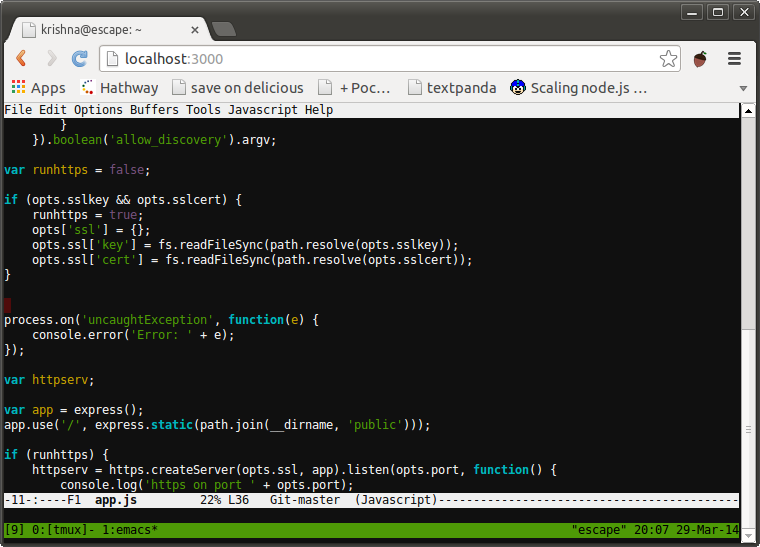
butlerx/wetty is one of the API-first repositories TopGit tracks, currently at 5.5k stars, written primarily in TypeScript. Terminal in browser over http/https. (Ajaxterm/Anyterm alternative, but much better)
Snapshot summary built from the project's own GitHub metadata — there's no written TopGit review yet. The page will update automatically when a full review is published.
WHY NO REVIEW YET
TopGit writes full reviews for the most-starred, most-requested repositories. This page is a snapshot until then — see the READ ME tab for the original README in full.
Terminal over HTTP and https. WeTTY is an alternative to ajaxterm and anyterm
but much better than them because WeTTY uses xterm.js which is a full fledged
implementation of terminal emulation written entirely in JavaScript. WeTTY uses
websockets rather than Ajax and hence better response time.
Prerequisites
node ^22.23.4 || ^24.22.1 || >=26.12.1 — only the Node lines that carry the
fix for the Brotli decoder RCE (CVE-2026-111497); 18, 20, 23 and 25 are EOL
and never get it
make
python
build-essential
Install
npm -g i wetty
Usage
$ wetty --help
Options:
  --help, -h              Print help message                            [boolean]
  --version               Show version number                           [boolean]
  --conf                  config file to load config from                [string]
  --ssl-key               path to SSL key                                [string]
  --ssl-cert              path to SSL certificate                        [string]
  --ssh-host              ssh server host                                [string]
  --ssh-port              ssh server port                                [number]
  --ssh-user              ssh user                                       [string]
  --title                 window title                                   [string]
  --ssh-auth              defaults to "password", you can use
                          "publickey,password" instead                   [string]
  --ssh-pass              ssh password                                   [string]
  --ssh-key               path to an optional client private key
                          (connection will be password-less and
                          insecure!)                                     [string]
  --ssh-config            Specifies an alternative ssh configuration
                          file. For further details see "-F" option in
                          ssh(1)                                         [string]
  --force-ssh             Connecting through ssh even if running as
                          root                                          [boolean]
  --known-hosts           path to known hosts file                       [string]
  --base, -b              base path to wetty                             [string]
  --port, -p              wetty listen port                              [number]
  --host                  wetty listen host                              [string]
  --socket                Make wetty listen on unix socket               [string]
  --command, -c           command to run in shell                        [string]
  --allow-iframe          Allow wetty to be embedded in an iframe,
                          defaults to allowing same origin              [boolean]
  --allow-remote-hosts    Allow wetty to use the host and port params
                          in a url as ssh destination                   [boolean]
  --allow-remote-command  Allow wetty to use the command and path
                          params in a url as command and working
                          directory on ssh host                         [boolean]
  --ping-interval         Milliseconds between Socket.IO heartbeat
                          pings sent to the client                       [number]
  --ping-timeout          Milliseconds to wait for a Socket.IO
                          heartbeat pong before considering the
                          connection dead                                [number]
  --allowed-origin        Required trusted browser origin allowed to
                          connect to Socket.IO. Repeat for multiple
                          origins; also accepts ALLOWEDORIGINS            [array]
  --log-level             set log level of wetty server                  [string]
Start WeTTY with an explicit trusted browser origin (required):
wetty --allowed-origin http://yourserver:3000
Open your browser on http://yourserver:3000 and you will be prompted to login.
Or go to http://yourserver:3000/ssh/<username> to specify the user beforehand.
For local use, configure http://localhost:3000 instead. Behind a reverse
proxy, configure the public HTTPS origin, not the internal backend address.
Origins never include the base path. Repeat --allowed-origin or set a
comma-separated ALLOWEDORIGINS list to allow multiple origins.
If you run it as root it will launch /bin/login (where you can specify the
user name), else it will launch ssh and connect by default to localhost. The
SSH connection can be forced using the --force-ssh option.
If instead you wish to connect to a remote host you can specify the --ssh-host
option, the SSH port using the --ssh-port option and the SSH user using the
--ssh-user option.
Check out the Flags docs for a full
list of flags
Docker container
To use WeTTY as a docker container, a docker image is available on
docker hub. To run this image, use
docker run --rm -p 3000:3000 -e ALLOWEDORIGINS=http://localhost:3000 wettyoss/wetty --ssh-host=<YOUR-IP>
and you will be able to open a ssh session to the host given by YOUR-IP under
the URL http://localhost:3000.
It is recommended to drive WeTTY behind a reverse proxy to have HTTPS security
and possibly Let’s Encrypt support. Popular containers to achieve this are
nginx-proxy and
traefik. For traefik there is an example
docker-compose file in the containers directory.
FAQ
Check out the docs
Running as daemon
HTTPS Support
Using NGINX
Using Apache
Automatic Login
Downloading Files
What browsers are supported?
WeTTY supports all browsers that
xterm.js supports.
How does butlerx/wetty compare to other API projects?
butlerx/wetty is tracked by TopGit in the API category, with 5.5k GitHub stars and written in TypeScript. Browse the API topic page on TopGit to compare it against similar projects by stars and activity.
Is butlerx/wetty open source?
Yes — butlerx/wetty ships under the MIT license, which makes its source code freely readable (and, depending on license terms, forkable and reusable). Source: github.com/butlerx/wetty.
What else is in the API space?
butlerx/wetty is tracked by TopGit under the API category, alongside 9 GitHub-tagged topics. Trending and Topics pages list peer repositories of comparable stars and language.
What is butlerx/wetty?
butlerx/wetty (butlerx/wetty) is a TypeScript project on GitHub. From the project's own README: Terminal in browser over http/https. (Ajaxterm/Anyterm alternative, but much better)
Where do I read more about butlerx/wetty?
This TopGit page is a snapshot — the READ ME tab shows the project's own README content (links stripped, images preserved). The GitHub repository at github.com/butlerx/wetty is the definitive source.
Why is butlerx/wetty categorized under API?
TopGit places butlerx/wetty in the API category based on its GitHub topics and description (tagged: "ajaxterm", "anyterm", "hacktoberfest"). Categories are assigned from real repository metadata, not editorial guesswork.
Read full README in the tab above.
Curious whether wetty is right for you?
Let ChatGPT, Claude, or Perplexity look into it — click below and see what AI actually says about wetty.

 /wetty