cactus-compute/needle
 cactus-compute/needle
A look at cactus-compute/needle: 5.6k stars on GitHub, written primarily in Python. 14MB foundation model for tiny devices; phones, wearables, smart home, and robots.
Snapshot summary built from the project's own GitHub metadata — there's no written TopGit review yet. The page will update automatically when a full review is published.
TopGit writes full reviews for the most-starred, most-requested repositories. This page is a snapshot until then — see the READ ME tab for the original README in full.
Snapshot
Top contributors
Show top contributors

Needle 2
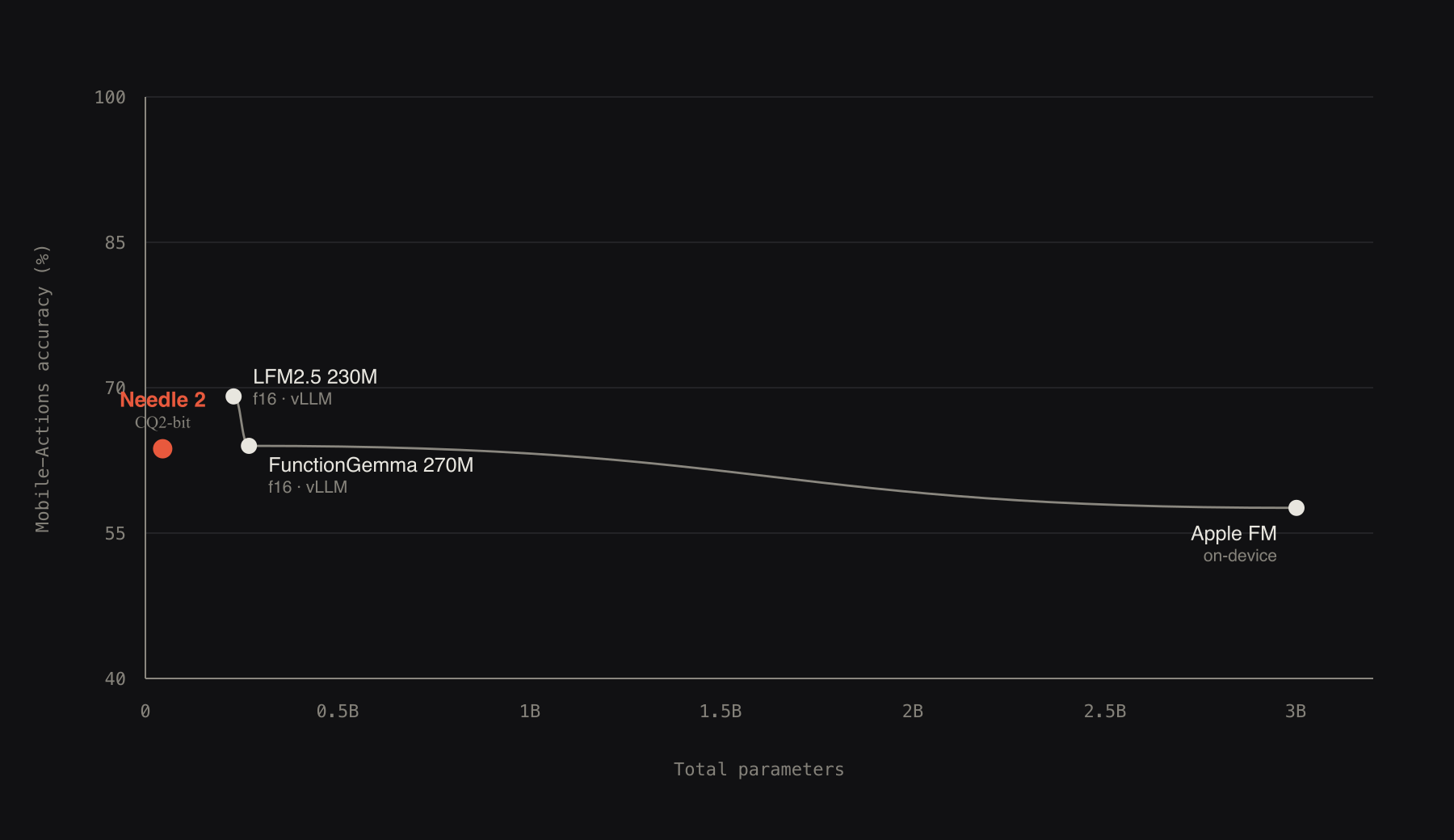
Needle 2 is an open 45M-parameter model for tool calling, device use and structured extraction. The whole model is a single 14MB binary that runs a full session in about 28MB of RAM. It is built on our Simple Attention Network findings, compressed to CQ2-bit with Cactus Quants, and baked into its own engine. On the benchmarks below, Needle 2 trades wins with other small models like FunctionGemma 270M, LFM2.5 230M and Apple FM, at 5x to 70x smaller, and 2 bits against their f16.
This repository is the Python package: inference, LoRA fine-tuning, and export. pip install cactus-needle, describe your tools, and call them from Python. The inference engine is fetched once from Hugging Face and cached; there is nothing else to build.
- Self-contained: weights baked into a single 14MB engine; no separate model files to manage, and inference does no network.
- Simple contract: tool calls come back as structured data, text in, JSON out; a byte-level grammar compiled from your schemas constrains every token.
- Confidence-gated: every response carries a calibrated confidence score from a learned head; set a threshold, act above it, escalate below it.
- Tool retrieval: declare a large catalogue and a built-in retrieval head renders only the top five tools per turn, with the grammar constrained to that subset.
- Bounded memory: a 256-token sliding window with the tools pinned as KV sinks, so total memory stays near 28MB no matter how long the conversation runs.
Weights: huggingface.co/Cactus-Compute/needle2 · source: github.com/cactus-compute/needle.
Simple Attention Network
Needle 2 is a Simple Attention Network, our dense small-model recipe: a Hadamard MLP in place of the FFN, GQA attention, engram key-value memory, and multi-lane hyper-connections. See the paper for the design and ablations: arXiv:2607.18363.
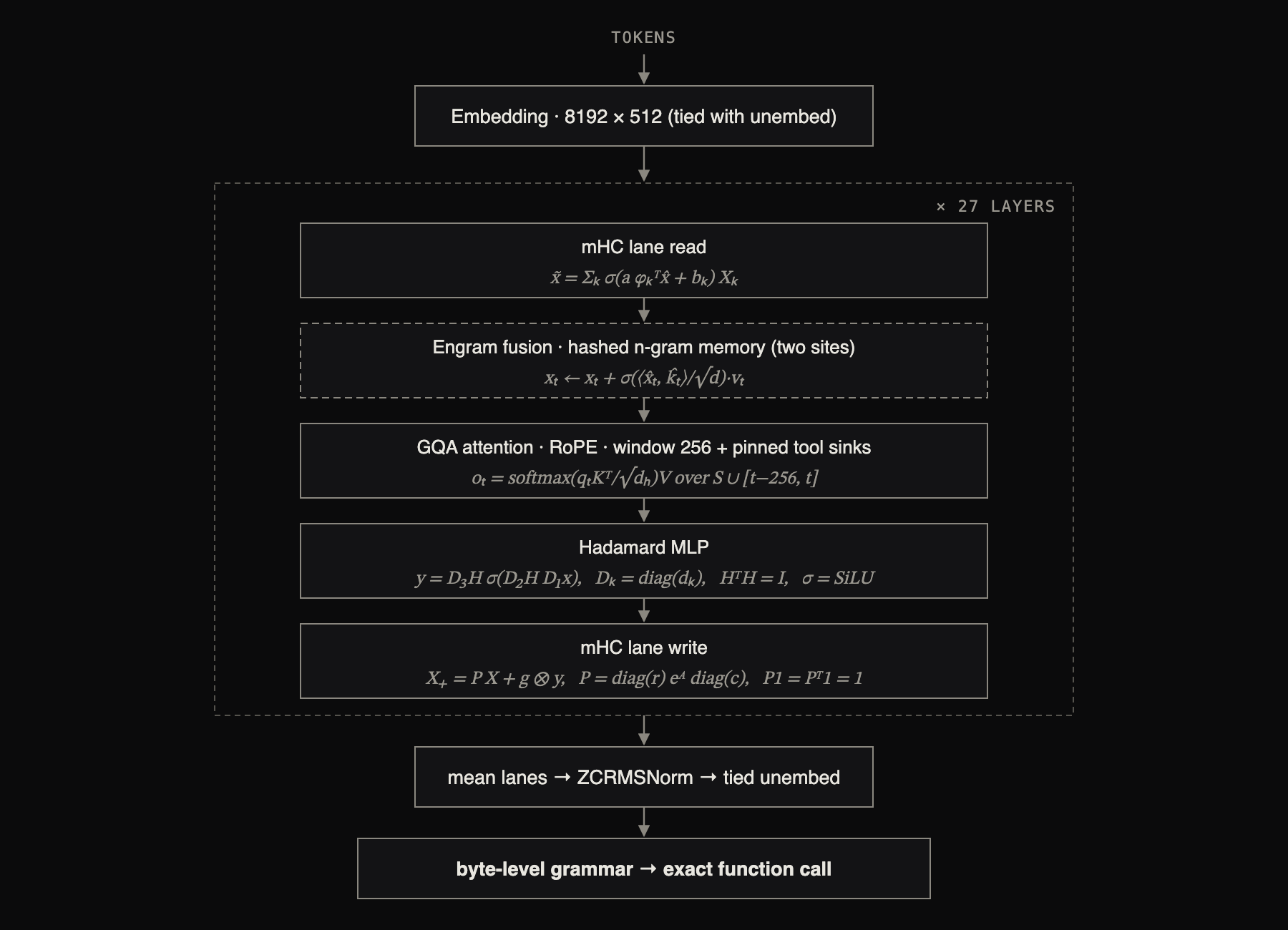
Each block carries its update rule. Here x̂ is the RMS-normalised flattening of the four residual streams, H the orthonormal Walsh-Hadamard transform (a fixed matrix, applied in n log n time with no weights to read), (kₜ, vₜ) rows gathered from hashed n-gram tables, and P the doubly-stochastic normalisation of the routing logits A, computed by Sinkhorn iteration; a, b, g and all σ-gates are learned and input-dependent. Both attention and MLP residuals are sandwich-normed and gated, the engram sites fire at two layers, and decoding is constrained by a byte-level grammar compiled from the declared schemas.
Quickstart
pip install cactus-needle
Needle reads your tool descriptions to decide what to call and how to fill arguments, so describing them well is the whole game. You can do it three ways, from least to most control.
Simple: decorate a function. The signature gives the argument types, the docstring is the tool description, and run() completes the loop: model picks the call, Needle executes your function, feeds the result back, and returns the final response with the executed tool results attached as results.
import needle

@needle.tool
def get_weather(city: str):
    "Get the current weather for a city."
    return {"city": city, "temp_c": 27, "sky": "clear"}

agent = needle.Needle(tools=[get_weather])
print(agent.run("what's it like in Lagos right now?")["results"])
# [{'city': 'Lagos', 'temp_c': 27, 'sky': 'clear'}]
Medium: describe each argument and offer choices. Needle reads a Google-style Args: block for per-parameter descriptions; a default makes an argument optional; a Literal becomes a fixed set the model must choose from (it cannot emit anything else).
from typing import Literal

@needle.tool
def set_thermostat(temperature: int, mode: Literal["heat", "cool", "auto"] = "auto"):
    """Set the thermostat.

    Args:
        temperature: target temperature in Celsius
        mode: heating strategy to use
    """
    return {"temperature": temperature, "mode": mode}

agent = needle.Needle(tools=[set_thermostat])
agent.run("make it 21 and cool the room")
Advanced: constrain the values with needle.Field, attached inline via Annotated. Ranges, patterns, lengths, and item counts are compiled into the decode grammar, so the model can only ever emit values that satisfy them.
from typing import Annotated

@needle.tool
def send_money(
    amount: Annotated[float, needle.Field(gt=0, le=10000, description="USD, up to 10,000")],
    to:     Annotated[str,   needle.Field(pattern=r"^@[a-z0-9_]+$", description="recipient handle")],
    memo:   Annotated[str,   needle.Field(max_length=80)] = "",
):
    "Send money to a handle."
    return {"sent": amount, "to": to}
Field supports description, enum, const, ge/le/gt/lt, multiple_of, min_length/max_length, pattern, format, min_items/max_items, and unique_items.
Extraction: to pull structured data out of text, declare the shape and call extract(). Pass a Pydantic model and you get a typed object back.
from pydantic import BaseModel

class Invoice(BaseModel):
    vendor: str
    total: float
    due_date: str

invoice = needle.extract("Invoice from Acme Corp, $1,200.00, due 2026-09-01", Invoice)
print(invoice.vendor, invoice.total)   # -> Acme Corp 1200.0
By hand - the decorator just builds a JSON schema; you can pass that schema directly, which is exactly what Needle consumes. This is how you set descriptions and constraints without the decorator:
tools = [{
    "name": "set_lights",
    "description": "Turn a room's lights on or off and set brightness",
    "parameters": {
        "type": "object",
        "properties": {
            "room": {"type": "string", "description": "which room to control"},
            "on": {"type": "boolean"},
            "brightness": {"type": "integer", "minimum": 0, "maximum": 100},
        },
        "required": ["room", "on"],
    },
}]
agent = needle.Needle(tools=tools)
Prefer to drive the loop yourself instead of run()? complete() returns the raw call and you execute it:
import json
response = agent.complete("dim the living room to 30")
if response["type"] == "call":
    result = set_lights(**response["function_calls"][0]["arguments"])
    response = agent.complete(json.dumps(result))   # feed the result back
With a large catalogue, persist tool embeddings across runs with needle.Needle(tools=..., tool_index_path="tools.idx"). Every turn returns one JSON object:
{
  "type": "call",
  "success": true,
  "error": null,
  "error_code": null,
  "function_calls": [ { "name": "set_lights", "arguments": { "room": "living room", "on": true, "brightness": 30 } } ],
  "reasoning": "'living room' -> room; 'dim' -> on true, brightness 30",
  "confidence": 0.94,
  "prefill_tps": 4300.0,
  "decode_tps": 850.0
}
Playground
Try any model in the browser: pick a preset, edit the tools or prompt, and Run. Follow-up queries continue the same conversation.
needle playground                      # base model, http://127.0.0.1:7860
needle playground --weights my.cact    # a tuned model
The server downloads and initializes the model before serving, so the first query is instant. The Finetune on these tools button runs the fine-tuning pipeline below from the UI and hands back a downloadable .cact.
Behaviour
Needle solves every problem as a function call. The context declares what may be called; the model answers with calls. Performing an action and extracting structured data are the same operation, the only difference is what you declare.
- A request no declared tool can serve is refused with the empty call
[]. That is the whole contract for off-topic input; there is no free-text fallback. - Arguments contain only values evidenced by the input. An optional field with no evidence is omitted, not guessed; omission is the field-level
[]. reasoningis the model's short derivation of each argument from its source span ('ten minutes' -> minutes 10). It is generated unconstrained; only the call itself is grammar-constrained, so the JSON cannot be malformed while the derivation stays legible.- After you execute a call, pass the result back as the next
complete(). The model continues from it, and later arguments may depend on earlier results:search_for_contactfirst, thensend_instant_messagewith the returnedcontact_id. A final"type": "respond"with emptyfunction_callssignals the loop is done; the answer is the tool results themselves, whichrun()collects on the final response asresults. No free text is generated. - A session shares one toolset. Later turns are bare queries against the same tools;
reset()rewinds the conversation and keeps the tools loaded.
Extraction
Extraction is not a separate mode - it is tool calling with one tool. Declare the record as the only schema and pass the content where the query goes; the returned call's arguments are the extracted fields. With one declared tool the grammar admits exactly one call of that name, so schema conformance is guaranteed rather than requested. Use the extract() helper for a typed result (shown in Quickstart), or pass a plain schema and read the call:
receipt = [{
    "name": "receipt",
    "description": "A purchase receipt shared as text",
    "parameters": {
        "type": "object",
        "properties": {
            "merchant": {"type": "string"},
            "total": {"type": "number"},
            "currency": {"type": "string"},
            "line_items": {"type": "array", "items": {"type": "object"}},
        },
        "required": ["merchant", "total"],
    },
}]
agent = needle.Needle(tools=receipt)
print(agent.complete("GreenMart receipt: oat milk 3.50, total 7.75 paid by visa")["function_calls"])
# -> [{"name": "receipt", "arguments": {"merchant": "GreenMart", "total": 7.75}}]
Because it is the same operation, everything else applies unchanged: confidence gates the extraction, unsupported input returns the empty call [], and fine-tuning uses the same data format (the record as the tool, the passage as the query).
System facts
An optional system turn carries environment state as facts, never instructions:
agent = needle.Needle(tools=tools, system="date: 2026-07-21 Tue 14:30; locale: en-US; device: phone; battery: 62%")
Recognized keys are date, locale, device, battery, network, location, user, and assistant. The model resolves relative language against them: "tomorrow at 7" becomes an absolute time only when a date: fact licenses it, otherwise the human phrase passes through verbatim. assistant: declares the identity the model binds to. Needle trains with and without the turn, so omitting it is safe; instructions placed there do not steer the model.
Tool retrieval
Five or fewer declared tools render directly. Above that, retrieval engages: at init every tool schema is embedded once by a built-in contrastive head, each turn embeds the query, and only the five highest-scoring tools enter the context, with the grammar rebuilt over just that subset. An unselected tool is unreachable, not merely unlikely. tool_index_path persists the embeddings on disk, keyed by a fingerprint over the schemas and the model; a matching fingerprint loads instantly, a changed schema re-embeds only what changed.
Confidence
The confidence field is the minimum of two signals: a calibrated post-hoc head that scores the full prompt plus the call the model just produced, and the decoding probability of the call tokens. A call is accepted only when both agree, so the failure mode is escalation, not wrong execution. The contract: pick a threshold for your product, act at or above it, re-ask or route to a bigger model below it. Off-topic requests return the empty call [].
Fine-tuning
Needle fine-tunes with LoRA on the frozen base and merges the adapter at export, so a run is cheap and the tuned model is still a single .cact that runs on the same engine. The workflow is: (optionally) synthesize data, LoRA fine-tune, then build a tuned .cact.
Data format. A JSONL file, one example per line. reasoning is optional; an off-topic example has answers: [].
{"query": "dim the kitchen to 10", "tools": [{"name": "set_lights", "parameters": {"type": "object", "properties": {"room": {"type": "string"}, "brightness": {"type": "integer"}}, "required": ["room"]}}], "answers": [{"name": "set_lights", "arguments": {"room": "kitchen", "brightness": 10}}], "reasoning": "'kitchen' -> room; 'dim to 10' -> brightness 10"}
1. Synthesize data (optional). Needs OPENROUTER_API_KEY. Seed from a tool schema file, or expand an existing set:
export OPENROUTER_API_KEY=sk-or-...
needle generate-data --tools my_tools.json --num-samples 500 --output data.jsonl
needle generate-data --augment data.jsonl --num-samples 500      # expand an existing JSONL
2. LoRA fine-tune. The base checkpoint auto-downloads from Hugging Face if you do not pass --checkpoint. --generate N first synthesizes N more examples from the tools in your data (also needs OPENROUTER_API_KEY).
needle finetune data.jsonl --epochs 3
needle finetune data.jsonl --epochs 3 --generate 300 --lora-rank 16 --lora-alpha 32
Key options: --lora-rank (default 16), --lora-alpha (32), --lr (1e-4), --batch-size (16), --max-len (1024), --checkpoint <base.pkl>, --out <adapter.pkl>. The adapter is written to checkpoints/needle_lora.pkl.
3. Build a tuned .cact. Merge the adapter into the base and quantize. The base auto-downloads if absent.
needle build checkpoints/needle2.pkl --lora checkpoints/needle_lora.pkl --out my_needle.cact
Add --bits 2 (default 4) for a smaller model, or set NEEDLE_HF_REPO=<you>/<model> and pass --upload to publish the .cact.
4. Run it. The engine is weights-agnostic, so a tuned .cact runs on it directly - no recompilation:
import needle
agent = needle.Needle(weights="my_needle.cact", tools=[...])
agent.run("...")
Citation
Needle 2 is built by the Cactus Compute team. If you use it in your work, please cite:
@misc{needle2_2026,
  title        = {Needle 2: A 45M-Parameter Foundation Tool-Calling Model for Tiny Devices},
  author       = {Ndubuaku, Henry and Mosoyan, Karen and Mroz, Jakub and Cylich, Noah and
                  Kumar, Satyajit and Sandhu, Parkirat and Shemet, Roman and Lee, Justin H.},
  year         = {2026},
  organization = {Cactus Compute, Inc.},
  howpublished = {\url{https://github.com/cactus-compute/needle}}
}
Reach out on [email protected] for partnerships, collaborations, synergies and deploying Needle2 in your product.
Related repositories
ECC is an MIT-licensed system from affaan-m/ECC that installs into AI coding agent harnesses such as Claude Code, Codex, and several others, adding skills, specialized agents, persistent memory, and AgentShield security scanning around whatever large language model the harness already runs. The README positions it as developer productivity tooling for LLM agent development and agent performance tuning rather than a code generation tool itself, composing around whichever model the harness already calls.
The agent harness performance optimization system. Skills, instincts, memory, security, and research-first development for Claude Code, Codex, Opencode, Cursor and beyond.
Hermes Agent (NousResearch/hermes-agent) is an open-source, self-improving AI agent from Nous Research, written in Python and released under the MIT license. The README describes a closed learning loop, a terminal UI, and a messaging gateway spanning Telegram, Discord, Slack, WhatsApp, and Signal, plus support for running the agent on a VPS, a GPU cluster, or serverless infrastructure.
AutoGPT is an open-source platform designed for building, deploying, and running AI agents that can carry out complete workflows. Users can define tasks in plain English or use a visual builder to shape each step. The project offers two primary paths: a managed, hosted AutoGPT Platform that handles infrastructure and model access for a fee, and a self-hosting option that is free but requires users to provide their own infrastructure and model API keys. Agents can run on demand, on schedules, or from triggers, connecting to over 45 platforms and hundreds of AI models. It's presented as a tool to automate various functions, from executive operations and sales research to marketing campaign drafts and incident triage in engineering.
Quick answers
How active is development on cactus-compute/needle?
The most recent commit recorded on cactus-compute/needle was 10 days ago, based on the GitHub push timestamp. The repository has 373 forks — one of the better signals of community interest.
Is cactus-compute/needle open source?
Yes — cactus-compute/needle ships under the MIT license, which makes its source code freely readable (and, depending on license terms, forkable and reusable). Source: github.com/cactus-compute/needle.
What license does cactus-compute/needle use?
cactus-compute/needle is released under the MIT license. Always verify the LICENSE file directly on GitHub for the authoritative terms — license strings can be edited out of sync with a project's actual stance.
What topics is cactus-compute/needle associated with?
GitHub's repository topics for cactus-compute/needle: "cactus", "gemini", "gemma", "llm", "on-device-ai". TopGit's editorial category is open-source.
Where can I see cactus-compute/needle in action?
The project maintains a homepage at https://cactuscompute.com. The README tab on this page also usually contains screenshots and a quickstart.
Where do I read more about cactus-compute/needle?
This TopGit page is a snapshot — the READ ME tab shows the project's own README content (links stripped, images preserved). The GitHub repository at github.com/cactus-compute/needle is the definitive source.
Read full README in the tab above.
Want a second opinion on needle?
Ask an AI that can read this page — one click and you get its take on needle.