calimarkus/JDStatusBarNotification is a Swift project with 4.3k stars in the Mobile space. Highly customizable & feature rich notifications. Interactive dismiss. Custom Views. SwiftUI. Tap-to-hold. Progress. Written in Swift, compatible for ObjC!
Snapshot summary built from the project's own GitHub metadata — there's no written TopGit review yet. The page will update automatically when a full review is published.
WHY NO REVIEW YET
TopGit writes full reviews for the most-starred, most-requested repositories. This page is a snapshot until then — see the READ ME tab for the original README in full.
Highly customizable & feature rich notifications displayed below the status bar / notch / Island. Written in Swift, compatible for Obj-C! Please open a Github issue, if you think anything is missing or wrong.
Customizable colors, fonts & animations with multiple built-in styles
Interactive & interuptable Drag-to-Dismiss
Adaptive, dynamic layout
Built-in pill-style or full-width layouts
Pill width matches the presented text (customizable)
Works on notch and no-notch devices
Works in landscape & portrait
Built-in features (automatic layout):
Title, subtitle and left-hand-views (e.g. Icons)
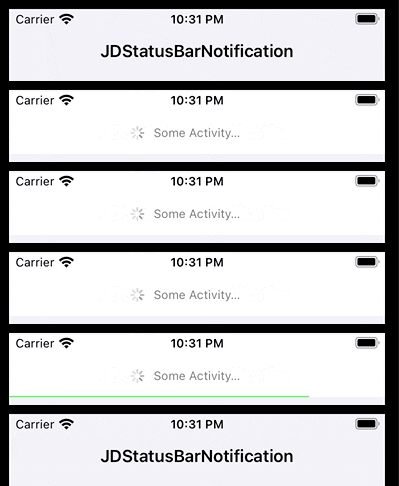
An activity indicator
A progress bar
Custom views (UIView or SwiftUI View)
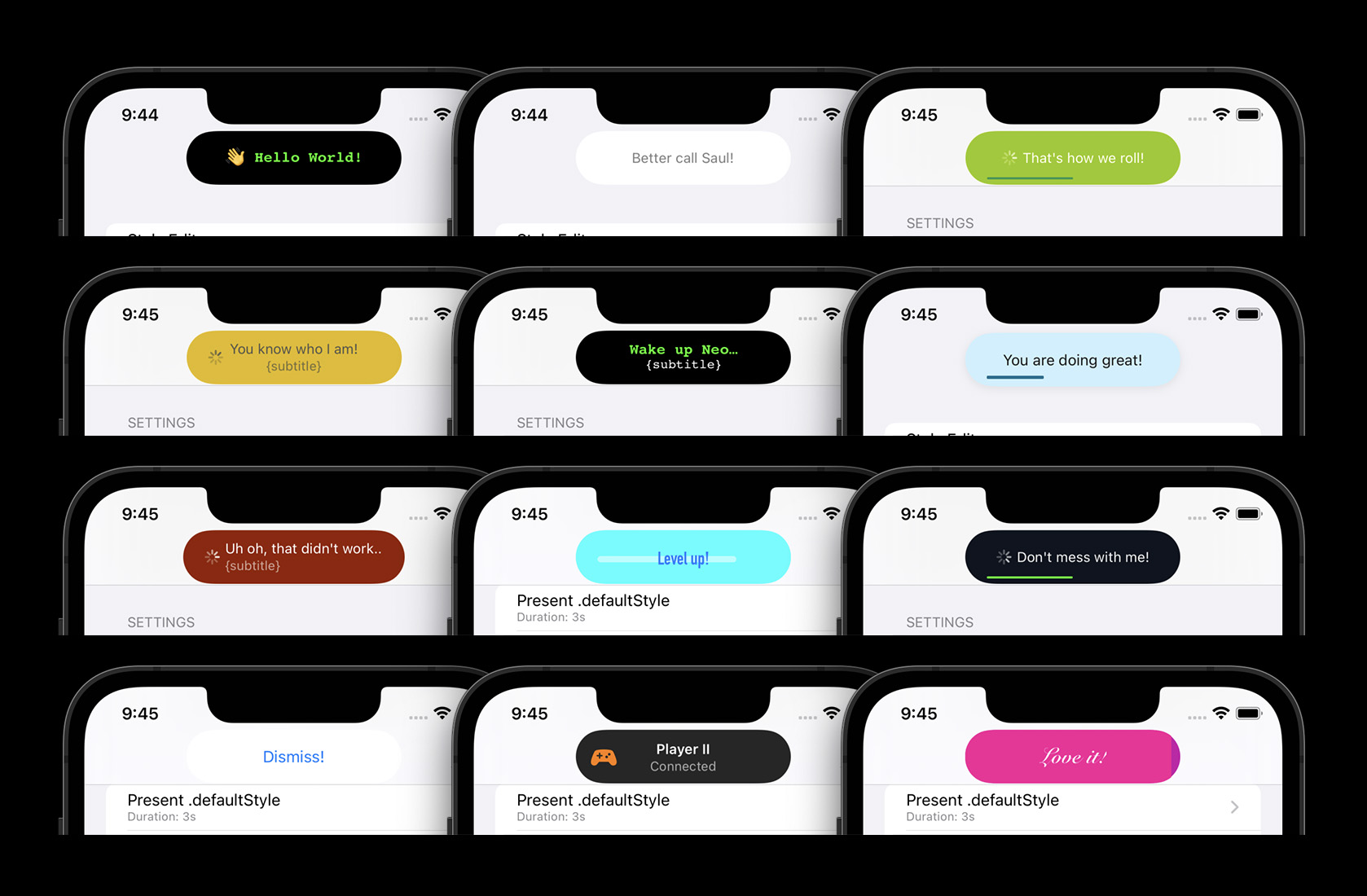
Some examples of the possibilities - the pill style is the default:
Full-Width styles in action - the above pill style supports the same features and animations:
Copy the JDStatusBarNotification/JDStatusBarNotification folder into your project.
Documentation
Find the class documentation hosted on Github.
Changelog
See CHANGELOG.md
Getting started
All examples here are written in Swift. But everything can be called from Objective-C too. Also checkout the example project, which has many examples and includes a convenient style editor to build a custom style.
SwiftUI state-driven presentation
Showing a simple text notification
var body: some View {
    Button("Present/dismiss") {
      isPresented.toggle()
    }
    .notification(title: "Hello World", isPresented: $isPresented)
}
Showing a styled notification with subtitle, activity and/or progress
var body: some View {
    Button("Present/dismiss") {
      isPresented.toggle()
    }
    .notification(title: "A text",
                  subtitle: "with a little subtitle.",
                  isPresented: $isPresented,
                  isShowingActivity: $activity, // toggles an activity indicator on/off
                  progress: $progress,          // sets the percentage of a progress bar
                  includedStyle: .success)      // picks a predefined style
}
Showing a custom view as notification
var body: some View {
    Button("Present/dismiss") {
      isPresented.toggle()
    }
    .notification(isPresented: $isPresented) {
      Text("👋 Hi there!")
        .font(.subheadline)
        .foregroundStyle(.white)
    }
}
Manual presentation (from Swift or ObjC)
Showing a text notification
NotificationPresenter.shared.present("Hello World")

// with completion
NotificationPresenter.shared.present("Hello World") { presenter in
    // ...
}
Dismissing a notification
NotificationPresenter.shared.dismiss()

// with completion
NotificationPresenter.shared.dismiss(after: 0.5) { presenter in
   // ...
}
NotificationPresenter.shared.present("Animating Progress…") { presenter in
  presenter.animateProgressBar(to: 1.0, duration: 0.75) { presenter in
    presenter.dismiss()
  }
}

// or set an explicit percentage manually (without animation)
NotificationPresenter.shared.displayProgressBar(at: 0.0)
Using other included styles
There's a few included styles you can easily use with the following API:
NotificationPresenter.shared.present("Yay, it works!",
                                     includedStyle: .success)
Showing a custom SwiftUI view (Swift only)
NotificationPresenter.shared.presentSwiftView {
    Text("Hi from Swift!")
}

// with completion
NotificationPresenter.shared.presentSwiftView {
    Text("Hi from Swift!")
} completion: { presenter in
   // ...
}
Using a custom UIView (Swift or ObjC)
If you want full control over the notification content and styling, you can use your own custom UIView.
// present a custom view
let button = UIButton(type: .system, primaryAction: UIAction { _ in
  NotificationPresenter.shared.dismiss()
})
button.setTitle("Dismiss!", for: .normal)
NotificationPresenter.shared.presentCustomView(button)
Light Mode
Dark Mode
Customization
You have the option to easily create & use fully customized styles.
From SwiftUI
Modify the style in a NotificationStyleClosure:
var body: some View {
    Button("Present/dismiss") {
      isPresented.toggle()
    }
    .notification(isPresented: $isPresented, style: {
      let s = $0.backgroundStyle
      s.backgroundColor = .black
      s.pillStyle.minimumWidth = 150
      s.pillStyle.height = 44
    }) {
      Text("👋 Hi there!")
        .font(.subheadline)
        .foregroundStyle(.white)
    }
}
Manually
The PrepareStyleClosure provides a copy of the default style, which can then be modified. See the StatusBarNotificationStyle API for all options.
// update default style
NotificationPresenter.shared.updateDefaultStyle { style in
   style.backgroundStyle.backgroundColor = .red
   style.textStyle.textColor = .white
   style.textStyle.font = UIFont.preferredFont(forTextStyle: .title3)
   // and many more options
   return style
}

// set a named custom style
NotificationPresenter.shared.addStyle(named: "xxx") { style in
   // ...
   return style
}
Style Editor
Or checkout the example project, which contains a full style editor. You can tweak all customization options within the app, see the changes live and even export the configuration code for the newly created style to easily use it in your app.
Background Styles
There's two supported StatusBarNotificationBackgroundType's:
enum {
    /// The background is a floating pill around the text.
    /// The pill size and appearance can be customized. This is the default.
    .pill,

    /// The background covers the full display width and the full status bar + navbar height.
    .fullWidth
}
Animation Types
The supported StatusBarNotificationAnimationType's:
enum {
    /// Slide in from the top of the screen and slide
    /// back out to the top. This is the default.
    .move,

    /// Fade-in and fade-out in place. No movement animation.
    .fade,

    /// Fall down from the top and bounce a little bit, before
    /// coming to a rest. Slides back out to the top.
    .bounce
}
Troubleshooting
No notifications are showing up
If your app uses a UIWindowScene the NotificationPresenter needs to know about it before you present any notifications.
The library attempts to find the correct WindowScene automatically, but that might fail. If it fails no notifications will show up at all. You can explicitly set the window scene to resolve this:
How active is development on calimarkus/JDStatusBarNotification?
The most recent commit recorded on calimarkus/JDStatusBarNotification was 1.9 years ago, based on the GitHub push timestamp. The repository has 563 forks — one of the better signals of community interest.
How many stars does calimarkus/JDStatusBarNotification have?
calimarkus/JDStatusBarNotification has 4.3k GitHub stars — refresh the page for the live number, or check github.com/calimarkus/JDStatusBarNotification. TopGit mirrors GitHub's count but does not claim minute-by-minute accuracy.
What language is calimarkus/JDStatusBarNotification written in?
calimarkus/JDStatusBarNotification is written primarily in Swift. GitHub's language field is based on the largest share of bytes in the default branch.
What license does calimarkus/JDStatusBarNotification use?
calimarkus/JDStatusBarNotification is released under the MIT license. Always verify the LICENSE file directly on GitHub for the authoritative terms — license strings can be edited out of sync with a project's actual stance.
What topics is calimarkus/JDStatusBarNotification associated with?
Where can I see calimarkus/JDStatusBarNotification in action?
The project maintains a homepage at http://calimarkus.github.io/JDStatusBarNotification/documentation/jdstatusbarnotification. The README tab on this page also usually contains screenshots and a quickstart.
Where do I read more about calimarkus/JDStatusBarNotification?
This TopGit page is a snapshot — the READ ME tab shows the project's own README content (links stripped, images preserved). The GitHub repository at github.com/calimarkus/JDStatusBarNotification is the definitive source.
Read full README in the tab above.
Curious whether JDStatusBarNotification is right for you?
Let ChatGPT, Claude, or Perplexity look into it — click below and see what AI actually says about JDStatusBarNotification.

 /JDStatusBarNotification