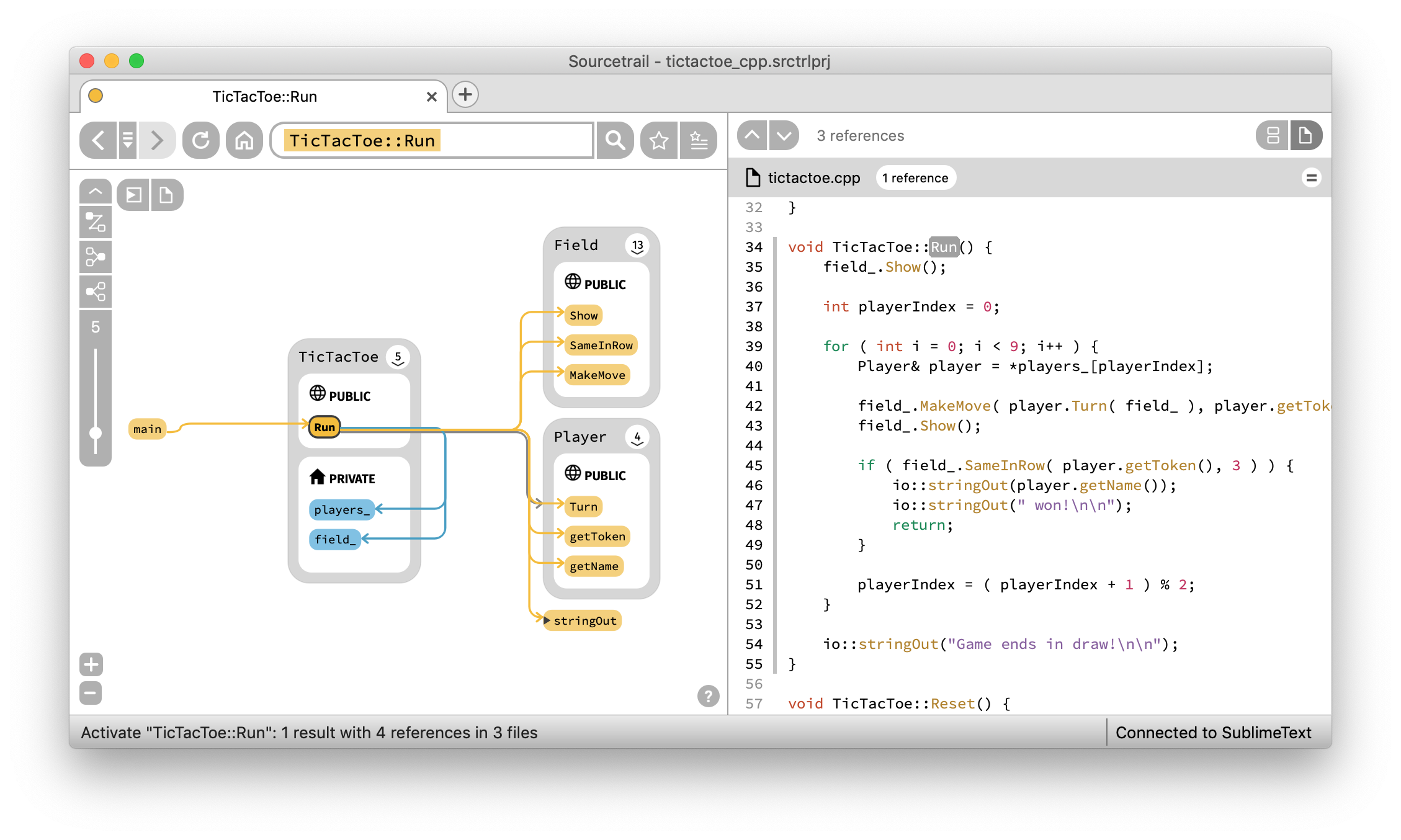
CoatiSoftware/Sourcetrail is a server-side project on GitHub with 16.5k stars, written primarily in C++. Sourcetrail - free and open-source interactive source explorer
Snapshot summary built from the project's own GitHub metadata — there's no written TopGit review yet. The page will update automatically when a full review is published.
WHY NO REVIEW YET
TopGit writes full reviews for the most-starred, most-requested repositories. This page is a snapshot until then — see the READ ME tab for the original README in full.
Important Note: This project was archived by the original autors and maintainers of Sourcetrail by the end of 2021. If you want to know more about this decision, read more on our blog.
Sourcetrail is a free and open-source cross-platform source explorer that helps you get productive on unfamiliar source code.
Windows:
Linux:
Links
Download
Quick Start Guide
Documentation
Changelog
Sourcetrail is:
free
working offline
operating on Windows, macOS and Linux
supporting C, C++, Java and Python
offering an SDK (SourcetrailDB) to write custom language extensions
Sourcetrail on Patreon
The open-source development and regular software releases are made possible entirely by the support of these awesome patrons!
Using Sourcetrail
To setup Sourcetrail on your machine, you can either download the respective build for your operating system from our list of Releases and install it on your machine, or use one of the following package managers:
Use the Chocolatey package with choco install sourcetrail
After your installation is complete, follow our Quick Start Guide to get to know Sourcetrail.
How to Report Issues
You can post all your feature requests and bug reports on our issue tracker.
Reporting
Use the following template:
platform version:
Sourcetrail version:
description of the problem:
steps to reproduce the problem:
Supporting
If you want to support a certain feature request or you have the same bug that another user already reported, please let us know:
Please read and follow the steps in CONTRIBUTING.md file.
You may want to look out for issues labeled good first issue to find some initial tasks to tackle.
If you are looking for more information about Sourcetrail software development, please refer to our wiki.
How to Build
Building Sourcetrail requires several dependencies to be in place on your machine. However, our CMake based setup allows to disable indexing support for specific languages which reduces the number of dependencies to a minimum.
Building the Base Application
Required Tools
CMake v3.12 (required for Windows, Linux and MacOS)
Reason: Used to generate a build configuration for your build system
Download: https://cmake.org/download
Git (required for Windows, Linux and MacOS)
Reason: Used for version control and to automatically generate the Sourcetrail version number from commits and tags
Download: https://git-scm.com/download
Remarks: Make sure git is added to your PATH environment variable before running CMake
$ git clone https://github.com/CoatiSoftware/Sourcetrail.git
$ cd Sourcetrail
$ mkdir -p build/win64
$ cd build/win64
$ cmake -G "Visual Studio 15 2017 Win64" -DBOOST_ROOT=<path/to/boost_1_67_0> -DQt5_DIR=<path/to/Qt/version/platform/compiler/lib/cmake/Qt5> ../..
Hint: If you are using the CMake GUI, we recommend that you activate advanced mode. Also you may be required to add some of the defines via the "Add Entry" button.
After generating the build configuration, just open the Sourcetrail.sln file that was generated by CMake and build the Sourcetrail project.
On Unix
To set up your build environment run:
$ cd Sourcetrail
$ mkdir -p build/Release
$ cd build/Release
$ cmake -DCMAKE_BUILD_TYPE="Release" -DBOOST_ROOT=<path/to/boost_1_67_0> -DQt5_DIR=<path/to/Qt/version/platform/compiler/lib/cmake/Qt5> ../..
Now start the build with:
$ make Sourcetrail
Running
Run Sourcetrail from within the build directory. During execution Sourcetrail needs resources from bin/app/data and bin/app/user. CMake creates symlinks within the build directory that make these directories accessible.
Enable C/C++ Language Support
Required dependencies
LLVM/Clang 11.0.0
Reason: Used for running the preprocessor on the indexed source code, building and traversing an Abstract Syntax Tree and generating error messages.
Building: Make sure to check out the correct tag: git checkout llvmorg-11.0.0
Building for Windows: Follow these steps to build the project. Run the cmake command exactly as described.
Building for Unix: Follow this installation guide to build the project. Make sure to build with -DLLVM_ENABLE_RTTI=ON.
Reason: Used to build the Java indexer and make it callable from the C++ code via JNI.
Remarks: Make sure that <jdk_root>/bin is available in your PATH environment variable and that the JAVA_HOME environment variable is set:
JAVA_HOME=<path/to/Java>/jdk1.x.x_xxx
Maven
REASON: Used within Sourcetrail's automated tests.
Remarks: Make sure .../apache-maven-x.x.x/bin is available in your PATH environment variable and that both M2_HOME and MAVEN_HOME environment variables are set:
Reason: Used for indexing the java sample project that ships with the package.
WinRAR
Reason: Used for creating the final zip files for the installer and the portable package.
Remarks: Make sure to add <path/to>/WinRAR to your PATH environment variable.
Building
Run ./script/deploy_windows.sh from your Developer Command Prompt for Visual Studio. The script which will generate a 64bit build and packages it into a portable .zip file and a Wix-based Windows installer, each.
macOS
After building, run the bundle_install.sh script within the build directory which will create a Sourcetrail.app bundle and generate a Sourcetrail_<version>.dmg container.
Linux
Run ./setup/Linux/createPackages.sh from the main directory, which creates both a .tar.gz and a .AppImage package in the main directory. Packaging depends on linuxdeployqt.
How to Run the Tests
The automated test suite of Sourcetrail is powered by Catch2. To run the tests, simply execute the Sourcetrail_test binary. Before executing, please make sure to set the working directory to ./bin/test.
License
Sourcetrail is licensed under the GNU General Public License Version 3.
Trademark
The "Sourcetrail" name is a trademark owned by Coati Software and is not included within the assets licensed under the GNU GPLv3.
How active is development on CoatiSoftware/Sourcetrail?
The most recent commit recorded on CoatiSoftware/Sourcetrail was 4.7 years ago, based on the GitHub push timestamp. The repository has 1.7k forks — one of the better signals of community interest.
How many stars does CoatiSoftware/Sourcetrail have?
CoatiSoftware/Sourcetrail has 16.5k GitHub stars — refresh the page for the live number, or check github.com/CoatiSoftware/Sourcetrail. TopGit mirrors GitHub's count but does not claim minute-by-minute accuracy.
Is CoatiSoftware/Sourcetrail open source?
Yes — CoatiSoftware/Sourcetrail ships under the GPL-3.0 license, which makes its source code freely readable (and, depending on license terms, forkable and reusable). Source: github.com/CoatiSoftware/Sourcetrail.
What else is in the Backend space?
CoatiSoftware/Sourcetrail is tracked by TopGit under the Backend category, alongside 4 GitHub-tagged topics. Trending and Topics pages list peer repositories of comparable stars and language.
What is CoatiSoftware/Sourcetrail?
CoatiSoftware/Sourcetrail (CoatiSoftware/Sourcetrail) is a C++ project on GitHub. From the project's own README: Sourcetrail - free and open-source interactive source explorer
What language is CoatiSoftware/Sourcetrail written in?
CoatiSoftware/Sourcetrail is written primarily in C++. GitHub's language field is based on the largest share of bytes in the default branch.
What license does CoatiSoftware/Sourcetrail use?
CoatiSoftware/Sourcetrail is released under the GPL-3.0 license. Always verify the LICENSE file directly on GitHub for the authoritative terms — license strings can be edited out of sync with a project's actual stance.
Where do I read more about CoatiSoftware/Sourcetrail?
This TopGit page is a snapshot — the READ ME tab shows the project's own README content (links stripped, images preserved). The GitHub repository at github.com/CoatiSoftware/Sourcetrail is the definitive source.
Read full README in the tab above.
Want a second opinion on Sourcetrail?
Ask an AI that can read this page — one click and you get its take on Sourcetrail.
 /Sourcetrail