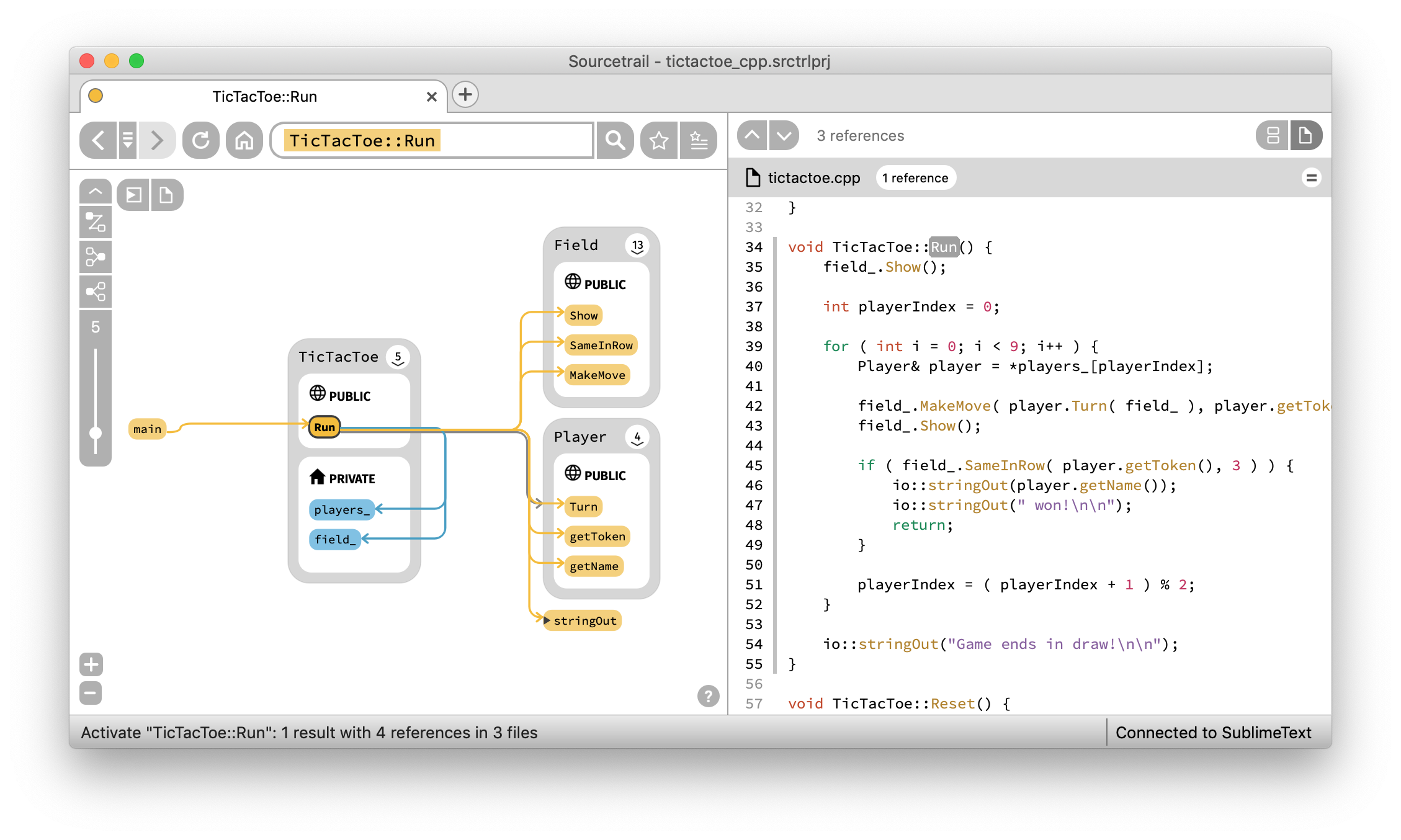
Một mục phía máy chủ trong kho dữ liệu GitHub của TopGit: CoatiSoftware/Sourcetrail, 16.5k sao, nhóm Backend, C++. Sourcetrail - free and open-source interactive source explorer
Tóm tắt dựng từ metadata GitHub của chính dự án — chưa có bài review TopGit. Trang sẽ tự động cập nhật khi bài review đầy đủ được xuất bản.
VÌ SAO CHƯA CÓ REVIEW
TopGit viết bài đầy đủ cho repo có nhiều sao nhất và được yêu cầu nhiều nhất. Trang này là snapshot trong thời gian chờ — xem README gốc ở tab READ ME.
Important Note: This project was archived by the original autors and maintainers of Sourcetrail by the end of 2021. If you want to know more about this decision, read more on our blog.
Sourcetrail is a free and open-source cross-platform source explorer that helps you get productive on unfamiliar source code.
Windows:
Linux:
Links
Download
Quick Start Guide
Documentation
Changelog
Sourcetrail is:
free
working offline
operating on Windows, macOS and Linux
supporting C, C++, Java and Python
offering an SDK (SourcetrailDB) to write custom language extensions
Sourcetrail on Patreon
The open-source development and regular software releases are made possible entirely by the support of these awesome patrons!
Using Sourcetrail
To setup Sourcetrail on your machine, you can either download the respective build for your operating system from our list of Releases and install it on your machine, or use one of the following package managers:
Use the Chocolatey package with choco install sourcetrail
After your installation is complete, follow our Quick Start Guide to get to know Sourcetrail.
How to Report Issues
You can post all your feature requests and bug reports on our issue tracker.
Reporting
Use the following template:
platform version:
Sourcetrail version:
description of the problem:
steps to reproduce the problem:
Supporting
If you want to support a certain feature request or you have the same bug that another user already reported, please let us know:
Please read and follow the steps in CONTRIBUTING.md file.
You may want to look out for issues labeled good first issue to find some initial tasks to tackle.
If you are looking for more information about Sourcetrail software development, please refer to our wiki.
How to Build
Building Sourcetrail requires several dependencies to be in place on your machine. However, our CMake based setup allows to disable indexing support for specific languages which reduces the number of dependencies to a minimum.
Building the Base Application
Required Tools
CMake v3.12 (required for Windows, Linux and MacOS)
Reason: Used to generate a build configuration for your build system
Download: https://cmake.org/download
Git (required for Windows, Linux and MacOS)
Reason: Used for version control and to automatically generate the Sourcetrail version number from commits and tags
Download: https://git-scm.com/download
Remarks: Make sure git is added to your PATH environment variable before running CMake
$ git clone https://github.com/CoatiSoftware/Sourcetrail.git
$ cd Sourcetrail
$ mkdir -p build/win64
$ cd build/win64
$ cmake -G "Visual Studio 15 2017 Win64" -DBOOST_ROOT=<path/to/boost_1_67_0> -DQt5_DIR=<path/to/Qt/version/platform/compiler/lib/cmake/Qt5> ../..
Hint: If you are using the CMake GUI, we recommend that you activate advanced mode. Also you may be required to add some of the defines via the "Add Entry" button.
After generating the build configuration, just open the Sourcetrail.sln file that was generated by CMake and build the Sourcetrail project.
On Unix
To set up your build environment run:
$ cd Sourcetrail
$ mkdir -p build/Release
$ cd build/Release
$ cmake -DCMAKE_BUILD_TYPE="Release" -DBOOST_ROOT=<path/to/boost_1_67_0> -DQt5_DIR=<path/to/Qt/version/platform/compiler/lib/cmake/Qt5> ../..
Now start the build with:
$ make Sourcetrail
Running
Run Sourcetrail from within the build directory. During execution Sourcetrail needs resources from bin/app/data and bin/app/user. CMake creates symlinks within the build directory that make these directories accessible.
Enable C/C++ Language Support
Required dependencies
LLVM/Clang 11.0.0
Reason: Used for running the preprocessor on the indexed source code, building and traversing an Abstract Syntax Tree and generating error messages.
Building: Make sure to check out the correct tag: git checkout llvmorg-11.0.0
Building for Windows: Follow these steps to build the project. Run the cmake command exactly as described.
Building for Unix: Follow this installation guide to build the project. Make sure to build with -DLLVM_ENABLE_RTTI=ON.
Reason: Used to build the Java indexer and make it callable from the C++ code via JNI.
Remarks: Make sure that <jdk_root>/bin is available in your PATH environment variable and that the JAVA_HOME environment variable is set:
JAVA_HOME=<path/to/Java>/jdk1.x.x_xxx
Maven
REASON: Used within Sourcetrail's automated tests.
Remarks: Make sure .../apache-maven-x.x.x/bin is available in your PATH environment variable and that both M2_HOME and MAVEN_HOME environment variables are set:
Reason: Used for indexing the java sample project that ships with the package.
WinRAR
Reason: Used for creating the final zip files for the installer and the portable package.
Remarks: Make sure to add <path/to>/WinRAR to your PATH environment variable.
Building
Run ./script/deploy_windows.sh from your Developer Command Prompt for Visual Studio. The script which will generate a 64bit build and packages it into a portable .zip file and a Wix-based Windows installer, each.
macOS
After building, run the bundle_install.sh script within the build directory which will create a Sourcetrail.app bundle and generate a Sourcetrail_<version>.dmg container.
Linux
Run ./setup/Linux/createPackages.sh from the main directory, which creates both a .tar.gz and a .AppImage package in the main directory. Packaging depends on linuxdeployqt.
How to Run the Tests
The automated test suite of Sourcetrail is powered by Catch2. To run the tests, simply execute the Sourcetrail_test binary. Before executing, please make sure to set the working directory to ./bin/test.
License
Sourcetrail is licensed under the GNU General Public License Version 3.
Trademark
The "Sourcetrail" name is a trademark owned by Coati Software and is not included within the assets licensed under the GNU GPLv3.
CoatiSoftware/Sourcetrail có 16.5k sao GitHub — tải lại trang để xem số mới nhất, hoặc xem trực tiếp github.com/CoatiSoftware/Sourcetrail. TopGit phản chiếu số sao của GitHub nhưng không cam kết đến từng phút.
CoatiSoftware/Sourcetrail có phải mã nguồn mở không?
Có — CoatiSoftware/Sourcetrail phát hành theo license GPL-3.0, nghĩa là mã nguồn mở để đọc, fork và (tùy license) tái sử dụng. Mã: github.com/CoatiSoftware/Sourcetrail.
CoatiSoftware/Sourcetrail còn đang phát triển không?
Commit gần nhất trên CoatiSoftware/Sourcetrail là 4.7 năm trước (theo timestamp GitHub). Repo có 1.7k fork — một chỉ báo về mức độ quan tâm của cộng đồng.
CoatiSoftware/Sourcetrail dùng license gì?
CoatiSoftware/Sourcetrail phát hành theo license GPL-3.0. Nên mở file LICENSE trên GitHub để xác nhận — license metadata đôi khi lệch với thực tế dự án.
CoatiSoftware/Sourcetrail là gì?
CoatiSoftware/Sourcetrail (CoatiSoftware/Sourcetrail) là dự án C++ trên GitHub. Theo mô tả gốc: Sourcetrail - free and open-source interactive source explorer
CoatiSoftware/Sourcetrail viết bằng ngôn ngữ gì?
CoatiSoftware/Sourcetrail chủ yếu viết bằng C++. Trường "language" của GitHub dựa trên phần lớn byte ở nhánh mặc định.
Cùng nhóm Backend còn repo nào?
CoatiSoftware/Sourcetrail thuộc nhóm Backend trên TopGit, cùng 4 topic GitHub. Trang Trending và Topics liệt kê các repo cùng số sao và cùng ngôn ngữ để so sánh.
Đọc thêm về CoatiSoftware/Sourcetrail ở đâu?
Trang TopGit này là một snapshot — tab "Readme" hiển thị nguyên văn README của repo (đã bỏ link, giữ ảnh). Repo GitHub ở github.com/CoatiSoftware/Sourcetrail là nguồn chính thức.
Đọc đầy đủ README ở tab phía trên.
Chưa chắc Sourcetrail có hợp với bạn?
Để ChatGPT, Claude hoặc Perplexity tìm hiểu giúp — bấm bên dưới và xem AI nói gì về Sourcetrail.
 /Sourcetrail