TopGit tracks dokan-dev/dokany on GitHub as part of the Backend family. The project has 5.9k stars. User mode file system library for windows with FUSE Wrapper
Snapshot summary built from the project's own GitHub metadata — there's no written TopGit review yet. The page will update automatically when a full review is published.
WHY NO REVIEW YET
TopGit writes full reviews for the most-starred, most-requested repositories. This page is a snapshot until then — see the READ ME tab for the original README in full.
When you want to create a new file system on Windows, other than FAT or NTFS,
you need to develop a file system driver. Developing a device driver that works
in kernel mode on windows is extremely technical. By using Dokan, you can create
your own file systems very easily without writing device drivers. Dokan is
similar to FUSE (Linux file system in user space) but works on Windows. Moreover,
dokany includes a FUSE wrapper
that helps you to port your FUSE filesystems without changes.
What is Dokany
Dokany is a fork of Dokan 0.6.0 with bug fixes, clean change history and
updated to build with latest tools.
Because the original Dokan Legacy (< 0.6.0) project is no longer maintained.
Since version 0.8.0, dokany broke compatibility with the dokan API. See
Choose a version
for more information.
The API has then again changed over time in 1.1.0 and 2.0.0.
Benchmark v1.5.1.1000 vs v2.0.3.1000
A benchmark that is testing multiple scenarios repeaditly and sequentially was run 5 times against the memfs sample of v1.5.1.1000 and v2.0.3.1000 in an idle environment to precise results.
The detail results can be seen in this spreadsheet here.
As better threading and memory poll were added in v2, it is expected that concurrent scenarios (like those tests) would be even more highly improved.
You can obtain source files from https://dokan-dev.github.io
Environment
Dokan works on
Windows Server 2022 / 2019 / 2016 / 2012 (R2) / 2008 R2 SP1
Windows 11 / 10 / 8.1 / 8 / 7 SP1
Platform
x86
x64
ARM
ARM64
Signed Release and Debug drivers are provided at each release for all platforms.
How it works
Dokan library contains a user mode DLL (dokan2.dll) and a kernel mode file
system driver (dokan2.sys). Once the Dokan file system driver is installed, you can
create file systems which can be seen as normal file systems in Windows. The
application that creates file systems using Dokan library is called File system
application.
File operation requests from user programs (e.g., CreateFile, ReadFile,
WriteFile, ...) will be sent to the Windows I/O subsystem (runs in kernel mode)
which will subsequently forward the requests to the Dokan file system driver
(dokan2.sys). By using functions provided by the Dokan user mode library
(dokan2.dll), file system applications are able to register callback functions
to the file system driver. The file system driver will invoke these callback
routines in order to respond to the requests it received. The results of the
callback routines will be sent back to the user program.
For example, when Windows Explorer requests to open a directory, the CreateFile
with Direction option request will be sent to Dokan file system driver and the
driver will invoke the CreateFile callback provided by the file system
application. The results of this routine are sent back to Windows Explorer as
the response to the CreateFile request. Therefore, the Dokan file system driver
acts as a proxy between user programs and file system applications. The
advantage of this approach is that it allows programmers to develop file systems
in user mode which is safe and easy to debug.
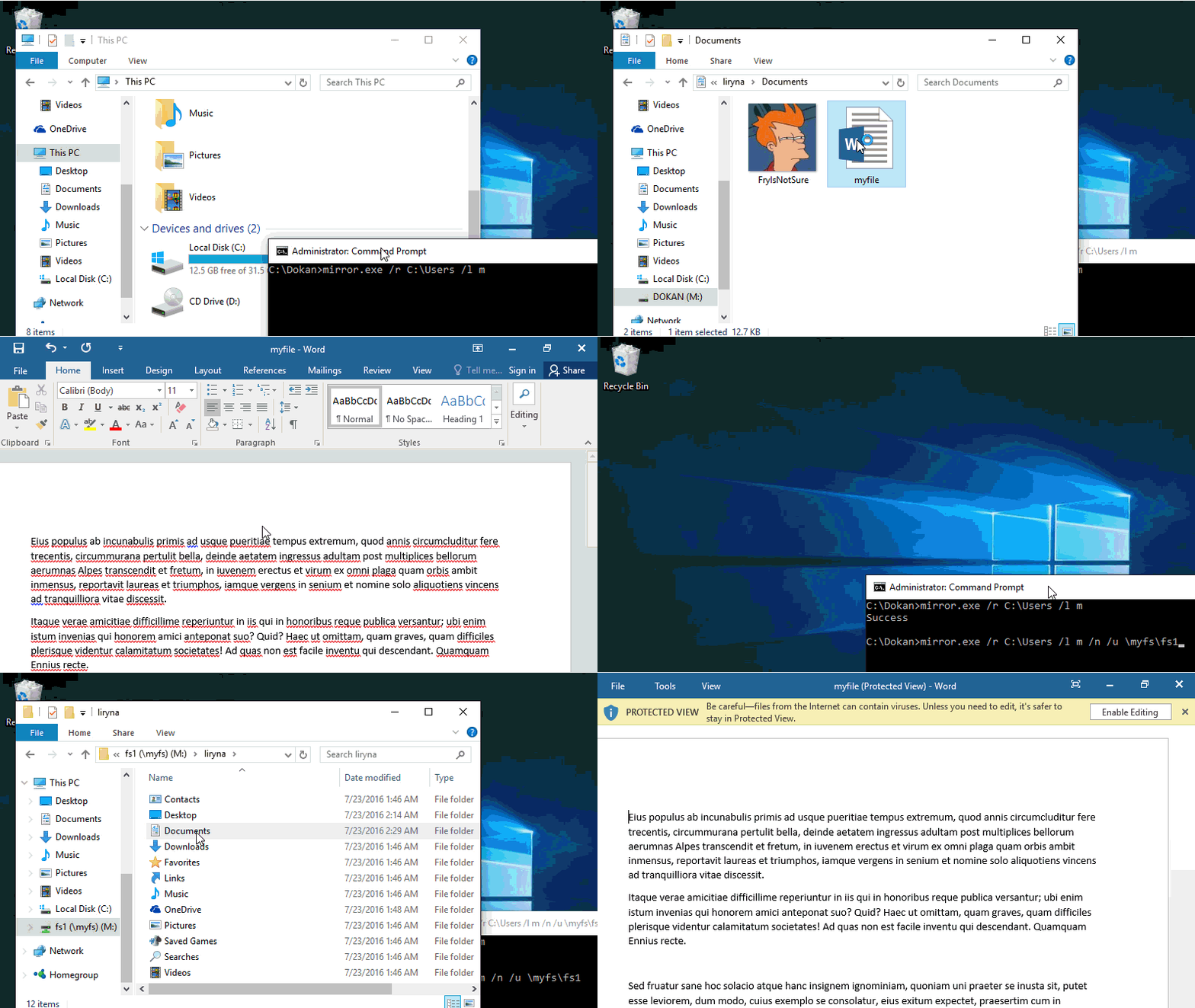
To learn more about Dokan file system development, see the
and the samples, especially dokan_memfs.
Build
In short, download and install the
Visual Studio 2019, select Windows 10 SDK component during the install or from the Tools menu &
install the WDK 10
For details, see the
build page.
Installation
The latest official and signed build can be downloaded from:
Github release page
choco install dokany2 or
winget install dokan-dev.dokany
For manual installation, see the
installation page.
Contribute
You want Dokan to get better? Contribute!
Learn the code and suggest your changes on
GitHub repository.
Detect defects and report them on
GitHub issue tracker.
Ask and answer questions on
Github Discussions or
Google discussion group.
TopGit's metadata for dokan-dev/dokany does not record a license. Most public repositories on GitHub ARE open source, but the exact terms vary — verify by opening the LICENSE file directly.
What else is in the Backend space?
dokan-dev/dokany is tracked by TopGit under the Backend category, alongside 16 GitHub-tagged topics. Trending and Topics pages list peer repositories of comparable stars and language.
What is dokan-dev/dokany?
dokan-dev/dokany (dokan-dev/dokany) is a C project on GitHub. From the project's own README: User mode file system library for windows with FUSE Wrapper
Where can I see dokan-dev/dokany in action?
The project maintains a homepage at http://dokan-dev.github.io. The README tab on this page also usually contains screenshots and a quickstart.
Where do I read more about dokan-dev/dokany?
This TopGit page is a snapshot — the READ ME tab shows the project's own README content (links stripped, images preserved). The GitHub repository at github.com/dokan-dev/dokany is the definitive source.
Why is dokan-dev/dokany categorized under Backend?
TopGit places dokan-dev/dokany in the Backend category based on its GitHub topics and description (tagged: "c", "createfile", "device-driver"). Categories are assigned from real repository metadata, not editorial guesswork.
Read full README in the tab above.
Still deciding about dokany?
One click hands the question to an AI along with this page — see what it says about dokany.
 /dokany




 and the samples, especially dokan_memfs.