Farama-Foundation/chatarena sits at 1.6k stars on GitHub, written primarily in Python. ChatArena (or Chat Arena) is a Multi-Agent Language Game Environments for LLMs. The goal is to develop communication and collaboration capabilities of AIs.
Snapshot summary built from the project's own GitHub metadata — there's no written TopGit review yet. The page will update automatically when a full review is published.
WHY NO REVIEW YET
TopGit writes full reviews for the most-starred, most-requested repositories. This page is a snapshot until then — see the READ ME tab for the original README in full.
Aug 11, 2025: This project has been deprecated due to a lack of wide spread community use, and is no longer planned to receive any additional updates or support.
ChatArena is a library that provides multi-agent language game environments and facilitates research about autonomous
LLM agents and their social interactions.
It provides the following features:
Abstraction: it provides a flexible framework to define multiple players, environments and the interactions
between them, based on Markov Decision Process.
Language Game Environments: it provides a set of environments that can help understanding, benchmarking or
training agent LLMs.
User-friendly Interfaces: it provides both Web UI and CLI to develop/prompt engineer your LLM agents to act in
environments.
Getting Started
Try our online demo:
Installation
Requirements:
Python >= 3. 7
OpenAI API key (optional, for using GPT-3.5-turbo or GPT-4 as an LLM agent)
To use GPT-3 as an LLM agent, set your OpenAI API key:
export OPENAI_API_KEY="your_api_key_here"
Optional Dependencies
By default pip install chatarena will only install dependencies necessary for ChatArena's core functionalities.
You can install optional dependencies with the following commands:
pip install chatarena[all_backends] # install dependencies for all supported backends: anthropic, cohere, huggingface, etc.
pip install chatarena[all_envs]     # install dependencies for all environments, such as pettingzoo
pip install chatarena[all]          # install all optional dependencies for full functionality
Launch the Demo Locally
The quickest way to see ChatArena in action is via the demo Web UI.
To launch the demo on your local machine, you first pip install chatarena with extra gradio dependency, then git clone
this repository to your local folder, and finally call the app.py in the root directory of the repository:
pip install chatarena[gradio]
git clone https://github.com/chatarena/chatarena.git
cd chatarena
gradio app.py
This will launch a demo server for ChatArena, and you can access it from your browser (port 8080).
Check out this video to learn how to use Web UI:
For Developers
For an introduction to the ChatArena framework, please refer to this document.
For a walkthrough of building a new environment, check
Here we provide a compact guide on minimal setup to run the game and some general advice on customization.
Key Concepts
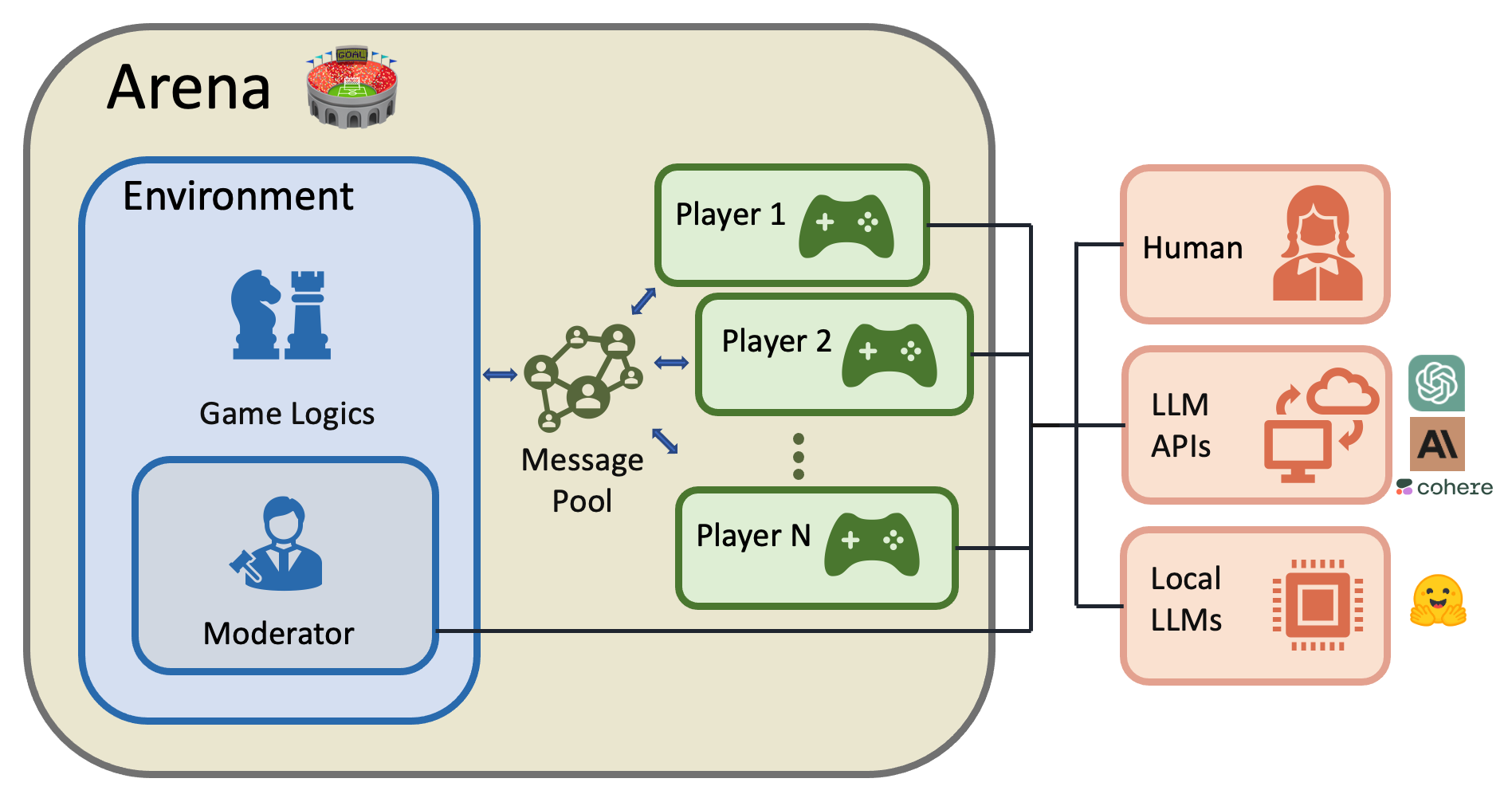
Arena: Arena encapsulates an environment and a collection of players. It drives the main loop of the game and
provides HCI utilities like webUI, CLI, configuration loading and data storage.
Environment: The environment stores the game state and executes game logics to make transitions between game
states. It also renders observations for players, the observations are natural languages.
The game state is not directly visible to the players. Players can only see the observations.
Language Backend: Language backends are the source of language intelligence. It takes text (or collection of
text) as input and returns text in response.
Player: The player is an agent that plays the game. In RL terminology, it’s a policy, a stateless function
mapping from observations to actions.
Run the Game with Python API
Load Arena from a config file -- here we use examples/nlp-classroom-3players.json in this repository as an example:
Check out this video to learn how to use
CLI:
A more detailed guide about how to run the main interaction loop with finer-grained control can be
found here
General Customization Advice
Arena: Overriding Arena basically means one is going to write their own main loop. This can allow different
interaction interfaces or drive games in a more automated manner, for example, running an online RL training loop
Environment: A new environment corresponds to a new game, one can define the game dynamics here with hard-coded
rules or a mixture of rules and language backend.
Backend: If one needs to change the way of formatting observations (in terms of messages) into queries for the
language model, the backend should be overridden.
Player: By default, when a new observation is fed, players will query the language backend and return the
response as actions. But one can also customize the way that players are interacting with the language backend.
Creating your Custom Environment
You can define your own environment by extending the Environment class. Here are the general steps:
Define the class by inheriting from a base class and setting type_name, then add the class
to ALL_ENVIRONMENTS
Initialize the class by defining __init__ method (its arguments will define the corresponding config) and
initializing class attributes
Implement game mechanics in methods step
Handle game states and rewards by implementing methods such as reset, get_observation, is_terminal,
and get_rewards
Develop role description prompts (and a global prompt if necessary) for players using CLI or Web UI and save them to
a
config file.
We provide a detailed tutorial to demonstrate how to define a custom
environment,
using the Chameleon environment as example.
If you want to port an existing library's environment to ChatArena, check
out PettingzooChess environment as an example.
List of Environments
Conversation
A multi-player language game environment that simulates a
conversation.
NLP Classroom: a 3-player language game environment that simulates a
classroom
setting. The game is played in turns, and each turn a player can either ask a question or answer a question.
The game ends when all players have asked and answered all questions.
Moderator Conversation
Based on conversation, but with a moderator that controls the game dynamics.
Rock-paper-scissors: a 2-player language game environment that simulates a
rock-paper-scissors game with moderator conversation.
Both player will act in parallel, and the game ends when one player wins 2 rounds.
Tic-tac-toe: a 2-player language game environment that simulates a tic-tac-toe
game with moderator conversation.
The game is played in turns, and each turn a player can either ask for a move or make a move. The game ends when
one
player wins or the board is full.
Chameleon
A multi-player social deduction game. There are two roles in the game, chameleon and non-chameleon.
The topic of the secret word will be first revealed to all the players.
Then the secret word will be revealed to non-chameleons.
The chameleon does not know the secret word.
The objective in the game depends on the role of the player:
If you are not a chameleon, your goal is to reveal the chameleon without exposing the secret word.
If you are a chameleon, your aim is to blend in with other players, avoid being caught, and figure out the secret
word.
There are three stages in the game:
The giving clues stage: each player will describe the clues about the secret word.
The accusation stage: In this stage, each player will vote for another player who is most likely the chameleon. The
chameleon should vote for other players.
The guess stage: If the accusation is correct, the chameleon should guess the secret word given the clues revealed by
other players.
PettingZooChess
A two-player chess game environment that uses the PettingZoo Chess environment.
PettingZoo TicTacToe
A two-player tic-tac-toe game environment that uses the PettingZoo TicTacToe environment. Differing from the
Moderator Conversation environment, this environment is driven by hard-coded rules rather than a LLM moderator.
Contributing
We welcome contributions to improve and extend ChatArena. Please follow these steps to contribute:
Fork the repository.
Create a new branch for your feature or bugfix.
Commit your changes to the new branch.
Create a pull request describing your changes.
We will review your pull request and provide feedback or merge your changes.
Please ensure your code follows the existing style and structure.
Citation
If you find ChatArena useful for your research, please cite our repository (our arxiv paper is coming soon):
@software{ChatArena,
  author = {Yuxiang Wu, Zhengyao Jiang, Akbir Khan, Yao Fu, Laura Ruis, Edward Grefenstette, and Tim Rocktäschel},
  title = {ChatArena: Multi-Agent Language Game Environments for Large Language Models},
  year = {2023},
  publisher = {GitHub},
  journal = {GitHub repository},
  version = {0.1},
  howpublished = {\url{https://github.com/chatarena/chatarena}},
}
Contact
If you have any questions or suggestions, feel free to open an issue or submit a pull request.
You can also contact us on the Farama discord server- https://discord.gg/Vrtdmu9Y8Q
Happy chatting!
Sponsors
We would like to thank our sponsors for supporting this project:
How active is development on Farama-Foundation/chatarena?
The most recent commit recorded on Farama-Foundation/chatarena was 1.3 years ago, based on the GitHub push timestamp. The repository has 153 forks — one of the better signals of community interest.
How does Farama-Foundation/chatarena compare to other AI Tools projects?
Farama-Foundation/chatarena is tracked by TopGit in the AI Tools category, with 1.6k GitHub stars and written in Python. Browse the AI Tools topic page on TopGit to compare it against similar projects by stars and activity.
How many stars does Farama-Foundation/chatarena have?
Farama-Foundation/chatarena has 1.6k GitHub stars — refresh the page for the live number, or check github.com/Farama-Foundation/chatarena. TopGit mirrors GitHub's count but does not claim minute-by-minute accuracy.
Is Farama-Foundation/chatarena open source?
Yes — Farama-Foundation/chatarena ships under the Apache-2.0 license, which makes its source code freely readable (and, depending on license terms, forkable and reusable). Source: github.com/Farama-Foundation/chatarena.
What is Farama-Foundation/chatarena?
Farama-Foundation/chatarena (Farama-Foundation/chatarena) is a Python project on GitHub. From the project's own README: ChatArena (or Chat Arena) is a Multi-Agent Language Game Environments for LLMs. The goal is to develop communication and collaboration capabilities of AIs.
Where do I read more about Farama-Foundation/chatarena?
This TopGit page is a snapshot — the READ ME tab shows the project's own README content (links stripped, images preserved). The GitHub repository at github.com/Farama-Foundation/chatarena is the definitive source.
Read full README in the tab above.
Still deciding about chatarena?
One click hands the question to an AI along with this page — see what it says about chatarena.

 /chatarena










 A more detailed guide about how to run the main interaction loop with finer-grained control can be
found here