hibiken/asynq is a Go project with 13.8k stars in the Backend space. Simple, reliable, and efficient distributed task queue in Go
Snapshot summary built from the project's own GitHub metadata — there's no written TopGit review yet. The page will update automatically when a full review is published.
WHY NO REVIEW YET
TopGit writes full reviews for the most-starred, most-requested repositories. This page is a snapshot until then — see the READ ME tab for the original README in full.
Simple, reliable & efficient distributed task queue in Go
Asynq is a Go library for queueing tasks and processing them asynchronously with workers. It's backed by Redis and is designed to be scalable yet easy to get started.
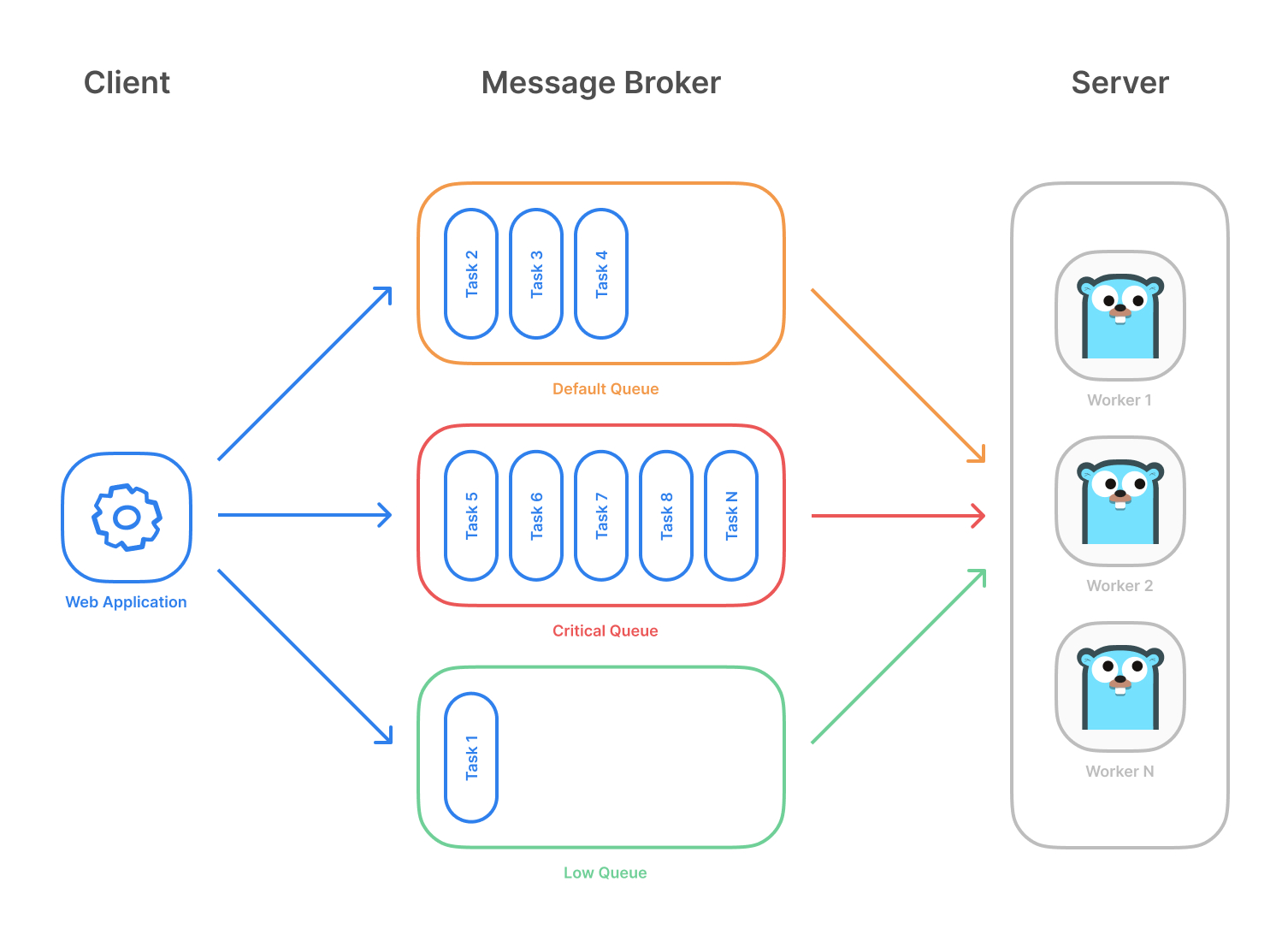
Highlevel overview of how Asynq works:
Client puts tasks on a queue
Server pulls tasks off queues and starts a worker goroutine for each task
Tasks are processed concurrently by multiple workers
Task queues are used as a mechanism to distribute work across multiple machines. A system can consist of multiple worker servers and brokers, giving way to high availability and horizontal scaling.
Example use case
Features
Guaranteed at least one execution of a task
Scheduling of tasks
Retries of failed tasks
Automatic recovery of tasks in the event of a worker crash
Weighted priority queues
Strict priority queues
Low latency to add a task since writes are fast in Redis
De-duplication of tasks using unique option
Allow timeout and deadline per task
Allow aggregating group of tasks to batch multiple successive operations
Flexible handler interface with support for middlewares
Ability to pause queue to stop processing tasks from the queue
Periodic Tasks
Support Redis Sentinels for high availability
Integration with Prometheus to collect and visualize queue metrics
Web UI to inspect and remote-control queues and tasks
CLI to inspect and remote-control queues and tasks
Stability and Compatibility
Status: The library is relatively stable and is currently undergoing moderate development with less frequent breaking API changes.
☝️ Important Note: Current major version is zero (v0.x.x) to accommodate rapid development and fast iteration while getting early feedback from users (feedback on APIs are appreciated!). The public API could change without a major version update before v1.0.0 release.
Redis Cluster Compatibility
Some of the lua scripts in this library may not be compatible with Redis Cluster.
Sponsoring
If you are using this package in production, please consider sponsoring the project to show your support!
Quickstart
Make sure you have Go installed (download). The last two Go versions are supported (See https://go.dev/dl).
Initialize your project by creating a folder and then running go mod init github.com/your/repo (learn more) inside the folder. Then install Asynq library with the go get command:
go get -u github.com/hibiken/asynq
Make sure you're running a Redis server locally or from a Docker container. Version 4.0 or higher is required.
Next, write a package that encapsulates task creation and task handling.
package tasks

import (
    "context"
    "encoding/json"
    "fmt"
    "log"
    "time"
    "github.com/hibiken/asynq"
)

// A list of task types.
const (
    TypeEmailDelivery   = "email:deliver"
    TypeImageResize     = "image:resize"
)

type EmailDeliveryPayload struct {
    UserID     int
    TemplateID string
}

type ImageResizePayload struct {
    SourceURL string
}

//----------------------------------------------
// Write a function NewXXXTask to create a task.
// A task consists of a type and a payload.
//----------------------------------------------

func NewEmailDeliveryTask(userID int, tmplID string) (*asynq.Task, error) {
    payload, err := json.Marshal(EmailDeliveryPayload{UserID: userID, TemplateID: tmplID})
    if err != nil {
        return nil, err
    }
    return asynq.NewTask(TypeEmailDelivery, payload), nil
}

func NewImageResizeTask(src string) (*asynq.Task, error) {
    payload, err := json.Marshal(ImageResizePayload{SourceURL: src})
    if err != nil {
        return nil, err
    }
    // task options can be passed to NewTask, which can be overridden at enqueue time.
    return asynq.NewTask(TypeImageResize, payload, asynq.MaxRetry(5), asynq.Timeout(20 * time.Minute)), nil
}

//---------------------------------------------------------------
// Write a function HandleXXXTask to handle the input task.
// Note that it satisfies the asynq.HandlerFunc interface.
//
// Handler doesn't need to be a function. You can define a type
// that satisfies asynq.Handler interface. See examples below.
//---------------------------------------------------------------

func HandleEmailDeliveryTask(ctx context.Context, t *asynq.Task) error {
    var p EmailDeliveryPayload
    if err := json.Unmarshal(t.Payload(), &p); err != nil {
        return fmt.Errorf("json.Unmarshal failed: %v: %w", err, asynq.SkipRetry)
    }
    log.Printf("Sending Email to User: user_id=%d, template_id=%s", p.UserID, p.TemplateID)
    // Email delivery code ...
    return nil
}

// ImageProcessor implements asynq.Handler interface.
type ImageProcessor struct {
    // ... fields for struct
}

func (processor *ImageProcessor) ProcessTask(ctx context.Context, t *asynq.Task) error {
    var p ImageResizePayload
    if err := json.Unmarshal(t.Payload(), &p); err != nil {
        return fmt.Errorf("json.Unmarshal failed: %v: %w", err, asynq.SkipRetry)
    }
    log.Printf("Resizing image: src=%s", p.SourceURL)
    // Image resizing code ...
    return nil
}

func NewImageProcessor() *ImageProcessor {
	return &ImageProcessor{}
}
In your application code, import the above package and use Client to put tasks on queues.
package main

import (
    "log"
    "time"

    "github.com/hibiken/asynq"
    "your/app/package/tasks"
)

const redisAddr = "127.0.0.1:6379"

func main() {
    client := asynq.NewClient(asynq.RedisClientOpt{Addr: redisAddr})
    defer client.Close()

    // ------------------------------------------------------
    // Example 1: Enqueue task to be processed immediately.
    //            Use (*Client).Enqueue method.
    // ------------------------------------------------------

    task, err := tasks.NewEmailDeliveryTask(42, "some:template:id")
    if err != nil {
        log.Fatalf("could not create task: %v", err)
    }
    info, err := client.Enqueue(task)
    if err != nil {
        log.Fatalf("could not enqueue task: %v", err)
    }
    log.Printf("enqueued task: id=%s queue=%s", info.ID, info.Queue)


    // ------------------------------------------------------------
    // Example 2: Schedule task to be processed in the future.
    //            Use ProcessIn or ProcessAt option.
    // ------------------------------------------------------------

    info, err = client.Enqueue(task, asynq.ProcessIn(24*time.Hour))
    if err != nil {
        log.Fatalf("could not schedule task: %v", err)
    }
    log.Printf("enqueued task: id=%s queue=%s", info.ID, info.Queue)


    // ----------------------------------------------------------------------------
    // Example 3: Set other options to tune task processing behavior.
    //            Options include MaxRetry, Queue, Timeout, Deadline, Unique etc.
    // ----------------------------------------------------------------------------

    task, err = tasks.NewImageResizeTask("https://example.com/myassets/image.jpg")
    if err != nil {
        log.Fatalf("could not create task: %v", err)
    }
    info, err = client.Enqueue(task, asynq.MaxRetry(10), asynq.Timeout(3 * time.Minute))
    if err != nil {
        log.Fatalf("could not enqueue task: %v", err)
    }
    log.Printf("enqueued task: id=%s queue=%s", info.ID, info.Queue)
}
Next, start a worker server to process these tasks in the background. To start the background workers, use Server and provide your Handler to process the tasks.
You can optionally use ServeMux to create a handler, just as you would with net/http Handler.
package main

import (
    "log"

    "github.com/hibiken/asynq"
    "your/app/package/tasks"
)

const redisAddr = "127.0.0.1:6379"

func main() {
    srv := asynq.NewServer(
        asynq.RedisClientOpt{Addr: redisAddr},
        asynq.Config{
            // Specify how many concurrent workers to use
            Concurrency: 10,
            // Optionally specify multiple queues with different priority.
            Queues: map[string]int{
                "critical": 6,
                "default":  3,
                "low":      1,
            },
            // See the godoc for other configuration options
        },
    )

    // mux maps a type to a handler
    mux := asynq.NewServeMux()
    mux.HandleFunc(tasks.TypeEmailDelivery, tasks.HandleEmailDeliveryTask)
    mux.Handle(tasks.TypeImageResize, tasks.NewImageProcessor())
    // ...register other handlers...

    if err := srv.Run(mux); err != nil {
        log.Fatalf("could not run server: %v", err)
    }
}
For a more detailed walk-through of the library, see our Getting Started guide.
To learn more about asynq features and APIs, see the package godoc.
Web UI
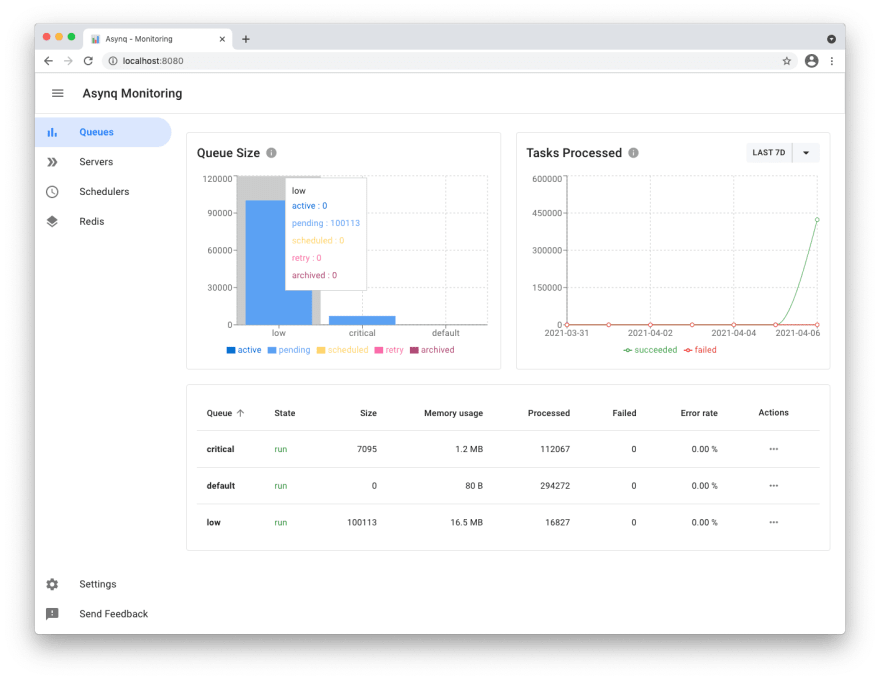
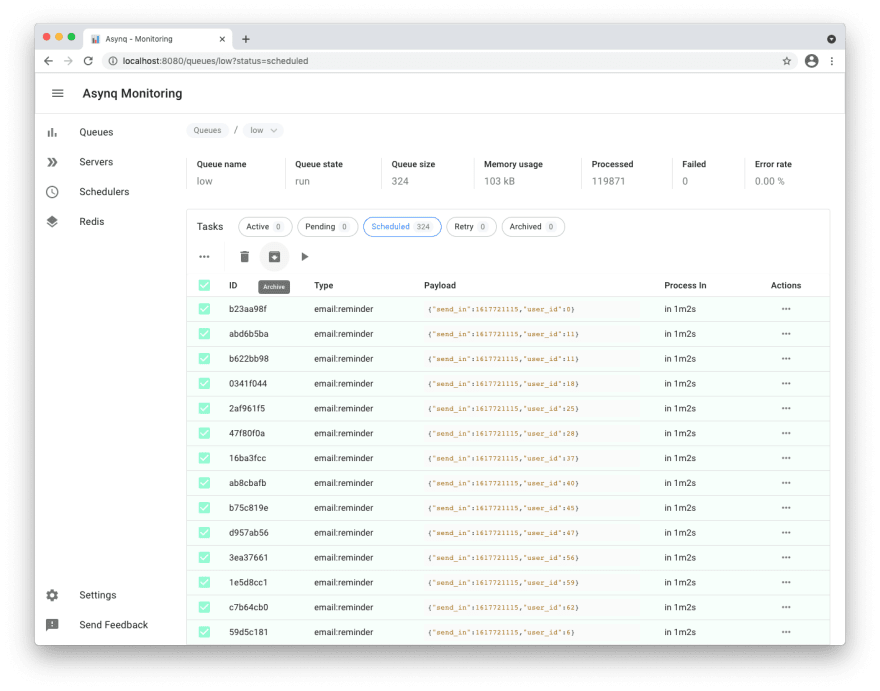
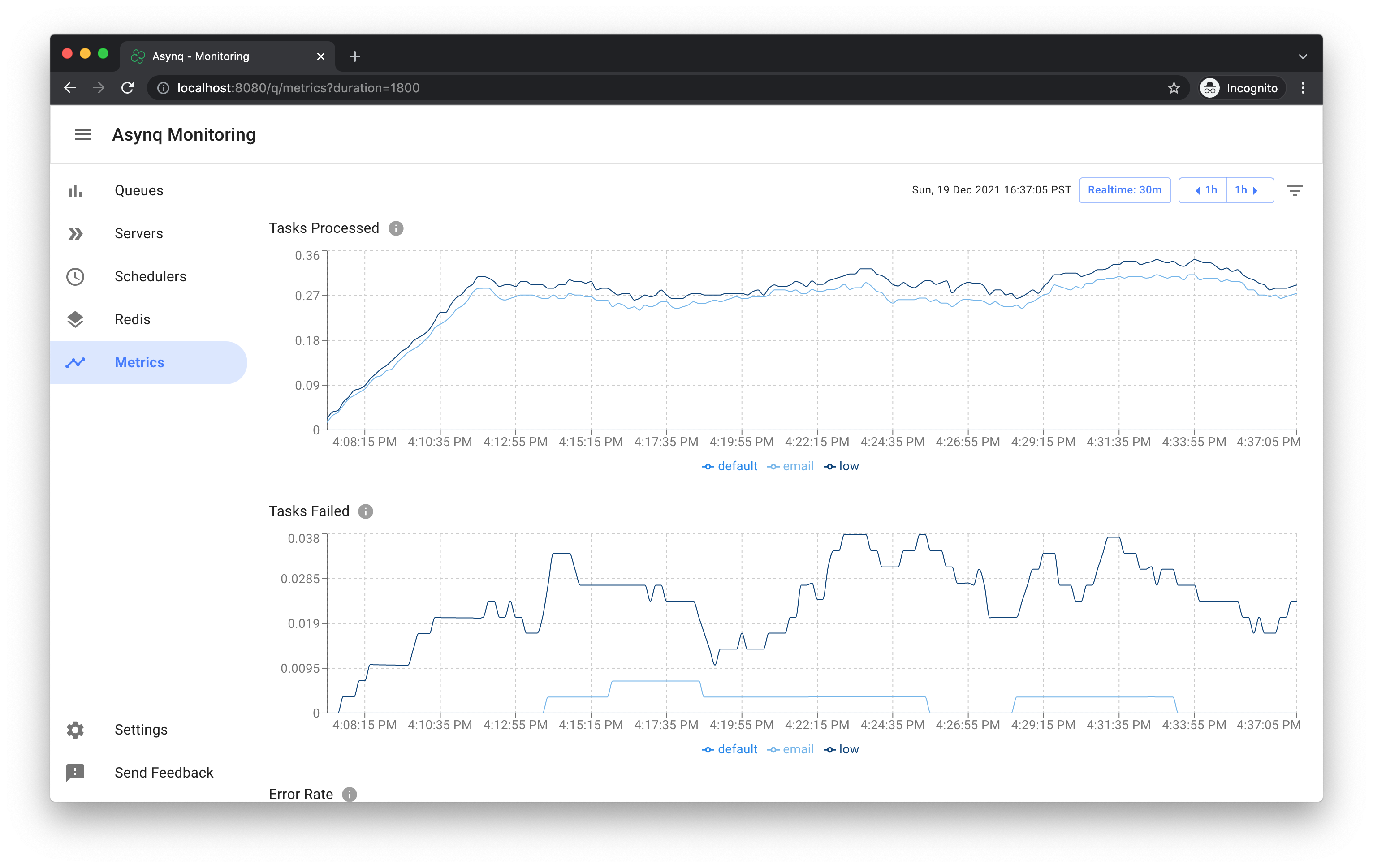
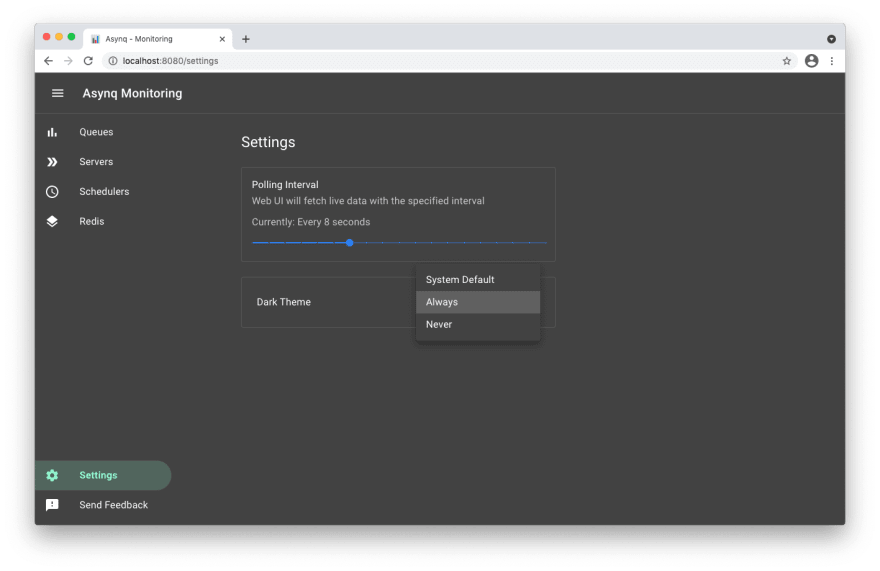
Asynqmon is a web based tool for monitoring and administrating Asynq queues and tasks.
Here's a few screenshots of the Web UI:
Queues view
Tasks view
Metrics view
Settings and adaptive dark mode
For details on how to use the tool, refer to the tool's README.
Command Line Tool
Asynq ships with a command line tool to inspect the state of queues and tasks.
To install the CLI tool, run the following command:
go install github.com/hibiken/asynq/tools/asynq@latest
Here's an example of running the asynq dash command:
For details on how to use the tool, refer to the tool's README.
Contributing
We are open to, and grateful for, any contributions (GitHub issues/PRs, feedback on Gitter channel, etc) made by the community.
Please see the Contribution Guide before contributing.
License
Copyright (c) 2019-present Ken Hibino and Contributors. Asynq is free and open-source software licensed under the MIT License. Official logo was created by Vic Shóstak and distributed under Creative Commons license (CC0 1.0 Universal).
No homepage URL was recorded for hibiken/asynq in TopGit's last sync. The README tab above frequently contains screenshots and demo links, or check the repository description on GitHub.
How active is development on hibiken/asynq?
The most recent commit recorded on hibiken/asynq was 4 months ago, based on the GitHub push timestamp. The repository has 993 forks — one of the better signals of community interest.
How many stars does hibiken/asynq have?
hibiken/asynq has 13.8k GitHub stars — refresh the page for the live number, or check github.com/hibiken/asynq. TopGit mirrors GitHub's count but does not claim minute-by-minute accuracy.
Is hibiken/asynq open source?
Yes — hibiken/asynq ships under the MIT license, which makes its source code freely readable (and, depending on license terms, forkable and reusable). Source: github.com/hibiken/asynq.
What else is in the Backend space?
hibiken/asynq is tracked by TopGit under the Backend category, alongside 7 GitHub-tagged topics. Trending and Topics pages list peer repositories of comparable stars and language.
What topics is hibiken/asynq associated with?
GitHub's repository topics for hibiken/asynq: "asynchronous-tasks", "background-jobs", "go", "golang", "redis", "task-queue", "worker-pool". TopGit's editorial category is Backend.
Where do I read more about hibiken/asynq?
This TopGit page is a snapshot — the READ ME tab shows the project's own README content (links stripped, images preserved). The GitHub repository at github.com/hibiken/asynq is the definitive source.
Read full README in the tab above.
Still deciding about asynq?
One click hands the question to an AI along with this page — see what it says about asynq.

 /asynq