A look at ibireme/yyjson: 3.9k stars on GitHub, written primarily in C, tracked under the Backend category. The fastest JSON library in C
Snapshot summary built from the project's own GitHub metadata — there's no written TopGit review yet. The page will update automatically when a full review is published.
WHY NO REVIEW YET
TopGit writes full reviews for the most-starred, most-requested repositories. This page is a snapshot until then — see the READ ME tab for the original README in full.
Manipulation: supports querying and modifying with JSON Pointer, JSON Patch, and JSON Merge Patch.
Developer-Friendly: easy integration with just one .h and one .c file.
Limitations
An array or object is stored as a data structure such as linked list, which makes accessing elements by index or key slower than using an iterator.
Duplicate keys are allowed in an object, and the order of the keys is preserved.
JSON parsing results are immutable, requiring a mutable copy for modification.
Performance
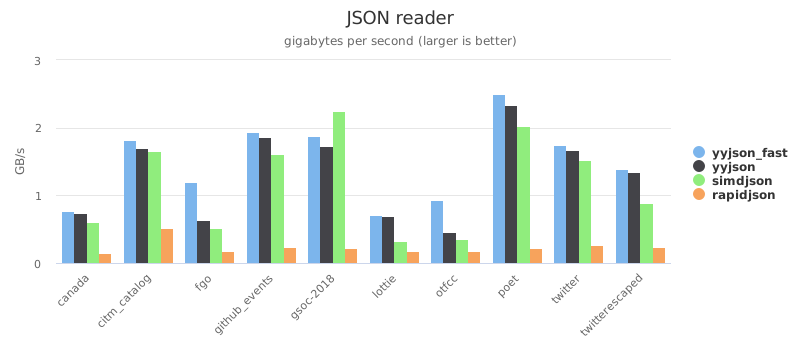
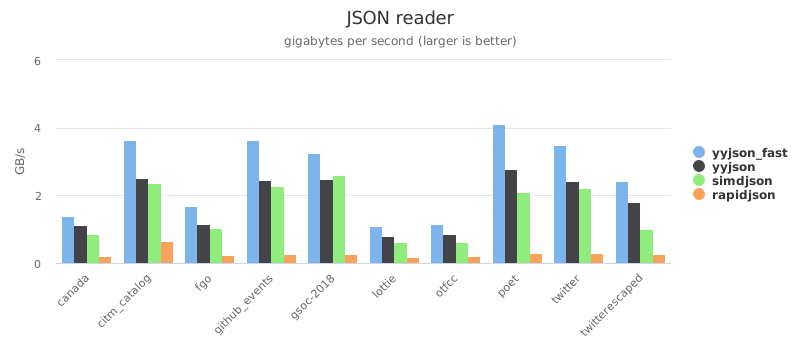
Benchmark project and dataset: yyjson_benchmark
The simdjson's new On Demand API is faster if most JSON fields are known at compile-time.
This benchmark project only checks the DOM API, a new benchmark will be added later.
AWS EC2 (AMD EPYC 7R32, gcc 9.3)
twitter.json
parse (GB/s)
stringify (GB/s)
yyjson(insitu)
1.80
1.51
yyjson
1.72
1.42
simdjson
1.52
0.61
sajson
1.16
rapidjson(insitu)
0.77
rapidjson(utf8)
0.26
0.39
cjson
0.32
0.17
jansson
0.05
0.11
iPhone (Apple A14, clang 12)
twitter.json
parse (GB/s)
stringify (GB/s)
yyjson(insitu)
3.51
2.41
yyjson
2.39
2.01
simdjson
2.19
0.80
sajson
1.74
rapidjson(insitu)
0.75
rapidjson(utf8)
0.30
0.58
cjson
0.48
0.33
jansson
0.09
0.24
More benchmark reports with interactive charts (last updated 2020-12-12)
Platform
CPU
Compiler
OS
Report
Intel NUC 8i5
Core i5-8259U
msvc 2019
Windows 10 2004
Charts
Intel NUC 8i5
Core i5-8259U
clang 10.0
Ubuntu 20.04
Charts
Intel NUC 8i5
Core i5-8259U
gcc 9.3
Ubuntu 20.04
Charts
AWS EC2 c5a.large
AMD EPYC 7R32
gcc 9.3
Ubuntu 20.04
Charts
AWS EC2 t4g.medium
Graviton2 (ARM64)
gcc 9.3
Ubuntu 20.04
Charts
Apple iPhone 12 Pro
A14 (ARM64)
clang 12.0
iOS 14
Charts
For better performance, yyjson prefers:
A modern processor with:
high instruction level parallelism
excellent branch predictor
low penalty for misaligned memory access
A modern compiler with good optimizer (e.g. clang)
Sample Code
Read JSON string
const char *json = "{\"name\":\"Mash\",\"star\":4,\"hits\":[2,2,1,3]}";

// Read JSON and get root
yyjson_doc *doc = yyjson_read(json, strlen(json), 0);
yyjson_val *root = yyjson_doc_get_root(doc);

// Get root["name"]
yyjson_val *name = yyjson_obj_get(root, "name");
printf("name: %s\n", yyjson_get_str(name));
printf("name length:%d\n", (int)yyjson_get_len(name));

// Get root["star"]
yyjson_val *star = yyjson_obj_get(root, "star");
printf("star: %d\n", (int)yyjson_get_int(star));

// Get root["hits"], iterate over the array
yyjson_val *hits = yyjson_obj_get(root, "hits");
size_t idx, max;
yyjson_val *hit;
yyjson_arr_foreach(hits, idx, max, hit) {
    printf("hit%d: %d\n", (int)idx, (int)yyjson_get_int(hit));
}

// Free the doc
yyjson_doc_free(doc);

// All functions accept NULL input, and return NULL on error.
Write JSON string
// Create a mutable doc
yyjson_mut_doc *doc = yyjson_mut_doc_new(NULL);
yyjson_mut_val *root = yyjson_mut_obj(doc);
yyjson_mut_doc_set_root(doc, root);

// Set root["name"] and root["star"]
yyjson_mut_obj_add_str(doc, root, "name", "Mash");
yyjson_mut_obj_add_int(doc, root, "star", 4);

// Set root["hits"] with an array
int hits_arr[] = {2, 2, 1, 3};
yyjson_mut_val *hits = yyjson_mut_arr_with_sint32(doc, hits_arr, 4);
yyjson_mut_obj_add_val(doc, root, "hits", hits);

// To string, minified
const char *json = yyjson_mut_write(doc, 0, NULL);
if (json) {
    printf("json: %s\n", json); // {"name":"Mash","star":4,"hits":[2,2,1,3]}
    free((void *)json);
}

// Free the doc
yyjson_mut_doc_free(doc);
Read JSON file with options
// Read JSON file, allowing comments and trailing commas
yyjson_read_flag flg = YYJSON_READ_ALLOW_COMMENTS | YYJSON_READ_ALLOW_TRAILING_COMMAS;
yyjson_read_err err;
yyjson_doc *doc = yyjson_read_file("/tmp/config.json", flg, NULL, &err);

// Iterate over the root object
if (doc) {
    yyjson_val *obj = yyjson_doc_get_root(doc);
    yyjson_obj_iter iter;
    yyjson_obj_iter_init(obj, &iter);
    yyjson_val *key, *val;
    while ((key = yyjson_obj_iter_next(&iter))) {
        val = yyjson_obj_iter_get_val(key);
        printf("%s: %s\n", yyjson_get_str(key), yyjson_get_type_desc(val));
    }
} else {
    printf("read error (%u): %s at position: %ld\n", err.code, err.msg, err.pos);
}

// Free the doc
yyjson_doc_free(doc);
Write JSON file with options
// Read the JSON file as a mutable doc
yyjson_doc *idoc = yyjson_read_file("/tmp/config.json", 0, NULL, NULL);
yyjson_mut_doc *doc = yyjson_doc_mut_copy(idoc, NULL);
yyjson_mut_val *obj = yyjson_mut_doc_get_root(doc);

// Remove null values in root object
yyjson_mut_obj_iter iter;
yyjson_mut_obj_iter_init(obj, &iter);
yyjson_mut_val *key, *val;
while ((key = yyjson_mut_obj_iter_next(&iter))) {
    val = yyjson_mut_obj_iter_get_val(key);
    if (yyjson_mut_is_null(val)) {
        yyjson_mut_obj_iter_remove(&iter);
    }
}

// Write the JSON with pretty printing, escape unicode
yyjson_write_flag flg = YYJSON_WRITE_PRETTY | YYJSON_WRITE_ESCAPE_UNICODE;
yyjson_write_err err;
yyjson_mut_write_file("/tmp/config.json", doc, flg, NULL, &err);
if (err.code) {
    printf("write error (%u): %s\n", err.code, err.msg);
}

// Free the doc
yyjson_doc_free(idoc);
yyjson_mut_doc_free(doc);
Documentation
The latest (unreleased) documentation can be accessed in the doc directory.
The pre-generated Doxygen HTML for the release version can be viewed here:
Home Page
Build and test
API and sample code
Data structure
Changelog
Packaging status
Built With yyjson
A non-exhaustive list of projects that expose yyjson to other languages or
use yyjson internally for a major feature. If you have a project that uses
yyjson, feel free to open a PR to add it to this list.
Project
Language
Description
ssrJSON
Python
A SIMD boosted high-performance and correct Python JSON parsing library, built on top of yyjson
py_yyjson
Python
Python bindings for yyjson
orjson
Python
JSON library for Python with an optional yyjson backend
serin
C++ / Python
A C++ and Python serialization library supporting TOON, JSON, and YAML with cross-format conversion.
cpp-yyjson
C++
C++ JSON library with a yyjson backend
reflect-cpp
C++
C++ library for serialization through automated field name retrieval from structs
xyjson
C++
C++ proxy and wrapper for yyjson with convenient operator overloading
yyjsonr
R
R binding for yyjson
Ananda
Swift
JSON model decoding based on yyjson
ReerJSON
Swift
A faster version of JSONDecoder based on yyjson
swift-yyjson
Swift
A fast JSON library for Swift, powered by yyjson
duckdb
C++
DuckDB is an in-process SQL OLAP Database Management System
fastfetch
C
A neofetch-like tool for fetching system information and displaying it in a pretty way
Zrythm
C
Digital Audio Workstation that uses yyjson to serialize JSON project files
bemorehuman
C
Recommendation engine with a focus on uniqueness of the person receiving the rec
mruby-yyjson
mruby
Efficient JSON parsing and serialization library for mruby using yyjson
How does ibireme/yyjson compare to other Backend projects?
ibireme/yyjson is tracked by TopGit in the Backend category, with 3.9k GitHub stars and written in C. Browse the Backend topic page on TopGit to compare it against similar projects by stars and activity.
How many stars does ibireme/yyjson have?
ibireme/yyjson has 3.9k GitHub stars — refresh the page for the live number, or check github.com/ibireme/yyjson. TopGit mirrors GitHub's count but does not claim minute-by-minute accuracy.
Is ibireme/yyjson open source?
Yes — ibireme/yyjson ships under the MIT license, which makes its source code freely readable (and, depending on license terms, forkable and reusable). Source: github.com/ibireme/yyjson.
What else is in the Backend space?
ibireme/yyjson is tracked by TopGit under the Backend category, alongside 9 GitHub-tagged topics. Trending and Topics pages list peer repositories of comparable stars and language.
What is ibireme/yyjson?
ibireme/yyjson (ibireme/yyjson) is a C project on GitHub. From the project's own README: The fastest JSON library in C
Where can I see ibireme/yyjson in action?
The project maintains a homepage at https://ibireme.github.io/yyjson/doc/doxygen/html/. The README tab on this page also usually contains screenshots and a quickstart.
Where do I read more about ibireme/yyjson?
This TopGit page is a snapshot — the READ ME tab shows the project's own README content (links stripped, images preserved). The GitHub repository at github.com/ibireme/yyjson is the definitive source.
Read full README in the tab above.
Is yyjson worth your time?
ChatGPT, Claude and Perplexity can all read this page. Ask one of them what it makes of yyjson.

 /yyjson