A look at itsOwen/CyberScraper-2077: 3.2k stars on GitHub, written primarily in Python, tracked under the AI Tools category. A Powerful web scraper powered by LLM | OpenAI, Gemini & Ollama
Snapshot summary built from the project's own GitHub metadata — there's no written TopGit review yet. The page will update automatically when a full review is published.
WHY NO REVIEW YET
TopGit writes full reviews for the most-starred, most-requested repositories. This page is a snapshot until then — see the READ ME tab for the original README in full.
Rip data from the net, leaving no trace. Welcome to the future of web scraping.
🔍 About
CyberScraper 2077 is not just another web scraping tool – it's a glimpse into the future of data extraction. Born from the neon-lit streets of a cyberpunk world, this AI-powered scraper uses OpenAI, Gemini and LocalLLM Models to slice through the web's defenses, extracting the data you need with unparalleled precision and style.
Whether you're a corpo data analyst, a street-smart netrunner, or just someone looking to pull information from the digital realm, CyberScraper 2077 has got you covered.
✨ Features
AI-Powered Extraction: Utilizes cutting-edge AI models to understand and parse web content intelligently.
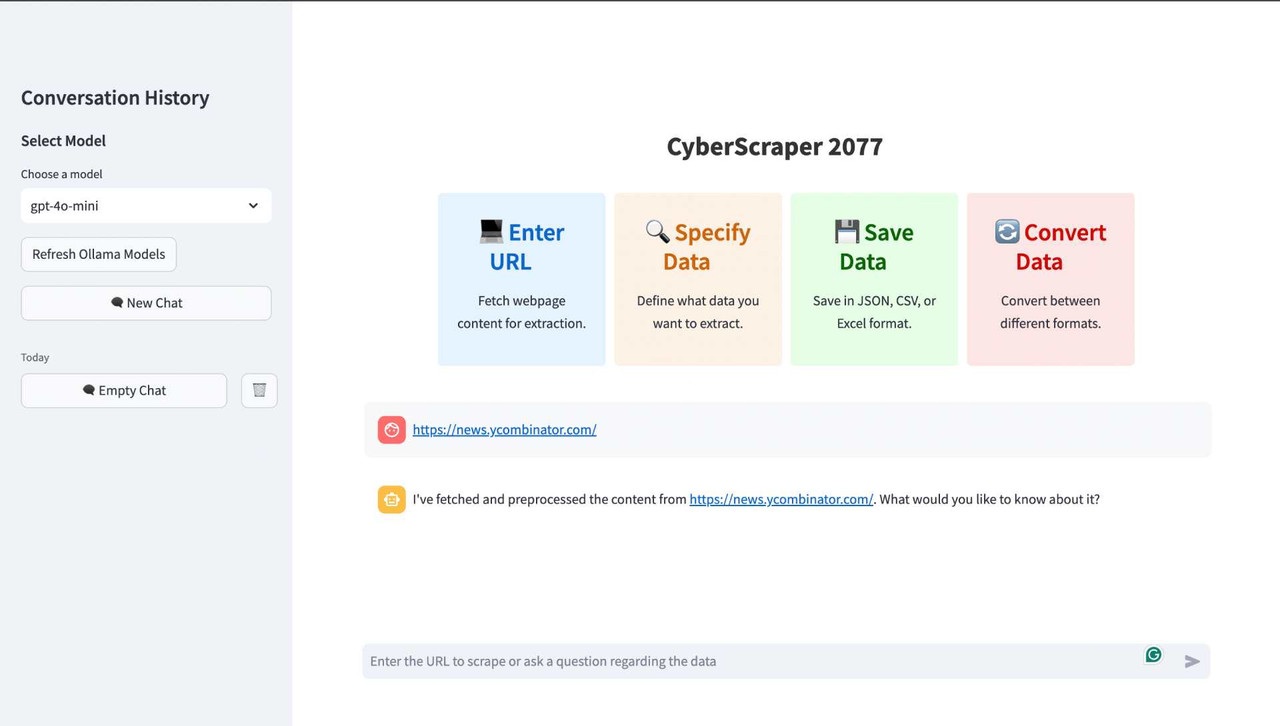
Sleek Streamlit Interface: User-friendly GUI that even a chrome-armed street samurai could navigate.
Multi-Format Support: Export your data in JSON, CSV, HTML, SQL or Excel – whatever fits your cyberdeck.
Tor Network Support: Safely scrape .onion sites through the Tor network with automatic routing and security features.
Stealth Mode: Implemented stealth mode parameters that help avoid detection as a bot.
Ollama Support: Use a huge library of open source LLMs.
Async Operations: Lightning-fast scraping that would make a Trauma Team jealous.
Smart Parsing: Structures scraped content as if it was extracted straight from the engram of a master netrunner.
Caching: Implemented content-based and query-based caching using LRU cache and a custom dictionary to reduce redundant API calls.
Upload to Google Sheets: Now you can easily upload your extracted CSV data to Google Sheets with one click.
Bypass Captcha: Bypass captcha by using the -captcha at the end of the URL. (Currently only works natively, doesn't work on Docker)
Current Browser: The current browser feature uses your local browser instance which will help you bypass 99% of bot detections. (Only use when necessary)
Navigate through the Pages (BETA): Navigate through the webpage and scrape data from different pages.
🪟 For Windows Users
Please follow the Docker Container Guide given below, as I won't be able to maintain another version for Windows systems.
🛠 Installation
Note: CyberScraper 2077 requires Python 3.10 or higher.
Clone this repository:
git clone https://github.com/itsOwen/CyberScraper-2077.git
cd CyberScraper-2077
The configured models appear in the sidebar as litellm:<model>. The base URL
defaults to http://localhost:4000/v1.
Using Ollama
Note: I only recommend using OpenAI and Gemini API as these models are really good at following instructions. If you are using open-source LLMs, make sure you have a good system as the speed of the data generation/presentation depends on how well your system can run the LLM. You may also have to fine-tune the prompt and add some additional filters yourself.
1. Setup Ollama using `pip install ollama`
2. Download Ollama from the official website: https://ollama.com/download
3. Now type: ollama pull llama3.1 or whatever LLM you want to use.
4. Now follow the rest of the steps below.
🐳 Docker Installation
If you prefer to use Docker, follow these steps to set up and run CyberScraper 2077:
Ensure you have Docker installed on your system.
Clone this repository:
git clone https://github.com/itsOwen/CyberScraper-2077.git
cd CyberScraper-2077
Build the Docker image:
docker build -t cyberscraper-2077 .
Run the container:
docker run -p 8501:8501 -e OPENAI_API_KEY="your-actual-api-key" -e GOOGLE_API_KEY="your-actual-api-key" cyberscraper-2077
Using Ollama with Docker
If you want to use Ollama with the Docker setup:
Install Ollama on your host machine following the instructions at https://ollama.com/download
Run Ollama on your host machine:
ollama pull llama3.1
Find your host machine's IP address:
On Linux/Mac: ifconfig or ip addr show
On Windows: ipconfig
Run the Docker container with the host network and set the Ollama URL:
docker run -e OLLAMA_BASE_URL=http://host.docker.internal:11434 -p 8501:8501 cyberscraper-2077
Now visit the url: http://localhost:8501/
On Linux you might need to use this below:
docker run -e OLLAMA_BASE_URL=http://<your-host-ip>:11434 -p 8501:8501 cyberscraper-2077
Replace <your-host-ip> with your actual host machine IP address.
In the Streamlit interface, select the Ollama model you want to use (e.g., "ollama:llama3.1").
Note: Ensure that your firewall allows connections to port 11434 for Ollama.
🚀 Usage
Fire up the Streamlit app:
source venv/bin/activate # If not yet done
streamlit run main.py
Open your browser and navigate to http://localhost:8501.
Enter the URL of the site you want to scrape or ask a question about the data you need.
Ask the chatbot to extract the data in any format. Select whatever data you want to export or even everything from the webpage.
Watch as CyberScraper 2077 tears through the net, extracting your data faster than you can say "flatline"!
Note: The multi-page scraping feature is currently in beta. While functional, you may encounter occasional issues or unexpected behavior. We appreciate your feedback and patience as we continue to improve this feature.
CyberScraper 2077 now supports multi-page scraping, allowing you to extract data from multiple pages of a website in one go. This feature is perfect for scraping paginated content, search results, or any site with data spread across multiple pages.
How to Use Multi-Page Scraping
I suggest you enter the URL structure every time if you want to scrape multiple pages so it can detect the URL structure easily. It detects nearly all URL types.
Basic Usage:
To scrape multiple pages, use the following format when entering the URL:
Replace {page} with where the page number should be in the URL.
Automatic Pattern Detection:
If you don't specify a pattern, CyberScraper 2077 will attempt to detect the URL pattern automatically. However, for best results, specifying the pattern is recommended.
Tips for Effective Multi-Page Scraping
Start with a small range of pages to test before scraping a large number.
Be mindful of the website's load and your scraping speed to avoid overloading servers.
Use the simulate_human option for more natural scraping behavior on sites with anti-bot measures.
Regularly check the website's robots.txt file and terms of service to ensure compliance.
Example
URL Example : "https://news.ycombinator.com/?p=1 1-3 or 1,2,3,4"
If you want to scrape a specific page, just enter the query "please scrape page number 1 or 2". If you want to scrape all pages, simply give a query like "scrape all pages in csv" or whatever format you want.
🧅 Tor Network Scraping
Note: The Tor network scraping feature allows you to access and scrape .onion sites. This feature requires additional setup and should be used responsibly and legally.
CyberScraper 2077 now supports scraping .onion sites through the Tor network, allowing you to access and extract data from the dark web safely and anonymously. This feature is perfect for researchers, security analysts, and investigators who need to gather information from Tor hidden services.
Prerequisites
Install Tor on your system:
# Ubuntu/Debian
sudo apt install tor

# macOS (using Homebrew)
brew install tor

# Start the Tor service
sudo service tor start  # on Linux
brew services start tor # on macOS
Install additional Python packages:
pip install PySocks requests[socks]
Using Tor Scraping
Basic Usage:
Simply enter an .onion URL, and CyberScraper will automatically detect and route it through the Tor network:
http://example123abc.onion
Safety Features:
Automatic .onion URL detection
Built-in connection verification
Tor Browser-like request headers
Automatic circuit isolation
Configuration Options
You can customize the Tor scraping behavior by adjusting the following settings:
tor_config = TorConfig(
    socks_port=9050,          # Default Tor SOCKS port
    circuit_timeout=10,        # Timeout for circuit creation
    auto_renew_circuit=True,   # Automatically renew Tor circuit
    verify_connection=True     # Verify Tor connection before scraping
)
Security Considerations
Always ensure you're complying with local laws and regulations
Use a VPN in addition to Tor for extra security
Be patient as Tor connections can be slower than regular web scraping
Avoid sending personal or identifying information through Tor
Some .onion sites may be offline or unreachable
Docker Support
For Docker users, add these additional flags to enable Tor support:
Customize the PlaywrightScraper settings to fit your scraping needs. If some websites are giving you issues, you might want to check the behavior of the website:
Adjust these settings based on your target website and environment for optimal results.
You can also bypass the captcha using the -captcha parameter at the end of the URL. The browser window will pop up, complete the captcha, and go back to your terminal window. Press enter and the bot will complete its task.
🤝 Contributing
We welcome all cyberpunks, netrunners, and code samurais to contribute to CyberScraper 2077!
Fork the repository
Create your feature branch (git checkout -b feature/amazing-feature)
Commit your changes (git commit -m 'Add some amazing feature')
Push to the branch (git push origin feature/amazing-feature)
Open a Pull Request
🔧 Troubleshooting
Ran into a glitch in the matrix? Let me know by adding the issue to this repo so that we can fix it together.
❓ FAQ
Q: Is CyberScraper 2077 legal to use?
A: CyberScraper 2077 is designed for ethical web scraping. Always ensure you have the right to scrape a website and respect their robots.txt file.
Q: Can I use this for commercial purposes?
A: Yes, under the terms of the MIT License.
📄 License
This project is licensed under the MIT License - see the LICENSE file for details. Use it, mod it, sell it – just don't blame us if you end up flatlined.
📞 Contact
Got questions? Need support? Want to hire me for a gig?
Listen up, choombas! Before you jack into this code, you better understand the risks:
This software is provided "as is", without warranty of any kind, express or implied.
The authors are not liable for any damages or losses resulting from the use of this software.
This tool is intended for educational and research purposes only. Any illegal use is strictly prohibited.
We do not guarantee the accuracy, completeness, or reliability of any data obtained through this tool.
By using this software, you acknowledge that you are doing so at your own risk.
You are responsible for complying with all applicable laws and regulations in your use of this software.
We reserve the right to modify or discontinue the software at any time without notice.
Remember, samurai: In the dark future of the NET, knowledge is power, but it's also a double-edged sword. Use this tool wisely, and may your connection always be strong and your firewalls impenetrable. Stay frosty out there in the digital frontier.
CyberScraper 2077 – Because in 2077, what makes someone a criminal? Getting caught.
How active is development on itsOwen/CyberScraper-2077?
The most recent commit recorded on itsOwen/CyberScraper-2077 was 19 days ago, based on the GitHub push timestamp. The repository has 356 forks — one of the better signals of community interest.
How does itsOwen/CyberScraper-2077 compare to other AI Tools projects?
itsOwen/CyberScraper-2077 is tracked by TopGit in the AI Tools category, with 3.2k GitHub stars and written in Python. Browse the AI Tools topic page on TopGit to compare it against similar projects by stars and activity.
How many stars does itsOwen/CyberScraper-2077 have?
itsOwen/CyberScraper-2077 has 3.2k GitHub stars — refresh the page for the live number, or check github.com/itsOwen/CyberScraper-2077. TopGit mirrors GitHub's count but does not claim minute-by-minute accuracy.
Is itsOwen/CyberScraper-2077 open source?
Yes — itsOwen/CyberScraper-2077 ships under the MIT license, which makes its source code freely readable (and, depending on license terms, forkable and reusable). Source: github.com/itsOwen/CyberScraper-2077.
What is itsOwen/CyberScraper-2077?
itsOwen/CyberScraper-2077 (itsOwen/CyberScraper-2077) is a Python project on GitHub. From the project's own README: A Powerful web scraper powered by LLM | OpenAI, Gemini & Ollama
Where do I read more about itsOwen/CyberScraper-2077?
This TopGit page is a snapshot — the READ ME tab shows the project's own README content (links stripped, images preserved). The GitHub repository at github.com/itsOwen/CyberScraper-2077 is the definitive source.
Read full README in the tab above.
Curious whether CyberScraper-2077 is right for you?
Let ChatGPT, Claude, or Perplexity look into it — click below and see what AI actually says about CyberScraper-2077.
 /CyberScraper-2077