A look at krzysztofzablocki/Playgrounds: 2.6k stars on GitHub, written primarily in Objective-C, tracked under the Mobile category. Better playgrounds that work both for Objective-C and Swift
Snapshot summary built from the project's own GitHub metadata — there's no written TopGit review yet. The page will update automatically when a full review is published.
WHY NO REVIEW YET
TopGit writes full reviews for the most-starred, most-requested repositories. This page is a snapshot until then — see the READ ME tab for the original README in full.
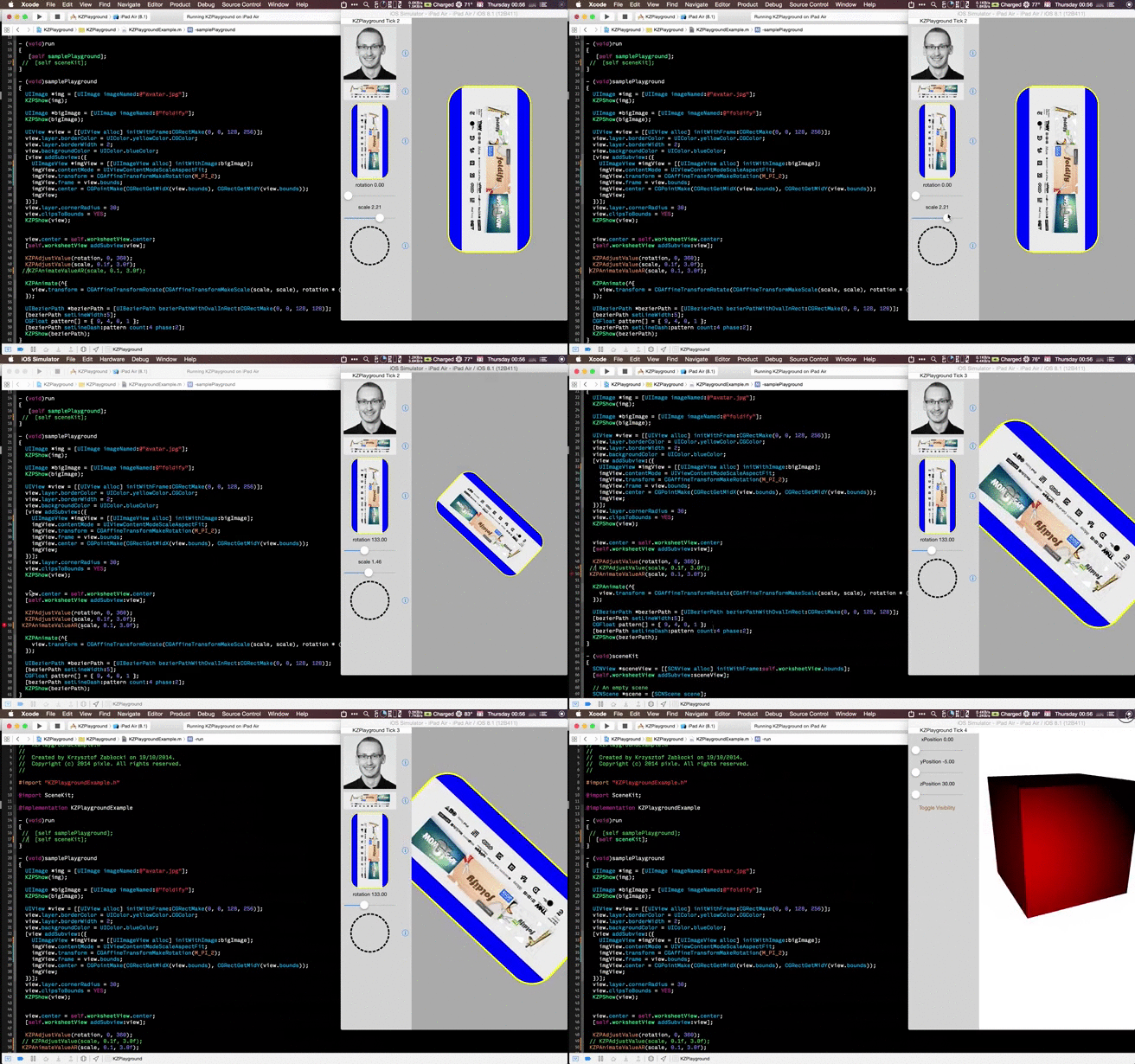
Swift Playgrounds... but supporting both Objective-C and Swift code, plus some superb features.
Watch demo
More in-depth overview video
Playgrounds are one of the niftiest features of Swift. They allow you to quickly test out bits of code and see results in real time without going through traditional edit-compile-run-debug cycle.
"But surely playgrounds aren't possible in Objective-C" you say? ... In fact they can be much better than Swift ones.
Objective-C Playgrounds
Features:
Faster than Swift playgrounds (a lot)
Extra controls for tweaking:
values
images
Auto-animated values
Synchronizing DSL's
Buttons
IDE agnostic, once you run it, you can modify the code even from vim.
Full iOS simulator and access to all iOS features, so you can prototype production ready code.
Nice DSL for rapid prototyping
CocoaPods support, so you can add it to existing projects to experiment
Open source, anyone can contribute to make them better!
and it’s just a start.
Technical details
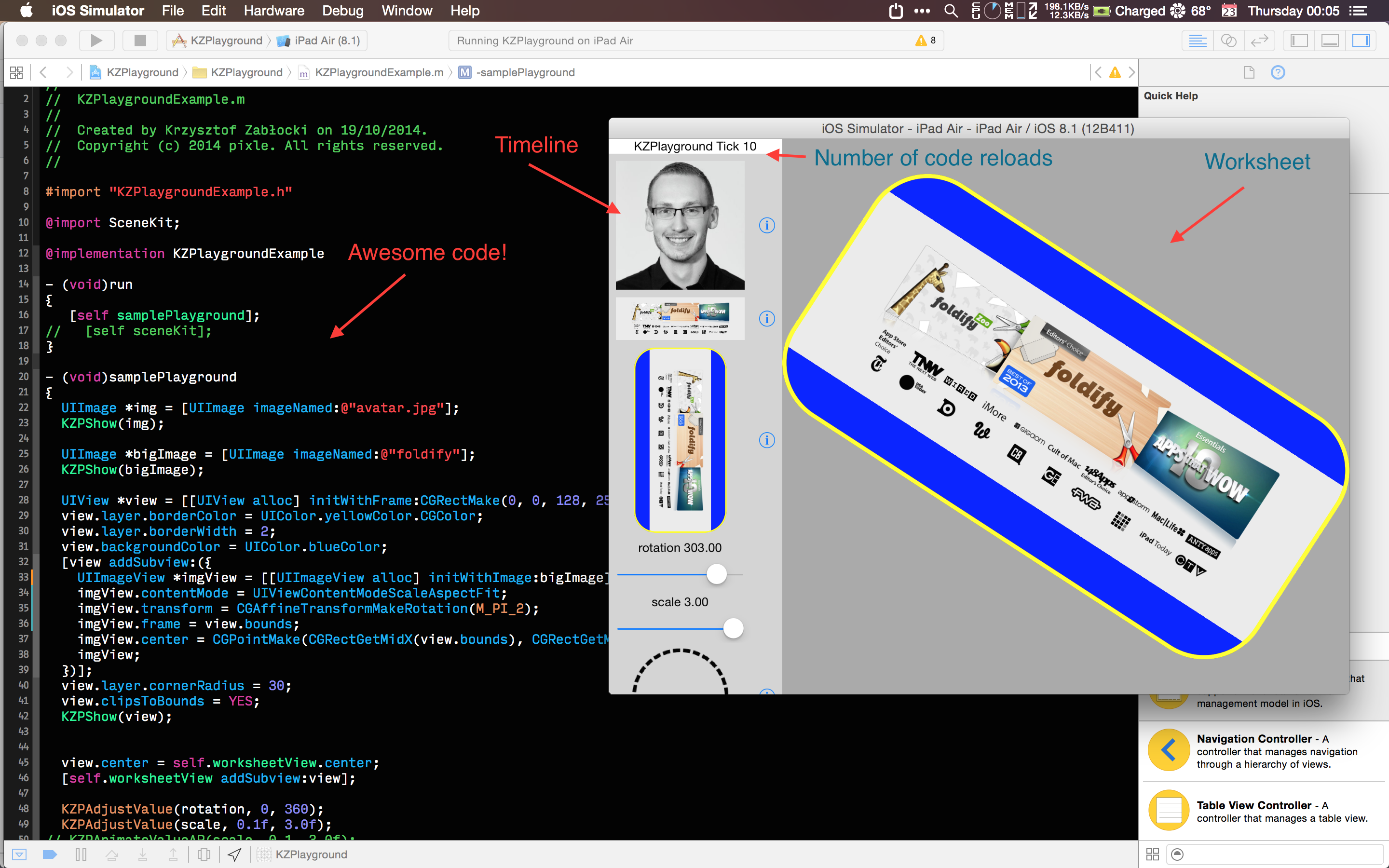
First, let’s establish naming:
Timeline is a place where you have snapshots and controls.
Worksheet is a place where you can add views / controls and have interaction with them. You can use all the stuff you’d normally use with iOS like UIGestureRecognizers etc.
Tick counter - number of times the code changes have been loaded, multiply by the time it takes to compile + load your project and you see how much time you saved.
DSL’s - Beautiful and fast way to prototype.
Timeline snapshots
KZPShow(obj)
CALayer
UIView
UIBezierPath
CGPathRef
CGImageRef
UIImage
NSString, with format or without
id
Implementing snapshotting for your custom classes
You can implement custom debug image:
- (UIImage*)kzp_debugImage;
If you have already implemented - (id)debugQuickLookObject that returns any of types supported by the KZPShow, you don’t need to do anything.
Instead of using instance variables / properties for KZPlayground class (you are fine to use them for normal classes that you create as part of playground), you should store playground specific variables that you need to reference between playground methods, eg. view you want to pan with UIPanGestureRecognizer inside transientObjects dictionary.
self.transientObjects[@"pannableView"] = view;
Persisted - Not cleared with recompilation
Implement setup method and use normal instance variables to store data you don't want to change on code change.
eg. if you need to do some expensive operation.
Snapshots recorded during setup will persist in timeline.
KZPlayground is distributed as a CocoaPod:
pod 'KZPlayground'
so you can either add it to your existing project or clone this repository and play with it.
Remember to not add playgrounds in production builds (easy with new cocoapods configuration scoping).
Once you have pod installed, you need to create your playground, it’s simple:
Subclass KZPPlayground
Implement run method
Conform to KZPActivePlayground protocol
You can have many playgrounds in one project, but only one should be marked as KZPActivePlayground. It will be automatically loaded.
Xcode/Appcode you can use cmd/ctrl + x (done via dyci plugin) while you are modifying your code.
(My Preferrence) Automatic on file save (IDE agnostic) using kicker gem in terminal: (N.B. you need to have the kicker gem installed, see below)
kicker -sql 0.05 FOLDER_WITH_SOURCE_FILES
in case of Example project you'd call kicker from inside the project root folder (one containing the .kick file, which you will also need.)
kicker -sql 0.05 Example
This will react to all changes in .m files in the Example directory and reload your playground.
(Optional) Make Kicker autostart whenever you run your project
Copy the .kick file to your project's directory.
Add a new "Run Script" under your target's "Build Phases" tab with the following:
PID_PATH=/tmp/${PROJECT_NAME}_kicker.pid
if [ -e $PID_PATH ]
then
  kill $(cat $PID_PATH)
  rm $PID_PATH
fi
kicker -sql 0.05 . > /dev/null 2>&1 & echo $! > $PID_PATH
Note: You will need to manually kill the kicker process when you're done since it won't be killed after you stop running your project.
Only once
KZPlayground is powered by Code Injection, currently using Dyci code injection tool, you only need to install it once on your machine (You’ll need to reinstall it on Xcode updates):
git clone https://github.com/DyCI/dyci-main.git
cd dyci-main/Install/
./install.sh
In order to use the kicker gem, you need to install it as follows:
(sudo) gem install kicker
Swift support
My playgrounds now support Swift code, to use that you should use injectionforxcode instead of Dyci, make sure to grab 0.4 Release for some simpler API.
Contributing
Pull-requests are welcomed.
Changelog
0.4
Basic Swift support
Added Swift example
0.3.2
Ability to hide timeline
0.3.1
XCAsset images picking.
Persisting selected images.
0.3.0
Image picking.
Synchronisations.
Change observing.
Localizable strings are injected.
0.2.5
Persistent setup functionality.
Improved snapshots details.
0.2.0
All files in the project can be now changed to trigger playground reload.
Better kicker setup.
Transient objects.
License
KZPlayground is available under the modified MIT license. See the LICENSE file for more info.
TopGit's metadata for krzysztofzablocki/Playgrounds does not record a license. Most public repositories on GitHub ARE open source, but the exact terms vary — verify by opening the LICENSE file directly.
What else is in the Mobile space?
krzysztofzablocki/Playgrounds is tracked by TopGit under the Mobile category, alongside 7 GitHub-tagged topics. Trending and Topics pages list peer repositories of comparable stars and language.
What is krzysztofzablocki/Playgrounds?
krzysztofzablocki/Playgrounds (krzysztofzablocki/Playgrounds) is a Objective-C project on GitHub. From the project's own README: Better playgrounds that work both for Objective-C and Swift
Where can I see krzysztofzablocki/Playgrounds in action?
The project maintains a homepage at http://twitter.com/merowing_. The README tab on this page also usually contains screenshots and a quickstart.
Where do I read more about krzysztofzablocki/Playgrounds?
This TopGit page is a snapshot — the READ ME tab shows the project's own README content (links stripped, images preserved). The GitHub repository at github.com/krzysztofzablocki/Playgrounds is the definitive source.
Why is krzysztofzablocki/Playgrounds categorized under Mobile?
TopGit places krzysztofzablocki/Playgrounds in the Mobile category based on its GitHub topics and description (tagged: "hot-reload", "hot-reloading", "objective-c"). Categories are assigned from real repository metadata, not editorial guesswork.
Read full README in the tab above.
Still deciding about Playgrounds?
One click hands the question to an AI along with this page — see what it says about Playgrounds.

 /Playgrounds


 First, let’s establish naming: