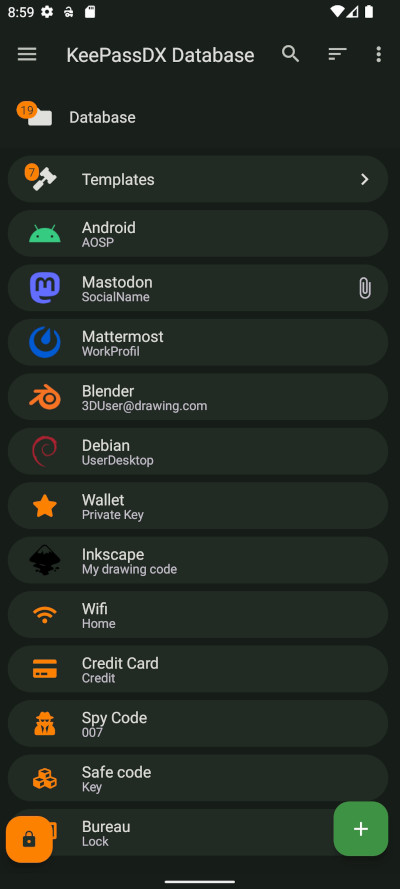
A mobile-focused entry in TopGit's GitHub warehouse: Kunzisoft/KeePassDX, 7.1k stars, Mobile, Kotlin. Lightweight vault and password manager for Android, KeePassDX allows editing encrypted data in a single file in KeePass format and fill in the forms in a secure way.
Snapshot summary built from the project's own GitHub metadata — there's no written TopGit review yet. The page will update automatically when a full review is published.
WHY NO REVIEW YET
TopGit writes full reviews for the most-starred, most-requested repositories. This page is a snapshot until then — see the READ ME tab for the original README in full.
Lightweight password safe and manager for Android, KeePassDX allows editing encrypted data in a single file in KeePass format and fill in the forms in a secure way.
Features
Passkeys for authentication and local storage of private keys.
Biometric recognition for fast unlocking (fingerprint / face unlock / …).
One-Time Password management (HOTP / TOTP) for two-factor authentication (2FA).
Autofill for easy form filling with passwords.
Magikeyboard to efficiently fill in any field.
Create encrypted database files.
Organisation of credentials by entry and in group trees.
Allows opening and copying URI / URL fields quickly.
Dynamic templates for each type of entry.
History of each entry.
Precise management of settings.
Material design with themes.
Support for .kdb and .kdbx files (version 1 to 4) with AES - Twofish - ChaCha20 - Argon2 algorithm.
Compatible with the majority of alternative programs (KeePass, KeePassXC, KeeWeb, …).
Code written in native languages (Kotlin / Java / JNI / C).
KeePassDX is open source and ad-free.
What is KeePassDX?
An alternative to remembering an endless list of passwords manually. This is made more difficult by using different passwords for each account. If you use one password everywhere and security fails only one of those places, it grants access to your e-mail account, website, etc, and you may not know about it or notice, before bad things happen.
KeePassDX is a local password and passkey manager for Android, which helps you manage your passwords in a secure way. You can put all your passwords in one database, locked with a master key and/or a keyfile. You only have to remember one single master password and/or select the keyfile to unlock the whole database. The databases are encrypted using the best and most secure encryption algorithms currently known.
Small print?
KeePassDX is under open source GPL3 license, meaning you can use, study, change and share it at will. Copyleft ensures it stays that way.
From the full source, anyone can build, fork, and check whether for example the encryption algorithms are implemented correctly.
There is no advertising.
Do not worry, the main features remain completely free, no security features are reserved for a specific version; encryption and data protection are strictly the same for all users.
KeePassDX is developed and maintained on a volunteer basis, so if you find the application useful and would like to support its development, there are several options available.
Contribution
Add features by making a pull request.
Help to translate KeePassDX to your language on Weblate.
Donate to encourage and finance design, deployment, ticket tracking, bug fixing, addition of new features, development and maintenance. You will then have access to a support version, KeePassDX Pro. (づ•ᴗ•)づ♡
Note : The support version provides access to optional visual styles that are accessible after a contribution (and a thank-you message ≽^•⩊•^≼) to encourage the work of this open source project!
It does not improve safety and provides no functional advantage.
If you contribute and do not have access to the styles, do not hesitate to contact the author at [email protected].
Download
F-Droid is the recommended way of installing, a libre software project that verifies all the libraries and app code is libre software.
Source
Status
Version
Google Play
Free + Pro
F-Droid
Libre
IzzyOnDroid
Free & Libre
GitHub / Obtainium
Free & Libre
Package authenticity from GitHub
Download the app from GitHub releases
Install apksigner from Android Studio
Open the directory where you saved the downloaded file in the Terminal
Make sure that you have apksigner installed by running:
Verified using v2 scheme (APK Signature Scheme v2): true
...
Number of signers: 1
Signer #1 certificate SHA-256 digest: 7d55b8af210381aabf960f07e17cf7857b6d2a642ca2da6bf0bdf1b200362f04
...
Signer #1 public key SHA-256 digest: 5d261d3176db1e077b80112824d9390167f3be0561827e42112ed6b71192db81
If it's the case, this means that the APK was well built by the author of KeePassDX.
Frequently Asked Questions
Other questions? You can read the FAQ
Other devices
KeePass (https://keepass.info/) is the original and official project for the desktop, with technical documentation for standardized database files. It is updated regularly with active maintenance (written in C#).
KeePassXC (https://keepassxc.org/) is an alternative integration of KeePass written in C++.
KeeWeb (https://keeweb.info/) is a web version that is also compatible with KeePass files.
KeePassDX is free software: you can redistribute it and/or modify
it under the terms of the GNU General Public License as published by
the Free Software Foundation, either version 3 of the License, or
(at your option) any later version.
KeePassDX is distributed in the hope that it will be useful,
but WITHOUT ANY WARRANTY; without even the implied warranty of
MERCHANTABILITY or FITNESS FOR A PARTICULAR PURPOSE. See the
GNU General Public License for more details.
You should have received a copy of the GNU General Public License
along with KeePassDX. If not, see http://www.gnu.org/licenses/.
This project is a fork of KeePassDroid by bpellin.
How does Kunzisoft/KeePassDX compare to other Mobile projects?
Kunzisoft/KeePassDX is tracked by TopGit in the Mobile category, with 7.1k GitHub stars and written in Kotlin. Browse the Mobile topic page on TopGit to compare it against similar projects by stars and activity.
How many stars does Kunzisoft/KeePassDX have?
Kunzisoft/KeePassDX has 7.1k GitHub stars — refresh the page for the live number, or check github.com/Kunzisoft/KeePassDX. TopGit mirrors GitHub's count but does not claim minute-by-minute accuracy.
Is Kunzisoft/KeePassDX open source?
Yes — Kunzisoft/KeePassDX ships under the GPL-3.0 license, which makes its source code freely readable (and, depending on license terms, forkable and reusable). Source: github.com/Kunzisoft/KeePassDX.
What else is in the Mobile space?
Kunzisoft/KeePassDX is tracked by TopGit under the Mobile category, alongside 10 GitHub-tagged topics. Trending and Topics pages list peer repositories of comparable stars and language.
What is Kunzisoft/KeePassDX?
Kunzisoft/KeePassDX (Kunzisoft/KeePassDX) is a Kotlin project on GitHub. From the project's own README: Lightweight vault and password manager for Android, KeePassDX allows editing encrypted data in a single file in KeePass format and fill in the forms in a secure way.
Where can I see Kunzisoft/KeePassDX in action?
The project maintains a homepage at https://www.keepassdx.com/. The README tab on this page also usually contains screenshots and a quickstart.
Where do I read more about Kunzisoft/KeePassDX?
This TopGit page is a snapshot — the READ ME tab shows the project's own README content (links stripped, images preserved). The GitHub repository at github.com/Kunzisoft/KeePassDX is the definitive source.
Read full README in the tab above.
Still deciding about KeePassDX?
One click hands the question to an AI along with this page — see what it says about KeePassDX.
 /KeePassDX
 Lightweight password safe and manager for Android, KeePassDX allows editing encrypted data in a single file in KeePass format and fill in the forms in a secure way.