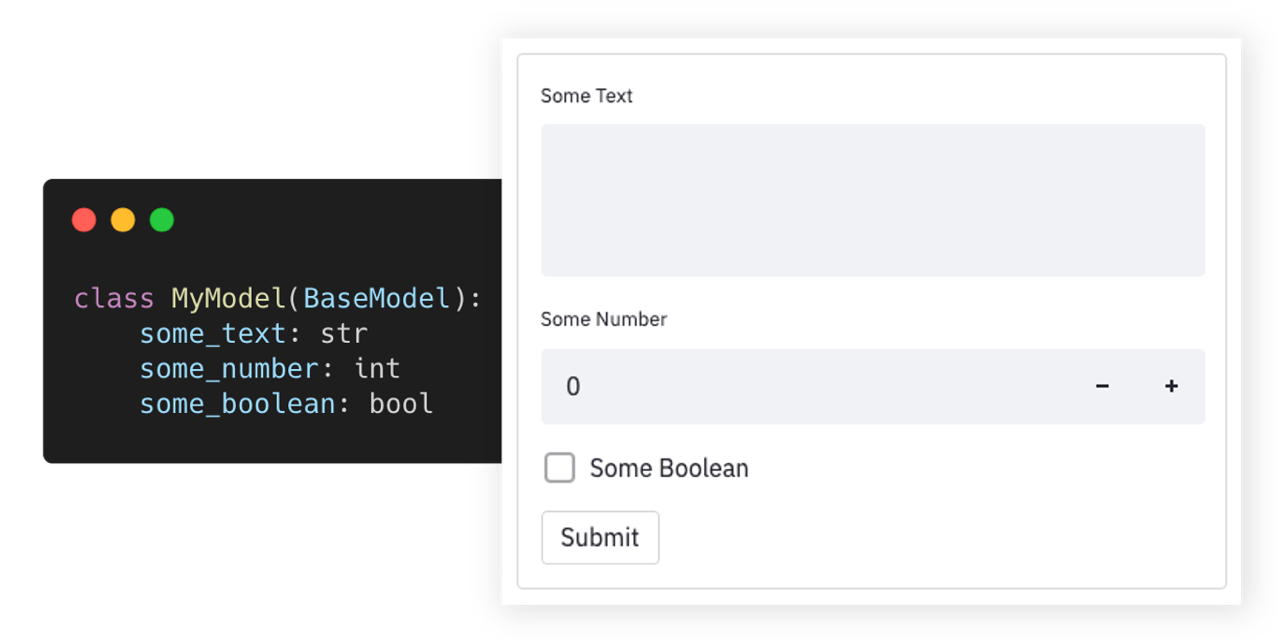
TopGit tracks lukasmasuch/streamlit-pydantic on GitHub as part of the Backend family. The project has 595 stars. 🪄 Auto-generate Streamlit UI from Pydantic Models and Dataclasses.
Snapshot summary built from the project's own GitHub metadata — there's no written TopGit review yet. The page will update automatically when a full review is published.
WHY NO REVIEW YET
TopGit writes full reviews for the most-starred, most-requested repositories. This page is a snapshot until then — see the READ ME tab for the original README in full.
Auto-generate Streamlit UI elements from Pydantic models.
Getting Started •
Documentation •
Support •
Report a Bug •
Contribution •
Changelog
Streamlit-pydantic makes it easy to auto-generate UI elements from Pydantic models or dataclasses. Just define your data model and turn it into a full-fledged UI form. It supports data validation, nested models, and field limitations. Streamlit-pydantic can be easily integrated into any Streamlit app.
Try out and explore various examples in our playground here.
Highlights
🪄 Auto-generated UI elements from Pydantic models & Dataclasses.
📇 Out-of-the-box data validation.
📑 Supports nested Pydantic models.
📏 Supports field limits and customizations.
🎈 Easy to integrate into any Streamlit app.
Getting Started
Installation
pip install streamlit-pydantic
Usage
Create a script (my_script.py) with a Pydantic model and render it via pydantic_form:
import streamlit as st
import streamlit_pydantic as sp
from pydantic import BaseModel


class ExampleModel(BaseModel):
    some_text: str
    some_number: int
    some_boolean: bool

data = sp.pydantic_form(key="my_sample_form", model=ExampleModel)
if data:
    st.json(data.model_dump())
Run the Streamlit server on the Python script: streamlit run my_script.py
You can find additional examples in the examples section below.
Examples
👉 Try out and explore these examples in our playground here
The following collection of examples demonstrates how Streamlit Pydantic can be applied in more advanced scenarios. You can find additional - even more advanced - examples in the examples folder or on the playground.
Simple Form
import streamlit as st
import streamlit_pydantic as sp
from pydantic import BaseModel


class ExampleModel(BaseModel):
    some_text: str
    some_number: int
    some_boolean: bool

data = sp.pydantic_form(key="my_sample_form", model=ExampleModel)
if data:
    st.json(data.model_dump())
Date Validation
import streamlit as st
import streamlit_pydantic as sp
from pydantic import BaseModel, Field, HttpUrl
from pydantic_extra_types.color import Color

class ExampleModel(BaseModel):
    url: HttpUrl
    color: Color = Field("blue", format="text")
    email: str = Field(..., max_length=100, regex=r"^\S+@\S+$")

data = sp.pydantic_form(key="my_form", model=ExampleModel)
if data:
    st.json(data.model_dump_json())
Dataclasses Support
import dataclasses
import json

import streamlit as st
from pydantic.json import pydantic_encoder

import streamlit_pydantic as sp


@dataclasses.dataclass
class ExampleModel:
    some_number: int
    some_boolean: bool
    some_text: str = "default input"


data = sp.pydantic_form(key="my_dataclass_form", model=ExampleModel)
if data:
    st.json(dataclasses.asdict(data))
Complex Nested Model
from enum import Enum
from typing import Set

import streamlit as st
from pydantic import BaseModel, Field

import streamlit_pydantic as sp


class OtherData(BaseModel):
    text: str
    integer: int


class SelectionValue(str, Enum):
    FOO = "foo"
    BAR = "bar"


class ExampleModel(BaseModel):
    long_text: str = Field(
        ..., format="multi-line", description="Unlimited text property"
    )
    integer_in_range: int = Field(
        20,
        ge=10,
        le=30,
        multiple_of=2,
        description="Number property with a limited range.",
    )
    single_selection: SelectionValue = Field(
        ..., description="Only select a single item from a set."
    )
    multi_selection: Set[SelectionValue] = Field(
        ..., description="Allows multiple items from a set."
    )
    read_only_text: str = Field(
        "Lorem ipsum dolor sit amet",
        description="This is a ready only text.",
        readOnly=True,
    )
    single_object: OtherData = Field(
        ...,
        description="Another object embedded into this model.",
    )


data = sp.pydantic_form(key="my_form", model=ExampleModel)
if data:
    st.json(data.model_dump_json())
Render Input
from pydantic import BaseModel

import streamlit_pydantic as sp


class ExampleModel(BaseModel):
    some_text: str
    some_number: int = 10  # Optional
    some_boolean: bool = True  # Option


input_data = sp.pydantic_input(
    "model_input", model=ExampleModel, group_optional_fields="sidebar"
)
Render Output
import datetime

from pydantic import BaseModel, Field

import streamlit_pydantic as sp


class ExampleModel(BaseModel):
    text: str = Field(..., description="A text property")
    integer: int = Field(..., description="An integer property.")
    date: datetime.date = Field(..., description="A date.")


instance = ExampleModel(text="Some text", integer=40, date=datetime.date.today())
sp.pydantic_output(instance)
Custom Form
import streamlit as st
from pydantic import BaseModel

import streamlit_pydantic as sp


class ExampleModel(BaseModel):
    some_text: str
    some_number: int = 10
    some_boolean: bool = True


with st.form(key="pydantic_form"):
    data = sp.pydantic_input(key="my_custom_form_model", model=ExampleModel)
    submit_button = st.form_submit_button(label="Submit")
    obj = ExampleModel(data)

if data:
    st.json(obj.model_dump())
Support & Feedback
Type
Channel
🐛 Bug Reports
✨ Feature Requests
👩💻 Usage Questions
📢 Announcements
Documentation
The API documentation can be found here. To generate UI elements, you can use the high-level pydantic_form method. Or the more flexible lower-level pydantic_input and pydantic_output methods. See the examples section on how to use those methods.
Contribution
Pull requests are encouraged and always welcome. Read our contribution guidelines and check out help-wanted issues.
Submit Github issues for any feature request and enhancement, bugs, or documentation problems.
By participating in this project, you agree to abide by its Code of Conduct.
The development section below contains information on how to build and test the project after you have implemented some changes.
Development
This repo uses Rye for development. To get started, install Rye and sync the project:
rye sync
Run the playground app:
rye run playground
Run linting and type checks:
rye run checks
[!TIP]
The linting and formatting is using ruff and
type-checking is done with mypy. You can use
the ruff and mypy extensions of your IDE to automatically run these checks
during development.
How active is development on lukasmasuch/streamlit-pydantic?
The most recent commit recorded on lukasmasuch/streamlit-pydantic was 2.0 years ago, based on the GitHub push timestamp. The repository has 89 forks — one of the better signals of community interest.
How does lukasmasuch/streamlit-pydantic compare to other Backend projects?
lukasmasuch/streamlit-pydantic is tracked by TopGit in the Backend category, with 595 GitHub stars and written in Python. Browse the Backend topic page on TopGit to compare it against similar projects by stars and activity.
How many stars does lukasmasuch/streamlit-pydantic have?
lukasmasuch/streamlit-pydantic has 595 GitHub stars — refresh the page for the live number, or check github.com/lukasmasuch/streamlit-pydantic. TopGit mirrors GitHub's count but does not claim minute-by-minute accuracy.
Is lukasmasuch/streamlit-pydantic open source?
Yes — lukasmasuch/streamlit-pydantic ships under the MIT license, which makes its source code freely readable (and, depending on license terms, forkable and reusable). Source: github.com/lukasmasuch/streamlit-pydantic.
What is lukasmasuch/streamlit-pydantic?
lukasmasuch/streamlit-pydantic (lukasmasuch/streamlit-pydantic) is a Python project on GitHub. From the project's own README: 🪄 Auto-generate Streamlit UI from Pydantic Models and Dataclasses.
Where do I read more about lukasmasuch/streamlit-pydantic?
This TopGit page is a snapshot — the READ ME tab shows the project's own README content (links stripped, images preserved). The GitHub repository at github.com/lukasmasuch/streamlit-pydantic is the definitive source.
Read full README in the tab above.
Want a second opinion on streamlit-pydantic?
Ask an AI that can read this page — one click and you get its take on streamlit-pydantic.
 /streamlit-pydantic