lukasmasuch/streamlit-pydantic là dự án Python với 595 sao trong nhóm Backend. 🪄 Auto-generate Streamlit UI from Pydantic Models and Dataclasses.
Tóm tắt dựng từ metadata GitHub của chính dự án — chưa có bài review TopGit. Trang sẽ tự động cập nhật khi bài review đầy đủ được xuất bản.
VÌ SAO CHƯA CÓ REVIEW
TopGit viết bài đầy đủ cho repo có nhiều sao nhất và được yêu cầu nhiều nhất. Trang này là snapshot trong thời gian chờ — xem README gốc ở tab READ ME.
Auto-generate Streamlit UI elements from Pydantic models.
Getting Started •
Documentation •
Support •
Report a Bug •
Contribution •
Changelog
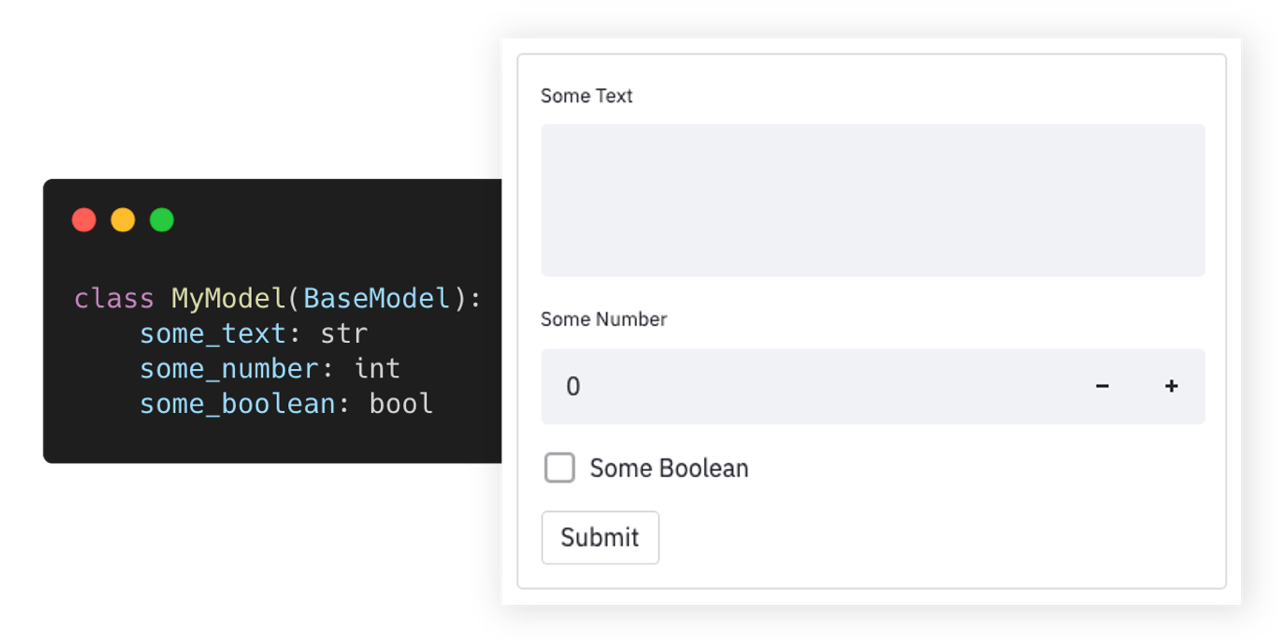
Streamlit-pydantic makes it easy to auto-generate UI elements from Pydantic models or dataclasses. Just define your data model and turn it into a full-fledged UI form. It supports data validation, nested models, and field limitations. Streamlit-pydantic can be easily integrated into any Streamlit app.
Try out and explore various examples in our playground here.
Highlights
🪄 Auto-generated UI elements from Pydantic models & Dataclasses.
📇 Out-of-the-box data validation.
📑 Supports nested Pydantic models.
📏 Supports field limits and customizations.
🎈 Easy to integrate into any Streamlit app.
Getting Started
Installation
pip install streamlit-pydantic
Usage
Create a script (my_script.py) with a Pydantic model and render it via pydantic_form:
import streamlit as st
import streamlit_pydantic as sp
from pydantic import BaseModel


class ExampleModel(BaseModel):
    some_text: str
    some_number: int
    some_boolean: bool

data = sp.pydantic_form(key="my_sample_form", model=ExampleModel)
if data:
    st.json(data.model_dump())
Run the Streamlit server on the Python script: streamlit run my_script.py
You can find additional examples in the examples section below.
Examples
👉 Try out and explore these examples in our playground here
The following collection of examples demonstrates how Streamlit Pydantic can be applied in more advanced scenarios. You can find additional - even more advanced - examples in the examples folder or on the playground.
Simple Form
import streamlit as st
import streamlit_pydantic as sp
from pydantic import BaseModel


class ExampleModel(BaseModel):
    some_text: str
    some_number: int
    some_boolean: bool

data = sp.pydantic_form(key="my_sample_form", model=ExampleModel)
if data:
    st.json(data.model_dump())
Date Validation
import streamlit as st
import streamlit_pydantic as sp
from pydantic import BaseModel, Field, HttpUrl
from pydantic_extra_types.color import Color

class ExampleModel(BaseModel):
    url: HttpUrl
    color: Color = Field("blue", format="text")
    email: str = Field(..., max_length=100, regex=r"^\S+@\S+$")

data = sp.pydantic_form(key="my_form", model=ExampleModel)
if data:
    st.json(data.model_dump_json())
Dataclasses Support
import dataclasses
import json

import streamlit as st
from pydantic.json import pydantic_encoder

import streamlit_pydantic as sp


@dataclasses.dataclass
class ExampleModel:
    some_number: int
    some_boolean: bool
    some_text: str = "default input"


data = sp.pydantic_form(key="my_dataclass_form", model=ExampleModel)
if data:
    st.json(dataclasses.asdict(data))
Complex Nested Model
from enum import Enum
from typing import Set

import streamlit as st
from pydantic import BaseModel, Field

import streamlit_pydantic as sp


class OtherData(BaseModel):
    text: str
    integer: int


class SelectionValue(str, Enum):
    FOO = "foo"
    BAR = "bar"


class ExampleModel(BaseModel):
    long_text: str = Field(
        ..., format="multi-line", description="Unlimited text property"
    )
    integer_in_range: int = Field(
        20,
        ge=10,
        le=30,
        multiple_of=2,
        description="Number property with a limited range.",
    )
    single_selection: SelectionValue = Field(
        ..., description="Only select a single item from a set."
    )
    multi_selection: Set[SelectionValue] = Field(
        ..., description="Allows multiple items from a set."
    )
    read_only_text: str = Field(
        "Lorem ipsum dolor sit amet",
        description="This is a ready only text.",
        readOnly=True,
    )
    single_object: OtherData = Field(
        ...,
        description="Another object embedded into this model.",
    )


data = sp.pydantic_form(key="my_form", model=ExampleModel)
if data:
    st.json(data.model_dump_json())
Render Input
from pydantic import BaseModel

import streamlit_pydantic as sp


class ExampleModel(BaseModel):
    some_text: str
    some_number: int = 10  # Optional
    some_boolean: bool = True  # Option


input_data = sp.pydantic_input(
    "model_input", model=ExampleModel, group_optional_fields="sidebar"
)
Render Output
import datetime

from pydantic import BaseModel, Field

import streamlit_pydantic as sp


class ExampleModel(BaseModel):
    text: str = Field(..., description="A text property")
    integer: int = Field(..., description="An integer property.")
    date: datetime.date = Field(..., description="A date.")


instance = ExampleModel(text="Some text", integer=40, date=datetime.date.today())
sp.pydantic_output(instance)
Custom Form
import streamlit as st
from pydantic import BaseModel

import streamlit_pydantic as sp


class ExampleModel(BaseModel):
    some_text: str
    some_number: int = 10
    some_boolean: bool = True


with st.form(key="pydantic_form"):
    data = sp.pydantic_input(key="my_custom_form_model", model=ExampleModel)
    submit_button = st.form_submit_button(label="Submit")
    obj = ExampleModel(data)

if data:
    st.json(obj.model_dump())
Support & Feedback
Type
Channel
🐛 Bug Reports
✨ Feature Requests
👩💻 Usage Questions
📢 Announcements
Documentation
The API documentation can be found here. To generate UI elements, you can use the high-level pydantic_form method. Or the more flexible lower-level pydantic_input and pydantic_output methods. See the examples section on how to use those methods.
Contribution
Pull requests are encouraged and always welcome. Read our contribution guidelines and check out help-wanted issues.
Submit Github issues for any feature request and enhancement, bugs, or documentation problems.
By participating in this project, you agree to abide by its Code of Conduct.
The development section below contains information on how to build and test the project after you have implemented some changes.
Development
This repo uses Rye for development. To get started, install Rye and sync the project:
rye sync
Run the playground app:
rye run playground
Run linting and type checks:
rye run checks
[!TIP]
The linting and formatting is using ruff and
type-checking is done with mypy. You can use
the ruff and mypy extensions of your IDE to automatically run these checks
during development.
Trang TopGit này là một snapshot — tab "Readme" hiển thị nguyên văn README của repo (đã bỏ link, giữ ảnh). Repo GitHub ở github.com/lukasmasuch/streamlit-pydantic là nguồn chính thức.
lukasmasuch/streamlit-pydantic có bao nhiêu sao?
lukasmasuch/streamlit-pydantic có 595 sao GitHub — tải lại trang để xem số mới nhất, hoặc xem trực tiếp github.com/lukasmasuch/streamlit-pydantic. TopGit phản chiếu số sao của GitHub nhưng không cam kết đến từng phút.
lukasmasuch/streamlit-pydantic có phải mã nguồn mở không?
Có — lukasmasuch/streamlit-pydantic phát hành theo license MIT, nghĩa là mã nguồn mở để đọc, fork và (tùy license) tái sử dụng. Mã: github.com/lukasmasuch/streamlit-pydantic.
lukasmasuch/streamlit-pydantic còn đang phát triển không?
Commit gần nhất trên lukasmasuch/streamlit-pydantic là 2.3 năm trước (theo timestamp GitHub). Repo có 89 fork — một chỉ báo về mức độ quan tâm của cộng đồng.
lukasmasuch/streamlit-pydantic là gì?
lukasmasuch/streamlit-pydantic (lukasmasuch/streamlit-pydantic) là dự án Python trên GitHub. Theo mô tả gốc: 🪄 Auto-generate Streamlit UI from Pydantic Models and Dataclasses.
lukasmasuch/streamlit-pydantic so với các dự án Backend khác thế nào?
lukasmasuch/streamlit-pydantic được TopGit xếp vào nhóm Backend, với 595 sao GitHub và viết bằng Python. Xem trang chủ đề Backend trên TopGit để so sánh với các dự án tương tự theo số sao và mức độ hoạt động.
Đọc đầy đủ README ở tab phía trên.
streamlit-pydantic có đáng để bạn bỏ thời gian?
ChatGPT, Claude và Perplexity đều đọc được trang này. Hỏi thử xem họ nghĩ gì về streamlit-pydantic.

 /streamlit-pydantic