A look at mac-cain13/R.swift: 9.6k stars on GitHub, written primarily in Swift, tracked under the Mobile category. Strong typed, autocompleted resources like images, fonts and segues in Swift projects
Snapshot summary built from the project's own GitHub metadata — there's no written TopGit review yet. The page will update automatically when a full review is published.
WHY NO REVIEW YET
TopGit writes full reviews for the most-starred, most-requested repositories. This page is a snapshot until then — see the READ ME tab for the original README in full.
Get strong typed, autocompleted resources like images, fonts and segues in Swift projects
Why use this?
It makes your code that uses resources:
Fully typed, less casting and guessing what a method will return
Compile time checked, no more incorrect strings that make your app crash at runtime
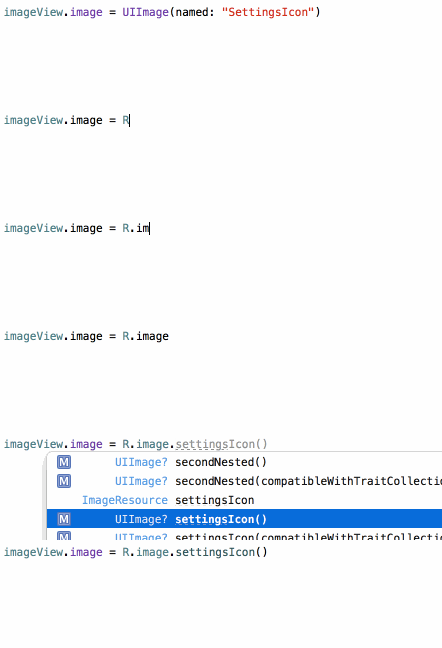
Autocompleted, never have to guess that image name again
Currently you type:
let icon = UIImage(named: "settings-icon")
let font = UIFont(name: "San Francisco", size: 42)
let color = UIColor(named: "indicator highlight")
let viewController = CustomViewController(nibName: "CustomView", bundle: nil)
let string = String(format: NSLocalizedString("welcome.withName", comment: ""), locale: NSLocale.current, "Arthur Dent")
With R.swift it becomes:
let icon = R.image.settingsIcon()
let font = R.font.sanFrancisco(size: 42)
let color = R.color.indicatorHighlight()
let viewController = CustomViewController(nib: R.nib.customView)
let string = R.string.localizable.welcomeWithName("Arthur Dent")
Check out more examples or hear about how Fabric.app uses R.swift!
Demo
Autocompleted images:
Compiletime checked images:
This is only the beginning, check out more examples!
CocoaHeadsNL presentation
Mathijs Kadijk presented R.swift at the September 2016 CocoaHeadsNL meetup.
Talking about the ideas behind R.swift and demonstrating how to move from plain stringly-typed iOS code to statically typed code.
Features
After installing R.swift into your project you can use the R-struct to access resources. If the struct is outdated just build and R.swift will correct any missing/changed/added resources.
R.swift currently supports these types of resources:
Images
Fonts
Resource files
Colors
Localized strings
Storyboards
Segues
Nibs
Reusable cells
Project
Entitlements
Info.plist
Runtime validation with R.validate():
If all images used in storyboards and nibs are available
If all named colors used in storyboards and nibs are available
If all view controllers with storyboard identifiers can be loaded
If all custom fonts can be loaded
Q&A
Why was R.swift created?
Why should I choose R.swift over alternative X or Y?
What are the requirements to run R.swift?
How to fix missing imports in the generated file?
How to use classes with the same name as their module?
Can I ignore resources?
Can I use R.swift in a library?
How does R.swift work?
How to upgrade to a new major version?
How can I only run specific generators?
Installation
As of Rswift 7, Swift Package Manager is the recommended method of installation.
Demo video: Updating from R.swift 6 to Rswift 7 (Starting at 1:06, this describes the installation of Rswift 7).
Xcode project using SPM (Recommended)
Demo Video: Install R.swift in Xcode with SPM
In Project Settings, on the tab "Package Dependencies", click "+", search for https://github.com/mac-cain13/R.swift and click "Add Package".
Select the target that will use R.swift next to "RswiftLibrary" and click "Add Package".
Now click on your target, on the tab "Build Phases", in the section "Run Build Tool Plug-ins", click "+" and add RswiftGenerateInternalResources. (Screenshot)
Now the R struct should be available in your code, use auto-complete to explore all static references.
Note: The first build you might need to approve the new plugin by clicking the build error warning you about the new plugin.
R.swift on Xcode Cloud or any other CI
On your CI server you can't explicitly allow the build plugin to run, so you need to disable plugin validation to be able to build without user interaction:
Run a script on your CI that runs: defaults write com.apple.dt.Xcode IDESkipPackagePluginFingerprintValidatation -bool YES before Xcode starts building.
On Xcode Cloud you can add a custom build script in ci_scripts/ci_post_clone.sh with this line that Xcode will run.
Build your project, now the R struct should be available in your code, use auto-complete to explore all static references
CocoaPods
Add pod 'R.swift' to your Podfile and run pod install
In Xcode: Click on your project in the file list, choose your target under TARGETS, click the Build Phases tab and add a New Run Script Phase by clicking the little plus icon in the top left
Drag the new Run Script phase above the Compile Sources phase and belowCheck Pods Manifest.lock, expand it and paste the following script:
Add $SRCROOT/R.generated.swift to the "Output Files" of the Build Phase
Uncheck "Based on dependency analysis" so that R.swift is run on each build
Build your project, in Finder you will now see a R.generated.swift in the $SRCROOT-folder, drag the R.generated.swift files into your project and uncheckCopy items if needed
Screenshot of the Build Phase can be found here
Tip: Add the *.generated.swift pattern to your .gitignore file to prevent unnecessary conflicts.
Manually
Add the R.swift library to your project
Download a R.swift release, unzip it and put it into your source root directory
In Xcode: Click on your project in the file list, choose your target under TARGETS, click the Build Phases tab and add a New Run Script Phase by clicking the little plus icon in the top left
Drag the new Run Script phase above the Compile Sources phase, expand it and paste the following script:
Add $SRCROOT/R.generated.swift to the "Output Files" of the Build Phase
Uncheck "Based on dependency analysis" so that R.swift is run on each build
Build your project, in Finder you will now see a R.generated.swift in the $SRCROOT-folder, drag the R.generated.swift files into your project and uncheckCopy items if needed
Screenshot of the Build Phase can be found here
Tip: Add the *.generated.swift pattern to your .gitignore file to prevent unnecessary conflicts.
Contribute
We'll love contributions, read the contribute docs for info on how to report issues, submit ideas and submit pull requests!
License
R.swift is created by Mathijs Kadijk and Tom Lokhorst released under a MIT License.
No homepage URL was recorded for mac-cain13/R.swift in TopGit's last sync. The README tab above frequently contains screenshots and demo links, or check the repository description on GitHub.
How active is development on mac-cain13/R.swift?
The most recent commit recorded on mac-cain13/R.swift was 1.4 years ago, based on the GitHub push timestamp. The repository has 777 forks — one of the better signals of community interest.
Is mac-cain13/R.swift open source?
Yes — mac-cain13/R.swift ships under the MIT license, which makes its source code freely readable (and, depending on license terms, forkable and reusable). Source: github.com/mac-cain13/R.swift.
What license does mac-cain13/R.swift use?
mac-cain13/R.swift is released under the MIT license. Always verify the LICENSE file directly on GitHub for the authoritative terms — license strings can be edited out of sync with a project's actual stance.
What topics is mac-cain13/R.swift associated with?
GitHub's repository topics for mac-cain13/R.swift: "autocompletion", "code-generator", "ios", "resources", "swift", "tvos", "watchos", "xcode". TopGit's editorial category is Mobile.
Where do I read more about mac-cain13/R.swift?
This TopGit page is a snapshot — the READ ME tab shows the project's own README content (links stripped, images preserved). The GitHub repository at github.com/mac-cain13/R.swift is the definitive source.
Read full README in the tab above.
Is R.swift worth your time?
ChatGPT, Claude and Perplexity can all read this page. Ask one of them what it makes of R.swift.
 /R.swift