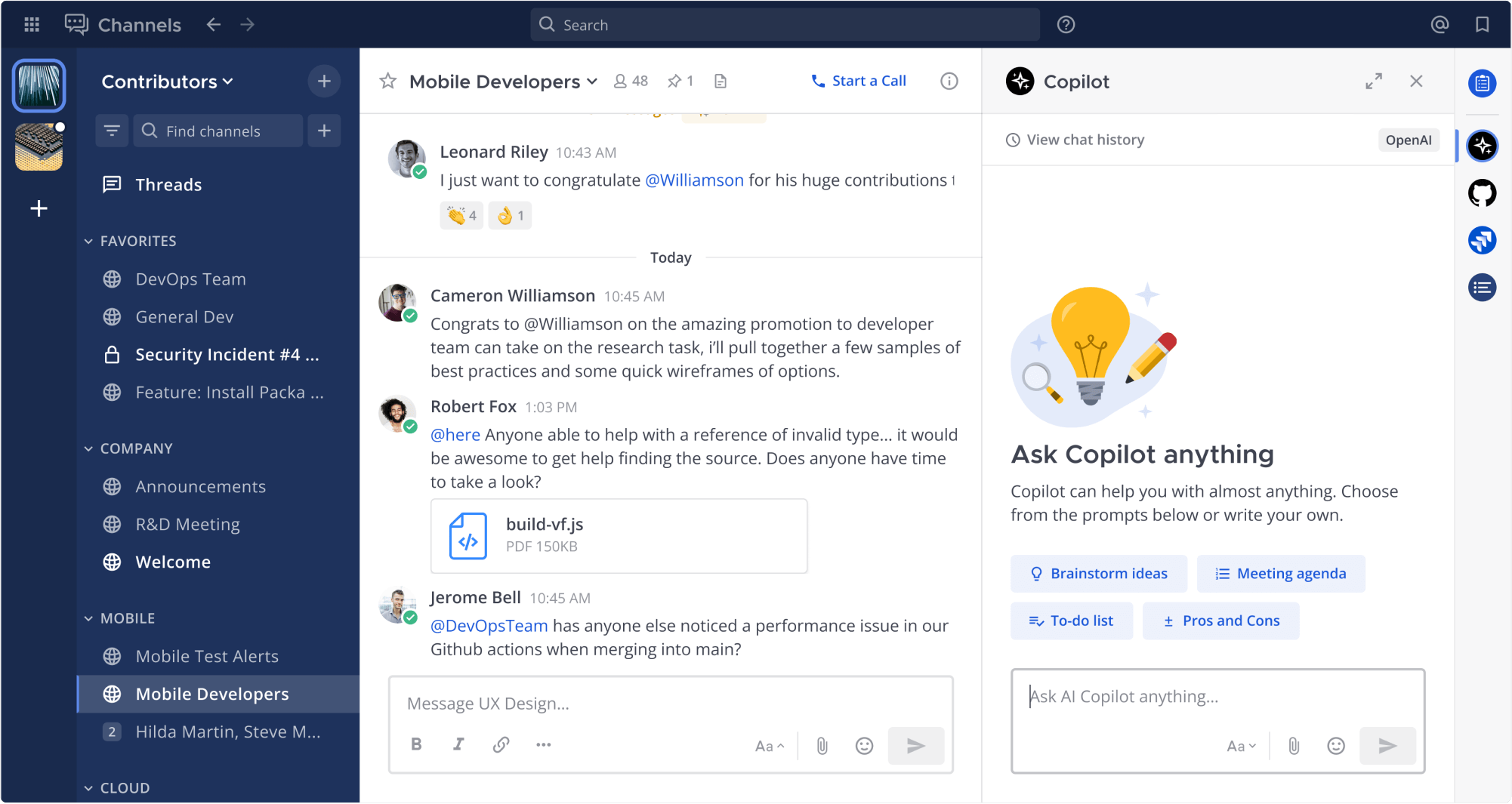
mattermost/mattermost-plugin-agents sits at 257 stars on GitHub, written primarily in Go. Mattermost Agents plugin supporting multiple LLMs
Snapshot summary built from the project's own GitHub metadata — there's no written TopGit review yet. The page will update automatically when a full review is published.
WHY NO REVIEW YET
TopGit writes full reviews for the most-starred, most-requested repositories. This page is a snapshot until then — see the READ ME tab for the original README in full.
Self-hosted AI agents for Mattermost that act on your behalf through tools and MCP servers, plus a built-in Mattermost MCP server for external AI clients such as Claude Code, Claude Desktop, Cursor, and VS Code.
Mattermost Agents (plugin ID mattermost-ai) adds AI agents to a Mattermost server. You talk to an agent in a direct message, the Agents pane, or a channel. The agent can search and post in Mattermost, call tools on other systems through the Model Context Protocol (MCP), and work with files, all with the permissions of the person it is acting for. You choose the LLM, including models that run on your own infrastructure, so with a self-hosted model, conversations and data stay in your environment.
Does Mattermost have an official MCP server? Yes. It is built into this plugin and needs no separate installation. After an admin enables it, MCP clients connect to /plugins/mattermost-ai/mcp-server/mcp on your Mattermost server and sign in as a Mattermost user. See Mattermost MCP Server.
Key Features
Agents that act on your behalf: Chat with a personal agent that searches and reads Mattermost, posts and sends messages, schedules posts and reminders, and uses tools from other systems. Configure multiple agents with their own instructions, models, and tool access. See Use Mattermost Agents as your personal AI assistant.
Tools and MCP: Agents use built-in Mattermost tools, remote MCP servers with per-user OAuth (with a Connect card in the conversation), and tools registered by other Mattermost plugins. Dynamic tool loading keeps large tool catalogs out of the model's context.
Built-in Mattermost MCP server: Connect Claude Code, Claude Desktop, Cursor, VS Code, or any MCP client that supports streamable HTTP to Mattermost, using OAuth with dynamic client registration or a personal access token. Over 100 tools run with the signed-in user's own permissions. See Mattermost MCP Server.
Governance: Per-tool approval policies, user, team, and channel access controls for agents, attribute-based access control, server audit logging, token usage tracking, and OpenTelemetry tracing. Admins decide which tools exist and which need approval. See the Admin Guide.
Bring your own LLM: Use local models through OpenAI-compatible APIs (Ollama, vLLM), or OpenAI, Anthropic, AWS Bedrock, Azure OpenAI, Google Gemini and Vertex AI, Cohere, Mistral, and Scale AI. See LLM Provider Configuration and Implementing Sovereign AI.
Summaries, search, and meetings: Summarize threads, unread messages, and channels; ask questions about a channel; search with keyword and semantic search; and summarize Mattermost Calls and Zoom meeting recordings.
Files and artifacts: Agents create text files attached to their replies, read attachments, analyze images with vision-capable models, and render HTML artifacts in the conversation.
Channel use: @mention an agent in a channel, or set a channel to auto-reply. Tool results in channels can be shared or kept private by the person who asked.
Custom prompts: Save reusable prompts, pin them in the Agents pane, and share them with your team.
Some features depend on your Mattermost license level. See the license requirements.
Documentation
Documentation is available in the docs directory:
User Guide: Use agents, tools, summaries, search, and meeting summaries
Use Mattermost Agents as your personal AI assistant: What a personal agent can do across channels, MCP servers, and integrations
Mattermost MCP Server: Connect Claude Code, Claude Desktop, Cursor, VS Code, and other MCP clients to Mattermost
LLM Provider Configuration: Configuration for supported LLM providers
AWS Bedrock Setup: Use Amazon Bedrock with IAM instance profiles
Implementing Sovereign AI: Deploy agents with local models and data control
Usage Tips: Voice dictation, prompting techniques, and workflow tips
Upgrading to Agents V2: Upgrade path, automatic migrations, and breaking changes from v1.x
Load Testing: Configure the in-process mock LLM and load-test-ng Agents controller
Feature documentation:
Managing Agents: Create, edit, and version agents and control their access and MCP tools
Custom Prompts: Save, share, and pin reusable prompts
Channel Summaries: Use the Ask Agents about this channel button to summarize and analyze channel activity
Multiplayer Tool Calling: Tool approval, credentials, and result visibility in shared channels
Installation
Download the latest release from the releases page. You can also download the experimental latest master
Upload and enable the plugin through the Mattermost System Console
Configure your desired LLM provider settings
System Requirements
Mattermost Server v12.0.0+
PostgreSQL database with pgvector extension for semantic search capabilities
Network access to your chosen LLM provider
Quick Start
After installation, complete these steps to get started:
Navigate to System Console > Plugins > Agents
Create an agent and configure it with your LLM provider credentials
Set permissions for who can access the agent
Open the Agents panel from any channel using the AI icon in the right sidebar
Start interacting with your AI assistant
For detailed configuration instructions, see the Admin Guide.
Integration
Bridge Client
The plugin provides a Go client library for other Mattermost plugins and the Mattermost server to interact with the AI plugin's LLM Bridge API. This allows you to easily add AI capabilities to your own plugins or server-side features.
See the Bridge Client README for installation and usage instructions.
Development
Prerequisites
Go 1.27+
Node.js 24.11+
Access to an LLM provider (OpenAI, Anthropic, etc.)
Local Setup
Setup your Mattermost development environment by following the Mattermost developer setup guide. If you have a remote mattermost server you want to develop to you can skip this step.
Setup your Mattermost plugin development environment by following the Plugin Developer setup guide.
Clone the repository:
git clone https://github.com/mattermost/mattermost-plugin-agents.git
cd mattermost-plugin-agents
Optional. If you are developing to a remote server, setup environment variables to deploy:
Run make evals to run prompt evaluations interactively (with TUI)
Run make evals-ci to run prompt evaluations in CI mode (non-interactive)
Benchmark Tests
The streaming code has benchmark tests to measure performance and detect regressions:
# Run all streaming benchmarks
go test -bench=. -benchmem ./llm/... ./streaming/...

# Run specific benchmark
go test -bench=BenchmarkStreamToPost -benchmem ./streaming/...

# Run with CPU profiling
go test -bench=BenchmarkReadAll -cpuprofile=cpu.prof ./llm/...
Benchmarks cover:
ReadAll() stream consumption with varying response sizes
TokenUsageLoggingWrapper interception overhead
StreamToPost() full processing pipeline with WebSocket events
Multi-Provider Evaluation Support
The evaluation system supports testing with multiple LLM providers: OpenAI, Anthropic, and Azure OpenAI. By default, evaluations run against all providers, but you can target specific ones:
# Run with all providers (default)
make evals

# Run with only Anthropic
LLM_PROVIDER=anthropic make evals

# Run with OpenAI and Azure
LLM_PROVIDER=openai,azure make evals

# Use a specific model
ANTHROPIC_MODEL=claude-opus-5-5 make evals
See cmd/evalviewer/README.md for complete documentation on environment variables and configuration options.
License
This repository is licensed under Apache-2, except for the enterprise directory which is licensed under the Mattermost Source Available License. See Mattermost Source Available License to learn more.
How does mattermost/mattermost-plugin-agents compare to other AI Tools projects?
mattermost/mattermost-plugin-agents is tracked by TopGit in the AI Tools category, with 257 GitHub stars and written in Go. Browse the AI Tools topic page on TopGit to compare it against similar projects by stars and activity.
How many stars does mattermost/mattermost-plugin-agents have?
mattermost/mattermost-plugin-agents has 257 GitHub stars — refresh the page for the live number, or check github.com/mattermost/mattermost-plugin-agents. TopGit mirrors GitHub's count but does not claim minute-by-minute accuracy.
Is mattermost/mattermost-plugin-agents open source?
Yes — mattermost/mattermost-plugin-agents ships under the Apache-2.0 license, which makes its source code freely readable (and, depending on license terms, forkable and reusable). Source: github.com/mattermost/mattermost-plugin-agents.
What else is in the AI Tools space?
mattermost/mattermost-plugin-agents is tracked by TopGit under the AI Tools category, alongside 4 GitHub-tagged topics. Trending and Topics pages list peer repositories of comparable stars and language.
What is mattermost/mattermost-plugin-agents?
mattermost/mattermost-plugin-agents (mattermost/mattermost-plugin-agents) is a Go project on GitHub. From the project's own README: Mattermost Agents plugin supporting multiple LLMs
Where can I see mattermost/mattermost-plugin-agents in action?
The project maintains a homepage at https://mattermost.com/copilot. The README tab on this page also usually contains screenshots and a quickstart.
Where do I read more about mattermost/mattermost-plugin-agents?
This TopGit page is a snapshot — the READ ME tab shows the project's own README content (links stripped, images preserved). The GitHub repository at github.com/mattermost/mattermost-plugin-agents is the definitive source.
Read full README in the tab above.
Is mattermost-plugin-agents worth your time?
ChatGPT, Claude and Perplexity can all read this page. Ask one of them what it makes of mattermost-plugin-agents.

 /mattermost-plugin-agents