On GitHub, mikepenz/Android-Iconics has picked up 5.3k stars, Mobile, Kotlin. Android-Iconics - Use any icon font, or vector (.svg) as drawable in your application.
Snapshot summary built from the project's own GitHub metadata — there's no written TopGit review yet. The page will update automatically when a full review is published.
WHY NO REVIEW YET
TopGit writes full reviews for the most-starred, most-requested repositories. This page is a snapshot until then — see the READ ME tab for the original README in full.
This library is deprecated. It still works and will receive critical and security fixes, but no new features and no new icon fonts will be added.
Android-Iconics solved a problem the platform has since solved better: it loads an entire icon font into memory and renders glyphs through a Drawable. In modern Compose projects, vector icons are cheaper, tree-shakeable, previewable, and typed at compile time.
Use instead:ImageVector with Material Symbols / androidx.compose.material.icons — see Migrating away from Android-Iconics.
Existing integrations do not need to move urgently — nothing is being shut off.
... allows to include any icon font with all its vector icons in your project. No limits. Scale with no limit, use any color at any time, provide a contour, and many additional customizations...
Migrating away 🪦 •
What's included 🚀 •
Setup 🛠️ •
Migration Guide 🧬 •
WIKI / FAQ 📖 •
Custom Font 🖍️ •
Sample App
What's included 🚀
No customization limitations (size, color, contour, background, padding, positioning, ...)
Shadow support
Use as XML Drawable starting API 24
One icon source (no more mdpi, hdpi, ...)
Flexibility
Size
Colors
Contour
Shadow
Auto mirroring for RTL (opt-in)
If it takes a Drawable, it will also work with the IconicsDrawable!
Save in APK size
Compose support
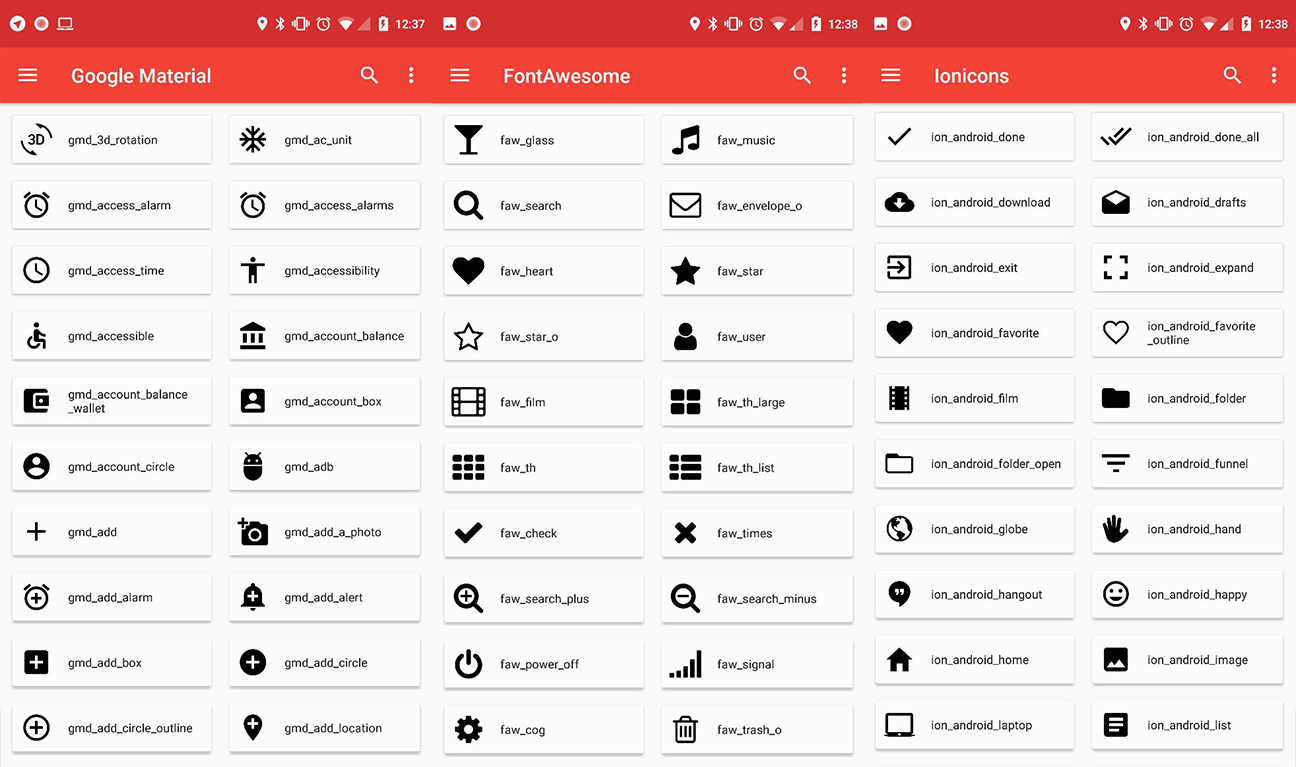
Already available fonts
Google Material Design Icons
Google Material Symbols
Material Design Iconic Font
Fontawesome
Meteocons
Octicons
Community Material
Weather Icons
Typeicons
Entypo
Devicon
Foundation Icons
Ionicons
Material Design DX
Pixeden 7 Stroke
Phosphor
Simple Icons
Or create your own font with any icon needed.
Migrating away from Android-Iconics
Compose renders icons as vectors. That removes the font file, the runtime glyph lookup, and the
string-key indirection Android-Iconics needed.
typed ImageVector properties, checked at compile time
*-typeface-library artifacts
androidx.compose.material:material-icons-extended, or an ImageVector port of the same icon set
// before
Image(GoogleMaterial.Icon.gmd_favorite, colorFilter = ColorFilter.tint(MaterialTheme.colors.primary))

// after
Icon(Icons.Filled.Favorite, contentDescription = null, tint = MaterialTheme.colorScheme.primary)
Icon sets without a first-party Compose equivalent (FontAwesome, Simple Icons, Phosphor, ...) have
community ImageVector ports. For a fully custom set, convert the SVG sources with Android Studio's
Vector Asset import instead of shipping a font.
Still on Views? VectorDrawable
plus app:tint covers most of what IconicsImageView and friends provided.
[!NOTE]
For users of the version catalog, it is not possible to add the type, however you can do so via
the implementation definition.
implementation(libs.material.typeface) { artifact { type = "aar" } }
[!WARNING]
The fonts use the jetpack startup library to automatically register themselves.
If jetpack startup is disabled,
it is required to manually register the fonts. Please find additional details in
the Register fonts.
Usage
[!NOTE]
It might be required to call Iconics.init(applicationContext) if no context based APIs are used
from the library otherwise.
If you use the Iconics library via XML provide the icon you want to use in the following syntax: gmd-favorite --> fontId-iconName. A list of the
available fonts and their fontId can be found here.
All icon names from the default fonts can be found via the DEMO application.
Notation within text
Use the { icon-definer } syntax
Some great text with a {faw-android} font awesome icon and {met-wind} meteocons icons.
Licenses for all included fonts are linked inside the class or can be found on the coresponding repositories.
Compatibility Note
appcompat:1.4.x
Appcompat v1.4.x introduces default enabled emoji support into all AppCompat* views, which prevents the IconicsView* views (iconics-views module) from properly applying the spannable style.
To fix this problem, emoji support has to be disabled by doing:
app:emojiCompatEnabled="false"
More information on the appcompat emoji support: https://developer.android.com/jetpack/androidx/releases/appcompat#1.4.0-alpha01
Advanced Usage
Register fonts
If you want to add your own custom font, or a GenericFont you have to register this font (before using it). The best place to do this is the Application.
And initialize Iconics as you wish
class CustomApplication : Application() {
    override fun onCreate() {
        super.onCreate()

        //register custom fonts like this (or also provide a font definition file)
        Iconics.registerFont(CustomFont())
    }
}
Advanced IconicsBuilder
Everything is easy and simple. Right? But now you got a single icon within your textview and you need additional styling?
Just define the style for all icons or only a specific one. You can find this in the PlaygroundActivity of the sample too.
This is possible with only the *.ttf and *.css mapping file. And will take you 2 minutes.
You can get these two files by downloading a web icon font, or if you want to create your
own custom icon font from *.svg files then you can use following tools:
Fontello
IcoMoon
Fontastic
let me know if you find other tools.
After you got those two files, head over to the icon addon creation tool android-iconics.mikepenz.com.
Enter all the information. Add the *.ttf and *.css and click the button. It will generate and download the icon font addon as
zip. (this tool is local only, no files are sent to a server, you can safely use it with any icons)
String fields for icons
For generating string field for each of icons of your font, you can use this simple generator:
Android-Iconics String Generator
Android module generator
A awesome gradle plugin which can automatically fetch a font from Fontastic, and generate the Android Module for your project.
Iconics-Font-Generator
ProGuard / R8
ProGuard / R8 rules are bundled internally with each font.
Special Contributor
Baptiste Lagache Thanks for the gradle font module generator
Also thanks for all the other contributors.
Credits
Joan Zapata He is the creator of Android-Iconify which gave me the idea of this project. Some core concepts and ideas were reused, but everything is written from scratch.
Christopher Jenkins Thanks for the great usage of a custom ContextWrapper inside Calligraphy
Copyright 2026 Mike Penz

Licensed under the Apache License, Version 2.0 (the "License");
you may not use this file except in compliance with the License.
You may obtain a copy of the License at

   http://www.apache.org/licenses/LICENSE-2.0

Unless required by applicable law or agreed to in writing, software
distributed under the License is distributed on an "AS IS" BASIS,
WITHOUT WARRANTIES OR CONDITIONS OF ANY KIND, either express or implied.
See the License for the specific language governing permissions and
limitations under the License.
Yes — mikepenz/Android-Iconics ships under the Apache-2.0 license, which makes its source code freely readable (and, depending on license terms, forkable and reusable). Source: github.com/mikepenz/Android-Iconics.
What else is in the Mobile space?
mikepenz/Android-Iconics is tracked by TopGit under the Mobile category, alongside 20 GitHub-tagged topics. Trending and Topics pages list peer repositories of comparable stars and language.
What is mikepenz/Android-Iconics?
mikepenz/Android-Iconics (mikepenz/Android-Iconics) is a Kotlin project on GitHub. From the project's own README: Android-Iconics - Use any icon font, or vector (.svg) as drawable in your application.
What license does mikepenz/Android-Iconics use?
mikepenz/Android-Iconics is released under the Apache-2.0 license. Always verify the LICENSE file directly on GitHub for the authoritative terms — license strings can be edited out of sync with a project's actual stance.
Where can I see mikepenz/Android-Iconics in action?
The project maintains a homepage at https://mikepenz.dev. The README tab on this page also usually contains screenshots and a quickstart.
Where do I read more about mikepenz/Android-Iconics?
This TopGit page is a snapshot — the READ ME tab shows the project's own README content (links stripped, images preserved). The GitHub repository at github.com/mikepenz/Android-Iconics is the definitive source.
Why is mikepenz/Android-Iconics categorized under Mobile?
TopGit places mikepenz/Android-Iconics in the Mobile category based on its GitHub topics and description (tagged: "android", "android-compose", "android-development"). Categories are assigned from real repository metadata, not editorial guesswork.
Read full README in the tab above.
Want a second opinion on Android-Iconics?
Ask an AI that can read this page — one click and you get its take on Android-Iconics.
 /Android-Iconics