mrousavy/react-native-fast-tflite — 1.2k★ on GitHub (TypeScript). 🧬 High-performance TensorFlow Lite library for React Native with GPU acceleration
Snapshot summary built from the project's own GitHub metadata — there's no written TopGit review yet. The page will update automatically when a full review is published.
WHY NO REVIEW YET
TopGit writes full reviews for the most-starred, most-requested repositories. This page is a snapshot until then — see the READ ME tab for the original README in full.
This allows you to drop .tflite files into your app and swap them out at runtime without rebuilding. 🔥
(Optional) To enable GPU delegates, see Using GPU Delegates below.
Run your app (yarn android / npx pod-install && yarn ios)
Usage
Find a TensorFlow Lite (.tflite) model. There are thousands of public models on tfhub.dev.
Drag your model into your app's asset folder (e.g. src/assets/my-model.tflite)
Load the Model:
// Option A: Standalone Function
const model = await loadTensorflowModel(require('assets/my-model.tflite'), [])

// Option B: Hook in a Function Component
const plugin = useTensorflowModel(require('assets/my-model.tflite'), [])
Models can be loaded from the React Native bundle via require(..), or any URI/URL (http://.. or file://..):
// Asset from React Native Bundle
loadTensorflowModel(require('assets/my-model.tflite'), [])
// File on the local filesystem
loadTensorflowModel({ url: 'file:///var/mobile/.../my-model.tflite' }, [])
// Remote URL
loadTensorflowModel(
  { url: 'https://tfhub.dev/google/lite-model/object_detection_v1.tflite' },
  []
)
Loading a Model is asynchronous since buffers need to be allocated. Make sure to handle errors when loading.
Input and Output data
TensorFlow uses tensors as input and output. Since TensorFlow Lite is optimized for fixed-size byte buffers, you are responsible for interpreting the raw data yourself.
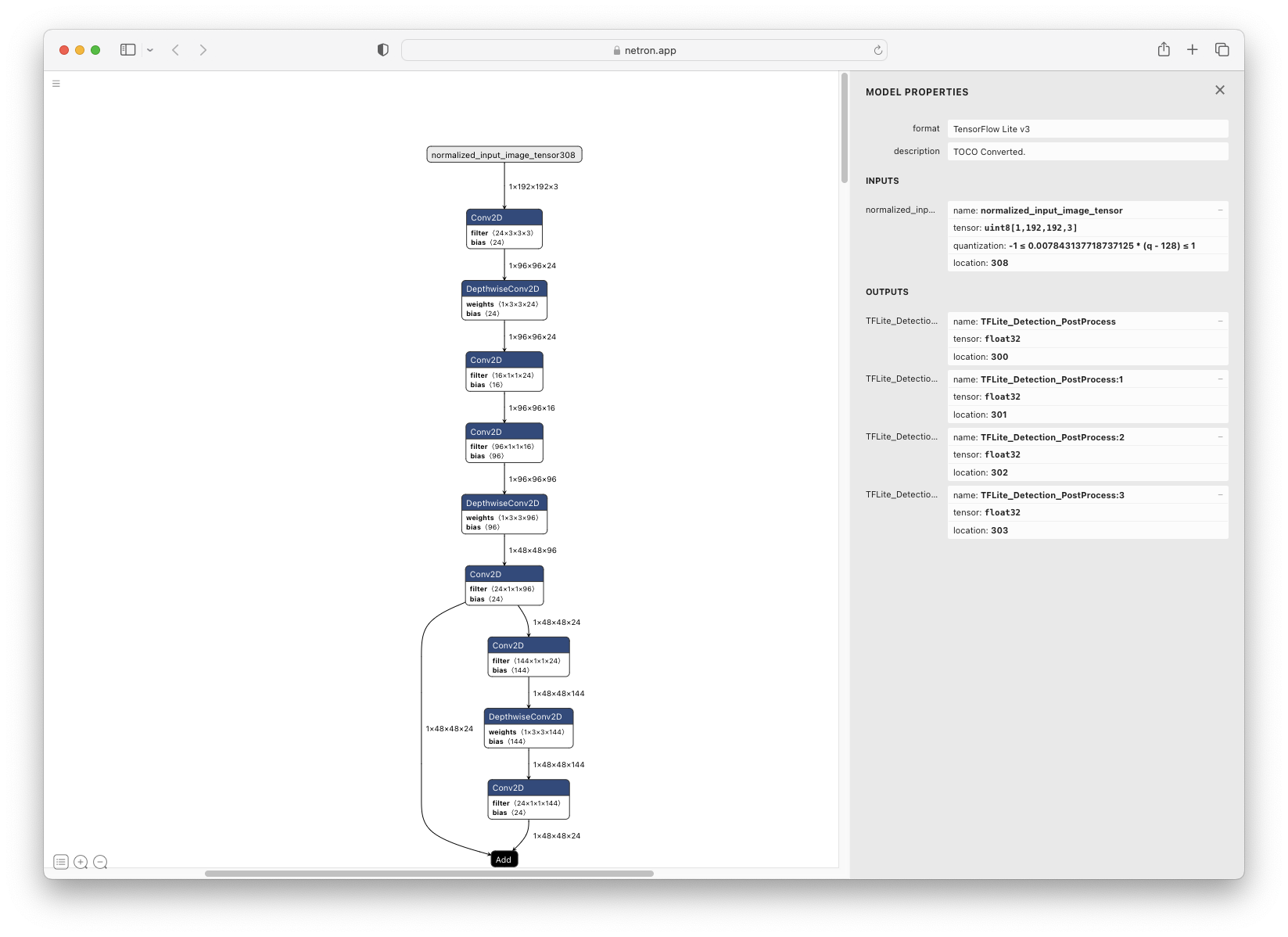
Input and output values are passed as ArrayBuffer. To inspect tensor shapes, open your model in Netron.
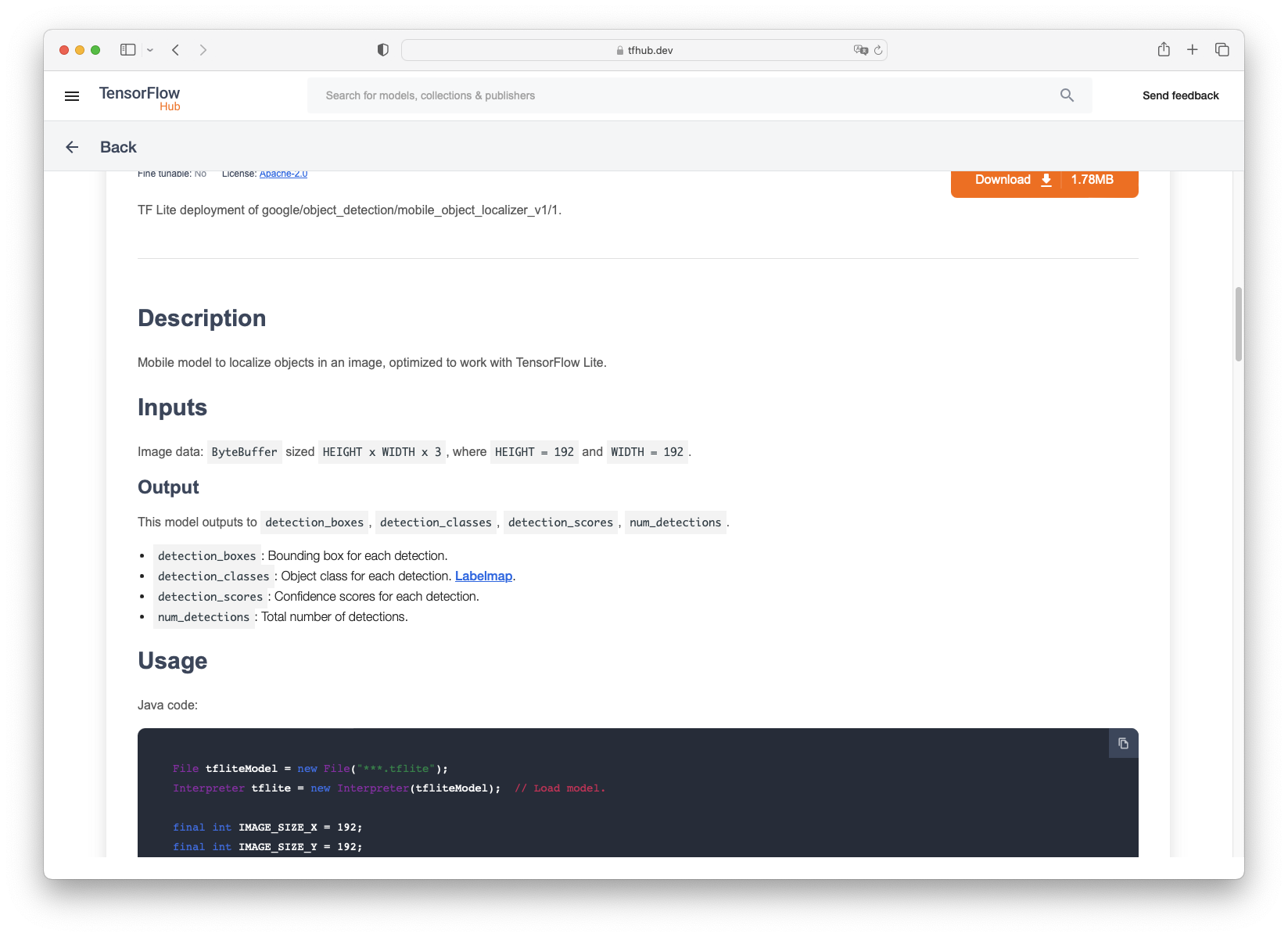
For example, the object_detection_mobile_object_localizer_v1_1_default_1.tflite model on tfhub.dev has 1 input tensor and 4 output tensors:
In the description on tfhub.dev we can find the description of all tensors:
From that we know we need a 192 x 192 input image with 3 bytes per pixel (RGB).
Usage (VisionCamera)
If you're using this model with a VisionCamera Frame Processor, you need to convert the Frame to the model's expected input size.
Use vision-camera-resizer to do the conversion:
import { Camera, useFrameOutput } from 'react-native-vision-camera'
import { useResizer } from 'react-native-vision-camera-resizer'
import { useTensorflowModel } from 'react-native-fast-tflite'

const objectDetection = useTensorflowModel(require('object_detection.tflite'), [])

// 1. Create a resizer that converts Frames to 192x192x3 (RGB, uint8)
const { resizer } = useResizer({
  width: 192,
  height: 192,
  channelOrder: 'rgb',
  dataType: 'uint8',
})

const frameOutput = useFrameOutput({
  pixelFormat: 'yuv',
  onFrame(frame) {
    'worklet'
    if (objectDetection.state !== 'loaded' || resizer == null) {
      frame.dispose()
      return
    }

    // 2. Resize the Frame to the model's input size
    const resized = resizer.resize(frame)
    frame.dispose()
    const data = new Uint8Array(resized.getPixelBuffer())
    resized.dispose()

    // 3. Extract the exact slice of the underlying ArrayBuffer
    const inputBuffer = data.buffer.slice(
      data.byteOffset,
      data.byteOffset + data.byteLength
    )

    // 4. Run model with given input buffer synchronously
    const outputs = objectDetection.model.runSync([inputBuffer])

    // 5. Interpret outputs accordingly
    const detection_boxes = new Float32Array(outputs[0]!)
    const detection_classes = new Float32Array(outputs[1]!)
    const detection_scores = new Float32Array(outputs[2]!)
    const num_detections = new Float32Array(outputs[3]!)
    console.log(`Detected ${num_detections[0]} objects!`)
  },
})

return <Camera device="back" isActive={true} outputs={[frameOutput]} {...otherProps} />
[!NOTE]
Unlike v4, VisionCamera v5 no longer requires boxing the model with NitroModules.box(). Since v5 is built on Nitro Modules and uses react-native-worklets, worklets can access HybridObjects like the TFLite model directly.
Using GPU Delegates
GPU Delegates offer faster, GPU-accelerated computation. There are multiple delegates available:
CoreML (iOS)
Expo
Use the config plugin in your expo config (app.json, app.config.json or app.config.js):
const model = await loadTensorflowModel(
  require('assets/my-model.tflite'),
  ['android-gpu']
)
// or
const model = await loadTensorflowModel(
  require('assets/my-model.tflite'),
  ['nnapi']
)
[!WARNING]
NNAPI is deprecated on Android 15. GPU delegate is preferred.
[!NOTE]
Android does not officially support OpenCL, but most GPU vendors do.
Community Discord
Join the Margelo Community Discord to chat about react-native-fast-tflite or other Margelo libraries.
Adopting at scale
This library is provided as is, I work on it in my free time.
If you're integrating react-native-fast-tflite in a production app, consider funding this project and contact me to receive premium enterprise support, help with issues, prioritize bugfixes, request features, and more.
Contributing
Clone the repo
Make sure you have installed Xcode CLI tools such as gcc, cmake and python/python3. See the TensorFlow documentation on what you need exactly.
Run yarn bootstrap and select y on all iOS and Android related questions.
Open the example app and start developing
iOS: example/ios/TfliteExample.xcworkspace
Android: example/android
See the contributing guide to learn how to contribute to the repository and the development workflow.
How active is development on mrousavy/react-native-fast-tflite?
The most recent commit recorded on mrousavy/react-native-fast-tflite was 30 days ago, based on the GitHub push timestamp. The repository has 90 forks — one of the better signals of community interest.
How does mrousavy/react-native-fast-tflite compare to other AI Tools projects?
mrousavy/react-native-fast-tflite is tracked by TopGit in the AI Tools category, with 1.2k GitHub stars and written in TypeScript. Browse the AI Tools topic page on TopGit to compare it against similar projects by stars and activity.
How many stars does mrousavy/react-native-fast-tflite have?
mrousavy/react-native-fast-tflite has 1.2k GitHub stars — refresh the page for the live number, or check github.com/mrousavy/react-native-fast-tflite. TopGit mirrors GitHub's count but does not claim minute-by-minute accuracy.
Is mrousavy/react-native-fast-tflite open source?
Yes — mrousavy/react-native-fast-tflite ships under the MIT license, which makes its source code freely readable (and, depending on license terms, forkable and reusable). Source: github.com/mrousavy/react-native-fast-tflite.
What is mrousavy/react-native-fast-tflite?
mrousavy/react-native-fast-tflite (mrousavy/react-native-fast-tflite) is a TypeScript project on GitHub. From the project's own README: 🧬 High-performance TensorFlow Lite library for React Native with GPU acceleration
Where do I read more about mrousavy/react-native-fast-tflite?
This TopGit page is a snapshot — the READ ME tab shows the project's own README content (links stripped, images preserved). The GitHub repository at github.com/mrousavy/react-native-fast-tflite is the definitive source.
Read full README in the tab above.
Want a second opinion on react-native-fast-tflite?
Ask an AI that can read this page — one click and you get its take on react-native-fast-tflite.
 /react-native-fast-tflite