murtaza-nasir/speakr

murtaza-nasir/speakr is tracked by TopGit as a mobile project, with 3.6k stars on GitHub, written primarily in Python. Speakr is a personal, self-hosted web application designed for transcribing audio recordings
Snapshot summary built from the project's own GitHub metadata — there's no written TopGit review yet. The page will update automatically when a full review is published.
TopGit writes full reviews for the most-starred, most-requested repositories. This page is a snapshot until then — see the READ ME tab for the original README in full.
Snapshot
Top contributors
Show top contributors

Speakr
Self-hosted AI transcription and intelligent note-taking platform




Documentation • Quick Start • Screenshots • Docker Hub • Releases
Overview
Speakr transforms your audio recordings into organized, searchable, and intelligent notes. Built for privacy-conscious groups and individuals, it runs entirely on your own infrastructure, ensuring your sensitive conversations remain completely private.
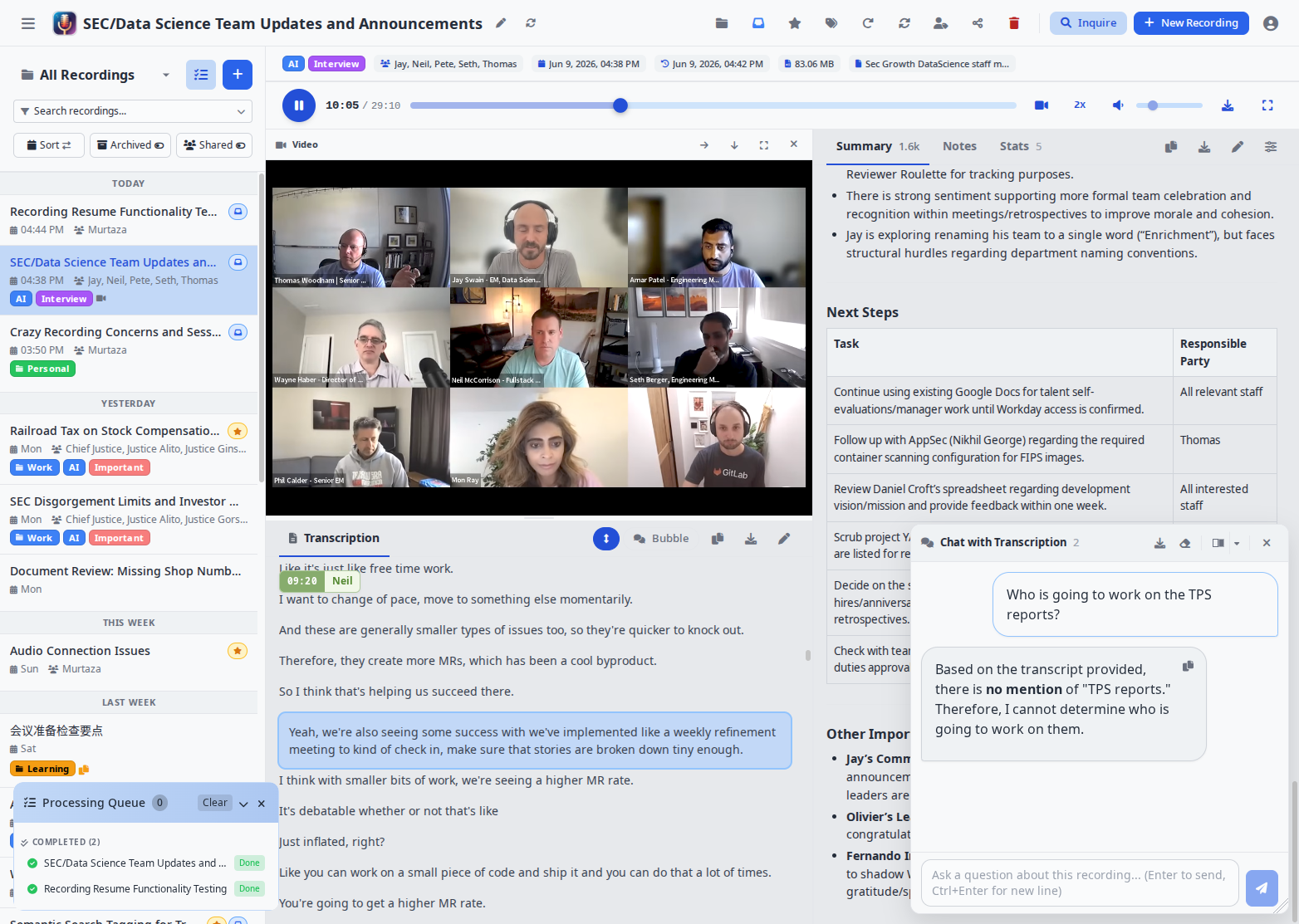
Key Features
Speakr turns a recording into organized, searchable, shareable knowledge. Here is the pipeline:
Capture
- Flexible input - record from your microphone, your computer's system or browser-tab audio, or both mixed together; or drag and drop existing files. A per-OS setup guide and a virtual-device picker surface Pulse / PipeWire monitors, BlackHole, VB-Cable, Voicemeeter, and Stereo Mix as inputs.
- Long sessions - in-app recordings stream to the server during capture, so sessions can run for hours and survive a page reload.
- Hands-off intake - a watched "black hole" folder auto-imports and processes any audio dropped into it.
Transcribe
- Bring your own engine - self-hosted WhisperX (recommended; it is what enables the speaker features below), OpenAI, Mistral / Voxtral, AssemblyAI, or any custom ASR webservice. The right connector is auto-detected from your configuration.
- Speaker diarization - automatic who-said-what labeling (WhisperX, or OpenAI's diarizing models).
- Voice profiles - recognize the same person across different recordings via voice embeddings (requires the WhisperX ASR backend).
- Custom vocabulary and hotwords (most effective with the WhisperX backend) - bias the transcriber toward names, jargon, and acronyms it would otherwise mishear; configurable globally or per tag / folder.
- Synced playback - click any line to jump to that moment, follow-along highlighting during playback, and a chat-style bubble view.
- Language support - automatic language detection plus a quick-pick of 11 common languages.
Understand
- Summaries - generated automatically, with prompts you can fully customize per recording, tag, or folder (including reusable prompt variables).
- Event extraction - surface action items and calendar-worthy events from a transcript.
- Per-recording chat - ask questions about a single recording in a floating, dockable panel.
- Inquire Mode - semantic search and natural-language chat across your entire library at once.
Organize
- Folders and bulk operations to keep a large library tidy.
- Smart tags that carry their own AI prompt and ASR settings - and stack, so multiple tags layer their instructions.
- Retention policies with auto-deletion and per-recording protection from cleanup.
- Automated export to templated files when a recording finishes.
Collaborate
- Multi-user with Single Sign-On against any OIDC provider (Keycloak, Azure AD, Google, Auth0, Pocket ID).
- Groups with group-scoped tags that auto-share recordings to every member.
- Granular internal sharing (view / edit / reshare) and admin-controlled, secure public links.
Automate
- REST API v1 with a Swagger UI, for automation tools (n8n, Zapier, Make) and dashboards.
- Signed webhooks - HMAC-signed, SSRF-guarded, retrying outbound notifications on recording lifecycle events.
- Usage budgets for LLM tokens and transcription minutes, per user.
Speakr is also an installable Progressive Web App - mobile-first, offline-capable, with a phone share-target - and ships light/dark themes, an incognito mode, and a UI translated into seven languages.
Real-World Use Cases
Different people use Speakr's collaboration and retention features in different ways:
| Use Case | Setup | What It Does |
|---|---|---|
| Family memories | Create "Family" group with protected tag | Everyone gets access to trips and events automatically, recordings preserved forever |
| Book club discussions | "Book Club" group, tag monthly meetings | All members auto-share discussions, can add personal notes about what resonated |
| Work project group | Share individually with 3 teammates | Temporary collaboration, easy to revoke when project ends |
| Daily group standups | Group tag with 14-day retention | Auto-share with group, auto-cleanup of routine meetings |
| Architecture decisions | Engineering group tag, protected from deletion | Technical discussions automatically shared, preserved permanently as reference |
| Client consultations | Individual share with view-only permission | Controlled external access, clients can't accidentally edit |
| Research interviews | Protected tag + Obsidian export | Preserve recordings indefinitely, transcripts auto-import to note-taking system |
| Legal consultations | Group tag with 7-year retention | Automatic sharing with legal group, compliance-based retention |
| Sales calls | Group tag with 1-year retention | Whole sales group learns from each call, cleanup after sales cycle |
Creative Tag Prompt Examples
Tags with custom prompts transform raw recordings into exactly what you need:
- Recipe recordings: Record yourself cooking while narrating - tag with "Recipe" to convert messy speech into formatted recipes with ingredient lists and numbered steps
- Lecture notes: Students tag lectures with "Study Notes" to get organized outlines with concepts, examples, and definitions instead of raw transcripts
- Code reviews: "Code Review" tag extracts issues, suggested changes, and action items in technical language developers can use directly
- Meeting summaries: "Action Items" tag ignores discussion and returns just decisions, tasks, and deadlines
Tag Stacking for Combined Effects
Stack multiple tags to layer instructions:
- "Recipe" + "Gluten Free" = Formatted recipe with gluten substitution suggestions
- "Lecture" + "Biology 301" = Study notes format focused on biological terminology
- "Client Meeting" + "Legal Review" = Client requirements plus legal implications highlighted
The order can matter - start with format tags, then add focus tags for best results.
Integration Examples
- Obsidian/Logseq: Enable auto-export to write completed transcripts directly to your vault using your custom template - no manual export needed
- Documentation wikis: Map auto-export to your wiki's import folder for seamless transcript publishing
- Content creation: Create SRT subtitle templates from your audio recordings for podcasts or video content
- Project management: Extract action items with custom tag prompts, then auto-export for automated task creation
Quick Start
Using Docker (Recommended)
# Create project directory
mkdir speakr && cd speakr

# Download docker-compose configuration:
wget https://raw.githubusercontent.com/murtaza-nasir/speakr/master/config/docker-compose.example.yml -O docker-compose.yml

# Download the environment template:
wget https://raw.githubusercontent.com/murtaza-nasir/speakr/master/config/env.transcription.example -O .env

# Configure your API keys and launch
nano .env
docker compose up -d

# Access at http://localhost:8899
Lightweight image: Use
learnedmachine/speakr:litefor a smaller image (~725MB vs ~4.4GB) that skips PyTorch. All features work normally — only Inquire Mode's semantic search falls back to basic text search.
Required API Keys:
TRANSCRIPTION_API_KEY- For speech-to-text (OpenAI) orASR_BASE_URLfor self-hostedTEXT_MODEL_API_KEY- For summaries, titles, and chat (OpenRouter or OpenAI)
Transcription Options
Speakr uses a connector-based architecture that auto-detects your transcription provider:
| Option | Setup | Speaker Diarization | Voice Profiles |
|---|---|---|---|
| OpenAI Transcribe | Just API key | Yes (gpt-4o-transcribe-diarize) | No |
| WhisperX ASR | GPU container | Yes (best quality) | Yes |
| Mistral Voxtral | Just API key | Yes (built-in) | No |
| VibeVoice ASR | Self-hosted (vLLM) | Yes (built-in) | No |
| MOSI/Mossland MOSS | Hosted API key | Yes (built-in) | No |
| AssemblyAI | Just API key | Yes (built-in) | No |
| Legacy Whisper | Just API key | No | No |
Simplest setup (OpenAI with diarization):
TRANSCRIPTION_API_KEY=sk-your-openai-key
TRANSCRIPTION_MODEL=gpt-4o-transcribe-diarize
Best quality (Self-hosted WhisperX):
ASR_BASE_URL=http://whisperx-asr:9000
ASR_RETURN_SPEAKER_EMBEDDINGS=true  # Enable voice profiles
Requires WhisperX ASR Service container with GPU.
Mistral Voxtral (cloud diarization):
TRANSCRIPTION_CONNECTOR=mistral
TRANSCRIPTION_API_KEY=your-mistral-key
TRANSCRIPTION_MODEL=voxtral-mini-latest
VibeVoice ASR (self-hosted, no cloud dependency):
TRANSCRIPTION_CONNECTOR=vibevoice
TRANSCRIPTION_BASE_URL=http://your-vllm-server:8000
TRANSCRIPTION_MODEL=vibevoice
Requires VibeVoice served via vLLM with GPU.
MOSI/Mossland MOSS (hosted multi-speaker transcription):
TRANSCRIPTION_CONNECTOR=mossland
TRANSCRIPTION_API_KEY=your-mosi-api-key
TRANSCRIPTION_MODEL=moss-transcribe-diarize
Create a key in the MOSI API Key console. The connector keeps long recordings in one provider task so speaker labels remain consistent, and it resumes stalled SSE jobs through task polling without submitting a duplicate. This connector uploads recordings to the third-party MOSI/Mossland service at api.mosi.cn; audio is not processed entirely on your self-hosted Speakr instance.
AssemblyAI (cloud diarization, long multi-speaker meetings):
TRANSCRIPTION_CONNECTOR=assemblyai
TRANSCRIPTION_API_KEY=your-assemblyai-key
Handles multi-hour, multi-speaker files in a single job. New accounts get free credits with no card required.
PyTorch 2.6 Users: If you encounter a "Weights only load failed" error with WhisperX, add
TORCH_FORCE_NO_WEIGHTS_ONLY_LOAD=trueto your ASR container. See troubleshooting for details.
View Full Installation Guide →
Documentation
Complete documentation is available at murtaza-nasir.github.io/speakr
- Getting Started - Quick setup guide
- User Guide - Learn all features
- Admin Guide - Administration and configuration
- Troubleshooting - Common issues and solutions
- FAQ - Frequently asked questions
Latest Release (v0.10.2-alpha)
A security and dependency release. Upgrading is recommended for all deployments. This release resolves three coordinated security reports: a stored cross-site scripting issue reachable by a group administrator through a tag color or name, a webhook server-side request forgery via DNS rebinding, and an SSO account-takeover path through an unverified email claim. Verified-email enforcement for SSO is now on by default; deployments whose identity provider does not send an email_verified claim must set SSO_REQUIRE_VERIFIED_EMAIL=false. The web framework moves to the Flask 3.1 and Werkzeug 3.1 line, which also closes two Werkzeug multipart denial-of-service issues. New features include contextual speaker labelling for transcription engines that diarize without voice embeddings, and pause/resume for in-app recording. This release also fixes malformed browser recording uploads, restores the API documentation page under the default Content-Security-Policy, and improves transcription-failure error messages. A one-time migration lowercases existing stored email addresses. Full release notes on the GitHub release page.
v0.10.1-alpha (previous release)
A security-hardening release. The application refuses the insecure built-in secret key and, when SECRET_KEY is unset, generates and persists a strong per-deployment key automatically, so session cookies and password-reset tokens can no longer be forged on installs that never set one. Baseline security headers and a Content-Security-Policy are set by the application itself rather than relying on a hardening reverse proxy. Password-reset links are single-use and are invalidated when the password changes. Markdown-rendered content is sanitized before display, the admin user list no longer exposes the full directory to group administrators, bulk tagging enforces group membership, and logout is a CSRF-protected action.
v0.10.0-alpha (previous release)
Fixes API auth responses and duplicate uploads, and hardens incognito mode. Unauthenticated API requests now return a proper JSON 401 instead of a redirect to the login page, so integrations with a bad token fail loudly rather than mistaking the login page for success (#333). The 200 MB size warning no longer fires when server-side chunk streaming is active; recordings instead warn at 80% of the duration ceiling before the automatic stop (#332). The upload button disables immediately while a recording finalizes and the finalize endpoint is idempotent, so double-clicking can no longer create duplicate recordings, and failed drag-and-drop uploads are no longer copied into the Downloads folder. Incognito recordings now stay entirely in the browser until explicitly processed, even with chunk streaming enabled, keep filenames out of server logs, and survive crash recovery as incognito. No database changes. Full release notes on the GitHub release page.
v0.9.7-alpha (previous release)
A bug fix release for MP3 playback, transcript interaction, and retention. MP3 uploads missing a Xing/VBR header, which cause stuttering playback in Chromium-based browsers, are now detected and repaired with a lossless in-place remux, so the audio stays bit-identical while gaining a proper header (#325). A transcript segment starting at exactly 0 seconds can be clicked again for seeking and is included in playback highlighting, in the main app and on the public share page (#326). The auto-deletion retention sweep now includes failed recordings rather than keeping them forever, while recordings that are still queued or processing remain protected (#328). No database changes. Full release notes on the GitHub release page.
v0.9.6-alpha (previous release)
Adds recording merge, Markdown transcript export, and a one-click backfill export, plus a large internal consolidation of how every ingestion path resolves its transcription settings. Several recordings can now be combined into one that is re-processed from scratch through the full pipeline (transcription, diarization, summary, and automatic speaker labelling) — useful when a dropped call or an interrupted recording leaves two partial transcripts. You can merge from the sidebar by selecting recordings, reordering them, and choosing which notes and prompt variables to keep (participants and tags are combined), or from the recording view, where a new split button lets you append a just-finished recording onto an existing one directly. The transcript download menu gains a TXT / MD toggle, and when automatic export is enabled, Settings gains an "Export all to disk" button that backfills every processed recording. Under the hood, uploads, reprocessing, merges, recording-session finalization, the share target, and the auto-process folder now resolve language, speaker hints, hotwords, prompt, and model through one shared precedence chain, so a recording created by any path transcribes identically to a standard upload. Full release notes on the GitHub release page.
v0.9.5-alpha (previous release)
Adds a cloud transcription provider, in-app video capture, and recording filters, with a round of security and reliability hardening. AssemblyAI is now a built-in transcription connector that diarizes and handles multi-hour files in a single job. When video retention is enabled, the System Audio and Mic + System recording modes can also record the shared tab, window, or screen as video that plays back alongside the transcript. The sidebar gains filters for recordings that still need transcription, a summary, or speaker identification (contributed by @fxfitz), alongside fixes for speaker-page dates and voice samples, drifting meeting dates, and pre-upload review seeking, plus enforced auth rate limits, an access check on bulk toggle, webhook delivery re-validation, and bounded FFmpeg timeouts. Full release notes on the GitHub release page.
v0.9.4-alpha (previous release)
A feature release focused on transcription control, sharing privacy, and upload reliability. Transcription templates now bundle an initial prompt and hotwords that you save once and reuse from the upload modal, tags, folders, or your account default. Summarization and chat each gain an independent toggle for making per-line timestamps available to the model, so the AI can reference moments in long recordings. Recipients of a shared recording now see only the tag or folder that granted them access, never the owner's other labels. Failed uploads retry themselves automatically across all browsers, and any recording is reachable by a direct /recordings/<id> link. For self-hosted text backends with prefix caching, an opt-in option reshapes the title and summary prompts to reuse the transcript prefix, and the admin dashboard now reports prompt-cache reads so the saving is visible. This option stays off by default for now and may become the default in a future release. Full release notes on the GitHub release page.
v0.9.3-alpha (previous release)
Security patch: updates bundled FFmpeg to fix CVE-2026-8461. Speakr runs FFmpeg/ffprobe on uploaded media, and the previously bundled build (johnvansickle static 7.0.2) carried a MagicYUV decoder flaw ("PixelSmash") that a crafted file could use for a crash or remote code execution. FFmpeg now comes from the maintained BtbN builds, pinned to the 8.1 branch (8.1.2, which contains the fix). Recommended for all deployments, especially multi-user instances that accept untrusted uploads. Full release notes on the GitHub release page.
v0.9.2-alpha (previous release)
Adds a pluggable local / S3 storage backend. Recording audio can now live in S3-compatible object storage (AWS S3, MinIO, Backblaze B2, Cloudflare R2, Wasabi) instead of, or alongside, the local filesystem, with presigned-URL delivery and a migration script for existing recordings. Local storage stays the default, so existing deployments are unaffected until they opt in. Contributed by @Daabramov (#268). Full release notes on the GitHub release page.
v0.9.1-alpha (previous release)
A patch release hardening the v0.9.0 upload path. Fixes uploads failing with an expired CSRF token after long sessions or sleep (#310), Inquire embeddings not being generated when auto-summarization is enabled (#305), and the Account page's API token modals not opening (#308); adds a timeout so stalled uploads fail into the recovery path and a warning before leaving the page mid-upload. Full release notes on the GitHub release page.
v0.9.0-alpha highlights (the major feature release this patches)
The first non-patch release in the v0.8 line. Three big user-facing themes: capturing audio is now multi-platform and properly documented, the mobile app is a first-class member of the design system, and the upload modal stops feeling like a desktop card pasted onto a phone. Full release notes on the GitHub release page.
System Audio & Multi-Input Recording
- Per-OS help guide auto-opens for the right platform (macOS BlackHole + Multi-Output Device, Windows "Share system audio", Linux pavucontrol +
pactl module-virtual-sourceone-liner) - New Input devices picker: pick a primary mic AND an optional "Also mix in" secondary device; Web Audio mixes both into one track for capturing both sides of a meeting
- Toggle to disable Chrome's echo cancellation / noise suppression / auto-gain (needed for monitor-source capture)
- Virtual audio device discovery (BlackHole, Loopback, VB-Cable, Voicemeeter, Stereo Mix, Pulse / PipeWire monitors)
- Privacy notes section flags the trade-offs honestly with concrete mitigations
Stats Tab
- New per-recording tab: total length, speaker count, turns, words at the top; per-speaker time / % / turns / words / WPM table; silence row
- Available on desktop right-rail tabs and mobile bottom-nav More overflow
Upload Modal Redesign
- Real modal overlay (not full-screen takeover), progressive disclosure of Options behind a chip summary, inline file preview with duration probe, sticky modal-footer Upload action, last-used tag/folder/language auto-restore with clearable chips, calmer recording buttons
- Mobile: full-width bottom-sheet with drag-to-dismiss
Mobile UI
- Bottom navigation (Summary / Transcript / Chat / More), contextual icons in the chevron row, edge-to-edge content, sticky speaker pills, sticky editor Cancel/Save footer, audio player polish (volume slider rotation fix, popover anchored upward), progress queue as a bottom sheet anchored above the player
Inquire mode "+ New Recording" now opens the upload modal directly via ?upload=1 instead of dumping you on the list.
Design system unification brought 22 modals onto shared .modal-* primitives, .btn + .field everywhere, dark-mode select theming, header consolidation, sidebar redesign, floating dockable chat panel.
Backend & infra: Webhooks Phase 1–3 with HMAC + retry + SSRF guard, server-side recording sessions (hours-long ceiling, resume-on-reload), IDOR fixes for folder / tag ownership, eager-loading and batch query performance work.
Localization refreshed across en, fr, de, es, ru, zh, pt-BR.
Older releases: see the GitHub Releases page for tagged versions, or the release history on the docs site for narrative changelog entries going back to earlier v0.x lines.
Screenshots
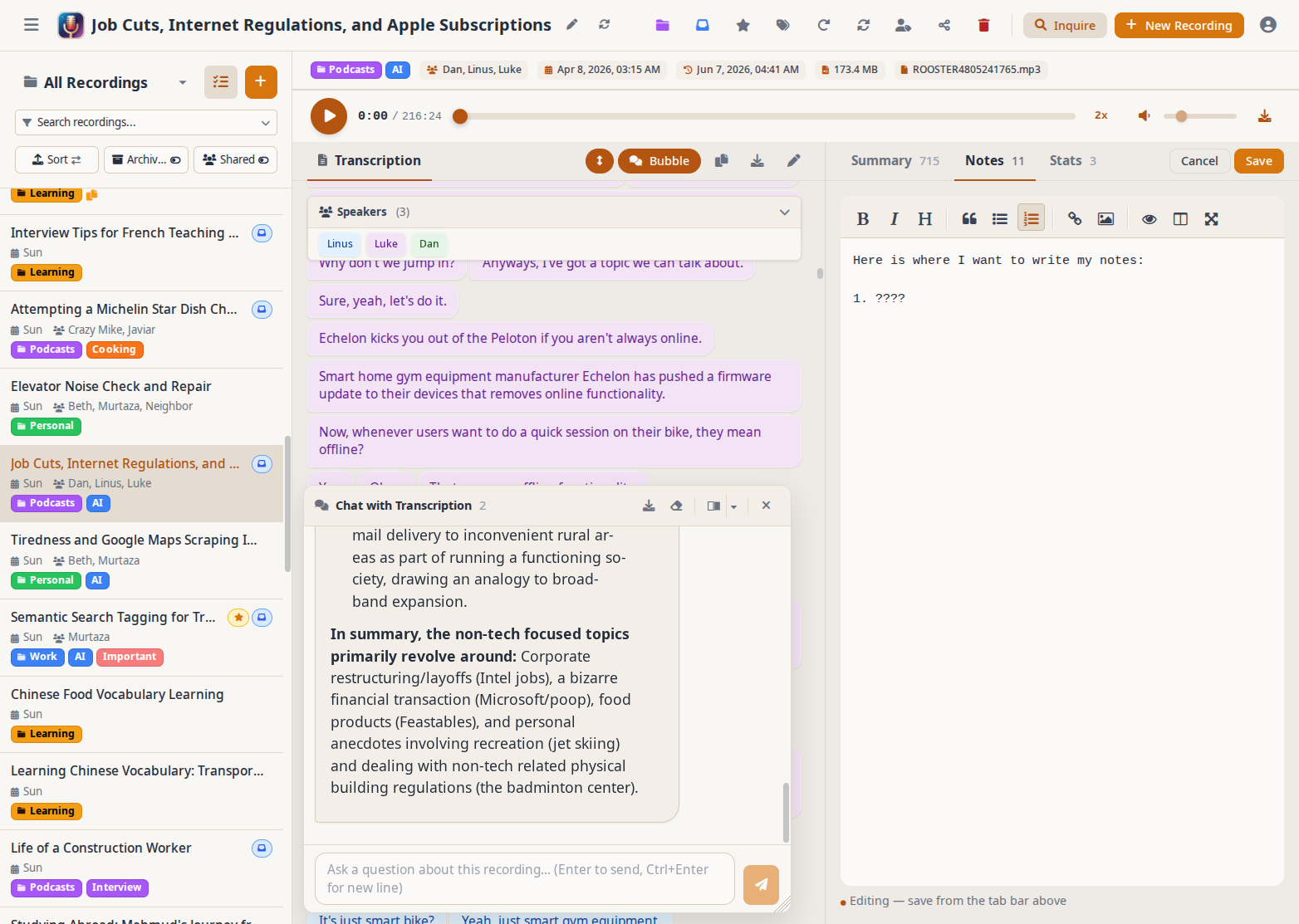
Main view with floating chat and notes |
Video playback synced to the transcript |
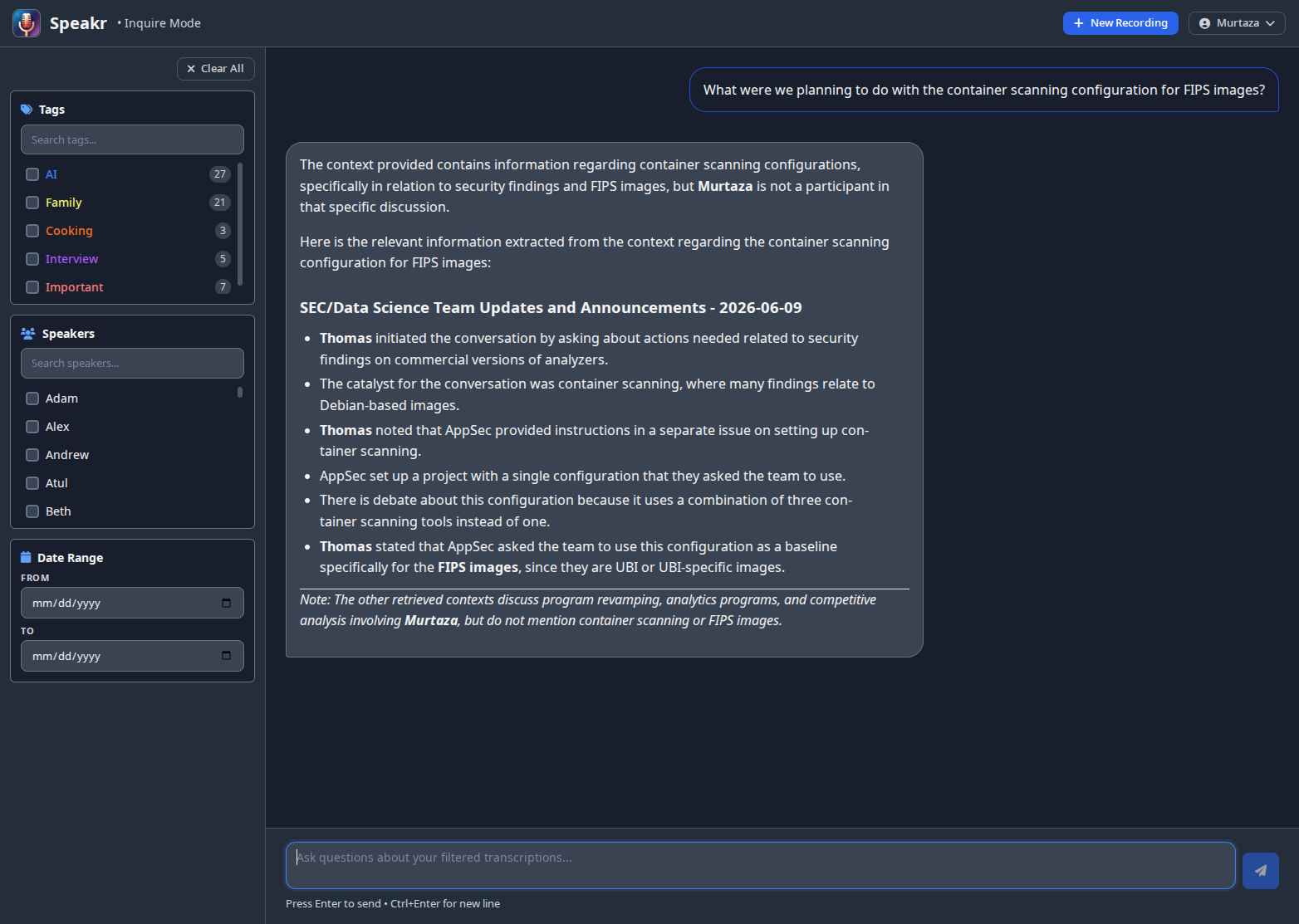
Ask questions across all your recordings |
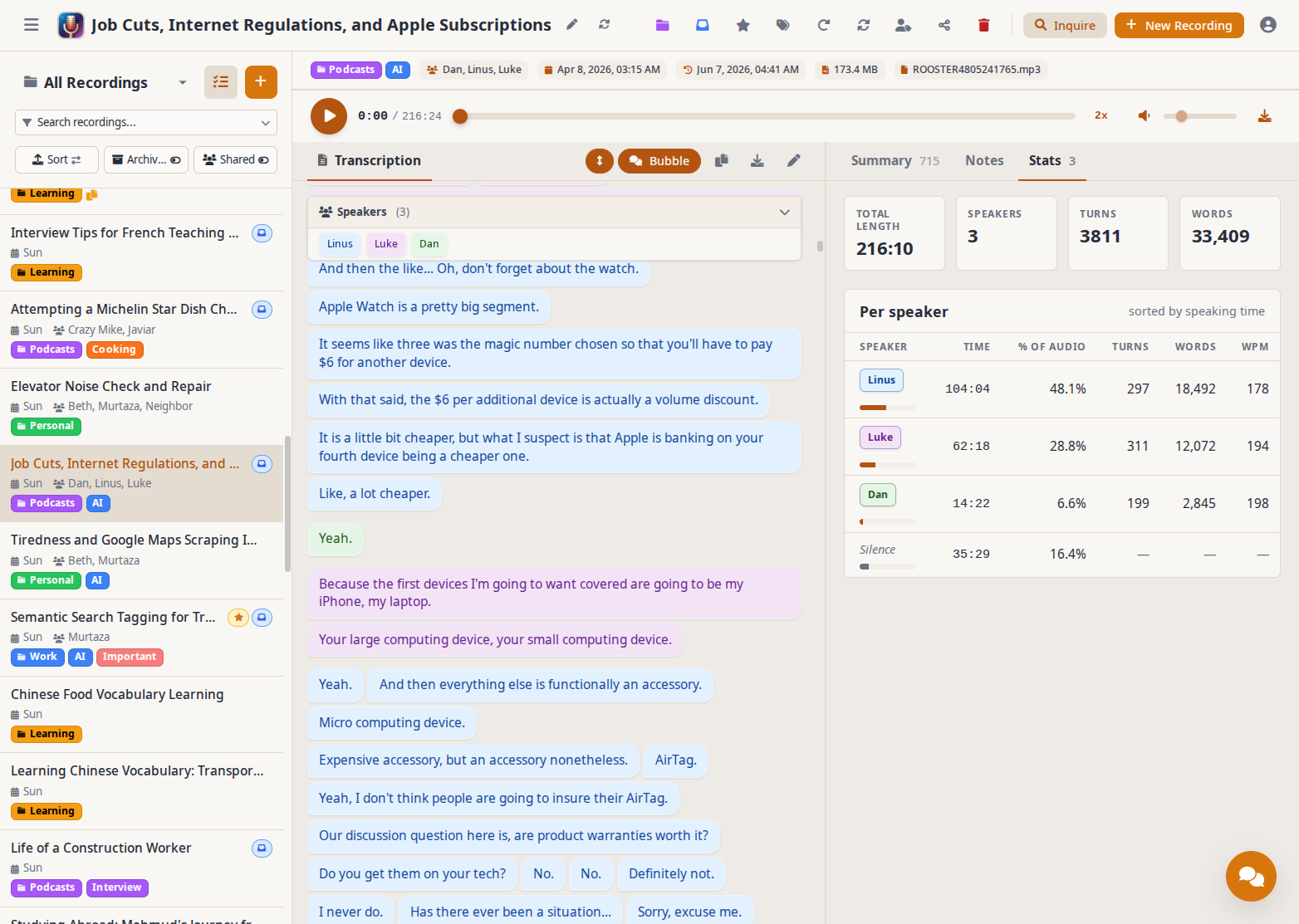
Per-recording stats and speaker breakdown |
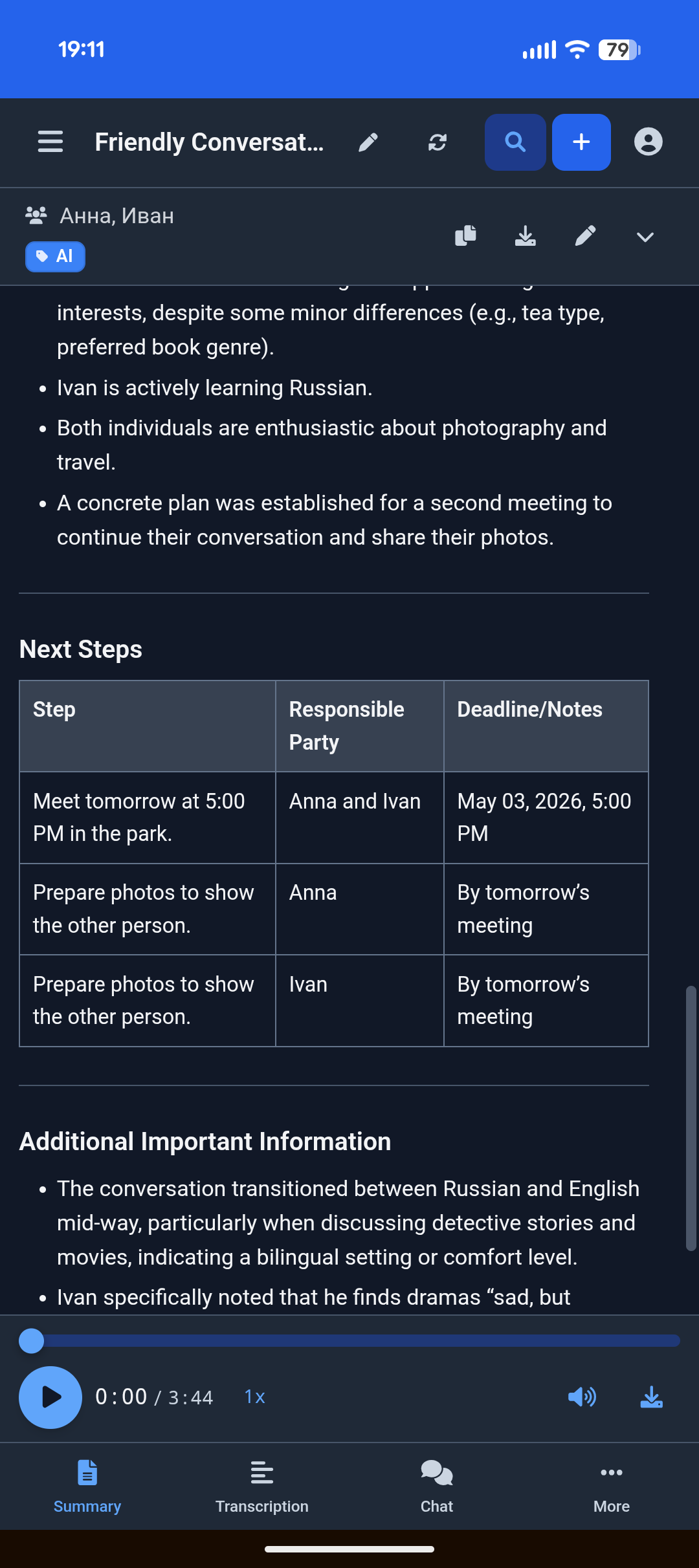
On mobile: summary with bottom navigation |
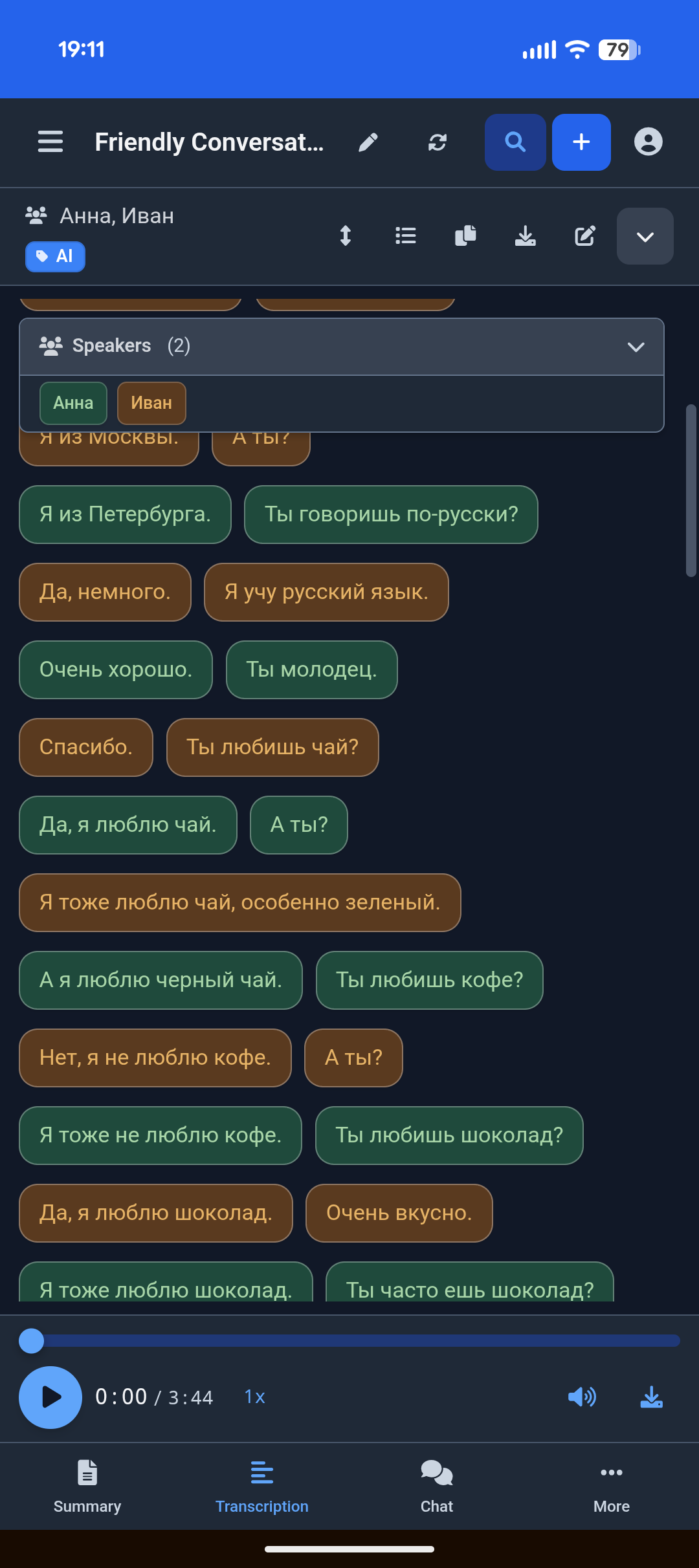
On mobile: transcript in bubble view |
View Full Screenshot Gallery →
Technology Stack
- Backend: Python/Flask with SQLAlchemy
- Frontend: Vue.js 3 with Tailwind CSS
- AI/ML: OpenAI Whisper, OpenRouter, Ollama support
- Database: SQLite (default) or PostgreSQL
- Deployment: Docker, Docker Compose
Roadmap
Completed
- Speaker voice profiles with AI-powered identification (v0.5.9)
- Group workspaces with shared recordings (v0.5.9)
- PWA enhancements with offline support and background sync (v0.5.10)
- Multi-user job queue with fair scheduling (v0.6.0)
- SSO integration with OIDC providers (v0.7.0)
- Token usage tracking and per-user budgets (v0.7.2)
- Connector-based transcription architecture with auto-detection (v0.8.0)
- Comprehensive REST API with Swagger UI documentation (v0.8.0)
- Video retention with in-browser video playback (v0.8.11)
- Parallel uploads with duplicate detection (v0.8.11)
- Fullscreen video mode with live subtitles (v0.8.14)
- Custom vocabulary and transcription hints (v0.8.14)
Near-term
- Quick language switching for transcription
- Automated workflow triggers
Long-term
- Plugin system for custom integrations
- End-to-end encryption option
Reporting Issues
- Report bugs
- Request features
License
This project is dual-licensed:
-
GNU Affero General Public License v3.0 (AGPLv3)
Speakr is offered under the AGPLv3 as its open-source license. You are free to use, modify, and distribute this software under the terms of the AGPLv3. A key condition of the AGPLv3 is that if you run a modified version on a network server and provide access to it for others, you must also make the source code of your modified version available to those users under the AGPLv3.
- You must create a file named
LICENSE(orCOPYING) in the root of your repository and paste the full text of the GNU AGPLv3 license into it. - Read the full license text carefully to understand your rights and obligations.
- You must create a file named
-
Commercial License
For users or organizations who cannot or do not wish to comply with the terms of the AGPLv3 (for example, if you want to integrate Speakr into a proprietary commercial product or service without being obligated to share your modifications under AGPLv3), a separate commercial license is available.
Please contact speakr maintainers for details on obtaining a commercial license.
You must choose one of these licenses under which to use, modify, or distribute this software. If you are using or distributing the software without a commercial license agreement, you must adhere to the terms of the AGPLv3.
Contributing
We welcome contributions to Speakr! There are many ways to help:
- Bug Reports & Feature Requests: Open an issue
- Discussions: Share ideas and ask questions
- Documentation: Help improve our docs
- Translations: Contribute translations for internationalization
Code Contributions
By submitting a pull request, you agree to our Contributor License Agreement (CLA). This ensures we can maintain our dual-license model (AGPLv3 and Commercial). You retain copyright ownership of your contribution — the CLA simply grants us permission to include it in both the open source and commercial versions of Speakr. Our bot will post a reminder when you open a PR.
See our Contributing Guide for complete details on:
- How the CLA works and why we need it
- Step-by-step contribution process
- Development setup instructions
- Coding standards and best practices
Related repositories
Flutter is Google's open-source SDK, hosted at flutter/flutter on GitHub, for building user interfaces across mobile, web, and desktop from a single Dart codebase. The repo has 178,380 stars and 30,962 forks, is licensed BSD-3-Clause, and its README documents stateful hot reload, a Skia/Impeller rendering pipeline, and Material/Cupertino widget sets as the core pieces developers work with.
scrcpy is an open-source application from Genymobile that mirrors an Android device's video and audio onto a Linux, Windows, or macOS desktop over USB or TCP/IP, and lets you control the device using the computer's keyboard and mouse. It runs without root access and without installing any companion app on the phone, per the README, and the project sits at 147,556 GitHub stars and 13,588 forks under an Apache-2.0 license.
Free Programming Books (Chinese) is justjavac's GitHub index of free programming books, translated manuals, and course notes in Chinese, organized under headings like AI, Go, C/C++, and version control, with 118,080 stars and 28,234 forks. It's a link list, not a curriculum - entries range from full book translations to single blog posts, some flagged `:worried:` for dead links, and contribution happens only through pull requests.
frp (fast reverse proxy) is a Go-based open source tool that creates secure tunnels from a public-facing server to localhost, enabling developers to expose services running on private networks or behind firewalls. With over 108k GitHub stars, it supports multiple protocols (TCP, UDP, HTTP, HTTPS), includes TLS encryption by default, and offers P2P connections for direct client-to-client communication. The architecture splits between frps (the server you deploy on a public VPS) and frpc (the client running on your LAN), with configuration via TOML, YAML, or JSON files. While v2 is in active development with ambitions toward cloud-native service mesh capabilities, the current stable version handles real-world NAT traversal and firewall bypass reliably for most use cases.
Quick answers
How active is development on murtaza-nasir/speakr?
The most recent commit recorded on murtaza-nasir/speakr was 29 days ago, based on the GitHub push timestamp. The repository has 293 forks — one of the better signals of community interest.
How many stars does murtaza-nasir/speakr have?
murtaza-nasir/speakr has 3.6k GitHub stars — refresh the page for the live number, or check github.com/murtaza-nasir/speakr. TopGit mirrors GitHub's count but does not claim minute-by-minute accuracy.
Is murtaza-nasir/speakr open source?
Yes — murtaza-nasir/speakr ships under the AGPL-3.0 license, which makes its source code freely readable (and, depending on license terms, forkable and reusable). Source: github.com/murtaza-nasir/speakr.
What else is in the Mobile space?
murtaza-nasir/speakr is tracked by TopGit under the Mobile category. Trending and Topics pages list peer repositories of comparable stars and language.
What is murtaza-nasir/speakr?
murtaza-nasir/speakr (murtaza-nasir/speakr) is a Python project on GitHub. From the project's own README: Speakr is a personal, self-hosted web application designed for transcribing audio recordings
What language is murtaza-nasir/speakr written in?
murtaza-nasir/speakr is written primarily in Python. GitHub's language field is based on the largest share of bytes in the default branch.
What license does murtaza-nasir/speakr use?
murtaza-nasir/speakr is released under the AGPL-3.0 license. Always verify the LICENSE file directly on GitHub for the authoritative terms — license strings can be edited out of sync with a project's actual stance.
Where do I read more about murtaza-nasir/speakr?
This TopGit page is a snapshot — the READ ME tab shows the project's own README content (links stripped, images preserved). The GitHub repository at github.com/murtaza-nasir/speakr is the definitive source.
Read full README in the tab above.
Curious whether speakr is right for you?
Let ChatGPT, Claude, or Perplexity look into it — click below and see what AI actually says about speakr.