
murtaza-nasir/speakr

4.2k sao GitHub và vẫn tăng — murtaza-nasir/speakr là dự án Python mà TopGit đang theo dõi trên nền tảng. Speakr is a personal, self-hosted web application designed for transcribing audio recordings
Tóm tắt dựng từ metadata GitHub của chính dự án — chưa có bài review TopGit. Trang sẽ tự động cập nhật khi bài review đầy đủ được xuất bản.
TopGit viết bài đầy đủ cho repo có nhiều sao nhất và được yêu cầu nhiều nhất. Trang này là snapshot trong thời gian chờ — xem README gốc ở tab READ ME.
Snapshot
Cộng tác viên hàng đầu
Xem cộng tác viên hàng đầu

Speakr
Self-hosted AI transcription and intelligent note-taking platform




Documentation • Quick Start • Screenshots • Docker Hub • Releases
Overview
Speakr transforms your audio recordings into organized, searchable, and intelligent notes. Built for privacy-conscious groups and individuals, it runs entirely on your own infrastructure, ensuring your sensitive conversations remain completely private.
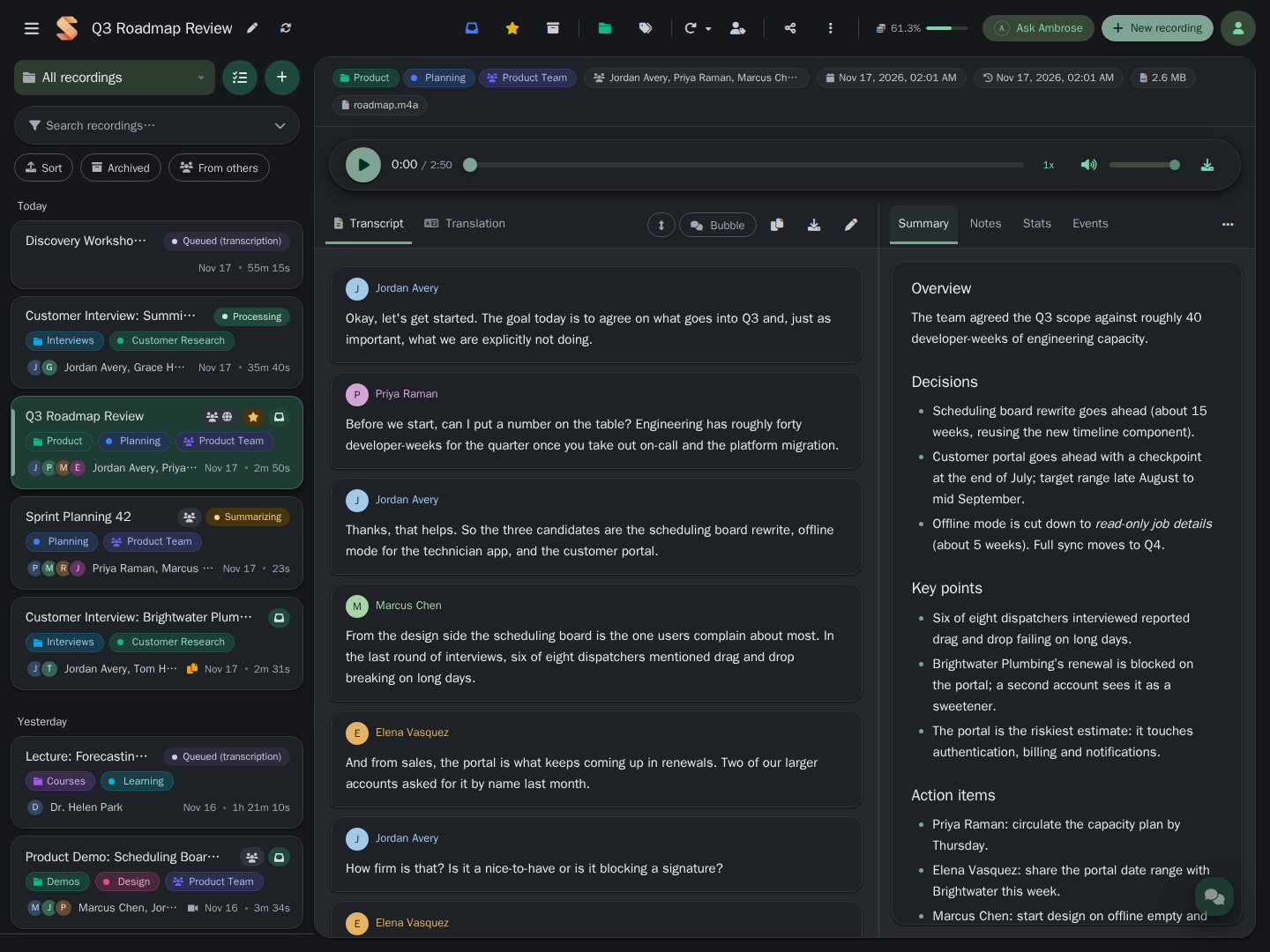
Key Features
Speakr turns a recording into organized, searchable, shareable knowledge. Here is the pipeline:
Capture
- Flexible input - record from your microphone, your computer's system or browser-tab audio, or both mixed together; or drag and drop existing files. A per-OS setup guide and a virtual-device picker surface Pulse / PipeWire monitors, BlackHole, VB-Cable, Voicemeeter, and Stereo Mix as inputs.
- Long sessions - in-app recordings stream to the server during capture, so sessions can run for hours and survive a page reload.
- Hands-off intake - a watched "black hole" folder auto-imports and processes any audio dropped into it, with optional per-user subfolders named by user id or username.
Transcribe
- Bring your own engine - self-hosted WhisperX (recommended; it is what enables the speaker features below), OpenAI, Mistral / Voxtral, AssemblyAI, Tencent Cloud ASR, OpenASR, Alibaba FunASR, or any custom ASR webservice. The right connector is auto-detected from your configuration.
- Speaker diarization - automatic who-said-what labeling (WhisperX, or OpenAI's diarizing models).
- Voice profiles - recognize the same person across different recordings via voice embeddings (requires the WhisperX ASR backend).
- Custom vocabulary and hotwords (most effective with the WhisperX backend) - bias the transcriber toward names, jargon, and acronyms it would otherwise mishear; configurable globally, per tag / folder, or right in the upload and in-app recording dialogs, with reusable saved templates.
- Synced playback - click any line to jump to that moment, follow-along highlighting during playback, and a chat-style bubble view.
- Language support - automatic language detection plus the full Whisper language list (about one hundred languages), with names localized to your interface language.
Understand
- Summaries - generated automatically, with prompts you can fully customize per recording, tag, or folder (including reusable prompt variables).
- Event extraction - surface action items and calendar-worthy events from a transcript.
- Per-recording chat - ask questions about a single recording in a floating, dockable panel; answers cite transcript timestamps as clickable chips that start playback at that moment.
- Inquire Mode - semantic search and natural-language chat across your entire library at once. An optional agentic mode (opt-in beta) upgrades this to an AI researcher that iteratively searches, lists, and reads your recordings until it can answer - showing every step live, and citing its sources with numbered links that open the recording and start playback at the cited segment. Ask "what did we decide about the pricing change, and did anyone disagree?" and it reads across the relevant meetings and cites each position back to where it was said. You decide what it may read: transcripts always, summaries and private notes only if you allow them.
Organize
- Folders and bulk operations to keep a large library tidy.
- Smart tags that carry their own AI prompt and ASR settings - and stack, so multiple tags layer their instructions.
- Retention policies with auto-deletion and per-recording protection from cleanup.
- Automated export to templated files when a recording finishes.
Collaborate
- Multi-user with Single Sign-On against any OIDC provider (Keycloak, Azure AD, Google, Auth0, Pocket ID).
- Groups with group-scoped tags that auto-share recordings to every member.
- Granular internal sharing (view / edit / reshare) and admin-controlled, secure public links.
Automate
- REST API v1 with a Swagger UI, for automation tools (n8n, Zapier, Make) and dashboards.
- Signed webhooks - HMAC-signed, SSRF-guarded, retrying outbound notifications on recording lifecycle events.
- Usage budgets for LLM tokens and transcription minutes, per user.
Speakr is also an installable Progressive Web App - mobile-first, offline-capable, with a phone share-target - and ships light/dark themes, an incognito mode, a configurable Help Center link for your own documentation, and a UI translated into seven languages.
Works with Mailr
Mailr is a self-hosted webmail application that I also develop. It includes a calendar, tasks, notes and an AI assistant, and mail accounts from any provider are connected over IMAP and SMTP. With a Speakr server connected, recordings are shown beside their meetings and emails, a follow-up email can be drafted from a recording, and its action items can be added as tasks. See Speakr recordings in the Mailr documentation.
Unofficial Companion Apps
These apps were built by members of the community for use with your own Speakr server. They are maintained by their authors, not by this project, and I have not tested them myself.
| App | Platform | Description |
|---|---|---|
| Minutes for Speakr | Android, Windows | Recording on the device with upload to Speakr, including automatic recording and automatic folder uploads |
| MeetingRecorder | Windows | Tray app for recording both sides of a call, with upload to Speakr through an API token |
| Mimio | Windows | Desktop client based on Minutes for Speakr, with a floating recorder and an English and Simplified Chinese interface |
See Companion Apps in the documentation.
Real-World Use Cases
Different people use Speakr's collaboration and retention features in different ways:
| Use Case | Setup | What It Does |
|---|---|---|
| Family memories | Create "Family" group with protected tag | Everyone gets access to trips and events automatically, recordings preserved forever |
| Book club discussions | "Book Club" group, tag monthly meetings | All members auto-share discussions, can add personal notes about what resonated |
| Work project group | Share individually with 3 teammates | Temporary collaboration, easy to revoke when project ends |
| Daily group standups | Group tag with 14-day retention | Auto-share with group, auto-cleanup of routine meetings |
| Architecture decisions | Engineering group tag, protected from deletion | Technical discussions automatically shared, preserved permanently as reference |
| Client consultations | Individual share with view-only permission | Controlled external access, clients can't accidentally edit |
| Research interviews | Protected tag + Obsidian export | Preserve recordings indefinitely, transcripts auto-import to note-taking system |
| Legal consultations | Group tag with 7-year retention | Automatic sharing with legal group, compliance-based retention |
| Sales calls | Group tag with 1-year retention | Whole sales group learns from each call, cleanup after sales cycle |
Creative Tag Prompt Examples
Tags with custom prompts transform raw recordings into exactly what you need:
- Recipe recordings: Record yourself cooking while narrating - tag with "Recipe" to convert messy speech into formatted recipes with ingredient lists and numbered steps
- Lecture notes: Students tag lectures with "Study Notes" to get organized outlines with concepts, examples, and definitions instead of raw transcripts
- Code reviews: "Code Review" tag extracts issues, suggested changes, and action items in technical language developers can use directly
- Meeting summaries: "Action Items" tag ignores discussion and returns just decisions, tasks, and deadlines
Tag Stacking for Combined Effects
Stack multiple tags to layer instructions:
- "Recipe" + "Gluten Free" = Formatted recipe with gluten substitution suggestions
- "Lecture" + "Biology 301" = Study notes format focused on biological terminology
- "Client Meeting" + "Legal Review" = Client requirements plus legal implications highlighted
The order can matter - start with format tags, then add focus tags for best results.
Integration Examples
- Obsidian/Logseq: Enable auto-export to write completed transcripts directly to your vault using your custom template - no manual export needed
- Documentation wikis: Map auto-export to your wiki's import folder for seamless transcript publishing
- Content creation: Create SRT subtitle templates from your audio recordings for podcasts or video content
- Project management: Extract action items with custom tag prompts, then auto-export for automated task creation
Quick Start
Using Docker (Recommended)
# Create project directory
mkdir speakr && cd speakr

# Download docker-compose configuration:
wget https://raw.githubusercontent.com/murtaza-nasir/speakr/master/config/docker-compose.example.yml -O docker-compose.yml

# Download the environment template:
wget https://raw.githubusercontent.com/murtaza-nasir/speakr/master/config/env.transcription.example -O .env

# Configure your API keys and launch
nano .env
docker compose up -d

# Access at http://localhost:8899
Lightweight image: Use
learnedmachine/speakr:litefor a smaller image (~725MB vs ~4.4GB) that skips PyTorch. All features work normally — only Inquire Mode's semantic search falls back to basic text search.
Required API Keys:
TRANSCRIPTION_API_KEY- For speech-to-text (OpenAI) orASR_BASE_URLfor self-hostedTEXT_MODEL_API_KEY- For summaries, titles, and chat (OpenRouter or OpenAI; not needed for a local server without authentication)
Transcription Options
Speakr uses a connector-based architecture that auto-detects your transcription provider:
| Option | Setup | Speaker Diarization | Voice Profiles |
|---|---|---|---|
| OpenAI Transcribe | API key | Yes (gpt-4o-transcribe-diarize) | No |
| WhisperX ASR | GPU container | Yes (best quality) | Yes |
| Mistral Voxtral | API key | Yes (built-in) | No |
| VibeVoice ASR | Self-hosted (vLLM) | Yes (built-in) | No |
| MOSI/Mossland MOSS | Hosted API key | Yes (built-in) | No |
| AssemblyAI | API key | Yes (built-in) | No |
| Tencent Cloud ASR | API keys (+ S3/COS bucket for files over 5 MiB) | Yes (built-in) | No |
| OpenASR | Self-hosted server | Yes (built-in) | No |
| Alibaba FunASR | API key + OSS bucket | Yes (built-in) | No |
| Legacy Whisper | API key | No | No |
Simplest setup (OpenAI with diarization):
TRANSCRIPTION_API_KEY=sk-your-openai-key
TRANSCRIPTION_MODEL=gpt-4o-transcribe-diarize
Best quality (Self-hosted WhisperX):
ASR_BASE_URL=http://whisperx-asr:9000
ASR_RETURN_SPEAKER_EMBEDDINGS=true  # Enable voice profiles
Requires WhisperX ASR Service container with GPU.
Mistral Voxtral (cloud diarization):
TRANSCRIPTION_CONNECTOR=mistral
TRANSCRIPTION_API_KEY=your-mistral-key
TRANSCRIPTION_MODEL=voxtral-mini-latest
VibeVoice ASR (self-hosted, no cloud dependency):
TRANSCRIPTION_CONNECTOR=vibevoice
TRANSCRIPTION_BASE_URL=http://your-vllm-server:8000
TRANSCRIPTION_MODEL=vibevoice
Requires VibeVoice served via vLLM with GPU.
MOSI/Mossland MOSS (hosted multi-speaker transcription):
TRANSCRIPTION_CONNECTOR=mossland
TRANSCRIPTION_API_KEY=your-mosi-api-key
TRANSCRIPTION_MODEL=moss-transcribe-diarize
Create a key in the MOSI API Key console. The connector keeps long recordings in one provider task so speaker labels remain consistent, and it resumes stalled SSE jobs through task polling without submitting a duplicate. This connector uploads recordings to the third-party MOSI/Mossland service at api.mosi.cn; audio is not processed entirely on your self-hosted Speakr instance.
AssemblyAI (cloud diarization, long multi-speaker meetings):
TRANSCRIPTION_CONNECTOR=assemblyai
TRANSCRIPTION_API_KEY=your-assemblyai-key
Handles multi-hour, multi-speaker files in a single job. New accounts get free credits with no card required.
Tencent Cloud ASR (Chinese and English meetings):
TRANSCRIPTION_CONNECTOR=tencent_asr
TENCENT_SECRET_ID=your-secret-id
TENCENT_SECRET_KEY=your-secret-key
Files over 5 MiB are passed to Tencent through an S3-compatible bucket such as Tencent COS. See the Tencent ASR guide for engines and storage.
PyTorch 2.6 Users: If you encounter a "Weights only load failed" error with WhisperX, add
TORCH_FORCE_NO_WEIGHTS_ONLY_LOAD=trueto your ASR container. See troubleshooting for details.
View Full Installation Guide →
Documentation
Complete documentation is available at murtaza-nasir.github.io/speakr
- Getting Started - Quick setup guide
- User Guide - Learn all features
- Admin Guide - Administration and configuration
- Troubleshooting - Common issues and solutions
- FAQ - Frequently asked questions
Latest Release (v0.10.20-alpha)
- Six interface themes, each with every color scheme and dark mode; new accounts start with Cards and Forest Emerald.
- The recording chat and Inquire are one assistant, Ambrose, with cited answers you can play from and a chat kept per recording until the tab is closed.
- Folders can be nested (PR #585), and the Regenerate summary dialog shows the prompt that will run and lets you edit it first (#584).
.envsettings can be changed in System Settings (#567), and group shares last only while the group still gives a reason for them (#570, #582).- Translation progress in the processing queue, Markdown and Word downloads, and fixes for sharing permissions (#571, #578, #579, #581) and failed summaries (#583).
v0.10.19-alpha
- Transcripts can be translated, on demand or automatically after transcription (PR #538, #463).
- Uploads are answered before their files are converted, and a queued recording shows what it waits for (discussion #543).
- Every waiting user gets a turn in the processing queues, and the API gives each recording's place in the queue (discussion #542).
- Inquire indexing is done on its own worker (discussion #541), and watched files go through the upload pipeline without its size limits (PR #552).
- Recordings made on iPhones play correctly (#495),
.localemail addresses can register (#551), and seeking in long videos no longer uses up the rate limit (#539).
v0.10.18-alpha
- Chat on incognito recordings works again (#527), and an incognito recording is kept through a page reload (#528).
- Password sign-in is locked per account and client address after repeated wrong passwords, with an unlock in User Management (discussion #529).
- The API specification lists only the operations a scoped token may call, so tool servers such as Open WebUI offer only those tools (#526).
Full release notes · All releases
Screenshots
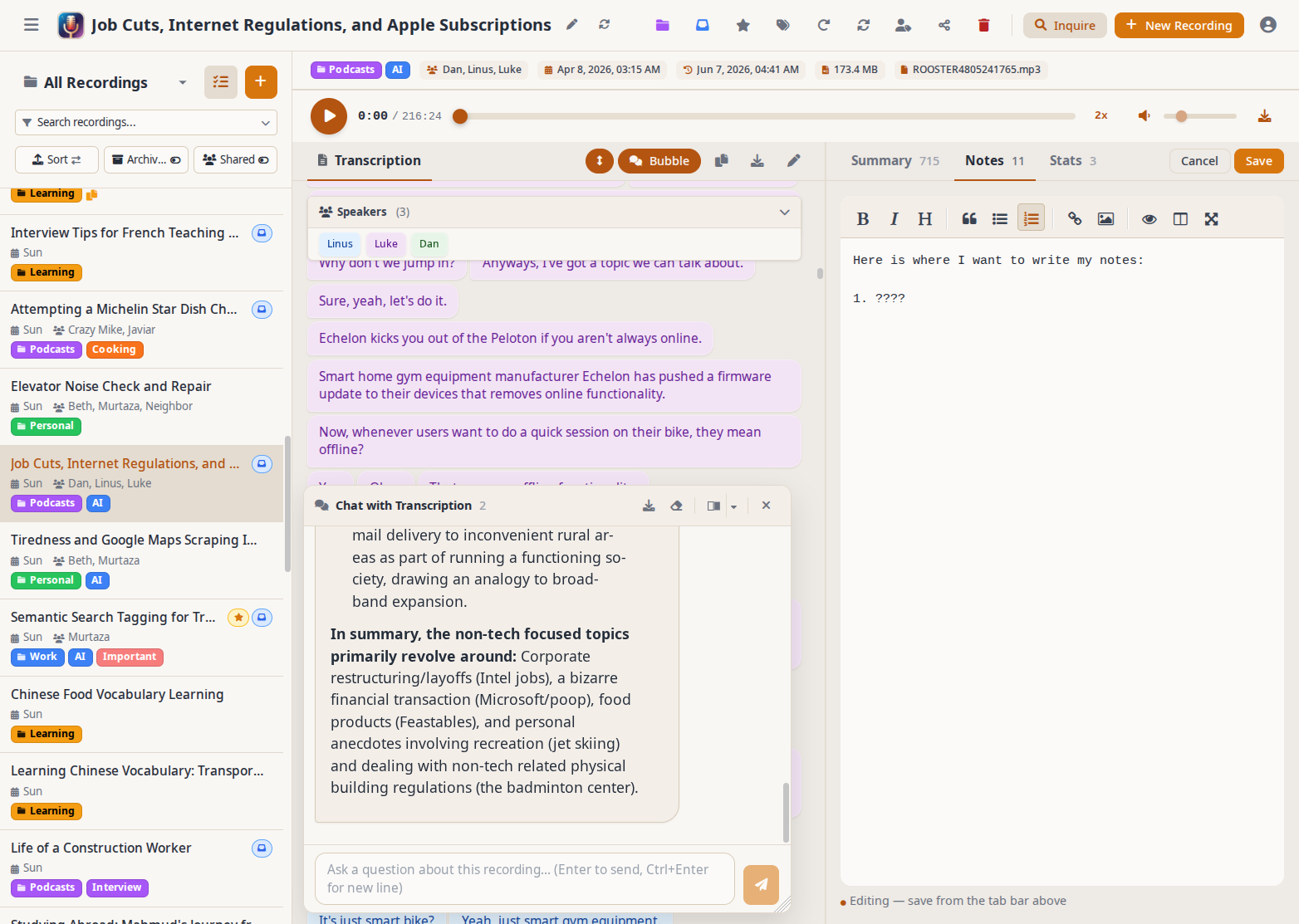
Main view with floating chat and notes |
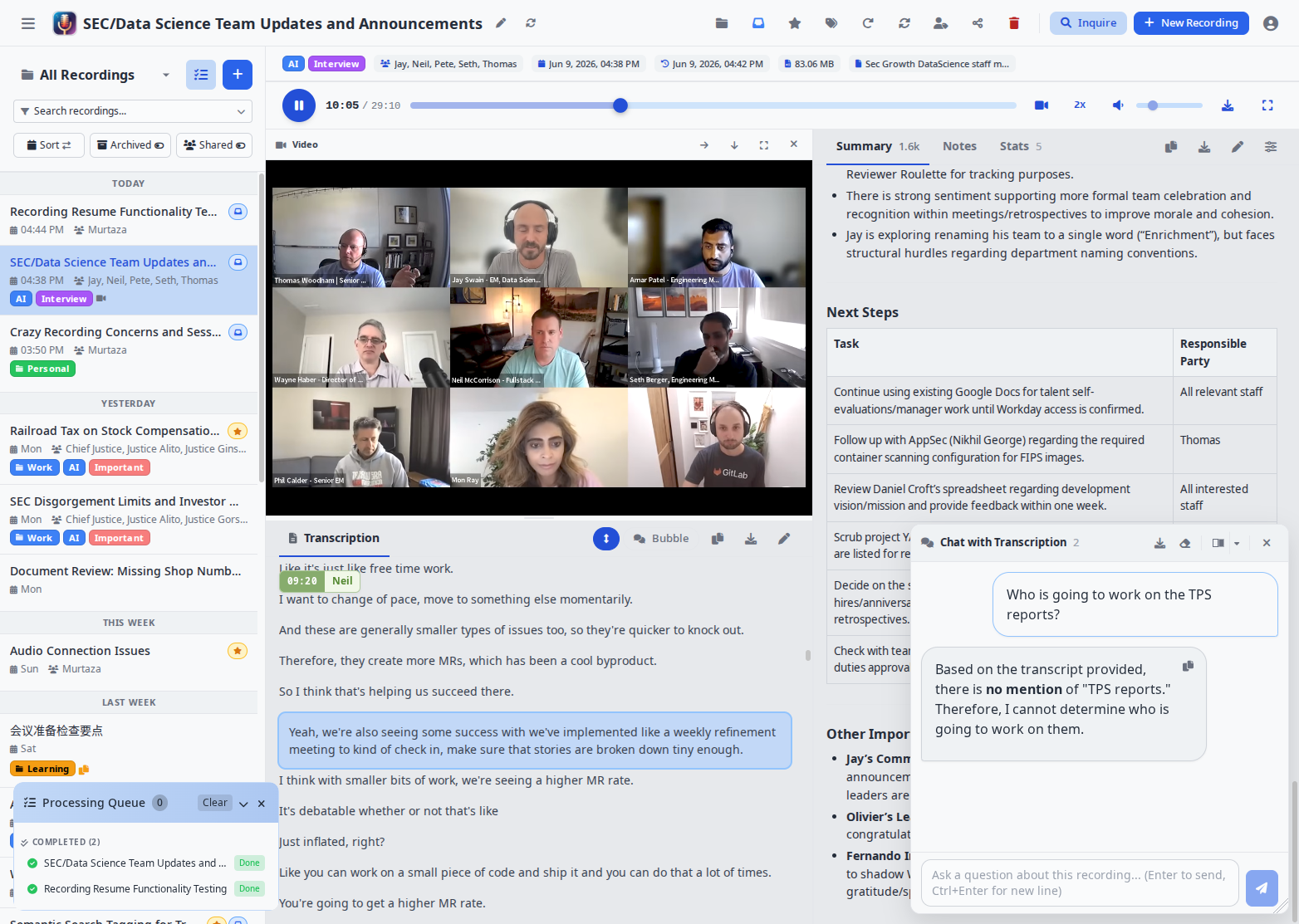
Video playback synced to the transcript |
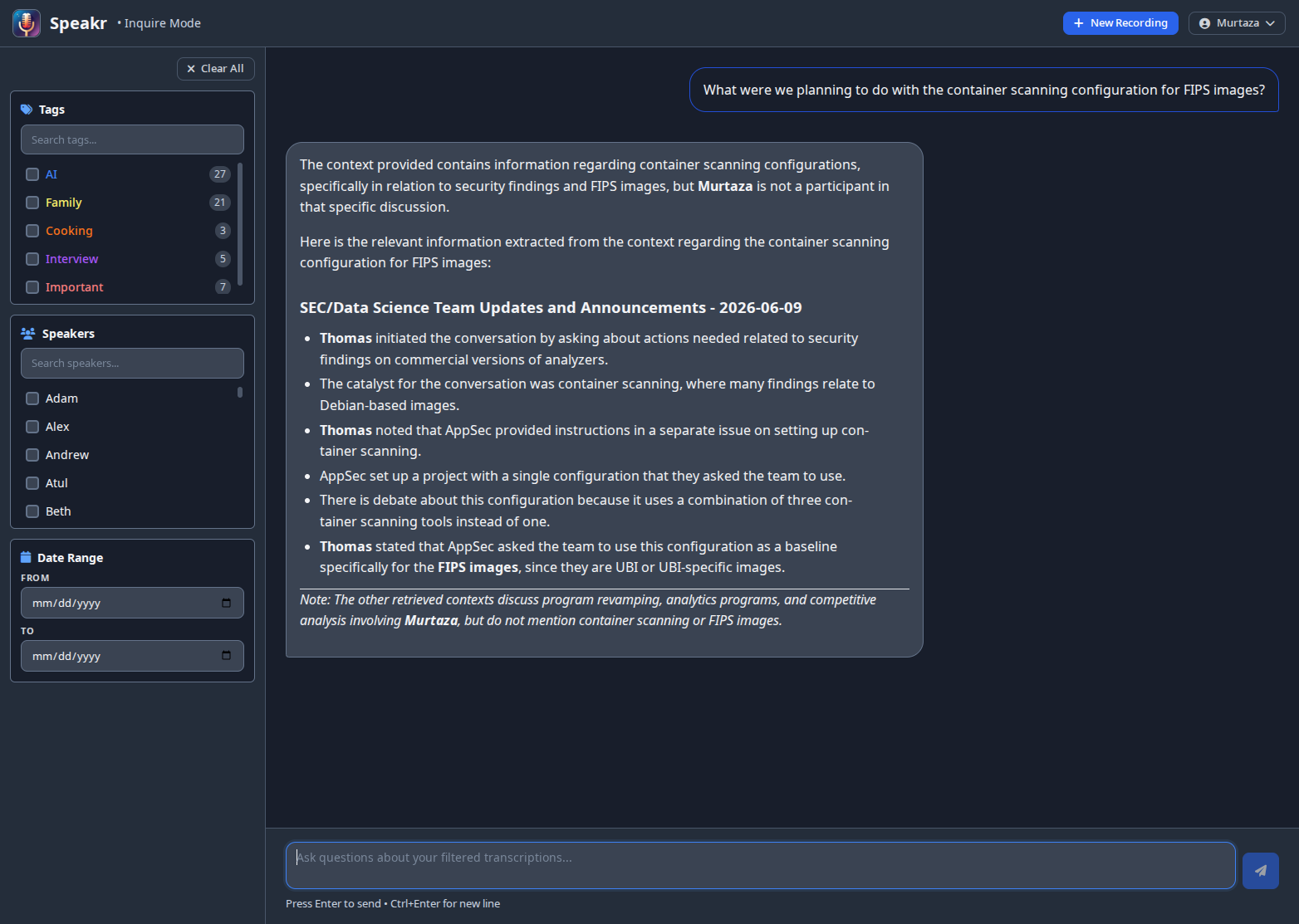
Ask questions across all your recordings |
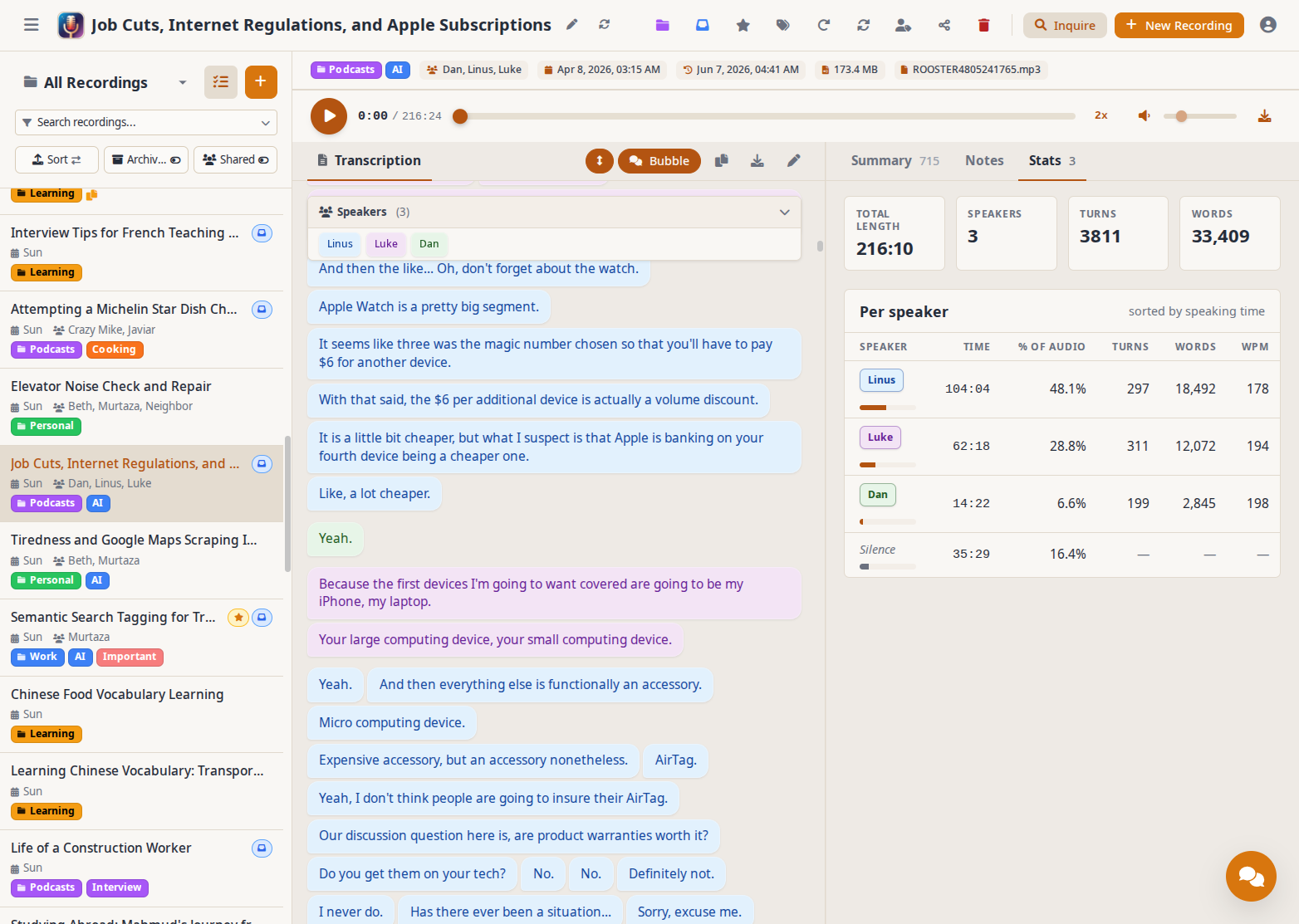
Per-recording stats and speaker breakdown |
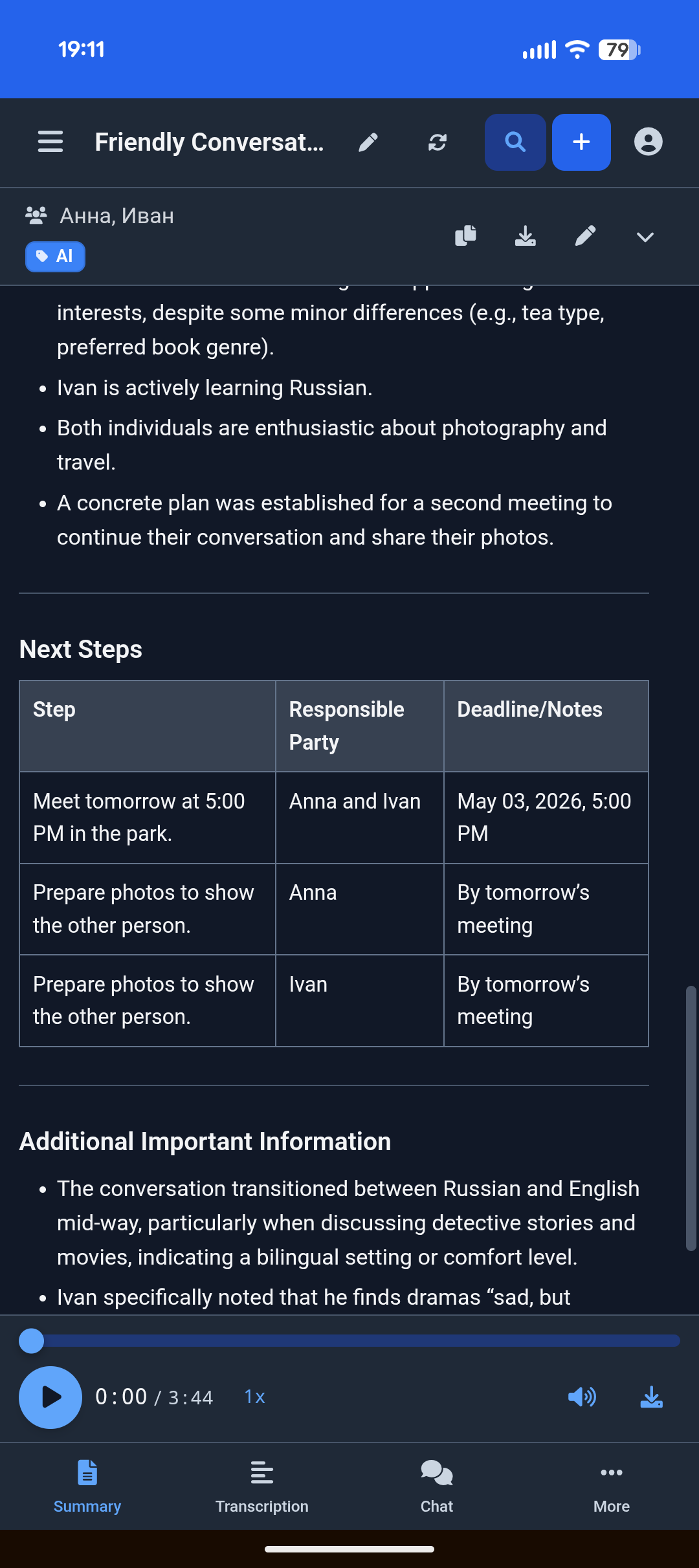
On mobile: summary with bottom navigation |
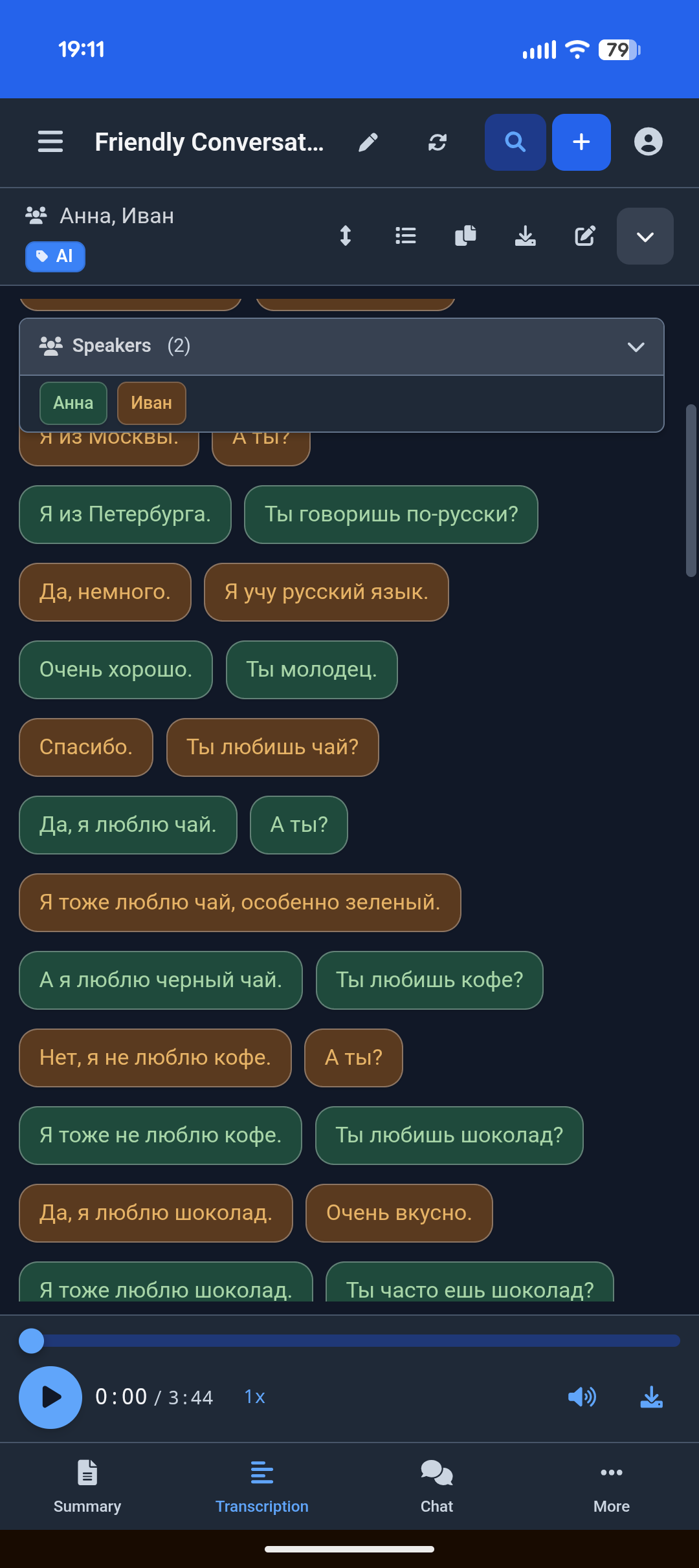
On mobile: transcript in bubble view |
View Full Screenshot Gallery →
Technology Stack
- Backend: Python/Flask with SQLAlchemy
- Frontend: Vue.js 3 with Tailwind CSS
- AI/ML: OpenAI Whisper, OpenRouter, Ollama support
- Database: SQLite (default) or PostgreSQL
- Deployment: Docker, Docker Compose
Reporting Issues
- Report bugs
- Request features
License
This project is dual-licensed:
-
GNU Affero General Public License v3.0 (AGPLv3)
Speakr is offered under the AGPLv3 as its open-source license. You are free to use, modify, and distribute this software under the terms of the AGPLv3. A key condition of the AGPLv3 is that if you run a modified version on a network server and provide access to it for others, you must also make the source code of your modified version available to those users under the AGPLv3.
- You must create a file named
LICENSE(orCOPYING) in the root of your repository and paste the full text of the GNU AGPLv3 license into it. - Read the full license text carefully to understand your rights and obligations.
- You must create a file named
-
Commercial License
For users or organizations who cannot or do not wish to comply with the terms of the AGPLv3 (for example, if you want to integrate Speakr into a proprietary commercial product or service without being obligated to share your modifications under AGPLv3), a separate commercial license is available.
Please contact speakr maintainers for details on obtaining a commercial license.
You must choose one of these licenses under which to use, modify, or distribute this software. If you are using or distributing the software without a commercial license agreement, you must adhere to the terms of the AGPLv3.
Contributing
We welcome contributions to Speakr! There are many ways to help:
- Bug Reports & Feature Requests: Open an issue
- Discussions: Share ideas and ask questions
- Documentation: Help improve our docs
- Translations: Contribute translations for internationalization
Code Contributions
By submitting a pull request, you agree to our Contributor License Agreement (CLA). This ensures we can maintain our dual-license model (AGPLv3 and Commercial). You retain copyright ownership of your contribution — the CLA simply grants us permission to include it in both the open source and commercial versions of Speakr. Our bot will post a reminder when you open a PR.
See our Contributing Guide for complete details on:
- How the CLA works and why we need it
- Step-by-step contribution process
- Development setup instructions
- Coding standards and best practices
Repo liên quan
Flutter is Google's open-source SDK, hosted at flutter/flutter on GitHub, for building user interfaces across mobile, web, and desktop from a single Dart codebase. The repo is licensed BSD-3-Clause, and its README documents stateful hot reload, a Skia/Impeller rendering pipeline, and Material/Cupertino widget sets as the core pieces developers work with.
scrcpy is an open-source application from Genymobile that mirrors an Android device's video and audio onto a Linux, Windows, or macOS desktop over USB or TCP/IP, and lets you control the device using the computer's keyboard and mouse. It runs without root access and without installing any companion app on the phone, per the README, and the project is available under an Apache-2.0 license.
Free Programming Books (Chinese) is justjavac's GitHub index of free programming books, translated manuals, and course notes in Chinese, organized under headings like AI, Go, C/C++, and version control. It's a link list, not a curriculum - entries range from full book translations to single blog posts, some flagged `:worried:` for dead links, and contribution happens only through pull requests.
frp (fast reverse proxy) is a Go-based open source tool that creates secure tunnels from a public-facing server to localhost, enabling developers to expose services running on private networks or behind firewalls. With over 108k GitHub stars, it supports multiple protocols (TCP, UDP, HTTP, HTTPS), includes TLS encryption by default, and offers P2P connections for direct client-to-client communication. The architecture splits between frps (the server you deploy on a public VPS) and frpc (the client running on your LAN), with configuration via TOML, YAML, or JSON files. While v2 is in active development with ambitions toward cloud-native service mesh capabilities, the current stable version handles real-world NAT traversal and firewall bypass reliably for most use cases.
Trả lời nhanh
Cùng nhóm Mobile còn repo nào?
murtaza-nasir/speakr thuộc nhóm Mobile trên TopGit. Trang Trending và Topics liệt kê các repo cùng số sao và cùng ngôn ngữ để so sánh.
Đọc thêm về murtaza-nasir/speakr ở đâu?
Trang TopGit này là một snapshot — tab "Readme" hiển thị nguyên văn README của repo (đã bỏ link, giữ ảnh). Repo GitHub ở github.com/murtaza-nasir/speakr là nguồn chính thức.
murtaza-nasir/speakr có bao nhiêu sao?
murtaza-nasir/speakr có 4.2k sao GitHub — tải lại trang để xem số mới nhất, hoặc xem trực tiếp github.com/murtaza-nasir/speakr. TopGit phản chiếu số sao của GitHub nhưng không cam kết đến từng phút.
murtaza-nasir/speakr có phải mã nguồn mở không?
Có — murtaza-nasir/speakr phát hành theo license AGPL-3.0, nghĩa là mã nguồn mở để đọc, fork và (tùy license) tái sử dụng. Mã: github.com/murtaza-nasir/speakr.
murtaza-nasir/speakr còn đang phát triển không?
Commit gần nhất trên murtaza-nasir/speakr là 10 ngày trước (theo timestamp GitHub). Repo có 358 fork — một chỉ báo về mức độ quan tâm của cộng đồng.
murtaza-nasir/speakr dùng license gì?
murtaza-nasir/speakr phát hành theo license AGPL-3.0. Nên mở file LICENSE trên GitHub để xác nhận — license metadata đôi khi lệch với thực tế dự án.
murtaza-nasir/speakr là gì?
murtaza-nasir/speakr (murtaza-nasir/speakr) là dự án Python trên GitHub. Theo mô tả gốc: Speakr is a personal, self-hosted web application designed for transcribing audio recordings
murtaza-nasir/speakr viết bằng ngôn ngữ gì?
murtaza-nasir/speakr chủ yếu viết bằng Python. Trường "language" của GitHub dựa trên phần lớn byte ở nhánh mặc định.
Đọc đầy đủ README ở tab phía trên.
Muốn nghe thêm một ý kiến về speakr?
Hỏi một AI đọc được trang này — một cú bấm là có ngay nhận định về speakr.